
Introduction
What DevOps really means, the problem it solves, the DevOps lifecycle, CI/CD, and how each tool in this bootcamp fits into the delivery pipeline.
Before DevOps, most companies had two separate teams. Developers wrote the code and "threw it over the wall". Operations took that code and tried to run it on servers they had prepared by hand. When something broke, each side blamed the other. Releases happened every few months, every release was stressful, and a small change could take weeks to reach users.
DevOps is the answer to that wall. It is a way of working where the people who build software and the people who run it share the same goal, the same tools and the same pipeline. The result is software that moves from a developer's laptop to production in small, safe, automated steps.
What DevOps is (and what it is not)
DevOps is a culture plus a set of practices, supported by tools. It is not a single tool you install, and it is not a job title that replaces developers or operations people.
| DevOps is | DevOps is not |
|---|---|
| Automating every repeatable step: build, test, infrastructure, deployment | Clicking through the same console screens before every release |
| Small, frequent releases that are easy to roll back | One giant release every quarter |
| Infrastructure described in code and stored in Git | Servers configured by hand that nobody can rebuild |
| Shared responsibility for production | "It works on my machine, now it is your problem" |
| Measuring and monitoring everything | Finding out about outages from angry users |
The DevOps lifecycle
The lifecycle is usually drawn as an infinite loop. Work flows from planning to monitoring, and what you learn from monitoring feeds straight back into the next plan.
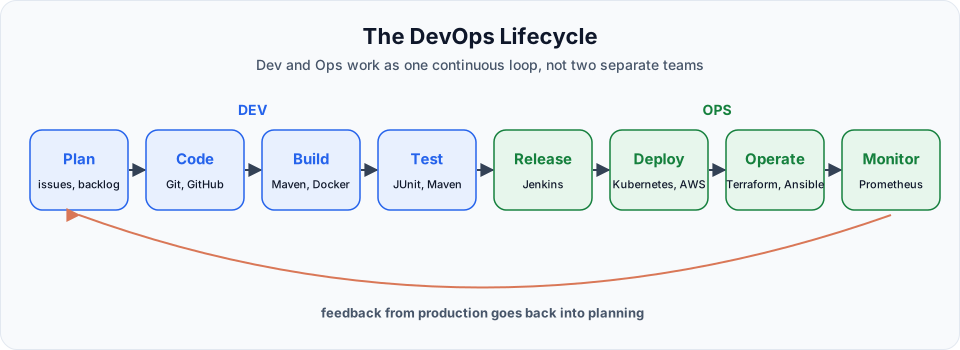
| Phase | What happens | Tools in this bootcamp |
|---|---|---|
| Plan | Decide what to build next | Issues, pull requests |
| Code | Write and version the code | Git, GitHub |
| Build | Compile and package the application | Maven, Docker |
| Test | Run automated tests on every change | JUnit through Maven |
| Release | Produce a versioned artifact or image | Jenkins, Docker Hub, Amazon ECR |
| Deploy | Ship the release to servers or clusters | Kubernetes on EKS, Argo CD |
| Operate | Create and configure the infrastructure | AWS, Terraform, Ansible |
| Monitor | Watch health, metrics and alerts | CloudWatch, Prometheus, Grafana |
CI and CD in one picture
You will hear CI/CD in every DevOps conversation. It is the automated pipeline at the centre of the lifecycle.
- Continuous Integration (CI): every push to Git triggers an automatic build and test, so broken code is caught within minutes instead of weeks
- Continuous Delivery: every successful build produces a release that is ready to deploy with one click
- Continuous Deployment: every successful build is deployed to production automatically, with no manual click at all
git push  ->  Jenkins pulls the code  ->  Maven builds and tests  ->  Docker builds the image
          ->  image pushed to a registry  ->  Kubernetes rolls out the new version on EKS
That exact pipeline is the final project of this bootcamp, in the Jenkins course.
Why each tool is in the bootcamp
| Tool | The problem it solves |
|---|---|
| Linux | Almost every server, container and cloud VM runs Linux. You cannot operate what you cannot log into |
| Bash scripting | Repeating the same 20 commands by hand is slow and error prone. Scripts make it one command |
| Git | Teams need a history of every change and a safe way to work in parallel |
| Maven | Java code must be compiled, tested and packaged the same way on every machine |
| AWS | Buying physical servers takes weeks. The cloud gives you a server in seconds and bills by the hour |
| Terraform | Clicking in the AWS console cannot be reviewed, repeated or versioned. Code can |
| Ansible | A new server still needs packages, users, files and services. Ansible configures hundreds at once |
| Docker | "It works on my machine" disappears when the app ships with its own runtime |
| Kubernetes | Running hundreds of containers needs scheduling, healing, scaling and rolling updates |
| Jenkins | All of the above must run automatically on every commit, not when someone remembers |
What a DevOps engineer does every day
A typical day mixes several of these tasks:
- Fixing a failed pipeline because a test, a credential or a Docker build broke
- Writing Terraform to add a new database or load balancer
- Updating an Ansible playbook so every server gets a security patch
- Investigating why a Kubernetes pod keeps restarting
- Adding an alert so the team hears about high CPU before customers notice
- Reviewing a developer's Dockerfile or pipeline change
None of these tasks need you to memorise every command. They need you to understand how the pieces connect, read error messages calmly, and know where to look. That is exactly what this bootcamp trains.
Start with the foundation
If you have never studied how a computer actually runs a program, the two optional lessons in Computer & Programming Essentials give you that picture in under 40 minutes. If you are comfortable with it already, go straight to the Linux course.
Official references
Written By: Shramik Masti
How is this guide?
Last updated on
Getting Started
The complete DevOps Bootcamp roadmap, from Linux and shell scripting to Git, Maven, AWS, Terraform, Ansible, Docker, Kubernetes on EKS and Jenkins CI/CD.
Programming Fundamentals
What a CPU really understands, why programs exist, and how we moved from machine language to assembly and high level languages with assemblers and compilers.