
Artifact Registry, Cloud Run and Testing
Enable the required Google Cloud APIs, create an Artifact Registry repository, build the image with Cloud Build, deploy it to Cloud Run with a real secret, and test the live app.
Everything is ready. Four commands take the app live. Replace telusko-content-tracker with your project ID in every command.
Step 1: Enable the services
gcloud services enable run.googleapis.com artifactregistry.googleapis.com cloudbuild.googleapis.com| API | What it does for us |
|---|---|
| Cloud Run | Runs our container and serves it over HTTPS |
| Artifact Registry | Stores our Docker image |
| Cloud Build | Builds the image in Google Cloud from our source |
This takes a minute and ends with Operation finished successfully.
Step 2: Create an Artifact Registry repository
gcloud artifacts repositories create telusko-repo \
  --repository-format=docker \
  --location=us-central1 \
  --description="Docker images for the Telusko Workflow Engine"
us-central1 is the region. Pick one close to your users, and use the same region in every following command.
Step 3: Build and push the image with Cloud Build
From the project root (where the Dockerfile is):
gcloud builds submit \
  --tag us-central1-docker.pkg.dev/telusko-content-tracker/telusko-repo/telusko-app:latest
The image path has a fixed structure:
us-central1-docker.pkg.dev / telusko-content-tracker / telusko-repo / telusko-app:latest
└──── region + registry ───┘ └──── project ID ──────┘ └── repo ───┘ └── image:tag ──┘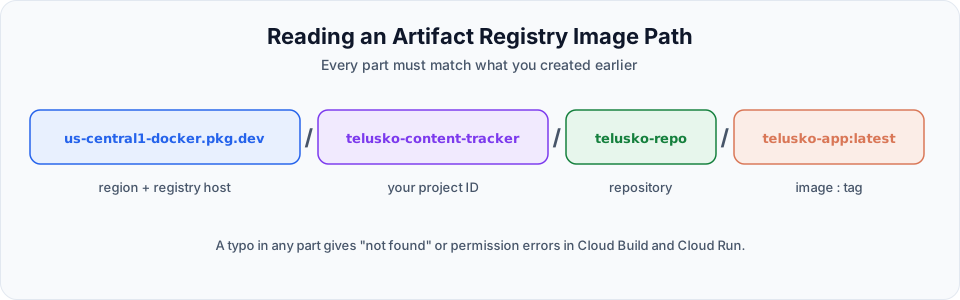
Cloud Build uploads your project, runs the Dockerfile in Google Cloud, and pushes the finished image to the repository. You see the same steps as your local build in the logs.
Step 4: Deploy to Cloud Run
First, generate a strong secret in your own terminal:
python -c "import secrets; print(secrets.token_hex(32))"Then deploy:
gcloud run deploy telusko-app \
  --image us-central1-docker.pkg.dev/telusko-content-tracker/telusko-repo/telusko-app:latest \
  --platform managed \
  --region us-central1 \
  --allow-unauthenticated \
  --port 8080 \
  --set-env-vars "JWT_SECRET_KEY=<your-generated-secret>,JWT_ALGORITHM=HS256,JWT_ACCESS_TOKEN_EXPIRE_MINUTES=60"
gcloud run deploy telusko-app `
--image us-central1-docker.pkg.dev/telusko-content-tracker/telusko-repo/telusko-app:latest `
--platform managed `
--region us-central1 `
--allow-unauthenticated `
--port 8080 `
--set-env-vars "JWT_SECRET_KEY=<your-generated-secret>,JWT_ALGORITHM=HS256,JWT_ACCESS_TOKEN_EXPIRE_MINUTES=60"| Flag | Meaning |
|---|---|
telusko-app | Name of the Cloud Run service |
--image | The image we just pushed |
--region | Same region as the repository |
--allow-unauthenticated | Anyone can open the URL. Our app has its own login, so that is what we want |
--port 8080 | The port the container listens on |
--set-env-vars | The JWT settings, as comma-separated NAME=value pairs |
Watch the quotes
In the video, the first attempt failed because of a missing closing double quote around --set-env-vars. If the shell waits for more input or gcloud complains about arguments, check your quotes first.
When it finishes, gcloud prints the Service URL, something like https://telusko-app-xxxxxxxxxx.us-central1.run.app, and shows that the new revision serves 100% of traffic.
Step 5: Test the live app
Open the Service URL. Cloud Run gives you HTTPS automatically.
| Test | Expected |
|---|---|
| Open the URL | Login page |
admin / admin123 | Full board, delete available |
editor / editor123 | Can move cards from Recorded and Editing only, cannot move back, deleting is refused |
| Logout | Back to the login page |
The Content Tracker is live. A deployed demo of the finished app is available at telusko-app-923380018328.us-central1.run.app.
Before you call it production
What we deployed is a great learning result. A few things deserve attention before real users rely on it:
SQLite on Cloud Run is not persistent
Our SQLite database file lives inside the container. Cloud Run containers are disposable: when an instance restarts, scales down to zero or a new revision is deployed, the file is recreated from scratch, and the seed script loads the demo data again. With several instances, each one even has its own separate database. For real data, move to a managed database such as Cloud SQL for PostgreSQL (remember the worktree decision notes in Section 7: this is exactly the trade-off we recorded).
- Secrets:
--set-env-varsis fine for learning. For production, store the JWT secret in Secret Manager and reference it from Cloud Run - Demo users: remove or change the seeded accounts and their simple passwords
- CORS: with a single origin, the old localhost CORS entries are no longer needed
- Costs: if you were only experimenting, delete the service when you are done:
gcloud run services delete telusko-app --region us-central1What you achieved
Look back at the whole journey:
| Section | You learned |
|---|---|
| 1 to 3 | What Claude Code is, how to install it, plans vs API, models, local models |
| 4 | The agentic loop, permission modes and checkpoints |
| 5 and 6 | CLAUDE.md, auto memory, slash commands and context management |
| 7 | Sub-agents for clean context, worktrees for parallel experiments |
| 8 | Building a full-stack app in small, reviewed feature branches |
| 9 | Skills and spec-driven development |
| 10 | JWT authentication and RBAC, implemented from a security spec |
| 11 | MCP and the GitHub workflow from issue to merged PR |
| 12 | Docker and deployment to Google Cloud Run |
Around 90% of the work was done by Claude Code. The other 10% was yours: the specs, the decisions, the reviews, the secrets and the final merges. That 10% is what makes the result trustworthy. Use AI to move fast, but keep the understanding and the control. That is what makes you a developer, not just a prompt writer.
Try It Yourself
Before moving to the next section, practise what you learned:
- Deploy your own copy and open the Service URL on your phone to confirm HTTPS works.
- Deploy a small change and look at the new revision in the Cloud Run console.
- Restart the service (or deploy again), then check whether a task you created is still there. Explain the result.
- Delete the service when you are done, so it does not cost anything.
Official references
- Cloud Run: Deploying container images
- Artifact Registry: Store Docker images
- Cloud Build: Build and push a Docker image
- Cloud Run: Configure secrets
- Cloud Run: Environment variables
Written By: Shramik Masti
How is this guide?
Last updated on
Google Cloud Project and SDK Setup
Create a Google Cloud project, install and initialise the Google Cloud CLI, authenticate, and verify the configuration from VS Code.
Getting Started
The complete DevOps Bootcamp roadmap, from Linux and shell scripting to Git, Maven, AWS, Terraform, Ansible, Docker, Kubernetes on EKS and Jenkins CI/CD.