
Introduction
What Claude Code is, how it works under the hood, and how its core features fit together before you start building.
A large language model on its own is like a brain sitting on a table. It can think, explain and write code as text, but it cannot open your project, run your tests or fix the file that is actually broken. To do real work, the brain needs a body.
Claude Code is that body.
It is an agentic coding tool from Anthropic. You run it inside your project, describe what you want, and it reads files, edits code, runs commands, checks the result and repeats until the task is complete. You stay in charge: you approve what it is allowed to do, you can stop it at any point, and you verify the final result.
The big picture
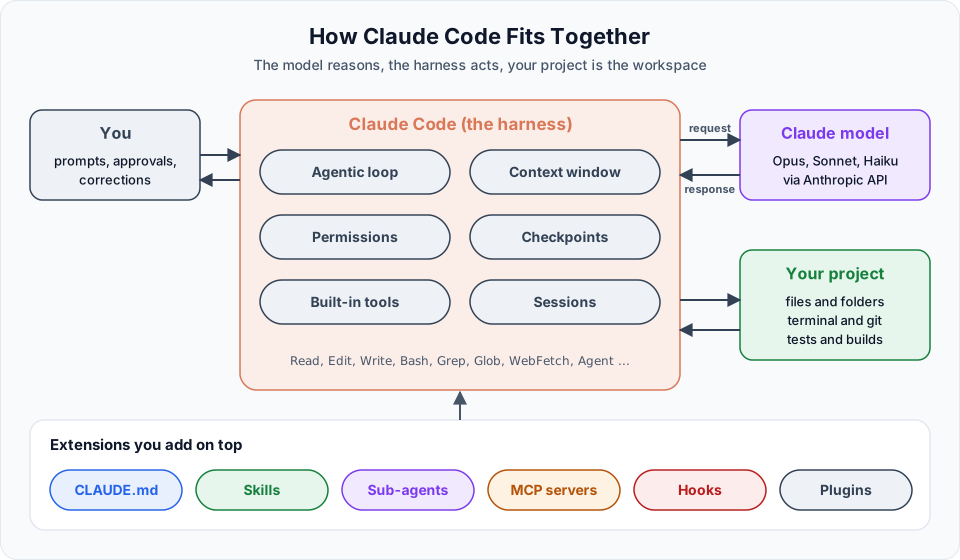
There are three parts to keep in mind:
| Part | What it does |
|---|---|
| The model | Claude (Opus, Sonnet or Haiku) does the reasoning: understanding code, planning steps and deciding what to do next |
| The harness | Claude Code itself. It gives the model tools, manages the context window, asks for permissions, saves checkpoints and keeps the session history |
| Your project | The folder, terminal, git repository and tests that Claude Code works on |
The word agentic simply means the model can act, not just answer. Each time Claude uses a tool, the result comes back and informs the next step. This repeated cycle is called the agentic loop, and you will see it in action in Section 4.
Where you can use Claude Code
Claude Code runs on several surfaces. They all use the same engine, so your CLAUDE.md, settings and MCP servers work everywhere.
| Surface | Best for |
|---|---|
| Terminal (CLI) | Full feature set. This is what we use throughout these docs |
| VS Code and Cursor | Inline diffs and a chat panel inside the editor, or the CLI inside the integrated terminal |
| JetBrains IDEs | IntelliJ IDEA, PyCharm, WebStorm and others through a plugin |
| Desktop app | Running several sessions side by side with visual diff review |
| Web and mobile | Long-running tasks in the cloud at claude.ai/code |
We work mostly in the terminal inside VS Code. Even when you prefer a graphical panel, some configuration (like hooks) still happens in the terminal, so being comfortable with the CLI pays off.
Core concepts at a glance
You will meet each of these in detail later. For now, get familiar with the names.
| Concept | One-line meaning | Section |
|---|---|---|
| Agentic loop | Gather context, take action, verify results, repeat | 4 |
| Permission modes | How much Claude can do without asking you | 4 |
| Checkpoints | Automatic restore points for files Claude edits | 4 |
CLAUDE.md | A markdown file of project instructions Claude reads every session | 5 |
| Context window | Everything Claude can "see" right now: chat, files, outputs, instructions | 5, 6 |
| Slash commands | Shortcuts like /init, /clear, /compact, /model | 6 |
| Sub-agents | Helper agents with their own context that return a summary | 7 |
| Worktrees | Separate working folders for parallel branches | 7 |
| Skills | Reusable instructions or workflows, invoked as /skill-name | 9 |
| Specs | Written specifications that drive the implementation | 9, 10 |
| MCP | An open protocol to connect Claude Code to tools like GitHub | 11 |
| Hooks | Scripts that run automatically on events, like after every edit | Official docs |
The .claude folder
Most of your Claude Code setup lives in plain files. That is good news: you can read them, review them in pull requests and share them with your team through git.
your-project/
├── CLAUDE.md                  # shared project instructions
├── CLAUDE.local.md            # your personal notes (add to .gitignore)
├── .mcp.json                  # MCP servers shared with the team
└── .claude/
    ├── settings.json          # shared settings and permission rules
    ├── settings.local.json    # your personal settings (gitignored)
    ├── agents/
    │   └── api-contract-extractor.md
    └── skills/
        └── telusko-status/
└── SKILL.md| File or folder | Purpose | Commit to git? |
|---|---|---|
CLAUDE.md | Shared project instructions (can also live at .claude/CLAUDE.md) | Yes |
CLAUDE.local.md | Your personal notes for this project | No |
.claude/settings.json | Shared settings such as permission rules | Yes |
.claude/settings.local.json | Your personal settings for this project | No |
.claude/agents/ | Custom sub-agents | Yes |
.claude/skills/ | Custom skills | Yes |
.mcp.json | MCP servers shared with the team | Yes, without secrets |
There is also a user-level folder at ~/.claude/ in your home directory. Settings, skills and agents placed there apply to every project on your machine.
Spec-driven, not vibe-driven
There are two ways to build with AI. The first is "vibe coding": describe the app in one line, accept whatever comes back, and keep saying "no, not like that" until it looks right. It is fun for a weekend demo. It burns tokens, wastes time and produces code nobody fully understands.
The second is spec-driven development. Before asking for code, you write down what you want: the API contract, the data shapes, the rules, what is in scope and what is not, and how to verify it. Claude then builds against that spec, and you check the result against the same spec.
This is an old software engineering idea. It simply becomes much more powerful when the one reading your spec can also write the code. That is the approach we follow throughout these docs.
Done is not the same as verified
An AI can tell you a task is done. Only you can confirm it is verified. Run the app, read the diff and test the edge cases before you commit. If something breaks in production, the responsibility is yours, not the model's.
Official references
Start with What is Claude Code and move through the sidebar in order. Each section builds on the previous one.
Written By: Shramik Masti
How is this guide?
Last updated on