
What is Claude Code
Understand what Claude Code is, how it differs from chatbots and IDE assistants, and why it changes the way we build software.
We are now in the agentic era. AI is no longer just answering questions, it is taking actions. When it comes to writing software, this changes how we work every day.
Before we install anything, let us understand where Claude Code fits and why it exists.
Three ways to write code today
| Approach | How it works | The catch |
|---|---|---|
| Traditional coding | You type every line yourself in an IDE | Slow for repetitive work |
| Chatbot-assisted | You describe a problem in ChatGPT or Claude.ai, copy the answer and paste it into your IDE | The chatbot cannot see your project. You become the copy-paste layer |
| Agentic coding | An AI agent works directly inside your project: it reads, edits, runs and verifies | You must learn how to guide and control it properly |
Chatbots are great at what they do. If you need a quick function, an explanation or a draft email, a chatbot is perfect. But building an application is not one prompt. It involves understanding the business case, designing the structure, writing code across many files, writing tests and deploying. How do you explain fifty files to a chat window? You cannot, at least not efficiently.
Brain vs body
A good way to remember this:
- An LLM (large language model) is the brain. It can think and reason.
- A brain alone cannot pick up a glass of water. It needs a body.
- Claude Code is the body. It gives the brain hands (tools) to read files, type code and run commands.
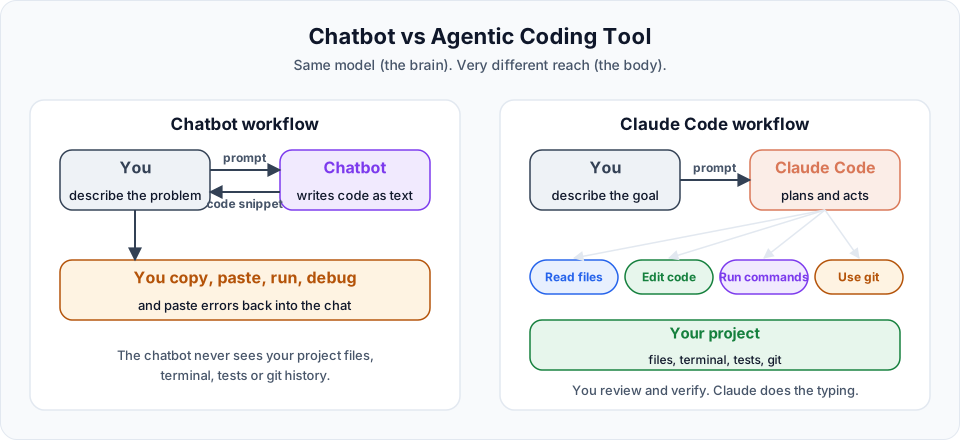
When you use Claude.ai in the browser, you are talking to a brain that can listen and reply. When you use Claude Code, you have given that brain your keyboard and mouse, with your permission.
The official definition
The official documentation describes it like this:
Claude Code is an agentic coding tool that reads your codebase, edits files, runs commands, and integrates with your development tools.
Every part of that sentence matters:
| Capability | What it means for you |
|---|---|
| Reads your codebase | It searches and opens your files on its own, so you do not paste code into a chat |
| Edits files | It changes code directly, across many files in one task |
| Runs commands | It can install packages, run tests, start servers and use git |
| Integrates with tools | It connects to GitHub, databases and other services through MCP |
You are now the senior developer
Here is a mindset shift that helps a lot. When you use Claude Code, you are no longer only a developer. You are the senior developer, and Claude Code is your junior developer.
A good junior developer is smart, fast and never gets tired. But a junior also:
- Needs clear instructions about what to build and what not to touch
- Needs to know the project conventions
- Can make confident mistakes
- Needs their work reviewed before it goes to production
Claude Code is exactly like that. It works best when you tell it precisely what you want, give it the right context and check its work. It does have one limit humans do not: usage limits and token budgets. When those run out, it stops until they reset.
Why not just "vibe code"?
"Vibe coding" means describing an app in a sentence and accepting whatever comes back. Everyone has tried it at least once. The problem shows up quickly:
- You describe the app
- The AI builds something close, but not quite right
- You say "no, change this"
- It rewrites a large part of the code, sometimes breaking what worked
- Repeat many times
Each iteration costs time and tokens, and tokens are not cheap. You end up with code that works today but that nobody fully understands.
Professional teams do not start a large application by writing code. They start with design and specifications. Then they implement against those specs. This is called spec-driven development, and it is a very old idea from software engineering. With AI, it becomes powerful: when you write proper specs with conventions, architecture and rules, Claude can build according to them, and you can verify the result against the same document.
That is the approach we follow in these docs.
How Claude Code differs from other AI coding tools
Claude Code is not the only AI coding tool. GitHub Copilot, Cursor and others are excellent. The main difference is where they started:
| Tool style | Starting point |
|---|---|
| Copilot, Cursor and similar | IDE-first: an editor or editor extension, with AI built into the editing experience |
| Claude Code | Terminal-first: an agent in your terminal that can work across your whole project and toolchain |
Because Claude Code lives in the terminal, it can run anything you can run: build tools, test runners, package managers, git, Docker and cloud CLIs. It now also has extensions for VS Code and JetBrains, a desktop app and a web version, but the terminal remains its home.
Quick recap
A chatbot gives you code. Claude Code does the work inside your project. You stay in control by giving clear instructions, approving actions and verifying results.
Official references
Written By: Shramik Masti
How is this guide?
Last updated on