
Getting Started
Learn Claude Code the practical way, from the first install to building, securing and deploying a real full-stack application.
Welcome to the Claude Code Docs.
Most of us started using AI for coding the same way. We opened a chatbot, described a problem, copied the code it gave us, pasted it into the IDE and hoped it would run. It works for small snippets. It does not work well when the project has fifty files, a database, a login system and a deployment pipeline.
Claude Code takes a different approach. It runs inside your project, reads your files, edits code, runs commands, checks the output and keeps going until the task is done. You stop being the person who types every line and become the person who plans the work, gives clear instructions and verifies the result.
If you have ever wondered:
- How do I give an AI assistant real access to my project without losing control?
- How do I stop repeating the same instructions in every new chat?
- How do professional developers use AI without falling into endless "vibe coding" loops?
- How do I go from an idea to a deployed, secured application with AI as my pair programmer?
...then you are in the right place.
Why Learn Claude Code?
AI coding tools are no longer a novelty. Teams use them every day to write features, fix bugs, review pull requests and automate repetitive work. The developers who get the most out of these tools are not the ones who type the longest prompts. They are the ones who understand how the tool works, manage its context properly and verify everything it produces.
By learning Claude Code properly, you will be able to:
- Delegate real development tasks instead of copying snippets from a chat window
- Control exactly what the AI is allowed to read, edit and execute
- Save tokens and money by managing context and choosing the right model
- Build repeatable workflows with skills, sub-agents and specs
- Connect Claude Code to external tools like GitHub through MCP
- Ship a working application to the cloud with confidence
What You'll Learn
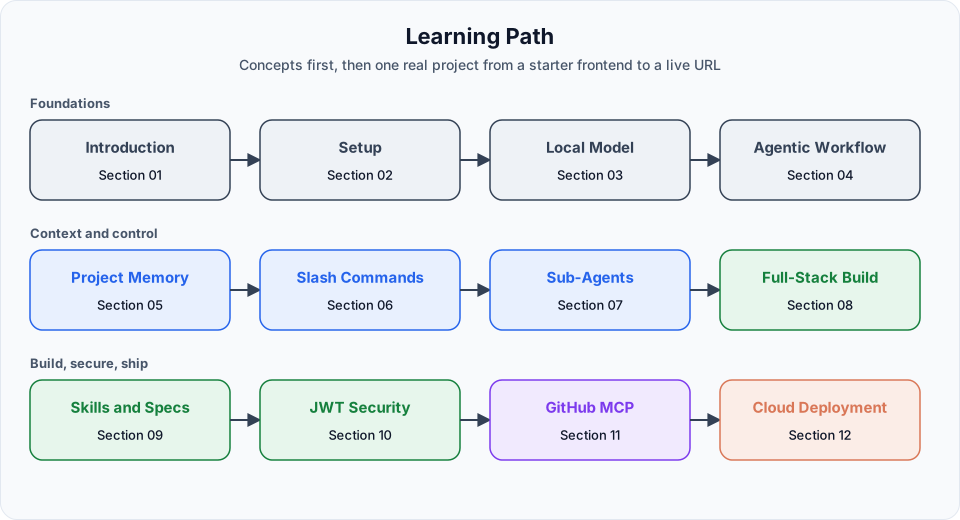
The docs follow the same order as the video lessons. We start with concepts and setup, then build one real project step by step.
| Stage | Sections | What it covers |
|---|---|---|
| Foundations | 1 to 4 | What Claude Code is, installation, plans, models, local models, the agentic loop, permissions and checkpoints |
| Context and control | 5 to 7 | CLAUDE.md project memory, built-in slash commands, sub-agents and git worktrees |
| Build | 8 | A full-stack Content Tracker with FastAPI, SQLAlchemy, Alembic, uv and a vanilla JavaScript frontend |
| Workflows | 9 | Custom skills and spec-driven development |
| Security | 10 | JWT authentication and role-based access control, implemented from a spec |
| Integrations | 11 | The Model Context Protocol (MCP) and the GitHub MCP server |
| Deployment | 12 | Docker, Google Cloud Artifact Registry and Cloud Run |
The project we build
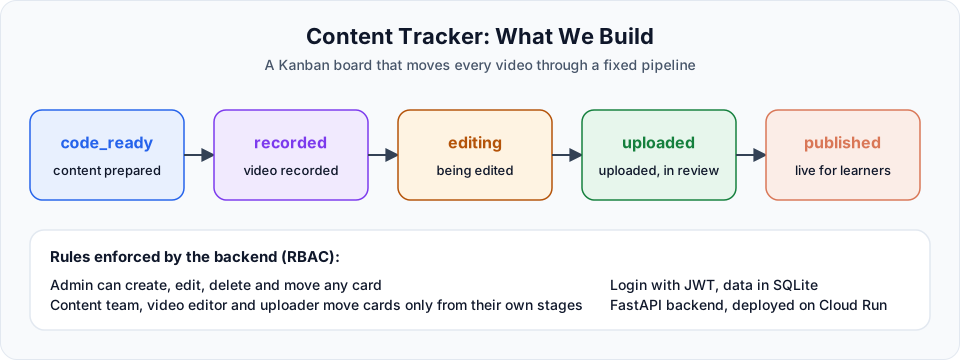
Throughout these docs we build the Content Tracker, a Kanban board that tracks every video from "content ready" to "published". It has a real backend, a database, login with JWT, role-based permissions and a live deployment on Google Cloud Run.
The complete source code is available on GitHub:
Content Tracker source code
Final project with specs, skills, sub-agents and the Dockerfile
Official Claude Code docs
Anthropic's reference for every feature covered here
What You Need
You do not need any previous experience with AI coding tools. You should be comfortable with:
- Using a terminal and running basic commands
- Reading code in at least one language (the project uses Python and JavaScript)
- Basic git: clone, commit, branch and push
You also need one of the following to run Claude Code:
- A Claude Pro, Max, Team or Enterprise subscription, or
- An Anthropic Console account with API credits, or
- A machine that can run a local model through Ollama (covered in Section 3)
The free claude.ai plan does not include Claude Code. If you only want to follow along and learn, a small amount of API credit or a Pro plan is enough for everything in these docs.
How to Learn Effectively
Claude Code is easy to start and surprisingly deep once you look closer. A few habits will help you a lot:
Follow along in a real folder
Create a practice folder and run every command yourself. Watching someone else use an agent is very different from steering one.
Read before you accept
Claude Code asks for permission before it edits files or runs commands. Read what it is about to do. This one habit prevents most of the problems people run into.
Treat "done" and "verified" as two different things
When Claude says a task is finished, that is "done". When you have run the app, tested the endpoint and read the diff yourself, that is "verified". Only verified work should be committed.
Keep the official docs open
Claude Code ships updates every week. Model names, defaults and commands change. When something in a video looks different on your screen, the official documentation is the source of truth.
What You'll Achieve
By the end, you will be able to:
- Install, configure and use Claude Code from the terminal and VS Code
- Pick the right model and effort level for each kind of task
- Write a
CLAUDE.mdthat makes Claude follow your project conventions - Use slash commands, sub-agents and worktrees to stay fast and organised
- Turn repeated prompts into reusable skills
- Build features from written specs instead of vague prompts
- Connect Claude Code to GitHub through MCP to manage issues and pull requests
- Containerize an application and deploy it to Google Cloud Run
Most importantly, you will understand how Claude Code thinks and works, so you can steer it instead of fighting with it.
Ready to Get Started?
Head to the Introduction for the big picture, then begin with What is Claude Code.
Happy Learning! 🚀
Written By: Shramik Masti
How is this guide?
Last updated on