
Preparing the App for Deployment
Replace hardcoded localhost URLs with relative paths, serve the frontend as static files from FastAPI in the correct order, and test the single-origin app locally.
Two changes make the app deployable as a single container:
- The frontend must stop calling
http://localhost:8000and use relative URLs - FastAPI must serve the frontend as static files
Commit your current work first, so these changes are easy to review and roll back.
Change 1: Relative URLs in the frontend
The backend URL is hardcoded in frontend/app.js. That works on your laptop, but on Cloud Run there is no localhost:8000. A relative URL like /api/tasks simply means "same host as this page", which works locally and in the cloud.
We're preparing the frontend for production deployment to Cloud Run.
In frontend/app.js, the backend URL is hardcoded as http://localhost:8000
in two places. Both need to become relative URLs so the same code works
locally AND on Cloud Run.

1. Inside apiFetch: change
   fetch(`http://localhost:8000${url}`, ...)
   to
   fetch(url, ...)

2. Inside handleLoginSubmit (which does NOT use apiFetch, the login
   form calls fetch directly): change
   fetch('http://localhost:8000/api/auth/login', ...)
   to
   fetch('/api/auth/login', ...)

Show me the diff before applying. Also scan the file and tell me if
there are any OTHER localhost references (comments, debug logs,
anywhere) that I might have missed.
Notice two good habits in this prompt:
- "Show me the diff before applying" keeps you in control
- "Tell me if there are any OTHER references" asks Claude to check what you might have missed
Claude found exactly two occurrences and no others.
Claude pushes back, and that is good
Claude also pointed out that CLAUDE.md contains a hard rule: "NEVER modify files in /frontend". It asked whether to proceed anyway. Since you wrote that rule and you are now deliberately overriding it, confirm and let it continue. This is exactly the behaviour you want: Claude respects project rules and asks before breaking them.
The result:
-    const response = await fetch('http://localhost:8000/api/auth/login', {
+ const response = await fetch('/api/auth/login', {- const response = await fetch(`http://localhost:8000${url}`, { ...options, headers });
+ const response = await fetch(url, { ...options, headers });Verify with /diff.
Change 2: Serve the frontend from FastAPI
We need FastAPI to serve our frontend as static files so the entire
app runs from a single origin in production.

In backend/app/main.py (NOT backend/main.py, that's just a stub):

1. Add an import at the top:
   from fastapi.staticfiles import StaticFiles

2. AFTER both router includes (auth_router and tasks_router), add a
   catch-all static files mount. The directory must be "../frontend"
   because when we deploy via Docker the WORKDIR will be /app/backend
   and the frontend folder gets copied to /app/frontend (one level up).

   app.mount("/", StaticFiles(directory="../frontend", html=True), name="static")

Critical: the mount MUST come AFTER both routers. FastAPI checks routes
in registration order. If the catch-all static mount comes first, it
will intercept every request including /api/* and break the API.

Show me the diff. Confirm the mount is positioned after both routers.
Do not touch any existing code. Only add the import and the mount.
The prompt names the exact file and warns about the stub. Remember the leftover backend/main.py we spotted while reviewing in Section 8? This is why cleaning up early matters: otherwise you keep having to warn Claude about it.
from fastapi.staticfiles import StaticFiles

# ... app creation and CORS ...

app.include_router(auth_router)
app.include_router(tasks_router)

# Must come AFTER the API routers, or it would swallow /api/* requests
app.mount("/", StaticFiles(directory="../frontend", html=True), name="static")
Why order matters
| Order | Request to /api/tasks |
|---|---|
| Routers first, then static mount | Matched by the tasks router. Works |
| Static mount first | The / mount catches it first and looks for a file called api/tasks. The API breaks |
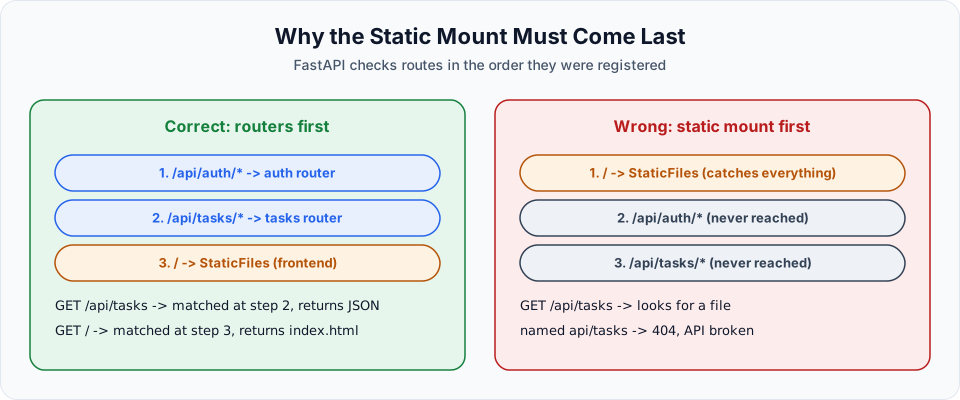
html=True makes the static mount serve index.html when someone opens /.
Test locally
From the backend folder, start the app on port 8080:
cd backend
uv run uvicorn app.main:app --port 8080
Open http://localhost:8080. The login page loads from FastAPI, and after logging in as admin / admin123, the board works. One server, one port, one origin.
Commit the changes before moving on.
What a relative URL resolves to
A relative URL takes its host from the page that is currently open. That is why the same app.js works everywhere without changes:
| Page opened from | fetch('/api/tasks') goes to |
|---|---|
http://localhost:8080 (local test) | http://localhost:8080/api/tasks |
http://localhost:8080 (Docker) | http://localhost:8080/api/tasks |
https://telusko-app-xxxx.run.app (Cloud Run) | https://telusko-app-xxxx.run.app/api/tasks |
With the old hardcoded http://localhost:8000, the deployed site would try to call port 8000 on the visitor's own computer, and that request fails.
Troubleshooting
| Symptom | Likely cause | Fix |
|---|---|---|
/ returns {"detail":"Not Found"} | The static mount is missing or points to the wrong folder | Check directory="../frontend" and that you start uvicorn from backend/ |
| API calls return HTML instead of JSON | The static mount is registered before the routers | Move app.mount(...) below both include_router lines |
RuntimeError: Directory '../frontend' does not exist | uvicorn was started from the project root, not from backend/ | cd backend first, exactly like the Docker WORKDIR |
| Login works but the board is empty | An old app.js is cached in the browser | Hard refresh with Ctrl+Shift+R (Cmd+Shift+R on macOS) |
Checklist before you write the Dockerfile
- No
localhostleft infrontend/app.js(search for it) -
app.mount("/", StaticFiles(...))is the last route registration inapp/main.py - The app works on a single port with
uv run uvicorn app.main:app --port 8080frombackend/ - Login, moving a card and logout all work in the browser
- Changes are committed
Official references
Written By: Shramik Masti
How is this guide?
Last updated on
The Deployment Pipeline
The plan for taking the Content Tracker from your laptop to a public URL on Google Cloud Run, using Docker and Claude Code at every step.
Dockerizing and Testing the App Locally
Ask Claude Code for a production-ready Dockerfile with precise requirements, understand every line, then build and run the container locally with environment variables.