
Dockerizing and Testing the App Locally
Ask Claude Code for a production-ready Dockerfile with precise requirements, understand every line, then build and run the container locally with environment variables.
Writing a good Dockerfile by hand takes time, especially for a project with a slightly unusual layout. Claude Code can write it in seconds, if you tell it the details that matter. A vague prompt gives a generic Dockerfile that fails in subtle ways.
Prerequisite: Docker
Install Docker Desktop and make sure the Docker engine is running before you build. Check with:
docker --versionThe prompt
This prompt includes every detail that caused problems in earlier attempts:
Write a Dockerfile at the project root for the Telusko Workflow Engine.

Project structure:
- Python 3.12 (pyproject.toml requires Python 3.12 or higher)
- Backend at backend/ with app/, seed.py, alembic/, alembic.ini, pyproject.toml
- Frontend at frontend/ (vanilla HTML/CSS/JS, no build step)
- Specs at specs/, REQUIRED at runtime because backend/seed.py reads
  Path(__file__).parent.parent / "specs" / "seed-data.json"
- backend/app/main.py is the real FastAPI app (backend/main.py is just a stub)
- backend/app/main.py mounts StaticFiles from directory "../frontend"
- alembic.ini lives in backend/; alembic upgrade head must run from backend/

Dockerfile requirements:
- Base image: python:3.12-slim
- Package manager: uv
- WORKDIR /app/backend so all relative paths in the code resolve correctly
- Optimise layer caching: copy pyproject.toml and install deps BEFORE
  copying application code
- Copy backend/app, backend/seed.py, backend/alembic, backend/alembic.ini
- Copy specs/ to ../specs (one level up from WORKDIR, required by seed.py)
- Copy frontend/ to ../frontend (one level up, served by StaticFiles)
- CMD: alembic upgrade head, then python seed.py, then uvicorn
- Bind to 0.0.0.0 on $PORT (default 8080; Cloud Run sets this env var)
- Add a comment on every line explaining what it does
Each requirement prevents a specific failure:
| Requirement | Without it |
|---|---|
| Python 3.12 | Install fails because pyproject.toml requires 3.12+ |
specs/ copied | seed.py crashes because it cannot find seed-data.json |
WORKDIR /app/backend and ../frontend | The static mount finds no files and every page is a 404 |
Bind 0.0.0.0 | The server only listens inside the container and is unreachable |
$PORT, default 8080 | Cloud Run cannot reach the app. It sends traffic to the port in $PORT, 8080 by default |
| Dependencies before code | Every code change reinstalls all packages, so builds are slow |
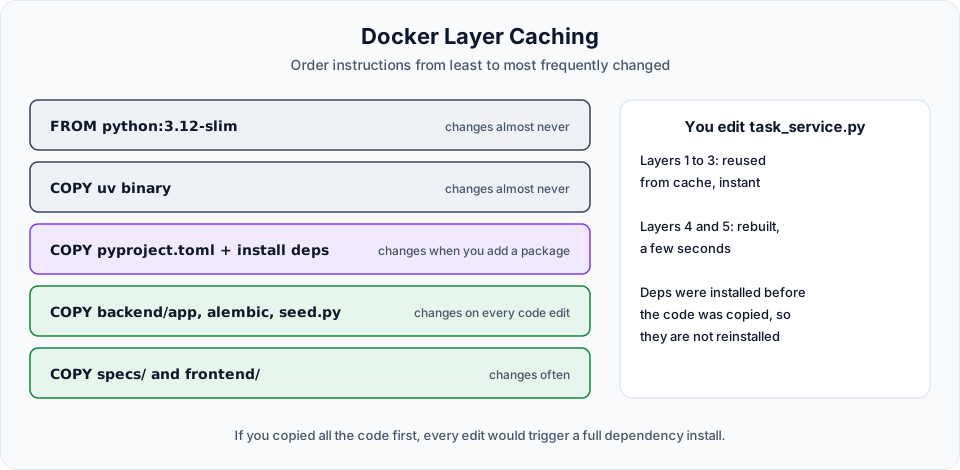
The Dockerfile Claude wrote
# Use the official Python 3.12 slim image, matches requires-python >=3.12 in pyproject.toml
FROM python:3.12-slim

# Pull the uv binary from its official image; no pip install needed
COPY --from=ghcr.io/astral-sh/uv:latest /uv /usr/local/bin/uv

# All relative paths in the app (alembic.ini, ../frontend, ../specs) resolve from here
WORKDIR /app/backend

# Copy only the dependency manifest first so the next layer can be cached independently
COPY backend/pyproject.toml ./pyproject.toml

# Install runtime deps from pyproject.toml using stdlib tomllib (Python 3.11+)
# This layer is reused on every rebuild as long as pyproject.toml is unchanged
RUN python3 -c "\
import tomllib, subprocess; \
deps = tomllib.load(open('pyproject.toml', 'rb'))['project']['dependencies']; \
subprocess.run(['uv', 'pip', 'install', '--system'] + deps, check=True)"

# Copy the FastAPI application package
COPY backend/app ./app

# Copy Alembic migration scripts and config, required by `alembic upgrade head`
COPY backend/alembic ./alembic
COPY backend/alembic.ini ./alembic.ini

# Copy the idempotent seeder; run once at startup to populate demo tasks and users
COPY backend/seed.py ./seed.py

# Copy seed-data JSON one level up so seed.py finds ../specs/seed-data.json
COPY specs/ ../specs/

# Copy the static frontend one level up; main.py mounts it via StaticFiles("../frontend")
COPY frontend/ ../frontend/

# Document the default port; Cloud Run overrides this with the $PORT env var at runtime
EXPOSE 8080

# 1. Apply pending DB migrations  2. Seed demo data (idempotent)  3. Start the server
# sh -c is required so the shell expands ${PORT:-8080} at container start time
CMD ["sh", "-c", "alembic upgrade head && python seed.py && uvicorn app.main:app --host 0.0.0.0 --port ${PORT:-8080}"]
Possible improvements
This Dockerfile works and is easy to read. For a production team you might also:
- Pin the uv image to a specific version tag instead of
latest, so builds are reproducible (the uv Docker guide shows how) - Commit
uv.lock(our.gitignoreexcludes it) and install withuv sync --frozen, so the container gets exactly the versions you tested - Add a
.dockerignorefile to keep.venv,.git,*.dband.envout of the build context - Run as a non-root user
Each of these is a good small prompt for Claude Code.
Build the image
From the project root:
docker build -t telusko-app .Docker downloads the base image, installs dependencies and copies the app. The result is an image called telusko-app:latest. Write that name down, along with the other names you will need later:
| Name | Value in our example |
|---|---|
| Docker image | telusko-app:latest |
| Google Cloud project ID | telusko-content-tracker (yours will differ) |
| Artifact Registry repository | telusko-repo |
Run the container
The app needs its JWT settings as environment variables. For a local test we use a throwaway secret:
docker run -p 8080:8080 \
  -e JWT_SECRET_KEY='local-test-secret-not-for-production' \
  -e JWT_ALGORITHM='HS256' \
  -e JWT_ACCESS_TOKEN_EXPIRE_MINUTES='60' \
  telusko-app
docker run -p 8080:8080 `
-e JWT_SECRET_KEY='local-test-secret-not-for-production' `
-e JWT_ALGORITHM='HS256' `
-e JWT_ACCESS_TOKEN_EXPIRE_MINUTES='60' `
telusko-app| Part | Meaning |
|---|---|
-p 8080:8080 | Map port 8080 on your machine to port 8080 in the container |
-e NAME=value | Set an environment variable inside the container |
telusko-app | The image to run |
In the logs you see the migrations run, the seed script insert the demo data, and uvicorn start. Open http://localhost:8080, log in as admin / admin123, and check the board.
The local secret is deliberately weak and obvious. Never use it outside your own machine. For Cloud Run we generate a real one.
Common problems
| Error or symptom | Cause | Fix |
|---|---|---|
Cannot connect to the Docker daemon | Docker Desktop is not running | Start Docker Desktop and wait for "Engine running" |
FileNotFoundError: ... seed-data.json | specs/ was not copied, or copied to the wrong place | COPY specs/ ../specs/ with WORKDIR /app/backend |
Directory '../frontend' does not exist | frontend/ was not copied one level up | COPY frontend/ ../frontend/ |
| Container starts but the browser shows nothing | Port not published, or uvicorn bound to 127.0.0.1 | Use -p 8080:8080 and --host 0.0.0.0 |
port is already allocated | Something else uses port 8080 | Stop it, or map another host port: -p 9090:8080 |
| Login fails with 500 | JWT environment variables missing | Pass all three -e JWT_... variables |
A .dockerignore file
Without it, Docker sends everything in the folder to the build, including your virtual environment, the local database and your .env:
.git
.venv
**/__pycache__
*.db
*.db-*
.env
**/.env
.claude/worktrees
This makes builds faster and keeps secrets out of the image.
Stop the container
Find the container ID and stop it:
docker ps
docker stop <container-id>
The image is tested and ready to go to the cloud.
Official references
- Docker: Dockerfile reference
- uv: Using uv in Docker
- Cloud Run: container runtime contract
- Docker docs on this site
Written By: Shramik Masti
How is this guide?
Last updated on
Preparing the App for Deployment
Replace hardcoded localhost URLs with relative paths, serve the frontend as static files from FastAPI in the correct order, and test the single-origin app locally.
Google Cloud Project and SDK Setup
Create a Google Cloud project, install and initialise the Google Cloud CLI, authenticate, and verify the configuration from VS Code.