
The Deployment Pipeline
The plan for taking the Content Tracker from your laptop to a public URL on Google Cloud Run, using Docker and Claude Code at every step.
The app is built and secured. The final step is to put it on the internet. You could do this by hand: configure a server, install Python, copy files, set up a process manager. It works, but it takes time and is easy to get wrong.
Instead, we use Claude Code to prepare the project and write the Dockerfile, and we deploy the resulting container to Google Cloud Run.
The steps matter more than the cloud
We use Google Cloud Run because it is simple for container-based apps and has a free tier. The same approach (single origin, Dockerfile, test locally, push an image, run it) works on AWS, Azure or any other platform. Focus on the logic, not on memorising gcloud commands.
The pipeline
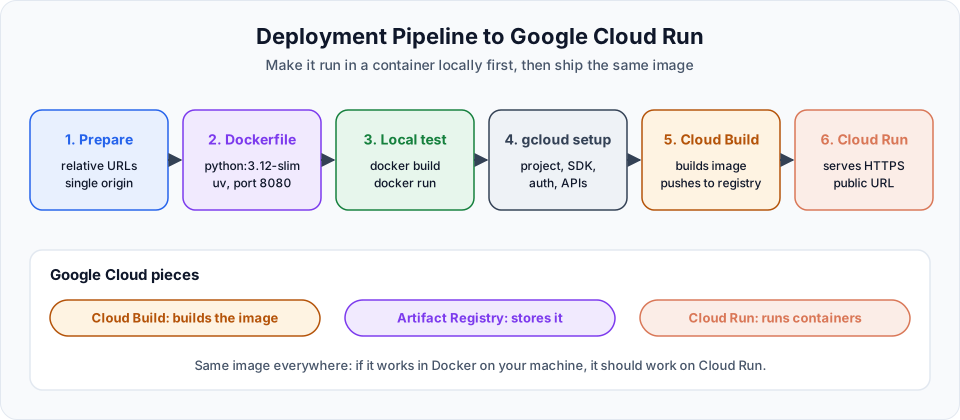
| Step | What we do | Lesson |
|---|---|---|
| 1. Prepare | Remove hardcoded URLs and serve the frontend from FastAPI, so the whole app runs from one origin | Preparing the App for Deployment |
| 2. Dockerfile | Ask Claude Code for a Dockerfile, with precise requirements | Dockerizing and Testing the App Locally |
| 3. Local test | Build the image and run it with Docker on your machine | Same lesson |
| 4. Google Cloud setup | Create a project, install the Google Cloud CLI, log in | Google Cloud Project and SDK Setup |
| 5. Build and store | Cloud Build builds the image and stores it in Artifact Registry | Artifact Registry, Cloud Run and Testing |
| 6. Run | Cloud Run runs the container and gives us an HTTPS URL | Same lesson |
Why a single origin?
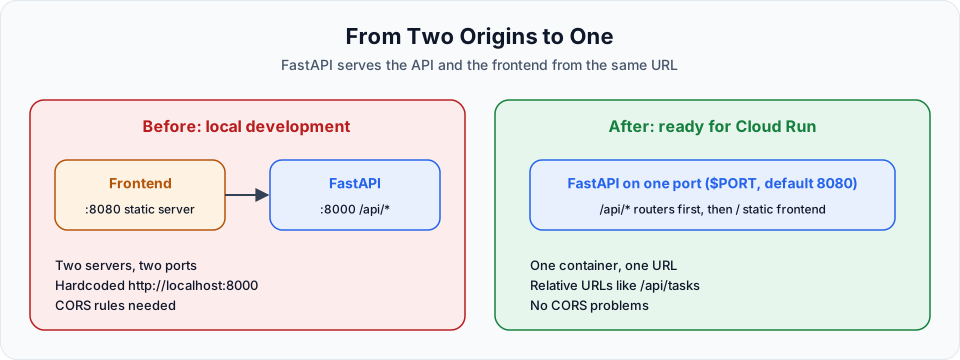
Locally we run two servers: the frontend on one port and the FastAPI backend on another. We could deploy them as two separate services, but that means two deployments, two URLs and CORS configuration between them.
Our frontend is just HTML, CSS and JavaScript. FastAPI can serve those files itself. Then the entire app is one container on one URL.
Why Docker?
A container packages the app with its exact Python version, dependencies and start command. If it runs in Docker on your laptop, it runs the same way on Cloud Run. Without a container, every difference between your machine and the server becomes a debugging session. (For a full introduction, see the Docker docs on this site.)
Cloud Run in a nutshell
| Concept | Meaning |
|---|---|
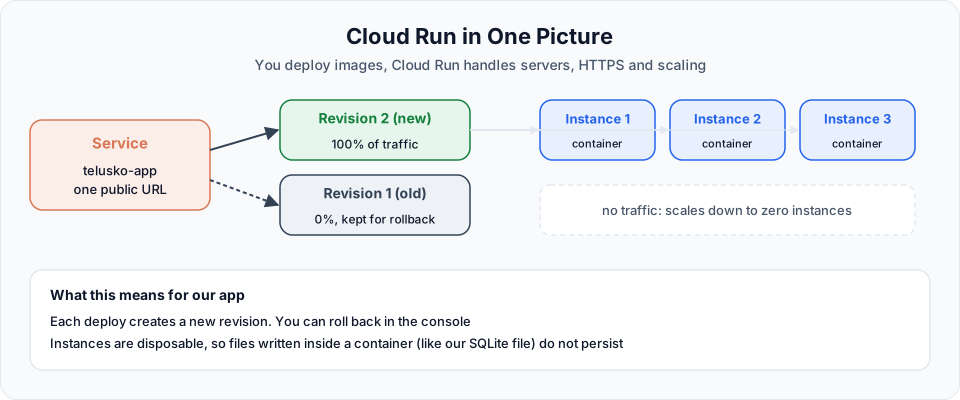
| Service | Your app on Cloud Run, with one stable HTTPS URL. Ours is telusko-app |
| Revision | An immutable snapshot created by every deploy (image plus settings). You can send traffic back to an older revision to roll back |
| Instance | A running copy of your container. Cloud Run adds instances when traffic grows |
| Scale to zero | With no requests, Cloud Run can stop all instances, so an idle app costs very little |
| Container contract | Your container must listen on the port in the PORT environment variable (8080 by default) |
What it costs
Cloud Run bills for the resources used while handling requests, and there is a monthly free tier. Cloud Build and Artifact Registry also have free allowances. For a small learning project the cost is usually zero or close to it, but always check the Cloud Run pricing page and set a budget alert.
What you need
- Docker Desktop (or Docker Engine) installed and running
- A Google account with access to the Google Cloud console. New accounts usually get free credits, but Cloud Run and Cloud Build may need billing enabled on the project
- The Google Cloud CLI (
gcloud), installed in a later lesson
Things can go wrong, and that is fine
Deployments often fail the first time: a missing permission, a wrong path, a typo in a flag. That is normal. Read the error, give it to Claude Code with the context, and fix one thing at a time.
Official references
- Cloud Run documentation
- Artifact Registry documentation
- Cloud Build documentation
- Docker: Get started
Written By: Shramik Masti
How is this guide?
Last updated on
Implementing GitHub Issue Changes
Use the GitHub MCP server to list and create issues, fix the missing auth endpoints on a branch, open a pull request that closes the issue, and review and merge it yourself.
Preparing the App for Deployment
Replace hardcoded localhost URLs with relative paths, serve the frontend as static files from FastAPI in the correct order, and test the single-origin app locally.