
Implementing GitHub Issue Changes
Use the GitHub MCP server to list and create issues, fix the missing auth endpoints on a branch, open a pull request that closes the issue, and review and merge it yourself.
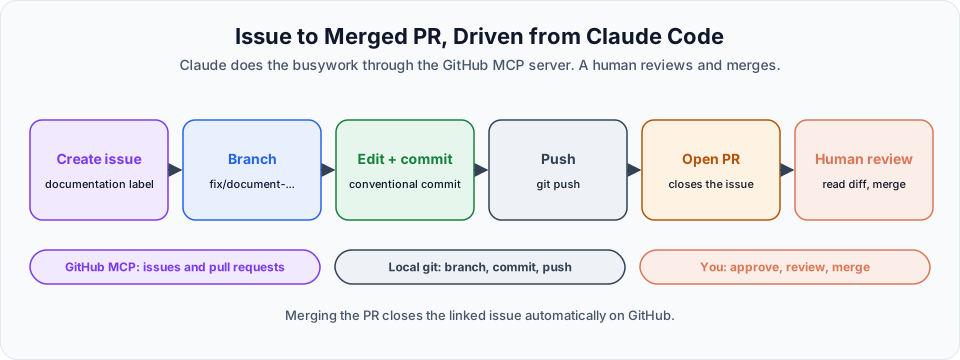
The GitHub MCP server is connected. Let us use it for a complete, real workflow: from an issue to a merged pull request, without leaving Claude Code except for the final human review.
Explore what the server offers
What tools does the GitHub MCP server expose? List all of them with a one-line explanation.You get a long list: create or fork a repository, create and list branches, read file contents, list, read and create issues, create pull requests, search code, and more. Your token's permissions decide which of these actually work. We only granted contents, issues and pull requests.
Read issues
On GitHub, create two quick test issues by hand, with different labels. Then ask Claude:
Using the GitHub MCP server, list the open issues from the content-tracker repo and give me their descriptions.Name the repository
If your token can access several repositories, always name the one you mean. It avoids Claude guessing, or reading from the wrong repository.
Claude calls the list-issues tool on your repository and shows each issue with its number, title, labels and description. You did not open the browser.
Create an issue from Claude Code
Now the real task. In Section 10 we added three auth endpoints but never documented them in specs/api-contract.md. Let us record that properly:
Create a new issue on the content-tracker repo using the GitHub MCP server.

Title: Update specs/api-contract.md with the new auth endpoints

Body: Explain that the three auth endpoints were added but never documented
in the contract file. List them:
  - POST /api/auth/login
  - POST /api/auth/users (admin only)
  - GET /api/auth/me

Note that this should be done before adding more endpoints so the
contract stays the source of truth.

Apply the 'documentation' label.
Claude Code asks permission to call the MCP tool. This is the same permission system as for files and commands. Approve it, then check GitHub: the issue is there with the right title, body and label.
Fix it on a branch
Create a new branch called fix/document-auth-endpoints from main.

On that branch, update specs/api-contract.md to add documentation
for the three auth endpoints: POST /api/auth/login, POST /api/auth/users
(admin only), GET /api/auth/me. Match the existing format in the file.

Commit with a conventional commits style message.
Do NOT push. Do NOT open a PR. Stop after the commit.
"Stop after the commit" keeps you in control. Review the change with /diff, then push:
Push this branch.The resulting commit message follows the Conventional Commits style, for example:
docs(api-contract): document the three auth endpointsConventional commit types
| Type | Use it for | Example |
|---|---|---|
feat | A new feature | feat(tasks): add filtering by state |
fix | A bug fix | fix(frontend): refresh board after move |
docs | Documentation only | docs(api-contract): document auth endpoints |
refactor | Code change without behaviour change | refactor(service): extract role checks |
test | Adding or fixing tests | test(auth): cover expired tokens |
chore | Tooling, config, housekeeping | chore: add .dockerignore |
The part in brackets is the optional scope: which area of the project changed.
Open a pull request
The branch fix/document-auth-endpoints is now pushed to GitHub.

Using the GitHub MCP server, open a pull request from
fix/document-auth-endpoints into main on the content-tracker repo.

Write a PR description that:
  - Explains what was changed and why
  - References the issue you created earlier (closes it)
  - Notes this completes the contract documentation gap

Use a conventional commits style title.
Claude opens the PR. The description includes a line such as Closes #4, which links the PR to the issue.
Why #4 and not #3?
On GitHub, issues and pull requests share the same number sequence. With two test issues and one PR or issue created earlier, the new issue ended up as #4. Always check the number Claude references.
Review and merge: the human step
You could ask Claude to merge the PR too. Do not. Reviewing and merging is your responsibility:
- Open the PR on GitHub
- Read the Files changed tab
- Check that the change matches the issue and the project's conventions
- Add comments if anything needs fixing
- Merge when you are satisfied
When the PR is merged, GitHub automatically closes the linked issue. The PR list and the issue list are both clean again.
What this unlocks
The same pattern works with any MCP server:
| Server | Example workflow |
|---|---|
| Jira | "Implement the feature described in ticket ENG-4521 and open a PR" |
| Slack | "Post a summary of today's merged PRs to #dev" |
| Postgres | "Find tasks stuck in editing for more than a week" |
| Playwright | "Open the app, log in as editor and check that delete is hidden" |
And if a system you use has no MCP server, you can build your own. The official MCP documentation explains how.
Troubleshooting the GitHub MCP server
| Problem | Likely cause | Fix |
|---|---|---|
/mcp shows the server as failed or needing auth | Token is wrong, expired or revoked | Create a new token and re-add the server |
403 or "Resource not accessible" when creating an issue | The token has no Issues: write permission, or not for this repository | Edit the token's permissions on GitHub |
Claude uses gh or asks for a token instead of MCP | The server is not connected in this session | Start a new session and check /mcp |
| The wrong repository is used | Several repositories are accessible to the token | Always name the owner and repo in your prompt |
| Push fails | Pushing uses your local git credentials, not the MCP token | Check git remote -v and your git login |
Try It Yourself
Before moving to the next section, practise what you learned:
- Create a fine-grained token for one repository only, with exactly the permissions from the previous lesson (Contents, Issues, Pull requests) and a short expiry.
- Add the GitHub MCP server from a normal terminal and verify it with
/mcp. - Ask Claude to list your open issues, create one with a label, and open a small PR that closes it.
- Review the PR on GitHub yourself before you merge it.
Official references
- Connect Claude Code to tools via MCP
- GitHub MCP server
- GitHub Docs: Linking a pull request to an issue
- Conventional Commits
Written By: Shramik Masti
How is this guide?
Last updated on
Configuring the GitHub MCP Server
Create a least-privilege fine-grained GitHub token, add the GitHub MCP server to Claude Code safely, choose the right scope, and verify the connection.
The Deployment Pipeline
The plan for taking the Content Tracker from your laptop to a public URL on Google Cloud Run, using Docker and Claude Code at every step.