
Working with GitHub Without MCP
See the usual GitHub team workflow of issues, branches and pull requests, try to drive it from Claude Code without MCP, and understand why that approach breaks down.
The application works and it is secured. In a real team, the next features arrive through a well-known GitHub workflow. Since Claude Code already writes our code, can it also take part in that workflow?
The GitHub team workflow
| Step | What happens on GitHub |
|---|---|
| Issue | Someone reports a bug or proposes a feature. Issues have a title, a description and labels such as bug, enhancement, documentation |
| Branch | A developer creates a branch to work on it |
| Push | The branch is pushed to GitHub |
| Pull request (PR) | The developer asks for the branch to be merged. Teammates review the changes |
| Merge | After review, the PR is merged into main, and the linked issue is closed |
The word "issue" comes from ticketing tools like Jira. Despite the name, an issue does not have to be a problem. It can be any unit of work, including a new feature or a documentation task.
Trying it without MCP
There is real work to do: when we added security in Section 10, we never updated specs/api-contract.md with the three new auth endpoints. The contract is supposed to be our source of truth, so let us track that as an issue.
From Claude Code, without any special setup:
Create an issue on GitHub with the title "Update API contract with auth APIs".Claude tries its best. It looks for a way to talk to GitHub:
- It checks whether the GitHub CLI (
gh) is installed. On our machine it was not. - It looks for a GitHub token in the environment. There was none.
- It suggests that you paste a token into the chat.
Never paste tokens into the chat
A token in the conversation becomes part of the model's context and the session history on disk. Anyone who gets that token can act on your repositories. Secrets belong in your own terminal, in a secret manager, or in tool configuration, never in a prompt.
Why this approach does not scale
Even if it worked, this is the wrong shape of solution:
- Every service is different. GitHub, Jira, Slack and Notion each have their own API, auth method and quirks. Claude would have to improvise a new integration every time.
- Discovery is manual. With a normal API, a developer reads the documentation to learn which endpoints exist. An AI agent needs the service to tell it what it can do.
- Security is ad hoc. Tokens end up in environment variables, scripts or chat messages, with no consistent control.
What we want is a standard way for a service to say: "Here are the actions I offer, here is what each one does, and here is how to call them." Any AI tool that understands that standard could then use any service that speaks it.
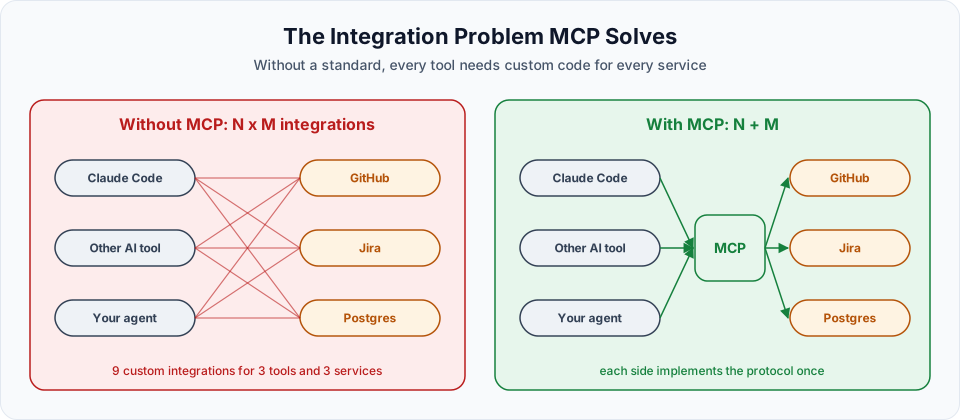
That standard exists. It is called the Model Context Protocol, and it is the subject of the next lesson.
What about the GitHub CLI?
If you already use gh and are logged in, Claude Code can use it through the Bash tool, and that works well for many tasks. MCP is the more general solution: the same mechanism connects Claude to GitHub, databases, browsers, Slack, Jira and hundreds of other services.
Three ways Claude Code can work with GitHub
| Approach | How it works | Good | Watch out |
|---|---|---|---|
| Raw API calls | Claude writes curl requests to the GitHub REST API | No setup beyond a token | The token ends up in commands or the environment, and Claude improvises every call |
GitHub CLI (gh) | Claude runs gh issue create, gh pr create through the Bash tool | Very capable if you already use gh | GitHub only, needs gh installed and logged in |
| GitHub MCP server | Claude calls tools the server describes, like "create issue" | Standard, self-describing, permissions in one place | Needs a token with the right scopes, one-time setup |
All three are valid. In this section we use MCP because the same skill transfers to every other service that offers an MCP server.
Official references
Written By: Shramik Masti
How is this guide?
Last updated on
Implementing JWT Security with Spec-Driven Development
Run /implement-spec on the security spec, follow what Claude builds, handle the bcrypt and browser cache issues, and verify authentication and RBAC with real requests.
What is MCP and How It Works
Understand the Model Context Protocol, its client-server architecture, tools, resources and prompts, transport types, and how MCP affects your context window.