
Implementing JWT Security with Spec-Driven Development
Run /implement-spec on the security spec, follow what Claude builds, handle the bcrypt and browser cache issues, and verify authentication and RBAC with real requests.
The spec is written and the secrets are in place. Now one command implements the whole security layer, backend and frontend.
Before you start
- Create a branch for the work. In the video we forgot and worked on the existing branch, which made the history messy. Do it first:
!git checkout -b feature/jwt-security- Start a fresh session and switch to Sonnet
- Make sure
backend/.envexists with your own secret
Run the skill
/implement-spec specs/security/security-spec.md --testThen watch. It is a big change, so it takes a while.
What Claude does
Reads everything first
The spec, CLAUDE.md, the existing routes, services and schemas, and then the frontend files. Because the spec says it explicitly overrides the "no frontend" rule, Claude notes that and reads the frontend too.
Lists acceptance criteria and out-of-scope items
Exactly as our skill requires: the 15 criteria, and the excluded features (refresh tokens, password reset, and so on).
Builds the security package
backend/app/security/
├── password.py       # hash_password, verify_password (bcrypt)
├── jwt.py            # create_access_token, decode_access_token
└── dependencies.py   # get_current_user, require_role
Plus the User model, user.py and auth.py schemas, and the auth router with /login, /users and /me.
Protects the task endpoints
Each endpoint gets the right dependency, and PUT enforces the state-advance rules:
# Keys are user roles; values are the states a role may advance FROM
_ADVANCE_ALLOWED: dict[str, list[str]] = {
    "admin":        ["code_ready", "recorded", "editing", "uploaded"],
    "content_team": ["code_ready"],
    "video_editor": ["recorded", "editing"],
    "uploader":     ["uploaded"],
}oauth2_scheme = OAuth2PasswordBearer(tokenUrl="/api/auth/login")
async def get_current_user(token: str = Depends(oauth2_scheme),
db: AsyncSession = Depends(get_db)) -> User:
token_data = decode_access_token(token) # 401 if invalid or expired
result = await db.execute(select(User).where(User.username == token_data.username))
user = result.scalar_one_or_none()
if user is None:
raise HTTPException(status_code=401, detail="User not found")
return user
def require_role(*allowed_roles: str):
async def _check(current_user: User = Depends(get_current_user)) -> User:
if current_user.role.value not in allowed_roles:
raise HTTPException(status_code=403, detail="role not allowed")
return current_user
return _checkMigrates and seeds
Generates an Alembic migration for the users table, applies it, and updates seed.py to add the five demo users with hashed passwords (idempotently).
Updates the frontend
Removes the role dropdown, adds a login modal, stores the token, sends Authorization: Bearer <token> on every request, handles 401 by showing the login form again, and adds a logout button styled to match the board.
Problems along the way (and what they teach)
The passlib and bcrypt incompatibility
The spec originally said "passlib[bcrypt]". During implementation Claude found that passlib does not work with bcrypt 5.x, which was already installed. Instead of forcing it, Claude used the bcrypt library directly:
import bcrypt


def hash_password(plain: str) -> str:
    return bcrypt.hashpw(plain.encode("utf-8"), bcrypt.gensalt()).decode("utf-8")


def verify_password(plain: str, hashed: str) -> bool:
    return bcrypt.checkpw(plain.encode("utf-8"), hashed.encode("utf-8"))
That is a reasonable decision, and one dependency fewer. But it was a deviation from the spec, so it is something you must notice in the report and agree with. (The security spec in the previous lesson already says "bcrypt" for exactly this reason.)
Worth knowing: JWT libraries
We use python-jose, as specified. Note that FastAPI's own security tutorial now uses PyJWT for tokens and pwdlib for password hashing. Our choices work too. When you write your own spec, check the FastAPI docs for the currently recommended libraries.
"Logged in as" but nothing works: the browser cache
After implementation, the page showed a broken mix of old and new UI. The backend was fine: logging in through Swagger returned a token. Asking Claude what was wrong pointed to the real cause: the browser was serving the old cached app.js with the new HTML.
A hard refresh (Ctrl+Shift+R, or Cmd+Shift+R on macOS) fixed it.
Lesson: when the backend works in Swagger but the UI does not, check the browser before changing code.
Verify it yourself
Claude ran the smoke tests, but some acceptance criteria can only be checked by a human ("frontend shows login form on first load"). Do both.
In the browser
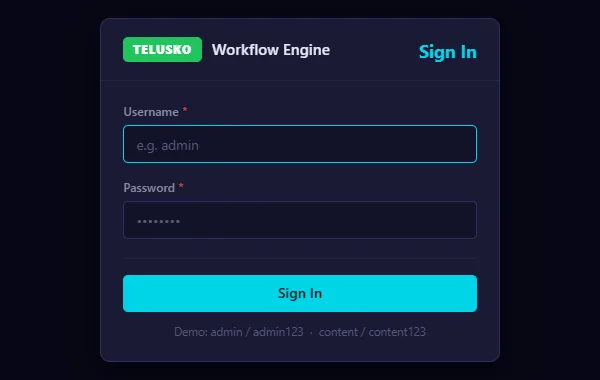
The new login form that replaces the role dropdown.
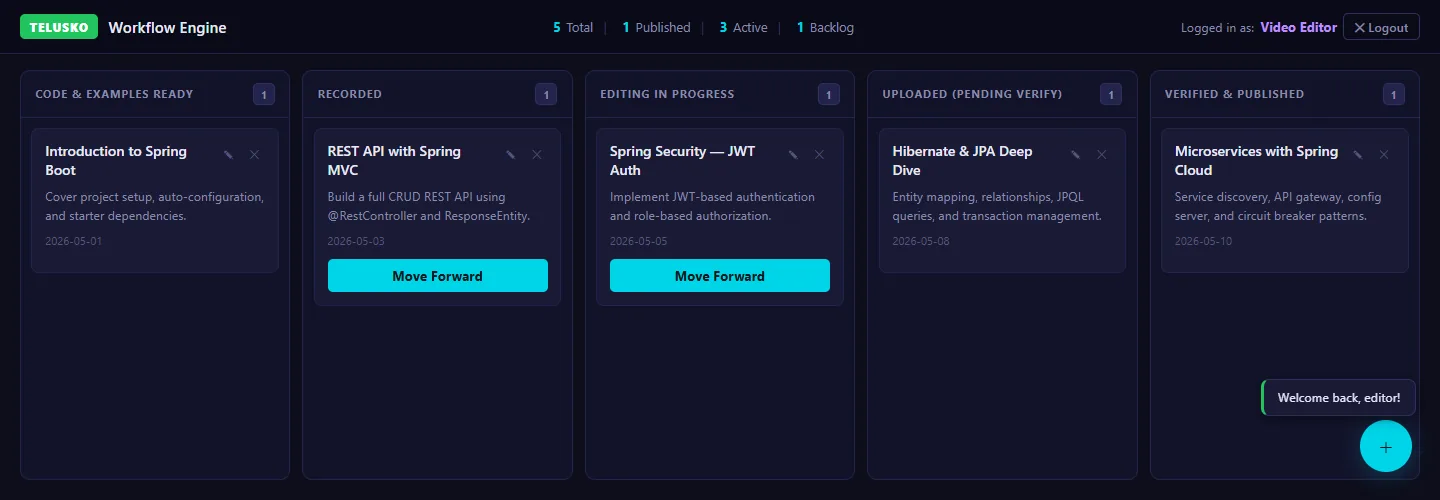
Logged in as editor: Move Forward appears only on Recorded and Editing, and a delete attempt is refused ("Only Admin can delete tasks."). The server enforces the same rules, so the UI cannot be bypassed.
| Test | Expected |
|---|---|
| Open the app | Login form appears |
Log in as admin / admin123 | Board loads, delete is available |
| Wrong password | Error message, no access |
Log in as editor / editor123 | Can move cards only from Recorded and Editing, delete is refused |
| Log out | Token cleared, back to login form |
From the terminal
# 1. Unauthenticated request is blocked (expect 401)
curl -s -o /dev/null -w "%{http_code}\n" http://localhost:8000/api/tasks

# 2. Log in as admin and capture the token
TOKEN=$(curl -s -X POST http://localhost:8000/api/auth/login \
  -H "Content-Type: application/x-www-form-urlencoded" \
  -d "username=admin&password=admin123" \
  | python -c "import sys,json; print(json.load(sys.stdin)['access_token'])")

# 3. Authenticated request works (expect 200 and the task list)
curl -s -H "Authorization: Bearer $TOKEN" http://localhost:8000/api/tasks

# 4. Uploader cannot delete (expect 403)
UTOKEN=$(curl -s -X POST http://localhost:8000/api/auth/login \
  -H "Content-Type: application/x-www-form-urlencoded" \
  -d "username=uploader&password=uploader123" \
  | python -c "import sys,json; print(json.load(sys.stdin)['access_token'])")
curl -s -o /dev/null -w "%{http_code}\n" -X DELETE \
  -H "Authorization: Bearer $UTOKEN" http://localhost:8000/api/tasks/1

# 5. Wrong password (expect 401)
curl -s -o /dev/null -w "%{http_code}\n" -X POST http://localhost:8000/api/auth/login \
  -H "Content-Type: application/x-www-form-urlencoded" \
  -d "username=admin&password=wrong"
You can also paste a token into jwt.io to see the sub, role and exp claims. Notice that you can read them, but if you change any of them, the server rejects the token.
Not everything worked perfectly
In the video, deleting a task was still broken at the end of this step. It was a leftover bug from earlier experiments, not part of the security feature. It is honest to show that: real projects always have a bug list. Write it down, open an issue, and fix it in its own small change. (In the next section we use the GitHub MCP server to manage issues just like this.)
A finding from reviewing this code
app/core/config.py reads JWT_ACCESS_TOKEN_EXPIRE_MINUTES from the environment, but the login route in app/api/v1/auth.py uses its own hardcoded _TOKEN_EXPIRE_MINUTES = 60. So changing the variable has no effect. Every smoke test still passes, because 60 minutes is also the spec's value. This is exactly the kind of gap that only a human review catches: the feature is done, but not fully verified. The fix is one line: use settings.access_token_expire_minutes in auth.py.
Security notes for real projects
Our implementation is a solid learning baseline. Before production, consider:
- HTTPS everywhere. Tokens sent over plain HTTP can be stolen. (Cloud Run gives us HTTPS automatically in Section 12.)
- Token storage.
localStorageis simple, but readable by any JavaScript on the page. If your app could have an XSS vulnerability, anhttpOnlycookie is safer. - Demo users. Delete them or change their passwords.
admin123is not a password. - Out-of-scope items. Refresh tokens, account lockout and password reset are real requirements for most apps. They each deserve their own spec.
When everything checks out, commit and merge the branch.
Try It Yourself
Before moving to the next section, practise what you learned:
- Run all five curl smoke tests and confirm every expected status code.
- Paste a token into jwt.io, change the role in the payload, send the edited token, and confirm you get 401.
- Log in as each of the five demo users and check which cards each one can move.
- Set
JWT_ACCESS_TOKEN_EXPIRE_MINUTES=1, log in, and wait two minutes. You stay logged in. Find out why (hint: compareapp/core/config.pywithapp/api/v1/auth.py), fix it with a small prompt, and test again.
Official references
- FastAPI: OAuth2 with password and JWT
- bcrypt on PyPI
- OWASP: JSON Web Token cheat sheet
- OWASP: HTML5 security (local storage)
Written By: Shramik Masti
How is this guide?
Last updated on
Setting Up the JWT Security Spec File
Write a complete security spec for JWT authentication and RBAC, generalise the implement-spec skill, and set up secrets yourself instead of letting Claude generate them.
Working with GitHub Without MCP
See the usual GitHub team workflow of issues, branches and pull requests, try to drive it from Claude Code without MCP, and understand why that approach breaks down.