
JWT Security Flow
Why the role dropdown is fake security, how JWT authentication works using a simple wristband analogy, and the role-based access rules we will enforce on the server.
The Content Tracker works. We can create, move and delete cards, and the role dropdown changes what each role can do. As Content team, I can only move cards out of code_ready. As Editor, only from recorded and editing. Only Admin can drag cards anywhere and delete.
But that is fake security.
Why the current roles are not security
The role checks live only in the frontend JavaScript. Anyone can:
- Switch the dropdown to Admin
- Open the browser developer tools and change
currentRole - Skip the UI entirely and call
DELETE /api/tasks/1withcurl
The backend accepts all of it, because it never asks who is calling. Our own CLAUDE.md already warned about this: role checks are "UX-only. The backend must re-enforce them server-side."
In a real team, every person has their own username and password, and the server decides what they are allowed to do. That needs two things:
| Concept | Question it answers |
|---|---|
| Authentication | Are you really who you say you are? |
| Authorization | Now that we know who you are, are you allowed to do this? |
JWT explained with a wristband
Think of an adventure park.
- At the entrance, you show your ID and pay. That is logging in.
- They give you a wristband. That is your token.
- For the rest of the day, you do not show your ID or pay again. You just show the wristband at each ride.
- Some rides have extra rules (age, height). The staff check your wristband and whether you are allowed on that ride. That is authorization.
- The wristband has a special stamp that nobody can fake. That is the signature, made with a secret key only the park has.
A JSON Web Token (JWT) works exactly like this wristband.
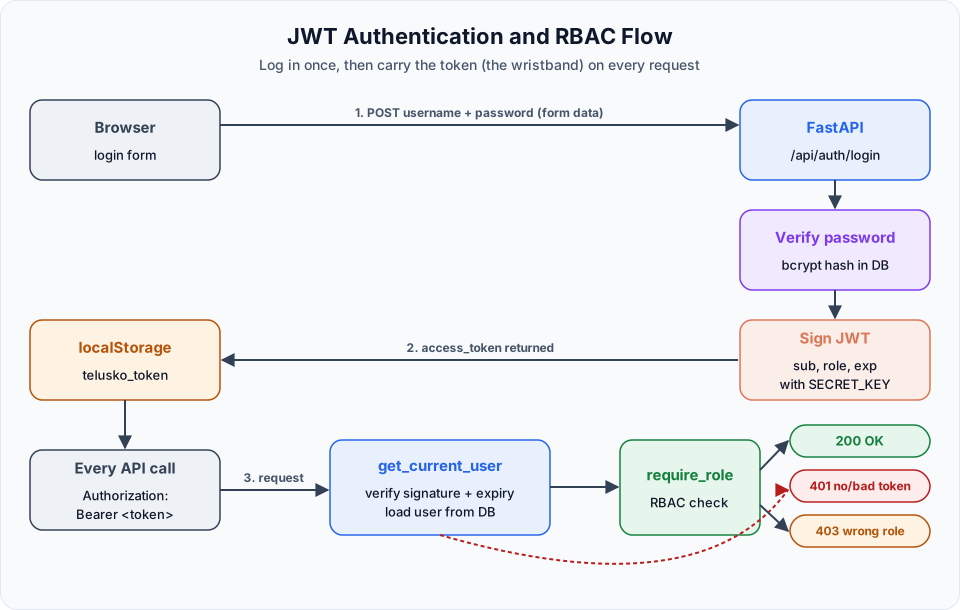
The flow step by step
Log in
The browser sends the username and password to POST /api/auth/login.
Verify the password
The server looks up the user in the database and checks the password. Passwords are never stored as plain text. We store a bcrypt hash: a one-way, deliberately slow transformation, so even if the database leaks, the original passwords are very hard to recover.
Issue a token
If the password is correct, the server creates a JWT containing:
| Claim | Meaning |
|---|---|
sub | Subject: the username |
role | The user's role, for example video_editor |
exp | Expiry time. Our tokens are valid for 60 minutes |
The server signs the token with its secret key and sends it back.
Store the token
The frontend saves the token in the browser's localStorage as telusko_token.
Verify and authorise
For each request the server checks the signature and expiry, loads the user, then checks whether that user's role is allowed to do this action. This is RBAC: role-based access control.
| Result | Status |
|---|---|
| No token, invalid token, expired or tampered token | 401 Unauthorized |
| Valid token, but the role is not allowed | 403 Forbidden |
| Valid token and allowed role | 200 / 201 / 204 |
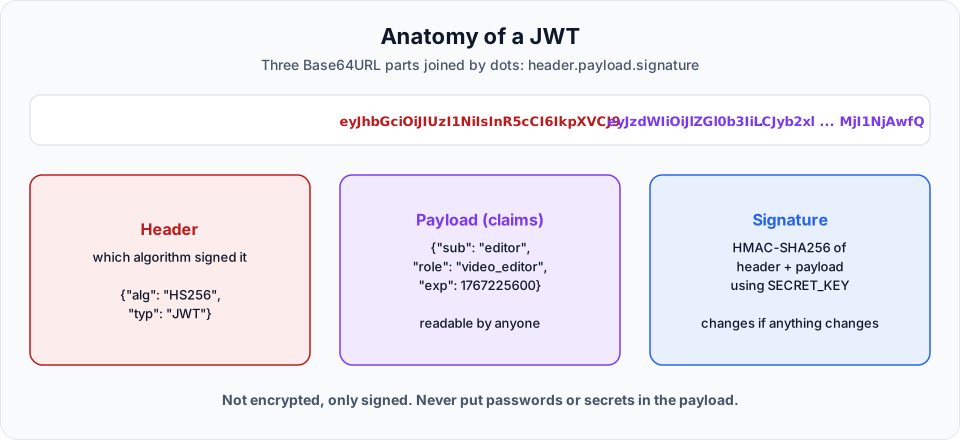
Why the signature matters
A JWT is not encrypted. Anyone can decode it and read sub and role. What they cannot do is change it: if someone edits the role from uploader to admin, the signature no longer matches and the server rejects it with 401. That is why the secret key must stay secret.
The RBAC rules for our app
These rules mirror the frontend's ROLE_CONFIG, but now the server enforces them:
| Role | View tasks | Create task | Advance a card from | Delete task |
|---|---|---|---|---|
admin | Yes | Yes | Any state | Yes |
content_team | Yes | Yes | code_ready | No |
video_editor | Yes | No | recorded, editing | No |
uploader | Yes | No | uploaded | No |
In the next lesson we write all of this down as a security spec, and then let our /implement-spec skill build it.
Official references
- JWT introduction (jwt.io)
- RFC 7519: JSON Web Token
- FastAPI: OAuth2 with password and JWT
- OWASP: Authentication cheat sheet
Written By: Shramik Masti
How is this guide?
Last updated on
Implementing Features with Spec-Driven Development
Write a feature spec with acceptance criteria and scope, build an /implement-spec skill that refuses specs without criteria, and implement task filtering from the spec.
Setting Up the JWT Security Spec File
Write a complete security spec for JWT authentication and RBAC, generalise the implement-spec skill, and set up secrets yourself instead of letting Claude generate them.