
What is MCP and How It Works
Understand the Model Context Protocol, its client-server architecture, tools, resources and prompts, transport types, and how MCP affects your context window.
The Model Context Protocol (MCP) is an open standard, introduced by Anthropic in late 2024, that lets AI applications connect to external tools and data in one consistent way. Today it is supported by most AI tools and offered by a large number of services.
The USB analogy
Think back to phone chargers before USB became universal. Every brand had its own connector. Today one standard port connects a mouse, a keyboard, a pen drive or a game controller to almost any computer, because both sides follow the same protocol.
MCP is that standard port for AI:
- The service (GitHub, a database, a browser automation tool) provides an MCP server
- The AI application (Claude Code) has a built-in MCP client
- As long as both speak MCP, they work together, with no custom integration code
Like HTTP or TCP, MCP is a protocol: a set of rules for the handshake, the message format and how capabilities are discovered.
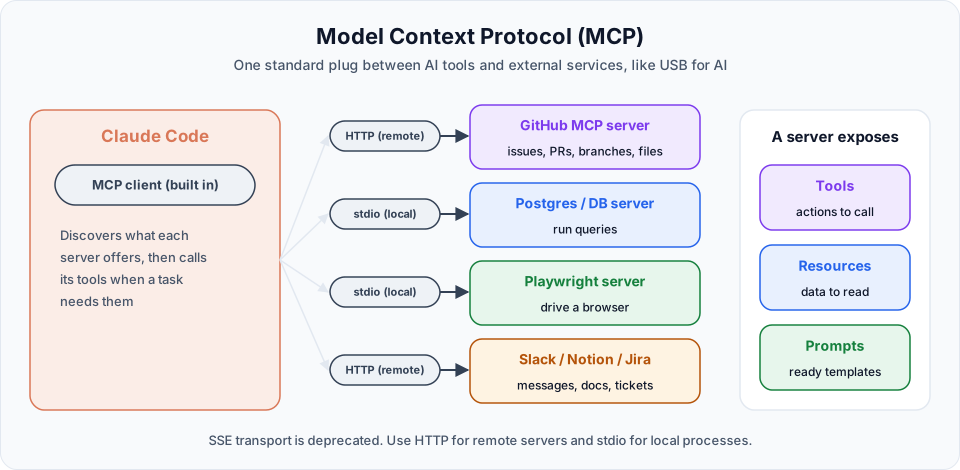
What an MCP server provides
| Capability | What it is | GitHub example |
|---|---|---|
| Tools | Actions the AI can call | Create an issue, open a pull request, list branches |
| Resources | Data the AI can read | File contents, issue details |
| Prompts | Ready-made prompt templates the server offers | A "review this PR" template |
Tools are the core of almost every server. Resources and prompts are optional.
The key difference from a plain API is self-description. A traditional API needs a human to read its documentation. An MCP server tells the client what tools it has and describes each one in plain language, so the AI can decide by itself which tool fits a task.
You can use the many existing servers, or build your own for internal systems.
Transport types
How the client and server communicate:
| Transport | Use it for | Status |
|---|---|---|
| HTTP (streamable HTTP) | Remote servers hosted by a service, like GitHub's | Recommended for remote servers |
| stdio | A server that runs as a local process on your machine | Standard for local tools |
| SSE (server-sent events) | Older remote servers | Deprecated. Use HTTP where available |
Popular MCP servers
| Server | What Claude can do with it |
|---|---|
| GitHub | Issues, pull requests, branches, code search |
| PostgreSQL and other databases | Query data (use a read-only user) |
| Playwright | Open and drive a real browser to test web apps |
| Filesystem | Work with files outside the project folder |
| Slack, Notion, Jira | Read and write messages, documents and tickets |
MCP and your context window
This is something many developers overlook. Every MCP server adds tool definitions, and those definitions take space in the context window.
In earlier versions of Claude Code, all tool definitions of every connected server were loaded into context in every session. A GitHub server alone exposes dozens of tools. Connect ten servers and you might carry hundreds of tool schemas in every request, even if you only use one tool a week. That is what happened in the video: the context kept filling up, and the cause was a pile of unused MCP servers.
Improved in current versions: tool search
Claude Code now uses MCP tool search by default. At session start, only tool names and server instructions load. The full definition of a tool is loaded only when Claude actually needs it. This makes MCP servers much cheaper to keep connected.
One exception worth remembering: tool search is turned off by default when ANTHROPIC_BASE_URL points to a non-Anthropic host, such as a local model through Ollama (Section 3). In that setup, every tool definition is loaded up front again.
Good habits still apply:
- Remove servers you do not use. In the video, Gmail and Google Calendar connectors were listed but never used
- Disable a server temporarily with
/mcpwhen you do not need it in a session - Run
/contextto see what your MCP servers are costing
Security
An MCP server can act on your behalf: create issues, push code, query databases. Treat it like any other powerful tool:
- Only install servers from sources you trust
- Give tokens the minimum permissions they need
- Remember that permission prompts and rules apply to MCP tools too
Official references
- Model Context Protocol: introduction
- Connect Claude Code to tools via MCP
- Scale with MCP tool search
- MCP server registry
Written By: Shramik Masti
How is this guide?
Last updated on
Working with GitHub Without MCP
See the usual GitHub team workflow of issues, branches and pull requests, try to drive it from Claude Code without MCP, and understand why that approach breaks down.
Configuring the GitHub MCP Server
Create a least-privilege fine-grained GitHub token, add the GitHub MCP server to Claude Code safely, choose the right scope, and verify the connection.