
Varargs in Java
1. Introduction
Varargs (Variable Arguments) in Java allow you to pass zero or more arguments to a method without manually creating an array.
Before varargs existed, if you wanted to pass a variable number of values, you needed to declare a method that accepted an array:
int sum(int[] numbers) { ... }Varargs simplify this:
int sum(int... numbers) { ... }This makes method calls cleaner and more flexible.
Varargs were introduced in Java 5, mainly to support APIs like printf() and Collections utilities.
2. What Are Varargs?
Varargs allow a method to accept any number of arguments, including:
- zero arguments
- one argument
- many arguments
Internal behavior:
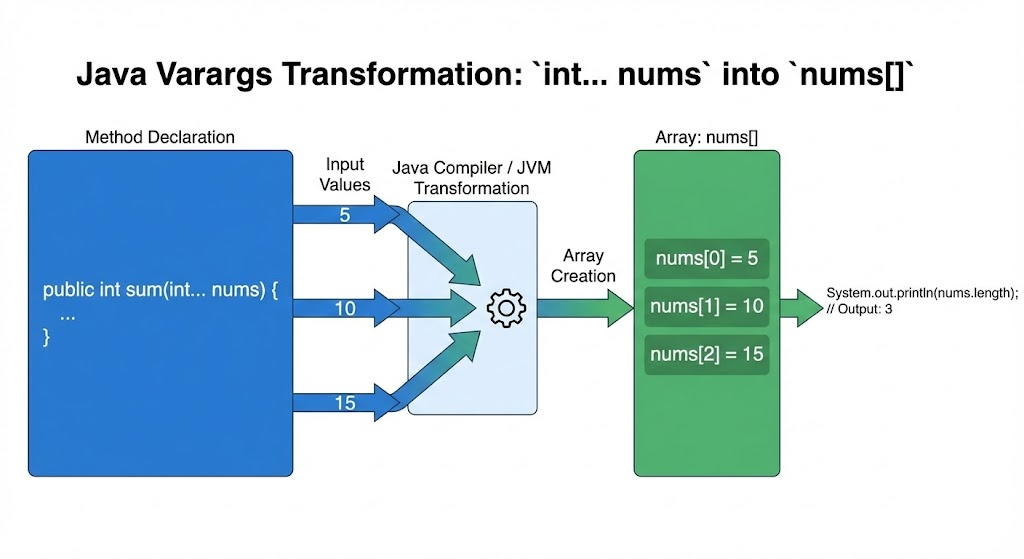
- The compiler automatically converts arguments into an array before passing them to the method.
Example:
void show(int... x) { }Calling:
show();           // 0 arguments
show(10);         // 1 argument
show(10, 20, 30); // 3 arguments
All are valid.
3. Syntax of Varargs
returnType methodName(dataType... variableName) {
    // method body
}
Example:
int sum(int... nums) {
    int total = 0;
    for (int n : nums) total += n;
    return total;
}
Call:
sum(10, 20, 30); // returns 604. How Varargs Work Internally
This method:
void test(int... x)Is treated by the compiler as:
void test(int[] x)So:
x.lengthgives the number of arguments- Each argument is stored inside an array
5. Varargs Example: Summation
int sum(int... nums) {
    int result = 0;
    for (int n : nums) {
        result += n;
    }
    return result;
}
Call:
sum();              // 0
sum(10);            // 10
sum(10, 20, 30);    // 60
6. Varargs with Other Parameters
Varargs must always be the last parameter.
Valid:
void display(String msg, int... nums) { }Invalid:
void display(int... nums, String msg) { } // ERRORReason: Java cannot determine where varargs end and the next argument begins.
7. Only One Varargs Parameter Allowed
A method cannot have two varargs parameters.
Invalid:
void test(int... a, String... b) { } // ERRORJava cannot determine how to split incoming arguments between two varargs.
8. Varargs with Method Overloading
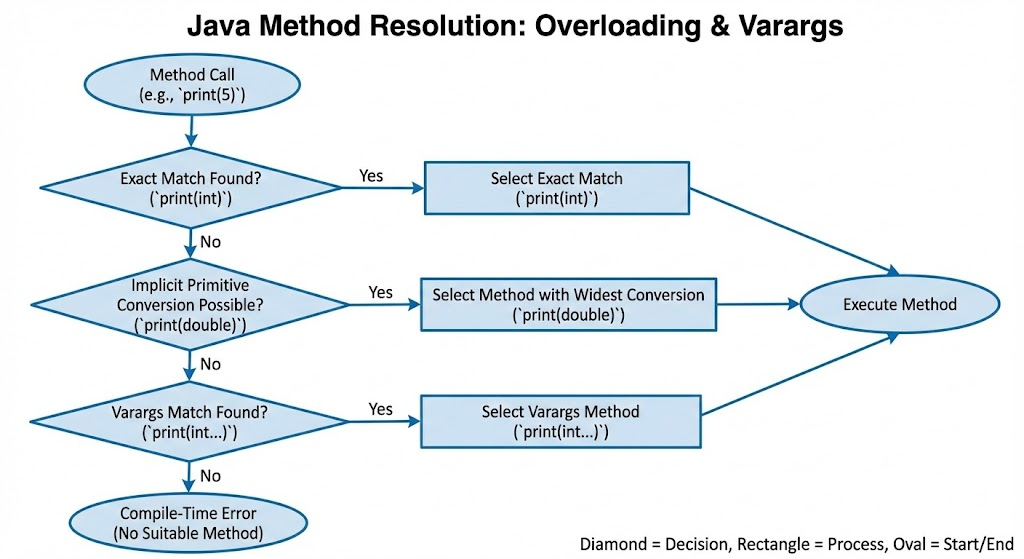
Varargs participate in method overloading, but can sometimes cause ambiguity.
Example:
void show(int... x) { }
void show(int x) { }
Calling:
show(10);Will call the single-argument version, because it is a more specific match.
But some cases cause compiler errors:
void test(int... x) { }
void test(Integer... x) { } // ERROR: ambiguous
Image prompt
A flowchart illustrating method resolution between overloaded varargs and non-varargs methods, showing how Java chooses the most specific method before falling back to varargs.
9. Real-World Example: printf()
Java’s printf() uses varargs internally:
System.out.printf("Name: %s, Age: %d", "Amit", 25);Signature of printf():
public PrintStream printf(String format, Object... args)10. Varargs vs Regular Array Parameter
Regular Array Method
void print(int[] arr) { }Call:
print(new int[]{10, 20, 30});Varargs Method
void print(int... arr) { }Call:
print(10, 20, 30);Much cleaner and easier.
11. Complete Example Program
class VarArgsDemo {

    static int sum(int... nums) {
        int result = 0;
        for (int n : nums) {
            result += n;
        }
        return result;
    }

    static void printNames(String... names) {
        for (String n : names) {
            System.out.println(n);
        }
    }
}

public class Main {
    public static void main(String[] args) {
        System.out.println(VarArgsDemo.sum());                 // 0
        System.out.println(VarArgsDemo.sum(5));                // 5
        System.out.println(VarArgsDemo.sum(5, 10, 15));        // 30

        VarArgsDemo.printNames("Amit", "Sara", "John");
    }
}
Output:
0
5
30
Amit
Sara
John
12. Summary
- Varargs allows methods to accept variable number of arguments.
- Declared using
type... variableName. - Internally treated as an array.
- Must be the last parameter.
- Only one varargs parameter allowed.
- Useful for APIs like
printf(), collections, utility methods. - Overloading can work with varargs but may cause ambiguity.
This completes Varargs in Java.
Written By: Shiva Srivastava
How is this guide?
Last updated on