
Methods in Java
1. Introduction
A method in Java is a named block of code that performs a specific task.
You can think of a method as a function that belongs to a class.
Methods allow you to:
- Break a program into logical units
- Remove repetition
- Reuse logic in multiple places
- Make code easier to test and debug
Every Java application starts its execution from a method:
public static void main(String[] args) {
    // program starts here
}
So understanding methods is fundamental to understanding Java itself.
2. Why Do We Need Methods?
Without methods, code quickly becomes:
- Long and unorganized
- Hard to understand
- Difficult to change
2.1 Without Methods (Repetition)
public class Main {
    public static void main(String[] args) {
        System.out.println("Welcome, Rohan");
        System.out.println("Welcome, Rohan");
        System.out.println("Welcome, Rohan");
    }
}
If later you want to change the message, you must modify every line.
2.2 With Methods (Reusable)
public class Main {

    static void printWelcome() {
        System.out.println("Welcome, Rohan");
    }

    public static void main(String[] args) {
        printWelcome();
        printWelcome();
        printWelcome();
    }
}
Now the message is defined once inside printWelcome().
If the message changes, you edit only one place.
3. Method Syntax and Components
General syntax:
modifier(s) returnType methodName(parameterList) {
    // method body (statements)
}
Example:
public int add(int a, int b) {
    int sum = a + b;
    return sum;
}
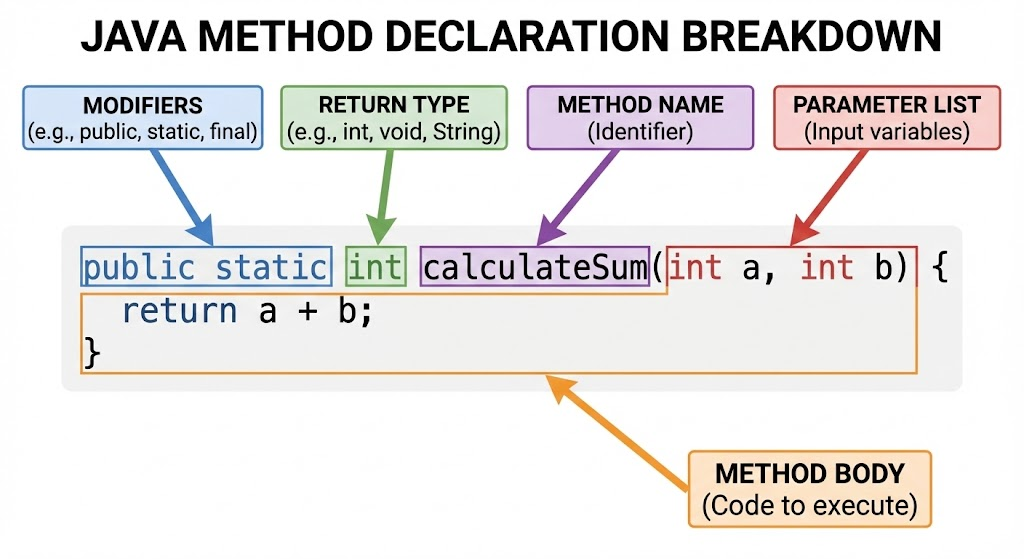
3.1 Components Breakdown
-
Modifiers (optional here:
public)- Control visibility (
public,private, etc.) - There can also be
static,final, etc. (covered in their own topics)
- Control visibility (
-
Return type (
int)- Tells what type of value the method will return
- If nothing is returned → use
void
-
Method name (
add)- Should be meaningful and follow naming conventions
- Starts with lowercase, uses camelCase:
calculateTotal,printResult
-
Parameter list (
int a, int b)- Inputs to the method
- Can be zero or more parameters
- Each parameter has a type and a name
-
Method body
- Inside
{ } - Contains local variables and statements
- May end with a
returnstatement (if return type is notvoid)
- Inside
4. Declaring vs Calling a Method
4.1 Declaring (Defining) a Method
You declare a method once, usually inside a class:
class Calculator {

    int add(int x, int y) {
        int result = x + y;
        return result;
    }
}
4.2 Calling a Method
You call a method wherever you want to use its logic.
For non-static methods, you call through an object:
public class Main {
    public static void main(String[] args) {
        Calculator calc = new Calculator();        // create object
        int sum = calc.add(5, 3);                  // method call
        System.out.println("Sum = " + sum);
    }
}
For static methods (belonging to the class itself), you can call directly from the class or from the same class without an object:
class MathUtil {

    static int square(int n) {
        return n * n;
    }
}

public class Main {
    public static void main(String[] args) {
        int result = MathUtil.square(4);           // call via class name
        System.out.println(result);
    }
}
(Details of static will be covered in static-method.mdx.)
5. Methods with and without Parameters
5.1 Methods Without Parameters
Used when no input is required.
void printLine() {
    System.out.println("--------------");
}
Call:
printLine();5.2 Methods With Parameters
Used when method needs input to work.
void greet(String name) {
    System.out.println("Hello, " + name);
}
Call:
greet("Amit");
greet("Sara");
Each call passes a different argument to the same method.
6. Methods With and Without Return Values
6.1 Methods with Return Type
If a method needs to produce a result, it should return a value.
double calculateArea(double radius) {
    double area = 3.14 * radius * radius;
    return area;
}
Call:
double circleArea = calculateArea(5.0);
System.out.println(circleArea);
Rules:
- The type of value returned must match the return type.
- Every possible execution path in a non-void method must end with a
return.
6.2 Methods with void (No Return Value)
Used when method performs an action but does not need to return anything.
void printWelcomeMessage() {
    System.out.println("Welcome to the system");
}
Call:
printWelcomeMessage();You cannot write:
int x = printWelcomeMessage(); // ERRORbecause the method does not return a value.
7. Parameters, Arguments, and Local Variables
7.1 Parameters vs Arguments
-
Parameters → variables in method declaration
void add(int a, int b) { ... }Here,
aandbare parameters. -
Arguments → actual values passed during method call
add(10, 20); // 10 and 20 are arguments
7.2 Local Variables
Variables declared inside a method:
void demo() {
    int x = 10; // local variable
}
Properties:
- Exist only while the method is executing
- Cannot be accessed outside the method
- Must be initialized before use (no default values like fields)
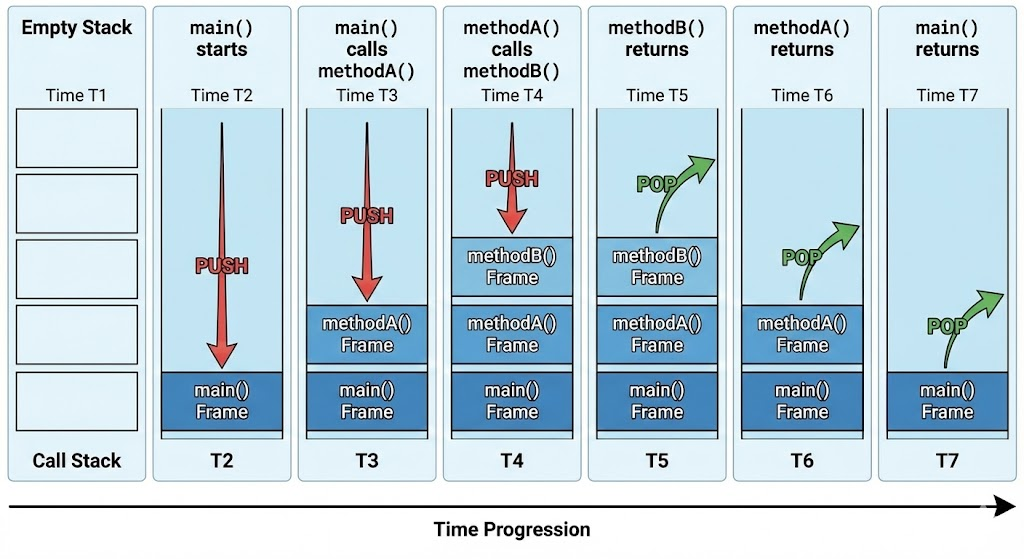
8. How Method Call Works (Call Stack Concept)
When a method is called:
- Java creates a stack frame for that method on the call stack
- Parameters and local variables are stored in this frame
- CPU executes the method body
- When method finishes (or hits
return), its frame is removed - Control goes back to the caller
Example:
public static void main(String[] args) {
    int result = multiply(3, 4);
}

static int multiply(int a, int b) {
    return a * b;
}
Call order:
mainstartsmaincallsmultiply(3,4)→ new frame formultiplymultiplyreturns 12 → frame removed- Control returns to
main
Understanding this helps when debugging and reading stack traces.
9. Pass-by-Value in Java
Java is strictly pass-by-value, meaning:
- When you pass a variable to a method, Java passes a copy of the value.
9.1 For Primitive Types
void change(int x) {
    x = 100;
}

public static void main(String[] args) {
    int n = 5;
    change(n);
    System.out.println(n); // still 5
}
n remains unchanged, because x received a copy of the value.
9.2 For Object References
class Student {
    String name;
}

void rename(Student s) {
    s.name = "Updated";
}

public static void main(String[] args) {
    Student st = new Student();
    st.name = "Original";

    rename(st);
    System.out.println(st.name); // "Updated"
}
Here:
- The reference value is copied
- Both
standsrefer to the same object - Modifying the object through
saffects whatstsees
Important: Java does not pass the object itself; it passes the reference value (also by value).
10. Method Design Best Practices
-
Single Responsibility
- Each method should perform one logical task
- Example:
calculateTax(),printInvoice(),validateUser()
-
Meaningful Names
- Use verbs:
calculate,print,fetch,update,validate - Avoid names like
doWork(),method1(),test123()
- Use verbs:
-
Short Methods
- Large methods become hard to understand
- Break into smaller helper methods
-
Limited Parameters
- Too many parameters → method is doing too much
- Prefer passing a small object instead of 7–8 separate parameters
-
Avoid Side Effects Unless Intended
- Side effect: method changes something outside itself (like a global variable or passed object)
- For clarity, document such behavior, or return new values instead of modifying arguments silently
11. Complete Example: Banking Utility
class BankAccount {
    String accountNumber;
    double balance;

    // Method to deposit money
    void deposit(double amount) {
        if (amount <= 0) {
            System.out.println("Invalid deposit amount");
            return;
        }
        balance = balance + amount;
        System.out.println("Deposited: " + amount);
    }

    // Method to withdraw money
    boolean withdraw(double amount) {
        if (amount <= 0) {
            System.out.println("Invalid withdrawal amount");
            return false;
        }
        if (amount > balance) {
            System.out.println("Insufficient balance");
            return false;
        }
        balance = balance - amount;
        System.out.println("Withdrawn: " + amount);
        return true;
    }

    // Method to print current balance
    void printBalance() {
        System.out.println("Current balance: " + balance);
    }
}

public class Main {
    public static void main(String[] args) {

        BankAccount acc = new BankAccount();
        acc.accountNumber = "ABC123";

        acc.deposit(1000);
        acc.withdraw(300);
        acc.printBalance();
    }
}
Explanation:
- Each method has a clear role (
deposit,withdraw,printBalance). - Some methods return a value (
withdrawreturnsboolean). - Some methods are void, performing actions.
12. Summary
-
A method is a named block of code that performs a specific task.
-
Methods help make code modular, reusable, and maintainable.
-
Methods have:
- Modifiers
- Return type
- Name
- Parameters
- Body
-
Methods can:
- Take parameters or not
- Return values or be
void
-
Java uses pass-by-value for both primitives and object references.
-
Good method design focuses on:
- Single responsibility
- Meaningful names
- Clear inputs and outputs
Written By: Shiva Srivastava
How is this guide?
Last updated on