
Creation of Array
1. Introduction
After understanding the basics of arrays, the next step is learning how to create arrays in Java.
Array creation involves:
- Declaring an array
- Allocating memory for it using
new - Optionally initializing it with values
Java arrays are objects, and memory allocation happens at runtime.
2. Array Creation Process
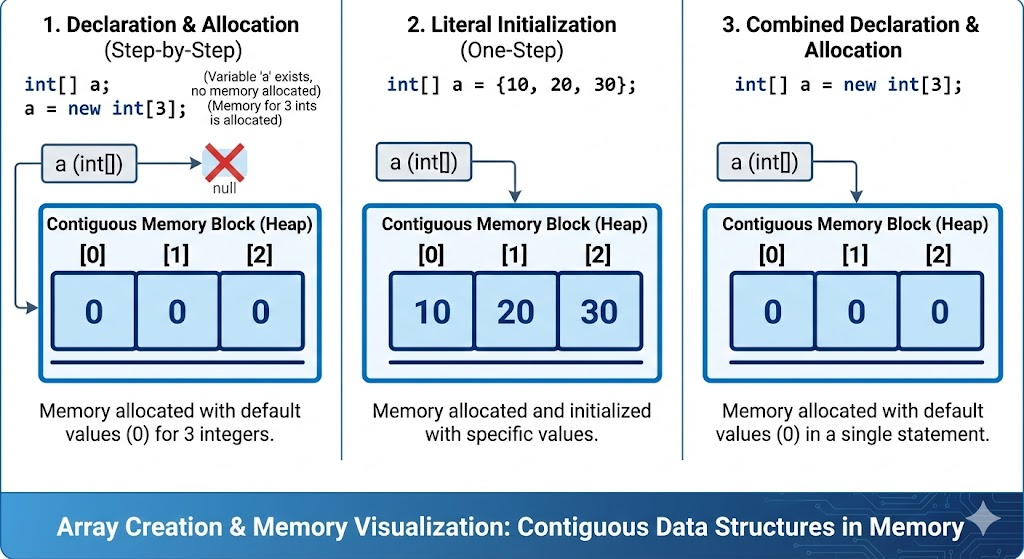
Array creation has two steps:
Step 1: Array Declaration
int[] numbers;This tells Java:
numbersis a variable- It will refer to an array of integers
- No memory is allocated yet
Step 2: Array Memory Allocation
numbers = new int[5];This creates space for 5 integers in memory.
You can combine both steps:
int[] numbers = new int[5];3. Syntax of Array Creation
dataType[] arrayName = new dataType[size];Examples:
int[] marks = new int[4];
double[] temperature = new double[10];
char[] vowels = new char[5];
String[] names = new String[3];
4. Default Values After Creation
When an array is created with new, Java initializes all elements with default values:
| Data Type | Default Value |
|---|---|
| int, byte, short, long | 0 |
| float, double | 0.0 |
| char | '\u0000' (empty) |
| boolean | false |
| Object (String, custom class) | null |
Example:
boolean[] flags = new boolean[3];

System.out.println(flags[0]); // false
System.out.println(flags[1]); // false
System.out.println(flags[2]); // false
5. Creating Arrays with Initial Values (Array Literals)
You can create an array and assign values immediately:
Method 1: Direct Literal
int[] nums = {10, 20, 30};Java counts elements and sets the array size automatically.
Method 2: Using new
int[] nums = new int[] {10, 20, 30};Both are valid.
6. Creating Arrays Without Initialization
If values are not known initially:
int[] values = new int[5];

// Assign values later
values[0] = 100;
values[1] = 200;
7. Different Ways to Declare and Create Arrays
Way 1: Common Approach
int[] a = new int[3];Way 2: Alternate Syntax
int a[] = new int[3];Both work, but the first style is recommended because it clearly shows the variable is an array.
Way 3: 2D Array Creation (Preview)
int[][] matrix = new int[3][4];(This is covered fully in multi-dimensional-array.mdx)
8. Errors During Array Creation
8.1 Negative Array Size
int[] arr = new int[-5]; // Runtime Error: NegativeArraySizeException8.2 Missing Size When Using new
int[] arr = new int[]; // ERROR8.3 Declaring Without Creating Memory
int[] arr;
arr[0] = 10; // NullPointerException
9. Best Practices
- Always use
int[] astyle for clarity. - Use array literals when values are known beforehand.
- Use
newwhen size is known but values are not. - Avoid excessively large arrays → may cause
OutOfMemoryError. - Use meaningful variable names:
Bad:
int[] x = new int[10];Good:
int[] studentMarks = new int[10];10. Complete Example
public class ArrayCreation {
    public static void main(String[] args) {

        // Creating array of size 4
        int[] marks = new int[4];

        // Assigning values
        marks[0] = 85;
        marks[1] = 90;
        marks[2] = 78;
        marks[3] = 88;

        // Printing values
        for (int i = 0; i < marks.length; i++) {
            System.out.println("marks[" + i + "] = " + marks[i]);
        }
    }
}
Output:
marks[0] = 85
marks[1] = 90
marks[2] = 78
marks[3] = 88
11. Summary
- Arrays are created using
newor array literals. - Array size is fixed once created.
- Default values are automatically assigned.
- Access elements using index; index starts at
0. - Proper array creation prevents
NullPointerExceptionand other errors.
Written By: Shiva Srivastava
How is this guide?
Last updated on