
Your First LangChain4j Application
See what LangChain4j is, add its Maven dependencies to a new project, create an OpenAiChatModel with a builder, and get an answer from a model with a few lines of Java.
You have now called a model twice. First with plain Java and HTTP, then with the OpenAI SDK. The second was much shorter, and it tied every line of the program to one provider.
This lesson introduces the library the rest of the course is built on: LangChain4j.
What LangChain4j is
The lesson starts on the official site and reads through the introduction page. The points that matter:
Its goal is to simplify integrating LLMs into Java applications.
Unified APIs. Every provider and every vector store has its own API. LangChain4j puts one API in front of all of them, so you can switch between them without rewriting your code.
A comprehensive toolbox. Prompt templates, chat memory, tool calling, agents, RAG. For each idea there is an interface and ready-made implementations.
It is not a port of LangChain. The documentation says this in a note of its own. Despite the name, LangChain4j is not the Python library translated to Java. It was designed for Java, around interfaces, annotations and builders.
| Core Java | OpenAI SDK | LangChain4j | |
|---|---|---|---|
| You deal with HTTP and JSON | Yes | No | No |
| Works with other providers | Rewrite everything | Built for OpenAI and services that copy its API | Yes, change the model class |
| Structured output and tools | Build it yourself | Supported | Built in |
| Chat memory, prompt templates, RAG | Build it yourself | Build it yourself | Built in |
Step 1: Look at the Get Started page
The Get Started page of the documentation has everything for a first program. It states that the minimum supported JDK version is 17, and shows two Maven dependencies:
| Dependency | What the documentation says about it |
|---|---|
langchain4j-open-ai | The integration with OpenAI. Each provider has its own dependency of this kind |
langchain4j | Needed if you want to use the high-level AI Services API |
The first one is enough for this lesson. The second one is needed from AI Services on, so the lesson adds both now.
Step 2: Create a new project
Create a second plain Maven project, the same way as before:
| Field | Value |
|---|---|
| Type | Java |
| Name | first-lc4j |
| Build system | Maven |
| JDK | 21 |
Add both dependencies to its pom.xml:
<?xml version="1.0" encoding="UTF-8"?>
<project xmlns="http://maven.apache.org/POM/4.0.0"
         xmlns:xsi="http://www.w3.org/2001/XMLSchema-instance"
         xsi:schemaLocation="http://maven.apache.org/POM/4.0.0 http://maven.apache.org/xsd/maven-4.0.0.xsd">
    <modelVersion>4.0.0</modelVersion>

    <groupId>com.telusko</groupId>
    <artifactId>first-lc4j</artifactId>
    <version>1.0-SNAPSHOT</version>

    <properties>
        <maven.compiler.source>21</maven.compiler.source>
        <maven.compiler.target>21</maven.compiler.target>
        <project.build.sourceEncoding>UTF-8</project.build.sourceEncoding>
    </properties>

    <dependencies>

        <dependency>
            <groupId>dev.langchain4j</groupId>
            <artifactId>langchain4j-open-ai</artifactId>
            <version>1.20.0</version>
        </dependency>
        <dependency>
            <groupId>dev.langchain4j</groupId>
            <artifactId>langchain4j</artifactId>
            <version>1.20.0</version>
        </dependency>
    </dependencies>

</project>
Reload the Maven project and clear the sample code in Main.java.
About the version number
1.20.0 is the version on the documentation page and in pom.xml in the lesson. Later lessons of the same video open prepared starter projects that use 1.18.1, so you will see both numbers in this course. LangChain4j is released frequently. Use the version shown here while you follow along, keep all LangChain4j dependencies of one project on the same version, and move to the current release for your own work.
Step 3: A run configuration for the new project
This is a new project, so it has no run configuration and no API key yet. Repeat what you did in the core Java lesson:
- Edit Configurations, add an Application configuration.
- Name it
lc4jand choosecom.telusko.Mainas the main class. - Add the environment variable
OPENAI_API_KEYwith your key.
If you forget this step, the program compiles and runs, and the request is rejected because the key is null.
Step 4: Write the program
The Get Started page gives three snippets. Together they are the whole program.
Read the key. The documentation recommends environment variables for API keys, to reduce the risk of exposing them.
String apiKey = System.getenv("OPENAI_API_KEY");Create the model.
OpenAiChatModel model = OpenAiChatModel.builder()
        .apiKey(apiKey)
        .modelName("gpt-4o-mini")
.build();| Call | Meaning |
|---|---|
OpenAiChatModel.builder() | Start configuring a chat model that talks to OpenAI |
.apiKey(apiKey) | The key to send with every request |
.modelName("gpt-4o-mini") | Which model should answer. A small, low-cost model |
.build() | Create the model object |
Chat.
String answer=model.chat("Tell me about Langchain4j in short ");
System.out.println(answer);
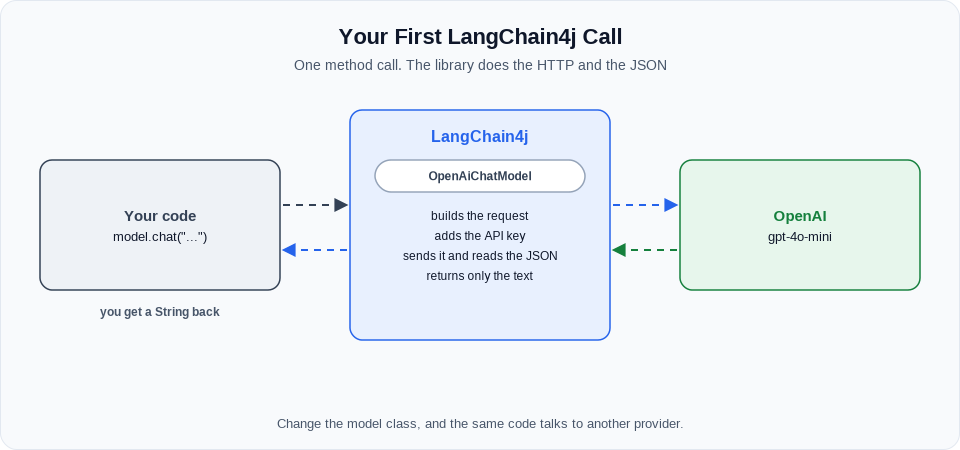
model.chat takes a String and returns a String. There is no response object to unpack and no stream chain.
The complete program
package com.telusko;

import dev.langchain4j.model.openai.OpenAiChatModel;

public class Main {
    public static void main(String[] args)
    {
        String apiKey = System.getenv("OPENAI_API_KEY");

        OpenAiChatModel model = OpenAiChatModel.builder()
                .apiKey(apiKey)
                .modelName("gpt-4o-mini")
                .build();

        String answer=model.chat("Tell me about Langchain4j in short ");
        System.out.println(answer);
    }
}
One import and a handful of statements.
Step 5: Run it
SLF4J(W): No SLF4J providers were found.
SLF4J(W): Defaulting to no-operation (NOP) logger implementation
SLF4J(W): See https://www.slf4j.org/codes.html#noProviders for further details.
Langchain4j is a Java framework designed for developing applications that utilize language models, particularly in the context of natural language processing (NLP). ...

Langchain4j aims to simplify the integration of language models into applications by providing tools for building chatbots, question-answering systems, and other ...

By focusing on modularity and ease of use, Langchain4j allows developers to quickly build, prototype, and deploy language model applications ...

Process finished with exit code 0
Three paragraphs about LangChain4j, written by the model.
The red SLF4J lines are not an error
LangChain4j writes its log messages through SLF4J, a common logging interface for Java. This small project contains no logging library, so SLF4J reports that it has nowhere to send them and carries on. The instructor says to ignore the lines, and you can. They appear in every plain Java program in this course. They disappear if you add a logging implementation, for example the slf4j-simple artifact, to pom.xml.
Checked for these docs
This program was compiled against LangChain4j 1.20.0 for these docs. With the model line changed to LangChain4j's Ollama model class and a local model, the same model.chat(...) call was run and returned text, which is the point of the next section.
Why the model class matters
In the lesson, the variable is declared with the concrete class:
OpenAiChatModel model = OpenAiChatModel.builder()...OpenAiChatModel implements an interface from LangChain4j's core, ChatModel. You can declare the variable with that interface:
ChatModel model = OpenAiChatModel.builder()...The difference is small here and important later. Code that only knows ChatModel does not care which provider is behind it. Every provider module has its own implementation: OpenAiChatModel, OllamaChatModel and many others. Changing the provider means changing the one line that builds the model. The line that calls model.chat(...) stays as it is.
You will see this pay off in Running LLMs Locally with Ollama, where the same program runs against a model on your own machine.
Mistakes and fixes
| What you see | Cause | Fix |
|---|---|---|
OpenAiChatModel cannot be resolved | The dependency was not added, or Maven was not reloaded | Check pom.xml and reload the Maven project |
An authentication error on the first chat call | The new project's run configuration has no OPENAI_API_KEY. The model object is created anyway, and the error appears only when a request is sent | Add the variable to the lc4j configuration |
| Three red SLF4J lines | No logging library in the project | Ignore them, or add slf4j-simple |
| An error that the model does not exist | The model id has been retired | Use a current low-cost model id |
Try It Yourself
- Create
first-lc4j, add the two dependencies and the run configuration, and run the program. - Change the prompt to a question of your own and run again.
- Run the same prompt three times. Is the answer worded the same each time?
- Change the declared type from
OpenAiChatModeltoChatModel, add the import and confirm that the program still works. - Remove the environment variable from the run configuration and read the exception.
- Compare this file with the SDK program from the previous lesson. Which lines disappeared, and where did their work go?
- Open the introduction page of the documentation and find the note that says LangChain4j is not a port of LangChain.
Official references
- LangChain4j: introduction
- LangChain4j: get started
- LangChain4j: chat and language models
- LangChain4j: OpenAI integration
Written By: Shramik Masti
How is this guide?
Last updated on
Using the OpenAI Java SDK
Replace the manual HTTP code with OpenAI's official Java SDK, create a client from the environment, send a request with ResponseCreateParams, and print only the answer text from the response.
ChatModel Configuration
Control a LangChain4j chat model with temperature and a limit on output tokens, and send a system message together with a user message to set how the model should behave.