
Calling an LLM from Core Java
Call the OpenAI Responses API from plain Java with java.net.http.HttpClient, no SDK and no framework, store the API key in an IntelliJ run configuration, and read the raw JSON that comes back.
The first program in this course uses no AI library at all. No SDK, no framework, no extra dependency. Only classes that come with the JDK.
That is on purpose. An LLM is a service behind an HTTP API. If you can send an HTTP request from Java, you can call an LLM. Once you have seen that with your own eyes, the libraries in the next lessons stop looking like magic. They are convenience on top of exactly this.
What we build
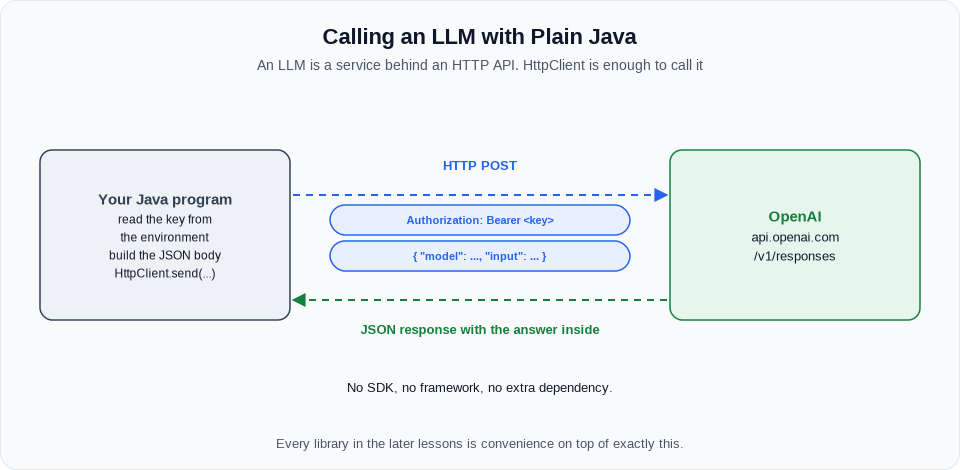
One class with a main method that:
- reads the API key from an environment variable
- builds a JSON request body
- sends it as an HTTP POST to OpenAI
- prints the JSON response
Step 1: Create a Maven project
In IntelliJ IDEA, choose New Project and fill in the dialog:
| Field | Value |
|---|---|
| Type | Java (not the Spring Boot generator) |
| Name | first-app-llm |
| Build system | Maven |
| JDK | 21 |
| Add sample code | Checked |
The lesson uses JDK 21. Any version from 17 upwards is fine for this course.
Open pom.xml and look at it. There is no <dependencies> section:
<?xml version="1.0" encoding="UTF-8"?>
<project xmlns="http://maven.apache.org/POM/4.0.0"
         xmlns:xsi="http://www.w3.org/2001/XMLSchema-instance"
         xsi:schemaLocation="http://maven.apache.org/POM/4.0.0 http://maven.apache.org/xsd/maven-4.0.0.xsd">
    <modelVersion>4.0.0</modelVersion>

    <groupId>com.telusko</groupId>
    <artifactId>first-app-llm</artifactId>
    <version>1.0-SNAPSHOT</version>

    <properties>
        <maven.compiler.source>21</maven.compiler.source>
        <maven.compiler.target>21</maven.compiler.target>
        <project.build.sourceEncoding>UTF-8</project.build.sourceEncoding>
    </properties>

</project>
Keep it that way for this lesson. Then open the generated Main.java and delete the sample code inside main, so that you start with an empty method.
Step 2: Store the API key in the run configuration
The program needs the key from the setup lesson. You could paste it into a String in the code. The instructor calls that "not realistic", and it is also the fastest way to leak a key.
The key goes into an environment variable instead. IntelliJ can set one for a program it runs:
- Open the run dropdown at the top right (it says Current File) and choose Edit Configurations.
- Add a new configuration of type Application.
- Name it
Mainand set the main class tocom.telusko.Main. - Open the Environment variables field and add one variable:
| Name | Value |
|---|---|
OPENAI_API_KEY | Your API key |
- Click OK, then Apply and OK.
The run dropdown now shows Main. Whenever you run that configuration, the program can read the variable:
String apiKey=System.getenv("OPENAI_API_KEY");The variable belongs to that one run configuration
A variable set this way exists only when the program is started through that configuration. If you run the class another way, for example with a different configuration or from a terminal, System.getenv returns null and the request is rejected. Every new project in this course needs its own run configuration with the key. The other option is to define OPENAI_API_KEY once in your operating system, so that every program can read it.
Step 3: Write the request body
The API expects JSON. A Java text block keeps it readable:
String requestBody= """
        {
            "model": "gpt-5.6-luna",
            "input": "Explain Java in one sentence"
        }
""";| Field | Meaning |
|---|---|
model | Which model should answer. The lesson uses a low-cost model |
input | The prompt |
Two fields are enough for a first request.
Step 4: Create the client and the request
HttpClient has been part of the JDK since Java 11. Nothing has to be added to the project.
//HTTP Client
HttpClient httpClient = HttpClient.newHttpClient();
//Request Body
HttpRequest request = HttpRequest.newBuilder()
        .uri(URI.create("https://api.openai.com/v1/responses"))
        .header("Authorization", "Bearer " + apiKey)
        .header("Content-Type", "application/json")
        .POST(HttpRequest.BodyPublishers.ofString(requestBody))
.build();| Line | What it does |
|---|---|
.uri(...) | The address of OpenAI's Responses API |
Authorization header | Proves who is calling. The word Bearer, a space, then the key |
Content-Type header | Tells the server that the body is JSON |
.POST(...) | Sends the JSON string as the body of a POST request |
This is the same kind of request you would send to any REST API. Nothing in it is special to AI.
Step 5: Send it and print the response
HttpResponse<String> response = httpClient.send(
        request, HttpResponse.BodyHandlers.ofString()
);
System.out.println(response.body());
send blocks until the server has answered. BodyHandlers.ofString() says that we want the response body as a String.
send can throw two checked exceptions, so the editor marks the line:
Unhandled exceptions: java.io.IOException, java.lang.InterruptedExceptionUse the quick fix Add exceptions to method signature. main then declares both.
The complete program
package com.telusko;

import java.io.IOException;
import java.net.URI;
import java.net.http.HttpClient;
import java.net.http.HttpRequest;
import java.net.http.HttpResponse;

public class Main {
    public static void main(String[] args) throws IOException, InterruptedException {
        String apiKey=System.getenv("OPENAI_API_KEY");

        String requestBody= """
                {
                    "model": "gpt-5.6-luna",
                    "input": "Explain Java in one sentence"
                }
                """;

        //HTTP Client
        HttpClient httpClient = HttpClient.newHttpClient();
        //Request Body
        HttpRequest request = HttpRequest.newBuilder()
                .uri(URI.create("https://api.openai.com/v1/responses"))
                .header("Authorization", "Bearer " + apiKey)
                .header("Content-Type", "application/json")
                .POST(HttpRequest.BodyPublishers.ofString(requestBody))
                .build();

        HttpResponse<String> response = httpClient.send(
                request, HttpResponse.BodyHandlers.ofString()
        );
        System.out.println(response.body());
    }
}
Look at the imports. Every one starts with java.. No external library is involved.
Step 6: Run it
Run the Main configuration. The console fills with a long JSON document. Parts of it, as seen in the lesson:
  "reasoning": {
    "context": "all_turns",
    "effort": "medium",
    "mode": "standard",
    "summary": null
  },
  ...
  "service_tier": "default",
  ...
  "temperature": 1.0,
Somewhere in the middle, inside an output section, is the sentence we asked for:
Java is a widely used, object-oriented programming language designed to be portable across platforms through its Java Virtual Machine...The response also contains a usage section. The instructor reads out a total of 40 tokens, input and output together. Tokens are what a request is billed by, with input and output priced separately, as explained in LLMs, Tokens and the Context Window.
It works. A Java program has called an LLM, with code that any Java developer can read.
Checked for these docs
This program was compiled and run for these docs. No OpenAI key was available, so it was pointed at a local Ollama server, which offers the same Responses API under http://localhost:11434/v1/responses, with a local model name in the body. The request was accepted with status 200 and the response was a JSON document of the same shape, including a separate reasoning part and the answer text.
What is not good about this
The program works, and the lesson is honest that this is not how you want to write an application.
| Problem | Why it hurts |
|---|---|
| The request is a hand-written JSON string | A missing comma or quote is found only when the server rejects the request |
| The response is one big string | To get the answer text you would have to parse the JSON and walk through its nested structure |
| Everything is specific to one provider | The URL, the headers and the JSON fields are all OpenAI's. Another provider means rewriting all of it |
| Nothing is reusable | A system message, a conversation or a tool call would each mean more JSON by hand |
Nobody builds real features this way. The value of this lesson is that you now know what every library underneath is doing: an HTTP POST with a key in a header and a prompt in the body.
The next two lessons remove the manual work in two steps. First the official OpenAI SDK, then LangChain4j.
Mistakes and fixes
These all happen on screen in the lesson, or follow directly from it.
| Problem | Cause | Fix |
|---|---|---|
| "Directory first-app is not empty in this location" in the project wizard | A folder with that name already exists | Choose another name. The lesson changes it to first-app-llm |
| "Cannot resolve symbol 'httpClient'" | The variable was used without declaring its type | Use the quick fix Create local variable, or write HttpClient httpClient = ... |
requestBody is red inside .POST(...) | The request was written before the variable existed | Declare requestBody above it |
| "Unhandled exceptions: java.io.IOException, java.lang.InterruptedException" | send throws checked exceptions | Add exceptions to method signature |
| The response is an error about authentication | The key is missing, wrong, expired or revoked | Check the environment variable in the run configuration, or create a new key |
| The response is an error about the model | The model id does not exist for your account any more | Use a current model id from the platform's models page |
When a request fails, the response body is still JSON. It contains an error object with a message that usually tells you exactly what is wrong. Read it before you change any code.
Try It Yourself
- Create the project and confirm that
pom.xmlhas no dependencies. - Add the run configuration with
OPENAI_API_KEYand run the complete program. - Find the answer sentence and the token usage in the printed JSON.
- Change the prompt and run again. Then change the model id to another one from the platform.
- Also print
response.statusCode(). What is it for a successful call? - Remove the environment variable from the run configuration, run again and read the error in the response.
- Break the JSON on purpose by deleting a comma. Read what the server answers.
- Think about how you would extract only the answer text from this JSON with plain Java. How many lines would it take?
Official references
- OpenAI: Responses API reference
- OpenAI: text generation
- Java: HttpClient API documentation
- IntelliJ IDEA: run/debug configurations
Written By: Shramik Masti
How is this guide?
Last updated on
Setup for Java AI Applications
Create an OpenAI API key on the API platform, give it a short expiry, add prepaid credit, and learn the habits that keep the key and your bill safe before you write any Java code.
Using the OpenAI Java SDK
Replace the manual HTTP code with OpenAI's official Java SDK, create a client from the environment, send a request with ResponseCreateParams, and print only the answer text from the response.