
Setup for Java AI Applications
Create an OpenAI API key on the API platform, give it a short expiry, add prepaid credit, and learn the habits that keep the key and your bill safe before you write any Java code.
The theory is done. To write code that talks to a model, you first need a model to talk to.
This course uses OpenAI as the provider. That is a closed model, so it works like any other paid API you may have integrated, a payment gateway for example. You get an API key, you put it into your application, and the provider accepts your calls because of that key.
You are not forced to pay
The instructor is clear about two things. He is not sponsored by any AI platform and chose OpenAI because he has worked with it. And you can follow the course without an API key by running a local model, which is shown in Running LLMs Locally with Ollama. A Gemini key or another provider also works, with small changes in the code. A hosted model is still recommended for learning, because it shows you how things behave in real applications.
What you need on your machine
The setup lesson itself only creates the key. The tools appear in the next lesson, so here is the whole list in one place:
| Tool | Used in the course | Notes |
|---|---|---|
| JDK | 21 | The projects set the Java version to 21 |
| IDE | IntelliJ IDEA | Any Java IDE works. The steps for run configurations are shown for IntelliJ |
| Build tool | Maven | Built into IntelliJ |
| An OpenAI account with some credit | From the next lesson | Created on this page |
| Node.js | Only for the filesystem MCP server | You can install it when you reach that lesson |
Step 1: Open the API platform, not ChatGPT
Search for "open ai api" and open the result named API Platform.
On the page that opens, the Log in button offers two choices:
| Choice | What it is |
|---|---|
| ChatGPT | The chat application. Not what we need |
| API Platform | The developer side, where API keys are created |
Choose API Platform, then sign up or log in. The lesson uses "Continue with Google". Email, Apple and Microsoft accounts work too.
You land on the platform's home page. Its "Get started" list names exactly the three things this page does: create an API key, test models, add credits.
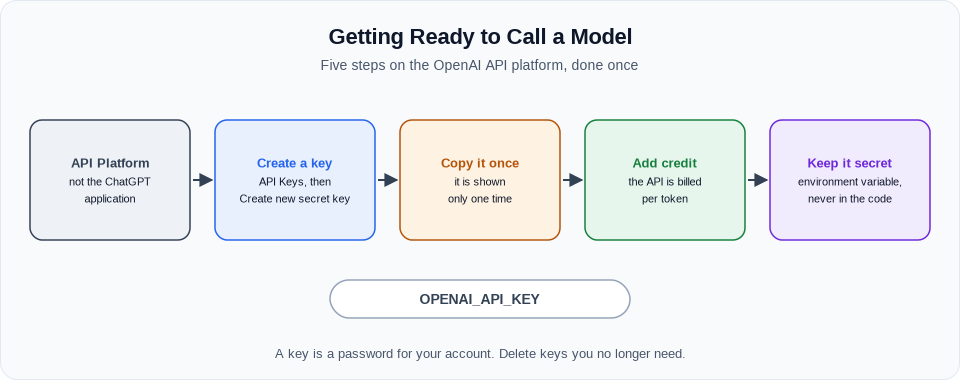
Step 2: Create an API key
Open API Keys in the left sidebar. A new account has none. Click Create new secret key and fill in the dialog:
| Field | Value in the lesson | Meaning |
|---|---|---|
| Owned by | You | The key belongs to your user |
| Name | ai-demo | Any name that tells you what the key is for |
| Project | Default project | The project the key can make requests for |
| Expiration | 1 day | The key stops working by itself after this time |
| Permissions | All | What the key is allowed to do |
Click Create secret key.
Why a one-day expiry?
The expiry is the most useful field in that dialog for a learner. A key that expires tomorrow cannot be misused next month. The price is small: when you sit down to practise again, you create a new key.
If you later see an error about the API key while practising, this is the first thing to check. The key has probably expired, and you need a new one.
Step 3: Copy the key before you close the dialog
A dialog named Save your key shows the key and a Copy button. Read what it says:
Please save your secret key in a safe place since you won't be able to view it again.
This is meant literally. After you click Done, the platform shows only a masked version. If you closed the dialog without copying, there is nothing to recover. You create another key.
Step 4: Delete keys you no longer need
Back in the list, each key has a delete action. Using it opens a Revoke secret key dialog, and after you confirm, the key's status changes from Active to Revoked.
The lesson creates a key, revokes it to show how, and then creates a second one for the actual practice.
A leaked key costs you money
If somebody else uses your key, the usage is billed to your account. Treat the key like a password. Do not put it in source code, do not commit it to Git, and do not show it in a screenshot or a screen recording. The lesson's advice is to delete the key every time you finish practising. A short expiry and a revoked key are both cheap. A key that is still active in a public repository is not.
Step 5: Add credit
API usage is paid, and it is separate from a ChatGPT subscription. The billing page says so: "API credits are separate from ChatGPT."
Open Billing. A new account shows a free trial and a credit of $0.00. Add your payment details and buy a small amount of credit.
| Point | What the lesson says |
|---|---|
| How much | A few dollars are enough for the whole course. The minimum purchase is usually around 5 dollars |
| Who gets the money | OpenAI. Not the instructor and not Telusko |
| Prepaid or postpaid | The lesson uses prepaid credit on purpose |
Prepaid is the safer choice while you learn. As long as automatic recharge is switched off, your spending cannot go beyond the credit you bought, even if a program runs in a loop or a key leaks.
Step 6: Keep the key ready for the next lesson
Create a fresh key with a one-day expiry and copy it. You will need it in a few minutes.
You will not paste it into Java code. In the next lesson it goes into an environment variable named OPENAI_API_KEY, and the program reads it from there.
Which models are available?
The platform's home page lists the models it currently recommends. At the time of recording these were:
| Model | How the platform describes it |
|---|---|
| GPT-6 Astra | The most capable model, built for the hardest end-to-end work |
| GPT-5.6 Terra | Balances intelligence and cost |
| GPT-5.6 Luna | Optimised for cost-sensitive workloads |
The course uses low-cost models, because we are learning and not solving hard problems: gpt-5.6-luna in the first two programs and gpt-4o-mini in the LangChain4j lessons.
Model names go out of date
This list is a snapshot of one day. Providers add models and retire old ones. If a model id from these pages is rejected, open the models page of the platform, pick a current low-cost model and use its id. Nothing else in the code has to change.
Checklist
- You can log in to the OpenAI API platform.
- Your account has some prepaid credit.
- You have an active API key, copied to a safe place.
- You know that the key will go into an environment variable and not into the code.
Try It Yourself
- Log in to the API platform and find the credit balance on the home page.
- Create a key with a one-day expiry, then revoke it and watch its status change.
- Create a second key and close the dialog without copying it. Try to see the full key again.
- Open the billing page and find where prepaid credit is added.
- Open the models page and write down the id and the token prices of the cheapest current model.
Official references
- OpenAI: developer quickstart
- OpenAI: models
- OpenAI: pricing
- OpenAI: best practices for API key safety
Written By: Shramik Masti
How is this guide?
Last updated on
Hallucinations
Understand why a language model sometimes gives confident answers that are wrong or made up, and the practical ways to reduce the risk with clear prompts, context, RAG, tool calling and verification.
Calling an LLM from Core Java
Call the OpenAI Responses API from plain Java with java.net.http.HttpClient, no SDK and no framework, store the API key in an IntelliJ run configuration, and read the raw JSON that comes back.