
Running LLMs Locally with Ollama
Install Ollama, pull and run an open-weight model on your own machine, and connect a LangChain4j application to it with OllamaChatModel, without an API key.
Every example so far used a closed model. The model ran in OpenAI's data centre, we reached it over the internet, and every call needed an API key and cost a little money.
In Open and Closed Models you saw the other kind: open-weight models, whose weights can be downloaded. Such a model can run on infrastructure that you control. Companies invest heavily in GPU servers for that. For learning, a normal laptop is enough for a small model.
The tool that makes this easy is Ollama.
What Ollama is, and what it is not
| Ollama is | Ollama is not |
|---|---|
| A program that downloads, manages and runs models on your machine | An AI model |
| A local server that your applications can call | An AI company such as OpenAI or Anthropic |
| Free to use for local models, with no API key | A service that receives your prompts, as long as the model runs locally |
Think of it as a facilitator. The model does the thinking, and Ollama loads it and serves it. It uses your own RAM, CPU and, if you have one, GPU.
| Closed model in the cloud | Open model with Ollama | |
|---|---|---|
| Where the model runs | On the provider's infrastructure | On your machine |
| API key | Required | Not needed |
| Cost of a call | Per token | Nothing per call. You pay with your own hardware and electricity |
| Where your prompt goes | To the provider | It stays on your machine |
| Quality and speed | The strongest models, fast | Depends on the model size and on your hardware |
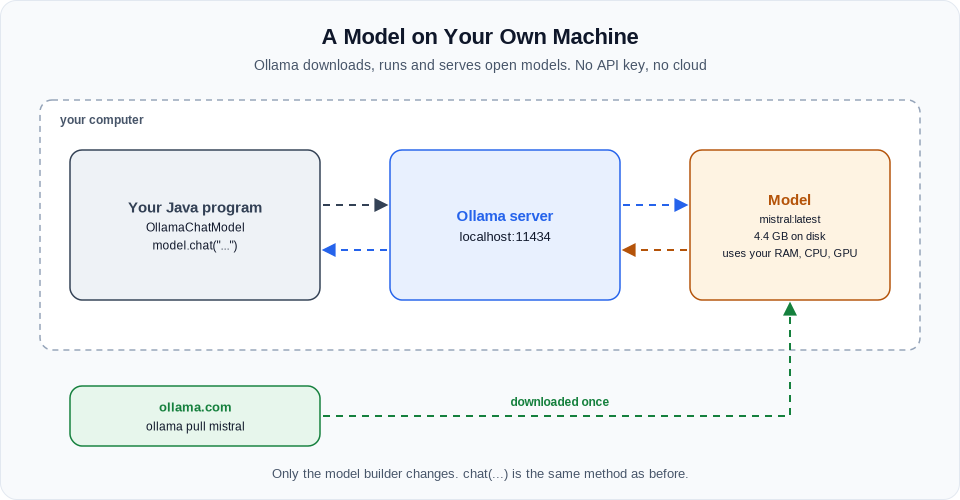
Step 1: Install Ollama
Search for "ollama download" or open ollama.com/download. Choose your operating system, download the installer and go through the usual setup steps.
Then open a terminal, for example PowerShell, and check:
PS C:\windows\system32> ollama --version
ollama version is 0.40.6
Your version number will be different. Any current version works.
Step 2: Download a model
ollama list shows the models that are already on your machine. On a fresh installation the list is empty. The instructor's list has several models from earlier work.
To download one, use pull with the model's name. The lesson uses Mistral:
PS C:\windows\system32> ollama pull mistral
pulling manifest
pulling f5074b1221da: 100% ... 4.4 GB
...
verifying sha256 digest
writing manifest
success
Mistral is a download of 4.4 GB, so the first pull takes a while. In the video it is finished at once, because the model was already there.
Choosing a model for your machine
A model has to fit into memory to run well. Mistral at 4.4 GB is comfortable on a machine with 16 GB of RAM. If your machine has less, choose a smaller model from the Ollama library, and use its name in every command and in the Java code of this lesson.
Step 3: Talk to the model in the terminal
PS C:\windows\system32> ollama run mistral:latest
>>> hi
 Hello there! How can I assist you today? Is there something specific you would like to know or talk about? I'm here to help with a wide
range of topics, so don't hesitate to ask.

>>> Send a message (/? for help)
This answer was generated on the laptop. Nothing was sent to a company, and no key was involved.
mistral:latest is the full name of the model: the name and a tag. ollama pull mistral without a tag pulls latest.
The Ollama commands of this lesson
| Command | What it does |
|---|---|
ollama --version | Shows the installed version |
ollama list | Lists the downloaded models |
ollama pull <model> | Downloads a model |
ollama run <model> | Loads a model and opens a chat in the terminal |
ollama stop <model> | Unloads a running model from memory |
ollama rm <model> | Deletes a model from disk |
Step 4: The Java project
The lesson opens a prepared project, lc4j-ollama-starter, with the package com.telusko and a single dependency:
<properties>
    <project.build.sourceEncoding>UTF-8</project.build.sourceEncoding>
    <langchain4j.version>1.18.1</langchain4j.version>
</properties>
<dependencies>
    <dependency>
        <groupId>dev.langchain4j</groupId>
        <artifactId>langchain4j-ollama</artifactId>
        <version>${langchain4j.version}</version>
    </dependency>
</dependencies>
langchain4j-ollama takes the place of langchain4j-open-ai. Each provider has its own module, and each module brings its own model class.
Step 5: Build an OllamaChatModel
package com.telusko;

import dev.langchain4j.model.ollama.OllamaChatModel;

public class Main {
    public static void main(String[] args)
    {
        OllamaChatModel model = OllamaChatModel.builder()
                .baseUrl("http://localhost:11434")
                .modelName("mistral:latest")
                .temperature(0.7)
                .build();

        String response= model.chat("Tell me about Java and AI");
        System.out.println("Response from Ollama Model: "+response);

    }
}
Compare the builder with the one for OpenAI:
| OpenAI | Ollama |
|---|---|
OpenAiChatModel.builder() | OllamaChatModel.builder() |
.apiKey(apiKey) | No key |
| The address is built in | .baseUrl("http://localhost:11434") |
.modelName("gpt-4o-mini") | .modelName("mistral:latest") |
.temperature(0.7) | .temperature(0.7) |
| Setting | Meaning |
|---|---|
baseUrl | Where the Ollama server listens. localhost because it runs on this machine. 11434 is Ollama's default port. If Ollama runs on another server in your network, put that address here |
modelName | A model that you have pulled, with the name that ollama list shows |
temperature | As before. More parameters are available on the builder |
After the builder, nothing is new. model.chat(...) is the same method as in the first LangChain4j program, because OllamaChatModel implements the same ChatModel interface as OpenAiChatModel.
Step 6: Run it
The answer takes a little longer than with OpenAI, because your own machine is doing the work. The end of the output in the lesson:
Here are some examples of AI applications that can be developed using Java:

1. Chatbots: Java can be used to develop chatbots for customer service or other applications. ...
2. Image recognition: Deep learning algorithms can be used for image recognition tasks, and libraries like Deeplearning4j can be ...
3. Natural language processing: Java can be used for natural language processing tasks, such as sentiment analysis, ...
4. Predictive analytics: Java can be used to develop predictive analytics applications, such as fraud detection systems or ...

Overall, while Java may not be the first choice for AI development, it does have libraries and frameworks ...
An answer about Java and AI, written by a model on the laptop.
Step 7: Stop the model
A loaded model occupies several gigabytes of memory. When you are done, leave the chat in the terminal with Ctrl+D, or by typing /bye, and unload the model:
PS C:\windows\system32> ollama stop mistral:latest
PS C:\windows\system32> ollama list
NAME                 ID              SIZE      MODIFIED
mistral:latest       6577803aa9a0    4.4 GB    4 minutes ago
...
stop removes the model from memory. It is still on disk, which is why ollama list still shows it, at the top of the instructor's longer list. To see which models are loaded at the moment, use ollama ps.
Everything else stays the same
This is the real lesson of the chapter. Because both model classes implement ChatModel, everything you built in this course works with a local model. You only change the builder.
| Feature | Works with OllamaChatModel? |
|---|---|
| AI Services, prompt templates | Yes |
| Chat memory | Yes |
| Response metadata | Yes. The lesson says so, and the previous page shows a run |
| Streaming | Yes, with OllamaStreamingChatModel |
| Structured output, tool calling, MCP | Yes, if the chosen model is good enough at it. Small models make more mistakes here |
Checked for these docs
Most "Checked for these docs" boxes in this course were produced exactly this way: the lesson's code, with the OpenAI builder replaced by OllamaChatModel.
For this lesson, the program above was run with langchain4j-ollama 1.18.1 against a local Ollama server with mistral:latest and a shortened prompt. It printed "Response from Ollama Model:" followed by an answer about Java and AI. No API key was set anywhere.
When the Ollama server was not running, the same program failed with a java.net.ConnectException.
Additions beyond the lesson
The first call is slow. Ollama loads the model into memory when the first request arrives. That can take longer than the default timeout of the client. If you get a timeout on the first call, add .timeout(Duration.ofMinutes(5)) to the builder. The runs for these docs needed that.
An OpenAI-compatible address. Ollama also answers at http://localhost:11434/v1 in the format of the OpenAI API. An application built with OpenAiChatModel can therefore be pointed at Ollama with .baseUrl(...) and any placeholder as key. The Spring Boot project of Building AI REST APIs was tested like that for these docs.
In Spring Boot. There is a starter for Ollama too, configured with properties such as langchain4j.ollama.chat-model.base-url and langchain4j.ollama.chat-model.model-name.
More on Ollama. The separate LangChain4j docs cover Ollama's own API and more commands: Running Local Models with Ollama and Using Ollama from Java.
Mistakes and fixes
| What you see | Cause | Fix |
|---|---|---|
java.net.ConnectException | The Ollama server is not running, or the port in baseUrl is wrong | Start Ollama and check http://localhost:11434 |
| An error that the model was not found | The name in modelName does not match a pulled model | Run ollama list and copy the exact name, or pull the model |
| A timeout on the first request | The model was still loading | Add a longer timeout to the builder and try again |
ollama is not recognised as a command | The terminal was open during the installation | Open a new terminal |
| Very slow answers | The model is too large for the machine and runs mostly on the CPU | Use a smaller model |
| An authentication error | The code still uses OpenAiChatModel | Switch to OllamaChatModel. It needs no key |
Try It Yourself
- Install Ollama, pull a model and chat with it in the terminal.
- Create the Java project and run the program from this lesson.
- Stop the Ollama server and run the program again. Read the exception.
- Change
modelNameto a model you have not pulled and read the error. - Take the
LearningAssistantfrom Prompt Templates and run it with the local model. - Print the token usage of a local call with the code from the previous lesson. Is there a response ID?
- Pull a second, smaller model and ask both the same question. Compare speed and quality.
- Run
ollama pswhile your program is waiting for an answer, and again afterollama stop.
Official references
Written By: Shramik Masti
How is this guide?
Last updated on
Response Metadata and Token Usage
Read more than the answer text from a model call, with ChatRequest and ChatResponse - the token usage, the finish reason, the model name and the response ID - and see how a token limit changes the finish reason.
AI Agents vs Agentic AI
The step from applications that answer to applications that act - chatbot, tool-using assistant, AI agent and agentic AI, with the definitions and the worked example from the lesson.