
Response Metadata and Token Usage
Read more than the answer text from a model call, with ChatRequest and ChatResponse - the token usage, the finish reason, the model name and the response ID - and see how a token limit changes the finish reason.
Until now we looked at one thing in every response: the text. A response from a model carries more than that.
- How many tokens did this call use? You pay for them.
- Did the model finish its answer, or was it cut off?
- Which model produced the answer?
This information is called the metadata of the response. LangChain4j gives it to you, as long as you ask for the response in the right form.
Why a String is not enough
model.chat(...) exists in several forms. The autocomplete in the lesson lists them. A fifth form, which takes a ChatRequest together with extra options, is left out of this table:
| Call | Returns | Contains |
|---|---|---|
chat(String userMessage) | String | Only the answer text |
chat(ChatMessage... messages) | ChatResponse | The answer and the metadata |
chat(List<ChatMessage> messages) | ChatResponse | The answer and the metadata |
chat(ChatRequest chatRequest) | ChatResponse | The answer and the metadata |
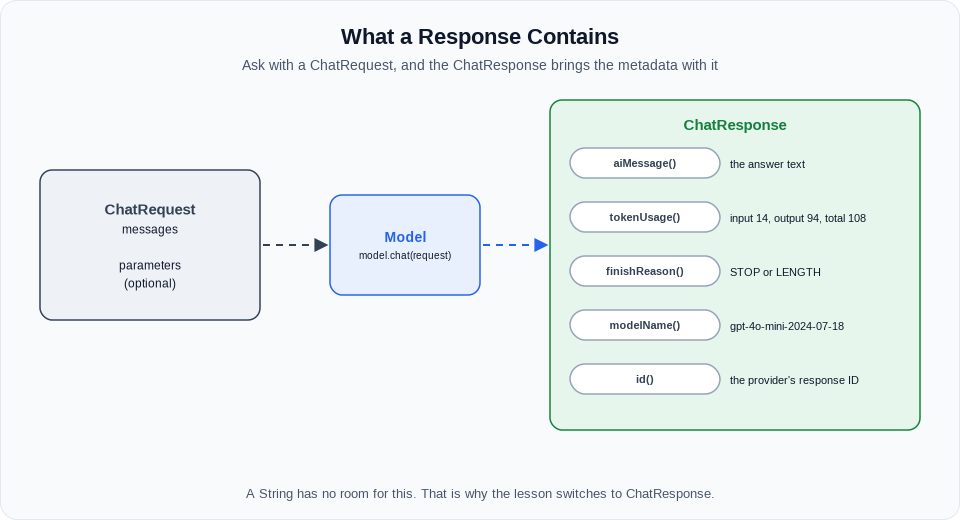
A String has no room for metadata. To get it, we need a ChatResponse. The lesson uses the last form, with a ChatRequest object, because a request object can also carry parameters. We will need that in Step 4.
The project
A prepared plain Java project, lc4j-response-metadata-starter-java21, with the package com.telusko.metadata. Main starts with a model and a user message:
OpenAiChatModel model = OpenAiChatModel.builder()
        .apiKey(System.getenv("OPENAI_API_KEY"))
        .modelName("gpt-4o-mini")
        .build();

UserMessage userMessage =
        UserMessage.from("Explain Java in 3 sentences.");
UserMessage.from(...) creates a message object, like UserMessage.userMessage(...) in ChatModel Configuration. It is the class from dev.langchain4j.data.message, not the annotation used in AI Services.
Step 1: Build a request and get a response
ChatRequest request = ChatRequest.builder()
        .messages(userMessage)
        .build();
ChatResponse response = model.chat(request);
System.out.println(response.aiMessage().text());| Object | What it is |
|---|---|
ChatRequest | Everything that goes to the model: the messages and, optionally, parameters |
ChatResponse | Everything that comes back: the AI message and the metadata |
response.aiMessage().text() | The answer text, the same text that the String form returns |
Java is a high-level, object-oriented programming language designed for portability and flexibility, allowing developers to write co...Step 2: Token usage
Integer tokenCount = response.tokenUsage().totalTokenCount();
System.out.println("Token Count: " + tokenCount);
Integer inputTokenCount = response.tokenUsage().inputTokenCount();
System.out.println("Input Token Count: " + inputTokenCount);
Integer outputTokenCount = response.tokenUsage().outputTokenCount();
System.out.println("Output Token Count: " + outputTokenCount);
Token Count: 108
Input Token Count: 14
Output Token Count: 94| Value | Meaning | Here |
|---|---|---|
| Input tokens | What you sent: the prompt, plus a few tokens of message formatting | 14 |
| Output tokens | What the model generated | 94 |
| Total | The sum of both | 108 |
The prompt "Explain Java in 3 sentences." is short, so the input is small. The answer of three sentences needs 94 tokens.
These numbers are your bill. Providers charge for input tokens and for output tokens, usually at different prices, as explained in LLMs, Tokens and the Context Window. An application that logs these three numbers for every call knows what it spends.
The lesson first names the variable tokenCost and then renames it to tokenCount. The correction is right. The value is a number of tokens. The cost follows from it only after multiplying with the provider's prices.
Step 3: The finish reason
System.out.println("Finish Reason: " + response.finishReason());Token Count: 105
Input Token Count: 14
Output Token Count: 91
Finish Reason: STOPThe finish reason says why the model stopped generating. STOP is the normal case: the model had said everything it wanted to say and ended the answer itself.
Notice the token numbers too. The same prompt now took 91 output tokens, not 94. The model wrote a slightly different answer in this run. The input stayed at 14, because the prompt did not change.
Step 4: Force a different finish reason
What if the model is not allowed to finish? Add a parameter to the request that limits the output to 10 tokens:
ChatRequest request = ChatRequest.builder()
        .messages(userMessage)
        .parameters(ChatRequestParameters.builder()
                .maxOutputTokens(10)
                .build())
        .build();
Three sentences do not fit into 10 tokens.
Java is a high-level, object-oriented programming language
Token Count: 24
Input Token Count: 14
Output Token Count: 10
Finish Reason: LENGTH| Before | With the limit | |
|---|---|---|
| Answer | Three sentences | Stops in the middle of the first sentence |
| Output tokens | 91 | Exactly 10 |
| Finish reason | STOP | LENGTH |
LENGTH means that the model stopped because it ran out of allowed tokens. As the lesson puts it, the model had much more to say and could not say it.
This is the value of the finish reason. In earlier lessons we saw answers that ended in the middle of a sentence, and we had to notice it by reading. With the finish reason, your code can detect it: if the reason is LENGTH, the answer is incomplete, and the application can react, for example by asking again with a higher limit or by warning the user.
Two places for a token limit
In ChatModel Configuration the limit was set on the model builder with maxCompletionTokens(...), and it applied to every call of that model. Here it is set on one request with ChatRequestParameters, and it applies only to that request. Parameters on a request are the way to change a setting for a single call.
Step 5: Model name and response ID
System.out.println("Model Name: " + response.modelName());
System.out.println("Response ID: " + response.id());
Model Name: gpt-4o-mini-2024-07-18
Response ID: chatcmpl-...We asked for gpt-4o-mini. The response reports gpt-4o-mini-2024-07-18. The short name is an alias, and the provider tells you which dated version actually answered. That is useful when you compare results over time, because the version behind an alias can change.
The response ID identifies this one call at the provider. It is the value to quote when you look for a request in the provider's logs or contact support.
The complete program
package com.telusko.metadata;

import dev.langchain4j.data.message.UserMessage;
import dev.langchain4j.model.chat.request.ChatRequest;
import dev.langchain4j.model.chat.request.ChatRequestParameters;
import dev.langchain4j.model.chat.response.ChatResponse;
import dev.langchain4j.model.openai.OpenAiChatModel;

public class Main
{

    public static void main(String[] args)
    {
        OpenAiChatModel model = OpenAiChatModel.builder()
                .apiKey(System.getenv("OPENAI_API_KEY"))
                .modelName("gpt-4o-mini")
                .build();

        UserMessage userMessage =
                UserMessage.from("Explain Java in 3 sentences.");
        ChatRequest request = ChatRequest.builder()
                .messages(userMessage)
                .parameters(ChatRequestParameters.builder()
                        .maxOutputTokens(10)
                        .build())
                .build();
        ChatResponse response = model.chat(request);
        System.out.println(response.aiMessage().text());
        Integer tokenCount = response.tokenUsage().totalTokenCount();
        System.out.println("Token Count: " + tokenCount);
        Integer inputTokenCount = response.tokenUsage().inputTokenCount();
        System.out.println("Input Token Count: " + inputTokenCount);
        Integer outputTokenCount = response.tokenUsage().outputTokenCount();
        System.out.println("Output Token Count: " + outputTokenCount);

        System.out.println("Finish Reason: " + response.finishReason());
        System.out.println("Model Name: " + response.modelName());
        System.out.println("Response ID: " + response.id());
    }
}
The import lines are not visible in the video. The ones above were confirmed by compiling the file.
What a ChatResponse contains
| Method | Returns | Meaning |
|---|---|---|
aiMessage() | AiMessage | The model's reply. text() gives the text. It can also contain tool requests |
tokenUsage() | TokenUsage | Input, output and total token counts |
finishReason() | FinishReason | Why generation stopped |
modelName() | String | The model that answered |
id() | String | The provider's ID of this response |
metadata() | ChatResponseMetadata | All of the above except the message, as one object |
The finish reason is an enum. The values you will meet most:
| Value | Meaning |
|---|---|
STOP | The model finished on its own |
LENGTH | A token limit was reached. The answer is incomplete |
TOOL_EXECUTION | The model stopped to request a tool. You saw the effect of this in Tool Calling |
CONTENT_FILTER | The provider's content filter stopped the answer |
Checked for these docs
The complete program was run for these docs with a local model, Mistral, through LangChain4j's Ollama model class. Only the model builder was changed.
- Without the limit: 112 tokens in total, 12 input and 100 output, finish reason
STOP. - With
maxOutputTokens(10): the answer stopped after "Java is a high-level, object-oriented". 22 tokens in total, 12 input and exactly 10 output, finish reasonLENGTH. - The model name was reported as
mistral:latest. - The response ID was
null. The local server does not send one, so not every provider fills every field.
The input count differs from the 14 in the video for the same prompt, because each model family has its own tokenizer.
Additions beyond the lesson
Metadata from an AI Service. The lesson uses the low-level model. An AI Service method that returns String hides the metadata again. Wrap the return type in Result and you get both:
interface Tutor {
    Result<String> explain(String topic);
}

Result<String> result = tutor.explain("Java");
System.out.println(result.content());
System.out.println(result.tokenUsage());
System.out.println(result.finishReason());
Result is in the package dev.langchain4j.service. This form was compiled and run for these docs, and returned the text together with its token usage and finish reason.
Token usage adds up. With tools or MCP, one question can cause several calls to the model. The token usage in a Result covers all of them. That is the number that matters for cost.
Check for null. As the local run showed, a field can be empty for some providers. Code that logs metadata should not assume that every value is present.
Mistakes and fixes
| What you see | Cause | Fix |
|---|---|---|
model.chat(...) gives a String, and there is no tokenUsage() | A string was passed | Pass a ChatRequest or message objects to get a ChatResponse |
.parameters is underlined: "Expected 1 argument but found 0" | The call was typed without its argument. This appears in the lesson while typing | Pass ChatRequestParameters.builder()...build() |
UserMessage.from cannot be resolved | The annotation dev.langchain4j.service.UserMessage was imported | Import dev.langchain4j.data.message.UserMessage |
The answer is cut short and the finish reason is LENGTH | A token limit is too small for the answer | Raise the limit, or ask for a shorter answer |
| The token numbers change from run to run | The model words its answer differently each time | Nothing to fix. Only the input count is stable for the same prompt |
Response ID: null | The provider did not send an ID | Handle missing values |
Try It Yourself
- Run the program without the
parametersblock and note the three token counts. - Run it three more times. Which numbers change, and which stay the same?
- Add
maxOutputTokens(10)and compare the answer and the finish reason. - Find by trial the smallest limit at which the finish reason becomes
STOPagain. - Make the prompt longer, for example by adding a paragraph of text to explain. How does the input count react?
- Print
response.metadata()in one line and compare it with the single values. - Write an
ifstatement that prints a warning when the finish reason isFinishReason.LENGTH. - Create an AI Service with a
Result<String>method and print its token usage.
Official references
- LangChain4j: chat and language models
- LangChain4j: model parameters
- LangChain4j: AI Services, return types
- OpenAI: pricing
Written By: Shramik Masti
How is this guide?
Last updated on
Building Your Own MCP Server
Write an MCP server in plain Java with the official MCP Java SDK, register three course tools by hand, package it as a jar, and connect the LangChain4j application from the previous lesson to it.
Running LLMs Locally with Ollama
Install Ollama, pull and run an open-weight model on your own machine, and connect a LangChain4j application to it with OllamaChatModel, without an API key.