
ChatModel Configuration
Control a LangChain4j chat model with temperature and a limit on output tokens, and send a system message together with a user message to set how the model should behave.
The first LangChain4j program set two things on the model: the API key and the model name. The builder accepts much more.
This lesson uses three settings that you will need in almost every application:
- temperature, which decides how varied the answers are
- a limit on output tokens, which caps the length and the cost of an answer
- a system message, which tells the model how to behave
We continue in the same project, first-lc4j, and the same Main.java.
Temperature
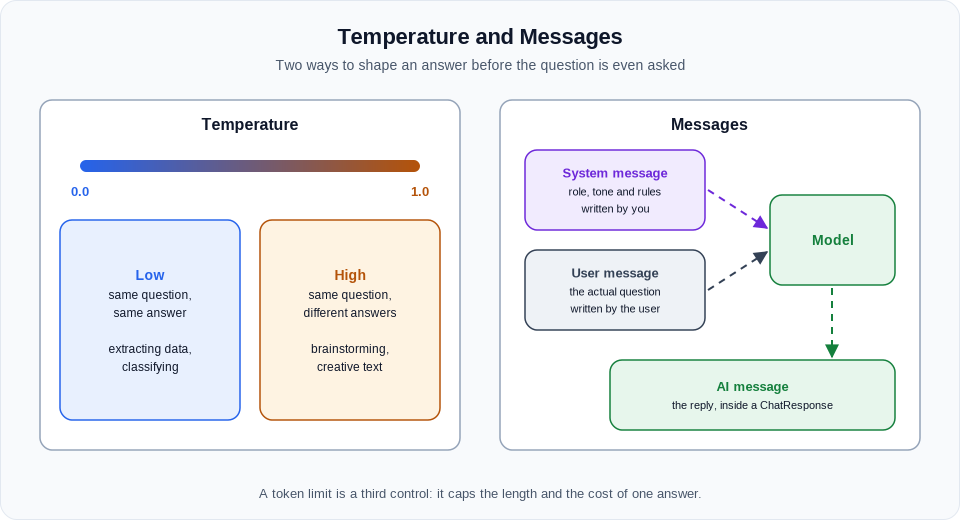
Temperature controls the randomness of the output. People also call it the creativity of the model.
| Temperature | Behaviour |
|---|---|
0.0 | The least random. The same question tends to get the same answer |
Around 0.4 to 0.7 | Some variation. A common middle ground |
1.0 and above | More random. The same question gets noticeably different answers |
It is one more call on the builder:
OpenAiChatModel model = OpenAiChatModel.builder()
        .apiKey(apiKey)
        .modelName("gpt-4o-mini")
        .temperature(1.0)
        .build();

String answer=model.chat("Suggest me course name for Java  ");
System.out.println(answer);
Experiment 1: temperature 1.0
A prompt that asks for ideas is a good test, because there is no single correct answer. The first run prints a long numbered list, including:
1. **Java Mastery: From Beginner to Pro**
2. **Java Jumpstart: Ignite Your Coding Career**
3. **Core Java Fundamentals: Build Strong Foundations**
4. **Java Programming Essentials: Code Your Future**
5. **Advanced Java Techniques: Elevate Your Skills**
6. **Java for Web Development: Create Dynamic Applications**
A list is hard to compare between runs, so the prompt is made stricter:
String answer=model.chat("Suggest me course name for Java in one sentence and one option ");"Java Mastery: From Beginner to Advanced Application Development."Run it several times with temperature 1.0 and the name changes from run to run.
Experiment 2: temperature 0.0
Change one value:
.temperature(0.0)"Mastering Java: From Fundamentals to Advanced Applications"Run it again and again, and you keep getting this same name. With the randomness turned down, the model picks the most likely tokens every time.
Which value should you use?
| Task | Sensible temperature |
|---|---|
| Extracting data, classifying, answering from given facts | Low. You want the same input to give the same output |
| Explaining, summarising | Low to medium |
| Brainstorming names, writing marketing text, stories | Higher |
Low temperature does not mean correct
Temperature changes how the next token is chosen among the likely ones. It makes answers more repeatable. It does not make them true. A model can repeat the same wrong answer very consistently at 0.0. Also, 0.0 makes identical output very likely, not guaranteed, and some newer reasoning models do not let you change the temperature at all.
A limit on output tokens
The builder offers many more options. The autocomplete list in the lesson shows timeout, topP, stop, maxRetries, logRequests, logResponses, presencePenalty, frequencyPenalty, maxCompletionTokens, baseUrl and others.
The lesson picks one of them:
OpenAiChatModel model = OpenAiChatModel.builder()
        .apiKey(apiKey)
        .modelName("gpt-4o-mini")
        .temperature(0.0)
        .maxCompletionTokens(300)
        .build();
maxCompletionTokens is the largest number of tokens the model may generate for one answer. It should not go beyond that.
It is useful for two reasons. Output tokens cost money, so the limit is a ceiling on the cost of a single request. And it protects you from an answer that runs on for pages.
The limit cuts, it does not summarise
The model does not plan its answer to fit the limit. When the limit is reached, the answer simply stops, in the middle of a sentence if necessary. You will see exactly that in the last run of this lesson. If you want a short answer, ask for a short answer in the prompt, and use the token limit as a safety net.
The system message
So far the model has received one thing from us: the question. There is a second kind of message.
| Message | Who writes it | Purpose |
|---|---|---|
| System message, also called system prompt | You, the developer | Sets the role, tone and rules of the application |
| User message | The user | The actual question |
A system message is how you turn a general model into your assistant. The user never sees it and does not have to repeat it.
Step 1: Create the two messages
SystemMessage systemMessage = SystemMessage.systemMessage(
        "You are an experienced Java instructor. " +
                "Explain concepts in simple words with examples in short."
);

UserMessage userMessage = UserMessage.userMessage("Explain dependency injection");
Both classes come from the package dev.langchain4j.data.message. When IntelliJ offers several classes named SystemMessage, choose that one. The other one, in dev.langchain4j.service, is an annotation that you will use in the next lesson.
Step 2: Send both
model.chat exists in several forms. The autocomplete in the lesson shows them:
| Method | Returns |
|---|---|
chat(String userMessage) | String |
chat(ChatMessage... messages) | ChatResponse |
chat(ChatRequest chatRequest) | ChatResponse |
The first is the one we have used. The second accepts any number of messages, so we can pass the system message and the user message together:
ChatResponse chatResponse = model.chat(systemMessage, userMessage);
String answer=chatResponse.aiMessage().text();
System.out.println(answer);
With messages going in, a ChatResponse comes out and not a plain string. The model's reply is inside it as an AI message, and .aiMessage().text() gives its text. The response object holds more than the text, which is the topic of Response Metadata and Token Usage.
The complete program
package com.telusko;

import dev.langchain4j.data.message.SystemMessage;
import dev.langchain4j.data.message.UserMessage;
import dev.langchain4j.model.chat.response.ChatResponse;
import dev.langchain4j.model.openai.OpenAiChatModel;

public class Main {
    public static void main(String[] args)
    {
        String apiKey = System.getenv("OPENAI_API_KEY");

        SystemMessage systemMessage = SystemMessage.systemMessage(
                "You are an experienced Java instructor. " +
                        "Explain concepts in simple words with examples in short."
        );

        UserMessage userMessage = UserMessage.userMessage("Explain dependency injection");

        OpenAiChatModel model = OpenAiChatModel.builder()
                .apiKey(apiKey)
                .modelName("gpt-4o-mini")
                .temperature(0.4)
                .maxCompletionTokens(400)
                .build();

      //  String answer=model.chat("Suggest me course name for Java in one sentence and one option ");
        ChatResponse chatResponse = model.chat(systemMessage, userMessage);
        String answer=chatResponse.aiMessage().text();
        System.out.println(answer);
    }
}
The final values are a temperature of 0.4, a little creativity, and a limit of 400 tokens.
Run it
The user message only says "Explain dependency injection". The answer nevertheless reads like a lesson from a Java instructor:
Dependency Injection (DI) is a design pattern used in software development to make your code more modular and easier to test. ...

### Key Concepts:

1. **Dependency**: A class that another class needs to function. For example, if you have a `Car` class that needs an `Engine` class ...

2. **Injection**: This is the process of providing the dependencies to a class. Instead of the `Car` creating an `Engine`, you provide the ...
Then comes a code example with constructor injection, and the output ends like this:
// Main class to demonstrate Dependency Injection
public class Main {
    public static void main(String[] args) {
        Engine myEngine = new V6Engine(); // Create an Engine
        Car myCar = new Car(myEngine);     // Inject the Engine into Car
Two things to notice.
The system message worked. Simple words, an example, the tone of a teacher. None of that was in the question.
The answer is cut off. The example's main method is never closed. The answer stops in the middle of the code, at the 400-token limit. The video does not comment on it, but it is the token limit doing what the warning above describes. The instruction said "in short", and the model still wrote more than 400 tokens.
Mistakes and fixes
| What you see | Cause | Fix |
|---|---|---|
systemMessage cannot be resolved on SystemMessage | The annotation dev.langchain4j.service.SystemMessage was imported, and it has no such method | Import dev.langchain4j.data.message.SystemMessage |
answer is red in System.out.println(answer) | The old String answer=model.chat(...) line was commented out before the new one was written. This happens in the lesson | Declare answer from chatResponse.aiMessage().text() |
| An answer that stops in the middle | The output token limit was reached | Raise the limit, or ask for a shorter answer |
| The same answer every time although you want variety | Temperature is at or near 0.0 | Raise it |
| An error that a parameter is not supported | The model you chose does not accept that setting | Remove the setting or use another model |
Try It Yourself
- Run the course-name prompt five times at temperature
1.0and five times at0.0. Write down the answers. - Try
0.5. How often does the answer change? - Set
maxCompletionTokens(20)and ask for an explanation of dependency injection. Where does the answer stop? - Change the system message to "You are a strict code reviewer. Answer in one sentence." and ask the same question.
- Put an instruction in the user message that contradicts the system message. Which one does the model follow?
- Remove the system message and compare the tone of the answer.
- Add
.logRequests(true)and.logResponses(true)to the builder and add theslf4j-simpledependency. Look at the JSON that LangChain4j sends for you. It is the request you wrote by hand in the core Java lesson.
Official references
- LangChain4j: chat and language models
- LangChain4j: model parameters
- LangChain4j: OpenAI integration
- LangChain4j: logging
Written By: Shramik Masti
How is this guide?
Last updated on
Your First LangChain4j Application
See what LangChain4j is, add its Maven dependencies to a new project, create an OpenAiChatModel with a builder, and get an answer from a model with a few lines of Java.
AI Services
Describe what you want from a model as a plain Java interface, add the system and user messages as annotations, and let LangChain4j's AiServices create the implementation at run time.