
Tool Calling
Let a model use your own Java methods to answer questions, by marking them with @Tool and registering them on an AI Service, and understand who really executes a tool.
Imagine you run a training company and add an AI assistant to your website. A student asks:
What is the price and duration of the Java course?
The model behind the assistant, whether it comes from OpenAI, Anthropic or Google, has never seen your price list. It does not know your course durations. It can only do one of two things: say that it does not know, or invent something that sounds plausible. You met the second one in Hallucinations.
Your application, on the other hand, knows the answer. Somewhere in it there is a method that returns the price of a course.
Tool calling, also named function calling, connects the two. The model can ask your application to run one of its methods, and then use the result to write the answer.
What a tool is
A tool is a normal Java method with one difference in purpose: it is not written for you to call. It is written so that the model can ask for it.
The official LangChain4j documentation, which the lesson opens at this point, describes the mechanism in one important sentence:
LLMs cannot actually call the tool themselves; instead, they express the intent to call a specific tool in their response (instead of responding in plain text). We, as developers, should then execute this tool with the provided arguments and report back the results of the tool execution.
Keep that in mind for the whole lesson. The model only requests. Your Java application executes.
The flow
The lesson draws the flow as five boxes:
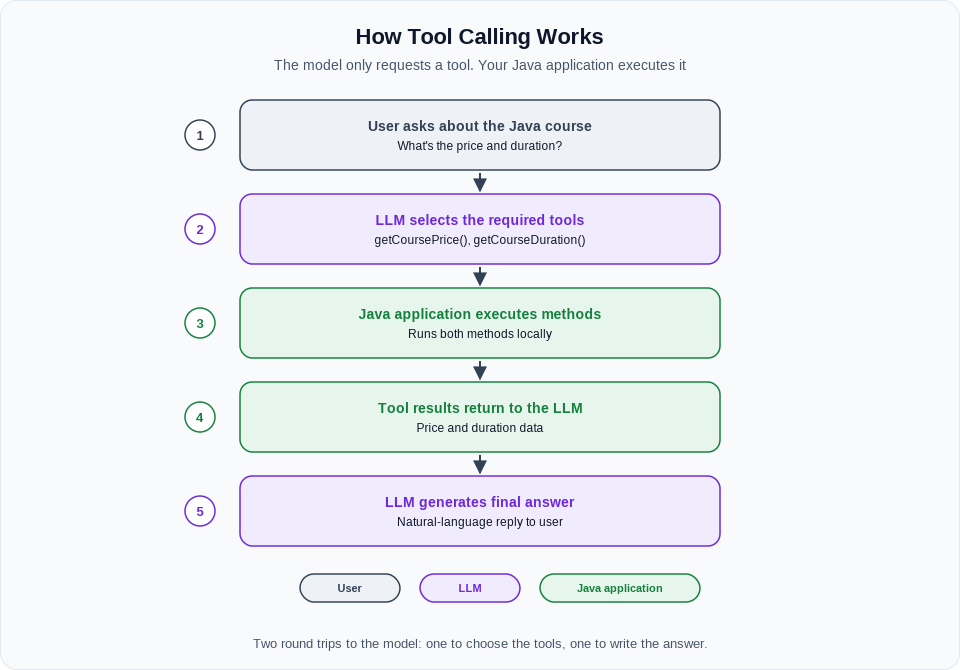
| Step | Who | What happens |
|---|---|---|
| 1 | User | Asks about the Java course: "What's the price and duration?" |
| 2 | LLM | Selects the required tools: getCoursePrice() and getCourseDuration() |
| 3 | Java application | Executes the methods. Both run locally, in your JVM |
| 4 | Java application | Sends the tool results, the price and the duration, back to the LLM |
| 5 | LLM | Generates the final answer, a natural-language reply to the user |
There are two round trips to the model. In the first, the model answers with a request for tools. In the second, it receives the results and writes the text. With an AI Service, LangChain4j runs this whole loop for you.
The project
The lesson continues in the plain Java project of the previous lesson, now with the package com.telusko.toolcalling. It starts with one class, CourseToolDemo, which reads the API key and builds the model as before.
Step 1: Write the tools
Create a package tools and a class CourseTools:
package com.telusko.toolcalling.tools;

import dev.langchain4j.agent.tool.Tool;

public class CourseTools {

    @Tool("Get the price of a training course")
    public String getCoursePrice(String courseName) {

        System.out.println("Tool called: getCoursePrice");

        if (courseName.equalsIgnoreCase("Java")) {
            return "3000 INR";
        }

        if (courseName.equalsIgnoreCase("Python")) {
            return "2500 INR";
        }

        return "Course price not available";
    }

    @Tool("Get the duration of a training course")
    public String getCourseDuration(String courseName) {

        System.out.println("Tool called: getCourseDuration");

        if (courseName.equalsIgnoreCase("Java")) {
            return "3 months";
        }

        if (courseName.equalsIgnoreCase("Python")) {
            return "2 months";
        }

        return "Course duration not available";
    }
}
These are two ordinary methods with hard-coded data. In a real application they would query a database or call another service.
| Part | Why it matters |
|---|---|
@Tool("...") | Turns the method into a tool. Without the annotation the model never hears about the method |
| The description | Sent to the model. The model reads it to decide whether this tool helps with the current question |
The method name and the parameter courseName | Also sent to the model. The model fills in the argument, for example "Java" |
The println line | Only for us. It proves in the console that the method really ran |
| The return value | Sent back to the model as the result of the tool |
The end of the second method
The video shows getCourseDuration only up to its Java branch. The Python branch and the last return line above are completed for these docs in the same pattern as getCoursePrice. The value "2 months" matches the answer in the lesson's second run.
Step 2: Write the AI Service
package com.telusko.toolcalling;

import dev.langchain4j.service.SystemMessage;
import dev.langchain4j.service.UserMessage;

public interface CourseAssistant {

    @SystemMessage("""
            You are a helpful course assistant.
            Use available tools to answer course
            price and duration questions.
            Do not invent course details.
            """)
    @UserMessage("{{it}}")
    String chat(String message);
}
The interface does not mention the tools at all. The system message does two useful things: it tells the model to use the tools for prices and durations, and it forbids invented details.
Step 3: Register the tools on the AI Service
package com.telusko.toolcalling;

import com.telusko.toolcalling.tools.CourseTools;
import dev.langchain4j.model.openai.OpenAiChatModel;
import dev.langchain4j.service.AiServices;

public class CourseToolDemo {

    public static void main(String[] args) {
        // Step 1: Read API key from environment (never hardcode secrets).
        String apiKey = System.getenv("OPENAI_API_KEY");

        // Step 2: Configure the model.
        OpenAiChatModel model = OpenAiChatModel.builder()
                .apiKey(apiKey)
                .modelName("gpt-4o-mini")
                .build();

        CourseTools tools=new CourseTools();

        CourseAssistant courseAssistant = AiServices.builder(CourseAssistant.class)
                .chatModel(model)
                .tools(tools)
                .build();

        String response = courseAssistant.chat(
                "What is the price and duration of the Java course?"
        );

        System.out.println("\nAI Response:");
        System.out.println(response);
    }
}
The top of this file, with the imports and the line that reads the API key, is not visible in this lesson. It is the same as in the previous lesson's project. The one new line is .tools(tools). You pass an object, and LangChain4j finds every method in it that carries @Tool. For each one it builds a description from the annotation text, the method name and the parameters, and sends these descriptions to the model with every request.
The lesson first tries the short form AiServices.create(CourseAssistant.class) and gets a red underline. The short form accepts an interface and a model, and nothing else. Tools, like chat memory, need the builder. The other builder options from earlier lessons can be combined with it, for example .chatMemory(...).
Step 4: Run it
Tool called: getCourseDuration
Tool called: getCoursePrice

AI Response:
The Java course has a duration of 3 months and costs 3000 INR.
Read this output from the top.
The two Tool called lines come from the println statements inside our methods. Nobody in main called those methods. The model asked for them, and LangChain4j executed them.
The last line is the model's final answer. The numbers in it, 3 months and 3000 INR, are exactly our hard-coded values. The sentence around them is the model's. The data is decided by us, and the wording by the model.
Step 5: Ask about another course
Change one word in the question:
String response = courseAssistant.chat(
        "What is the price and duration of the Python course?"
);
Tool called: getCoursePrice
Tool called: getCourseDuration
AI Response:
The price of the Python course is 2500 INR, and its duration is 2 months.Both tools ran again, this time with "Python" as the argument that the model chose.
Notice that the two Tool called lines are in the opposite order compared with the first run. That is normal. The model decides which tools to request, and you should not build logic that depends on the order.
Checked for these docs
The three files were compiled against LangChain4j 1.18.1 and run for these docs with a local model in place of OpenAI. The println lines were extended to show the argument as well.
- For the Java question the model requested
getCoursePriceandgetCourseDuration, both with the argumentJava, and answered with 3000 INR and 3 months. - For the Python question it requested both tools with
Pythonand answered with 2500 INR and 2 months. - For "What is the price of the DevOps course?" it requested
getCoursePricewithDevOps, received "Course price not available", and told the user that the price is unavailable. It did not invent a number. - For "What is polymorphism in one sentence?" no tool was called. The model answered directly.
What the model actually receives
The model never sees your Java code. For each tool it receives three things:
| Sent to the model | From |
|---|---|
| A name | The method name, getCoursePrice |
| A description | The text in @Tool |
| The parameters, with names and types | The method signature: one string named courseName |
From these alone it decides whether to request a tool, and with which arguments. That is why names and descriptions deserve care. A tool named process with the description "does stuff" will rarely be used correctly.
Additions beyond the lesson
Describing parameters. A parameter can get its own description with the @P annotation, for example @P("Name of the course, such as Java or Python") String courseName. The lesson does not need it, because the name courseName is clear enough.
Parameter names need a compiler flag in some builds. LangChain4j reads the parameter name courseName from the compiled class. That works when the code is compiled with the -parameters option of javac, which Spring Boot projects switch on by default. Without it, the model sees names such as arg0. If your tools receive strange arguments, add -parameters to the compiler configuration or name the parameter with @P.
Not every model supports tools. The documentation page shown in the lesson says so directly, and adds that models differ in how well they select and use tools. If a model ignores your tools, check first whether it supports tool calling at all.
A tool is a door into your system. The arguments of a tool are written by a model, and the model was influenced by whatever the user typed. Treat them like any other outside input. Validate them. A tool that only reads prices is harmless. A tool that deletes records, sends e-mail or moves money should check permissions in Java code and should not rely on the system message for safety.
More detail. The separate LangChain4j docs follow one tool call through all of its messages: Tools and AI Agents. The next lesson of this course shows how tools written by someone else can be used through MCP.
Mistakes and fixes
| What you see | Cause | Fix |
|---|---|---|
AiServices.create(CourseAssistant.class) is underlined in red | The short form needs a model as second argument and cannot take tools. This happens in the lesson | Use AiServices.builder(...) with .chatModel(model) and .tools(tools) |
No Tool called line, and the model says it has no information | The tools were not registered, or the method has no @Tool | Add .tools(tools) and the annotation |
An exception that the object has no methods annotated with @Tool | An object without tool methods was passed to .tools(...) | Pass the object whose methods carry @Tool |
| The model invents a price | The model did not use the tool. More likely with weak models or vague descriptions | Improve the descriptions, keep "Do not invent" in the system message, use a model with good tool support |
| The tool receives an unexpected argument | The parameter name or its description is unclear to the model | Use a clear name, or add @P |
| An error that the model does not support tools | The chosen model has no tool calling | Choose another model |
Try It Yourself
- Create the three files and ask for the price and duration of the Java course.
- Ask only for the price. Which tool is called?
- Ask "What is polymorphism?". Is any tool called?
- Ask about a course that is not in the code, for example DevOps. What does the model answer?
- Print the argument inside each tool method, and ask "How much is the JAVA course?". What arrives in
courseName? - Remove the
@Toolannotation fromgetCoursePriceand run the first question again. - Add a third tool
listCourses()without parameters and ask "Which courses do you offer?". - Add chat memory to the builder, ask about the Java course, and then ask "And how long does it take?".
Official references
- LangChain4j: tools (function calling)
- LangChain4j: AI Services, tools section
- OpenAI: function calling
Written By: Shramik Masti
How is this guide?
Last updated on
Chat Memory
Make an AI Service remember the conversation with MessageWindowChatMemory, and give every user a separate memory with @MemoryId and a ChatMemoryProvider.
MCP Explained
What the Model Context Protocol is, why it exists when tool calling already works, and how host, client and server fit together, before any code is written.