
MCP Explained
What the Model Context Protocol is, why it exists when tool calling already works, and how host, client and server fit together, before any code is written.
In Tool Calling we wrote two Java methods, marked them with @Tool, and the model could use them. That works well for business logic that only your application has, such as your own course prices.
Now think bigger. Your AI application should work with GitHub, with a database, and with files on disk.
Option 1 is to write all of it yourself. Methods for reading a file, creating a file, listing a folder. Methods for repositories, issues and pull requests. Methods for database queries. Each one annotated as a tool. How many methods will you write, and how many integrations will you maintain?
Option 2 is to use tools that somebody else has already written. That is where MCP comes in.
What MCP is
MCP stands for Model Context Protocol. The lesson's slide defines it like this:
An open standard that lets AI applications connect to external tools, data, and services in one consistent way.
Three properties are listed under the definition:
| Property | Meaning |
|---|---|
| Open standard | The protocol is published. Anyone can implement it |
| Tools and data access | It gives a model access to tools and data outside your application |
| Works across AI apps | A server written once can be used by many different AI applications |
And one comparison that is easy to remember:
Think of it like USB-C for AI: one standard plug, many tools
Before USB-C, every device had its own connector. With one standard plug, any device fits any charger. MCP does the same for tools. A tool provider writes its tools once, behind the standard plug. Every AI application that speaks MCP can use them, whether it is written in Java, Python or JavaScript.
From tools to MCP servers
The idea behind MCP is not new to you. It is tool calling with the tools moved out of your application.
| Tool calling | MCP | |
|---|---|---|
| Where the tools live | In your application, as @Tool methods | In a separate program, the MCP server |
| Who wrote them | You | Often someone else. It can also be you |
| Language of the tools | The language of your application | Any language. The protocol hides it |
| Who can use them | Only your application | Any application that speaks MCP |
An MCP server is a program that offers a set of tools through the protocol. There are MCP servers for the file system, for GitHub, for databases and for many other systems. Inside each of them there are, in the end, functions with some logic, exactly like our getCoursePrice.
One rule from the previous lesson stays true. The model never executes anything. It only requests a tool. With MCP, the request is passed on to the server, the server runs the function and returns the result, and the result goes back to the model, which writes the final answer.
The architecture
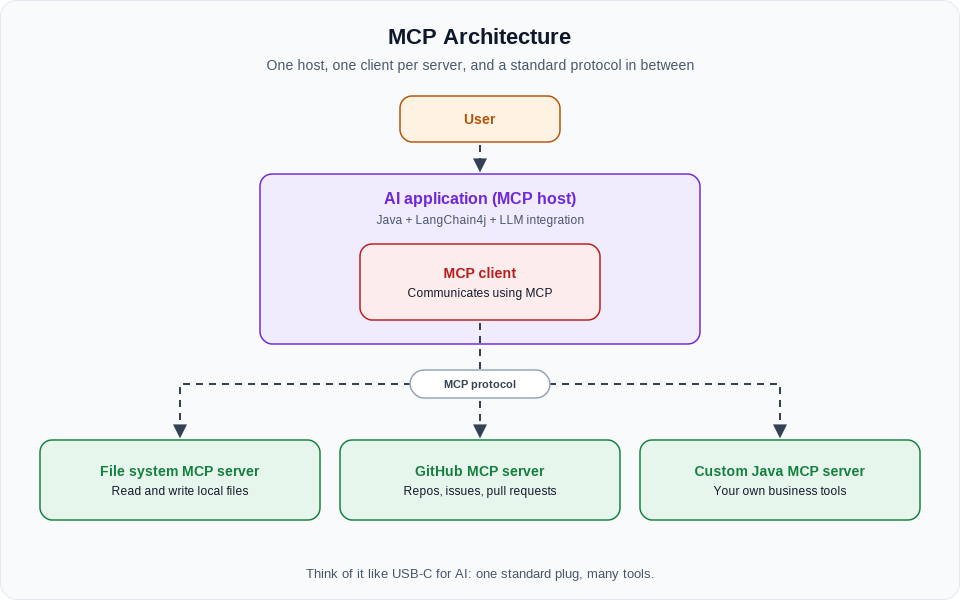
The slide shows four kinds of boxes:
| Part | In the slide | Role |
|---|---|---|
| User | "User" | Asks a question in normal language |
| MCP host | "AI application (MCP host)", Java + LangChain4j + LLM integration | Your application. It talks to the model and decides to use MCP |
| MCP client | "MCP client", communicates using MCP | A component inside the host. It holds the connection to one server |
| MCP servers | File system MCP server, GitHub MCP server, Custom Java MCP server | Programs that offer tools: read and write local files, work with repos, issues and pull requests, or run your own business tools |
You do not write the MCP client by hand. Frameworks such as LangChain4j and Spring AI, and the Python frameworks too, provide it. You configure it and tell it which server to connect to.
A request, step by step
| Step | What happens |
|---|---|
| 1 | At start-up, the MCP client connects to the server and asks which tools it offers |
| 2 | The user asks a question |
| 3 | The host sends the question to the model, together with the descriptions of those tools |
| 4 | The model answers with a request for one of the tools |
| 5 | The host passes the request to the MCP client, which sends it to the server |
| 6 | The server executes the tool and returns the result |
| 7 | The host gives the result to the model |
| 8 | The model writes the final answer for the user |
Compare this with the five boxes of the tool calling lesson. Only steps 1, 5 and 6 are different: the tools are discovered from a server, and executed by a server.
One client for each server
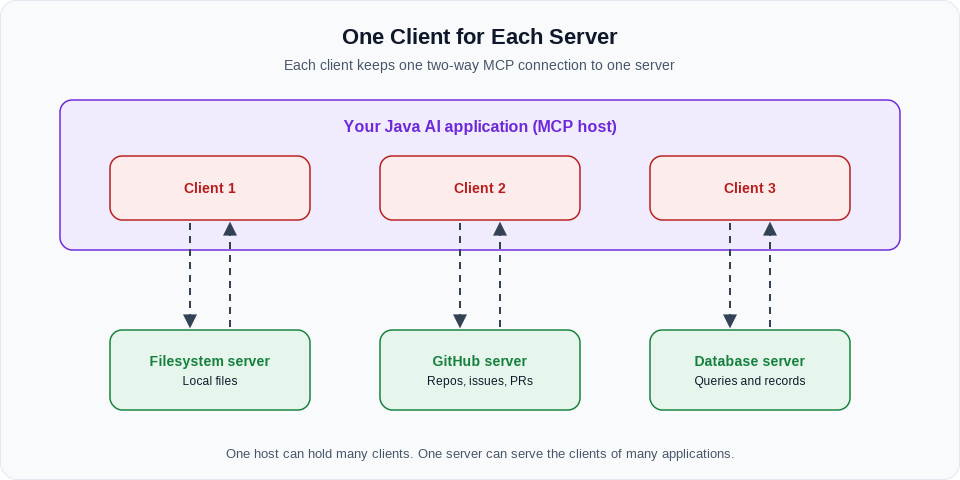
The second slide shows the host with three clients inside it, each connected to its own server: Client 1 to a filesystem server, Client 2 to a GitHub server, Client 3 to a database server. Its caption is the rule to remember:
Each client keeps one two-way MCP connection to one server
| Statement | True? |
|---|---|
| One client connects to several servers | No. One client, one server |
| One host contains several clients | Yes. Four servers need four clients |
| One server serves several clients | Yes. Your application connects with its client, and other people's applications connect with theirs |
So if your application needs the file system, a database, GitHub and one server of your own, it creates four clients. All of their tools can then be offered to the same model.
Where the servers run
The lesson speaks of servers that are "available on the internet". It helps to separate two cases, because the next two lessons use only the first one.
| Local server | Remote server | |
|---|---|---|
| Where it runs | On your machine, started by your application as a child process | On another machine, reached through a URL |
| How client and server talk | Through standard input and output. This transport is called stdio | Over HTTP |
| Example | The filesystem server, which you download and run locally | A hosted service that offers an MCP endpoint |
"Available on the internet" for the filesystem server means that its code can be downloaded. When it runs, it runs on your computer and reads your files.
What comes next
The course now builds both cases from the diagram:
- Connecting to a Filesystem MCP Server uses an existing server that somebody else wrote.
- Building Your Own MCP Server writes a custom Java MCP server and connects the same application to it.
Additions beyond the lesson
Where MCP comes from. MCP was introduced by Anthropic in November 2024 as an open standard. It has its own specification and official SDKs in several languages, including Java.
More than tools. The lesson concentrates on tools, the most used feature. The protocol also defines resources, which are data a server offers for reading, and prompts, which are reusable prompt templates.
A server runs with your permissions. A local MCP server is a program on your machine. It can do whatever its code does, with your user's rights, and the model decides when its tools are called. Use servers from sources you trust, give them access to as little as possible, and prefer read-only access when reading is all you need.
The same topic in Spring AI. The Telusko docs have a separate MCP course that builds clients and servers with Spring AI: What is MCP?.
Check your understanding
| Question | Answer |
|---|---|
What problem does MCP solve that @Tool does not? | Reusing tools that live outside your application and were often written by someone else |
| Which part is your Java application? | The MCP host |
| Who executes a tool of an MCP server? | The server. The model only requests it |
| How many clients do you need for three servers? | Three |
| Does the server have to be written in Java? | No. The protocol is independent of the language |
Try It Yourself
- Draw the architecture from memory: user, host, client, servers. Mark where the model sits.
- Write down the eight steps of a request without looking, then compare.
- List three systems you use at work for which an MCP server would be useful. Search whether one already exists.
- Decide for each of these whether you would write a
@Toolmethod or use an MCP server: your company's discount rules, reading files from a folder, creating GitHub issues. - Explain to a colleague why "one client for each server" does not limit how many servers an application can use.
Official references
- Model Context Protocol: introduction
- Model Context Protocol: architecture
- LangChain4j: Model Context Protocol (MCP)
- Anthropic: introducing the Model Context Protocol
Written By: Shramik Masti
How is this guide?
Last updated on
Tool Calling
Let a model use your own Java methods to answer questions, by marking them with @Tool and registering them on an AI Service, and understand who really executes a tool.
Connecting to a Filesystem MCP Server
Connect a LangChain4j application to the ready-made filesystem MCP server, with a stdio transport, an MCP client and a tool provider, and let the model list and summarise local files without writing a single tool.