
Building Your Own MCP Server
Write an MCP server in plain Java with the official MCP Java SDK, register three course tools by hand, package it as a jar, and connect the LangChain4j application from the previous lesson to it.
In the previous lesson our application used tools that somebody else had written. We did not write a line of file handling.
Now turn it around. You have your own business logic, the course list, the prices and the durations, and you want other AI applications to be able to use it through one standard. So this time you write the server.
The lesson has two halves:
- Build an MCP server in Java that offers three tools.
- Change the client application so that it starts and uses this server.
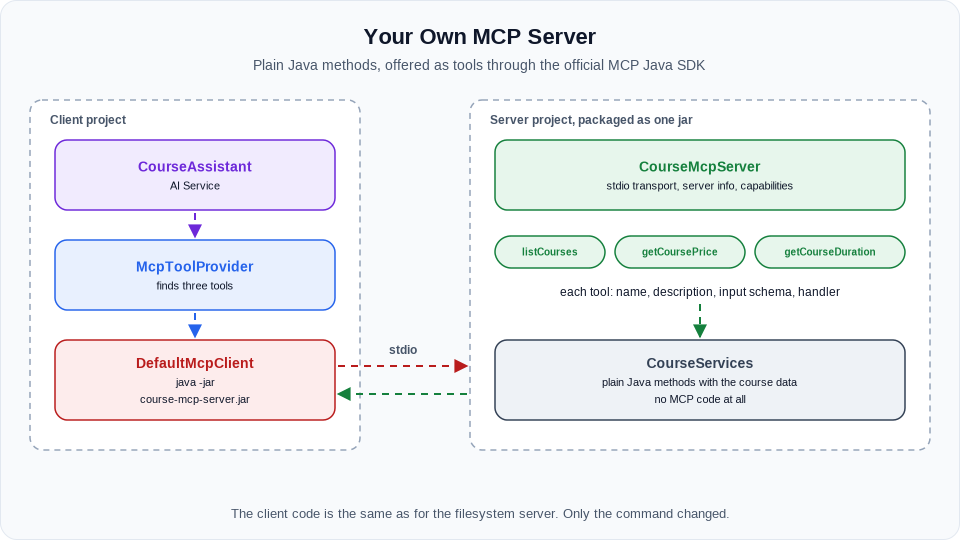
Follow the flow first
The server code is the most low-level code of this course, and the instructor says so more than once: do not get stuck on every line of syntax. Understand what a server has to do: hold some logic, open a transport, create the server object, register its tools and stay alive. Those are the steps of Part 1.
Part 1: The server
The project and the dependency
The lesson opens a prepared Maven project named course-mcp-server-starter-java21. It is plain Java, without Spring Boot, with the package com.telusko.mcp and one dependency:
<dependency>
    <groupId>io.modelcontextprotocol.sdk</groupId>
    <artifactId>mcp</artifactId>
    <version>${mcp.version}</version>
</dependency>
This is the official MCP Java SDK. It does not come from LangChain4j or Spring AI. Any Java program can use it to become an MCP server.
The <properties> section of the lesson's pom.xml is never opened in the video. The IDE reveals that version 2.0.1 of the SDK is in use. The properties below were written for these docs, and the code was built and run with them:
<properties>
    <maven.compiler.release>21</maven.compiler.release>
    <project.build.sourceEncoding>UTF-8</project.build.sourceEncoding>
    <mcp.version>2.0.1</mcp.version>
</properties>
Step 1: The business logic
Create a package com.telusko.mcp.services and a class with three ordinary methods:
package com.telusko.mcp.services;

public class CourseServices
{
    // Tool 1: List all available courses
    public String listCourses() {
        return "Available courses: Java, Python, DevOps";
    }

    // Tool 2: Return the price of a course
    public String getCoursePrice(String courseName) {

        return switch (courseName.toLowerCase()) {
            case "java" -> "Java course costs 3000 INR";
            case "python" -> "Python course costs 2500 INR";
            case "devops" -> "DevOps course costs 4000 INR";
            default -> "Course not found";
        };
    }

    // Tool 3: Return the duration of a course
    public String getCourseDuration(String courseName) {

        return switch (courseName.toLowerCase()) {
            case "java" -> "Java course duration is 3 months";
            case "python" -> "Python course duration is 2 months";
            case "devops" -> "DevOps course duration is 4 months";
            default -> "Course not found";
        };
    }
}
There is no annotation and no MCP code here. This class does not know that it will be offered through a server. That separation is good design: the logic can be tested and reused without MCP.
Everything else happens in the main method of CourseMcpServer.
Step 2: The transport
CourseServices courseServices= new CourseServices();
StdioServerTransportProvider transport =
        new StdioServerTransportProvider(
                McpJsonDefaults.getMapper()
        );
Client and server need a way to communicate. This server uses stdio, the same transport as the filesystem server:
| Stream | Used for |
|---|---|
| Standard input | The server receives MCP requests |
| Standard output | The server sends MCP responses |
The messages are JSON. McpJsonDefaults.getMapper() provides the JSON mapper that turns protocol messages into Java objects and back.
A stdio server has no port and no URL. It is started by the client as a child process.
Step 3: The server object
McpSyncServer server = McpServer.sync(transport)
        .serverInfo("course-mcp-server", "1.0.0")
        .capabilities(
                McpSchema.ServerCapabilities.builder()
                        .tools(true)
                        .build()
        )
.build();| Call | Meaning |
|---|---|
McpServer.sync(transport) | A synchronous server. A tool handler returns its result directly, without asynchronous types |
.serverInfo("course-mcp-server", "1.0.0") | The name and version that the server reports to clients |
.capabilities(...) | What the server supports |
.tools(true) | It supports tools. true means that it may notify clients when its list of tools changes |
Step 4: Register a tool without arguments
Every MCP tool has four parts: a name, a description, an input schema that describes its arguments, and the code to run when it is called.
listCourses takes no arguments, so its schema is an empty JSON object:
Map<String, Object> emptySchema = Map.of(
        "type", "object",
        "properties", Map.of()
);

var listCoursesTool = McpServerFeatures.SyncToolSpecification.builder()
        .tool(McpSchema.Tool.builder(
                        "listCourses", emptySchema)
                .description("List all available courses")
                .build())
        .callHandler((exchange, request) -> {

            // Execute our actual Java method.
            String courses = courseServices.listCourses();

            // Convert the String into an MCP tool response.
            return result(courses);
        })
        .build();

server.addTool(listCoursesTool);| Part | In the code |
|---|---|
| Name | "listCourses" |
| Input schema | emptySchema: an object with no properties |
| Description | "List all available courses" |
| Code to run | The callHandler lambda. It calls our Java method |
| Registration | server.addTool(...). A tool that is not added cannot be seen by any client |
The handler has to return an MCP result object and not a plain String. A small helper method does the conversion:
// Converts the String returned by our Java method
// into a response that an MCP client can understand.
private static McpSchema.CallToolResult result(String text) {

    return McpSchema.CallToolResult.builder()
            .content(List.of(
                    new McpSchema.TextContent(text)
            ))
            .build();
}
Step 5: Register the tools with an argument
getCoursePrice and getCourseDuration both need a course name. MCP describes tool inputs with JSON Schema:
Map<String, Object> courseSchema = Map.of(
        "type", "object",
        "properties", Map.of(
                "courseName", Map.of(
                        "type", "string",
                        "description", "Name of the course"
                )
        ),
        "required", List.of("courseName")
);
Read it as: the input is an object with one property named courseName, a string, and it is required. This is what the model reads to learn how to call the tool.
Both tools use this schema:
var priceTool = SyncToolSpecification.builder()
        .tool(McpSchema.Tool.builder(
                        "getCoursePrice", courseSchema)
                .description("Get the price of a course")
                .build())
        .callHandler((exchange, request) -> {

            // Read the course name from tool arguments.
            String name = (String)
                    request.arguments().get("courseName");

            // Execute the actual Java method.
            String price =
                    courseServices.getCoursePrice(name);

            // Convert Java String into MCP tool response.
            return result(price);
        })
        .build();

// Expose the tool to MCP clients.
server.addTool(priceTool);
request.arguments() holds the arguments that the client sent. The handler takes courseName out of it, calls our method and wraps the result. The duration tool is the same with the other method.
Compare with @Tool
In Tool Calling, one annotation did all of this. LangChain4j read the method name, the description and the parameters and built the schema for us. Here the plain SDK makes every part visible: name, description, schema, handler, registration. It is more typing, and it shows what a tool really consists of.
Step 6: Keep the server alive
System.err.println("Course MCP Server ready");

new CountDownLatch(1).await();
The server must keep running so that clients can send requests. Without the last line, main would simply end. new CountDownLatch(1).await() blocks the main thread until the process is terminated, because nobody ever counts this latch down. You met CountDownLatch in Streaming Responses.
await() throws a checked exception, so the lesson adds throws InterruptedException to main.
The complete server
package com.telusko.mcp;

import com.telusko.mcp.services.CourseServices;
import io.modelcontextprotocol.json.McpJsonDefaults;
import io.modelcontextprotocol.server.McpServer;
import io.modelcontextprotocol.server.McpServerFeatures;
import io.modelcontextprotocol.server.McpServerFeatures.SyncToolSpecification;
import io.modelcontextprotocol.server.McpSyncServer;
import io.modelcontextprotocol.server.transport.StdioServerTransportProvider;
import io.modelcontextprotocol.spec.McpSchema;

import java.util.List;
import java.util.Map;
import java.util.concurrent.CountDownLatch;

public class CourseMcpServer {

    public static void main(String[] args) throws InterruptedException {
        CourseServices courseServices= new CourseServices();
        StdioServerTransportProvider transport =
                new StdioServerTransportProvider(
                        McpJsonDefaults.getMapper()
                );
        McpSyncServer server = McpServer.sync(transport)
                .serverInfo("course-mcp-server", "1.0.0")
                .capabilities(
                        McpSchema.ServerCapabilities.builder()
                                .tools(true)
                                .build()
                )
                .build();

        Map<String, Object> emptySchema = Map.of(
                "type", "object",
                "properties", Map.of()
        );

        var listCoursesTool = McpServerFeatures.SyncToolSpecification.builder()
                .tool(McpSchema.Tool.builder(
                                "listCourses", emptySchema)
                        .description("List all available courses")
                        .build())
                .callHandler((exchange, request) -> {

                    // Execute our actual Java method.
                    String courses = courseServices.listCourses();

                    // Convert the String into an MCP tool response.
                    return result(courses);
                })
                .build();

        server.addTool(listCoursesTool);
        Map<String, Object> courseSchema = Map.of(
                "type", "object",
                "properties", Map.of(
                        "courseName", Map.of(
                                "type", "string",
                                "description", "Name of the course"
                        )
                ),
                "required", List.of("courseName")
        );
        var priceTool = SyncToolSpecification.builder()
                .tool(McpSchema.Tool.builder(
                                "getCoursePrice", courseSchema)
                        .description("Get the price of a course")
                        .build())
                .callHandler((exchange, request) -> {

                    // Read the course name from tool arguments.
                    String name = (String)
                            request.arguments().get("courseName");

                    // Execute the actual Java method.
                    String price =
                            courseServices.getCoursePrice(name);

                    // Convert Java String into MCP tool response.
                    return result(price);
                })
                .build();

        // Expose the tool to MCP clients.
        server.addTool(priceTool);
        var durationTool = SyncToolSpecification.builder()
                .tool(McpSchema.Tool.builder(
                                "getCourseDuration", courseSchema)
                        .description("Get the duration of a course")
                        .build())
                .callHandler((exchange, request) -> {

                    // Extract courseName from the request.
                    String name = (String)
                            request.arguments().get("courseName");

                    // Execute the actual Java method.
                    String duration =
                            courseServices.getCourseDuration(name);

                    // Return the result to the MCP client.
                    return result(duration);
                })
                .build();

        // Expose the tool to MCP clients.
        server.addTool(durationTool);

        System.err.println("Course MCP Server ready");

        new CountDownLatch(1).await();

    }

    // Converts the String returned by our Java method
    // into a response that an MCP client can understand.
    private static McpSchema.CallToolResult result(String text) {

        return McpSchema.CallToolResult.builder()
                .content(List.of(
                        new McpSchema.TextContent(text)
                ))
                .build();
    }
}
Two small differences from the file in the video, both on purpose:
- The import lines are not readable in the video. The ones above were confirmed by compiling the file. An unused static import that the IDE added by accident is left out.
- The starter line
System.out.println("Course MCP Server Starter");at the top ofmainis removed. The callout below explains why.
A stdio server must not print to standard output
With the stdio transport, standard output is the channel for protocol messages. Anything else printed there is mixed into the conversation between client and server. The ready message in the lesson is printed with System.err, which is a separate stream and therefore safe. The video does not comment on that choice.
The lesson's file still contains the starter line that prints "Course MCP Server Starter" with System.out. In the test for these docs the LangChain4j client coped with that extra line and the tools still worked. Other clients may be stricter. In your own stdio servers, send every log line to System.err or to a logger that writes there.
Step 7: Package the server as a jar
The client will start the server with java -jar, so the server has to be a single runnable jar that contains the SDK as well. In the IntelliJ Maven window, run Lifecycle > package. The lesson's build produces:
target/course-mcp-server-1.0-SNAPSHOT.jar
target/original-course-mcp-server-1.0-SNAPSHOT.jar
The second file with the prefix original- is the sign of the Maven Shade plugin, which builds such an all-in-one jar. The build section of the lesson's pom.xml is never shown. This configuration produced the same two files for these docs:
<build>
    <plugins>
        <plugin>
            <groupId>org.apache.maven.plugins</groupId>
            <artifactId>maven-shade-plugin</artifactId>
            <version>3.6.0</version>
            <executions>
                <execution>
                    <phase>package</phase>
                    <goals>
                        <goal>shade</goal>
                    </goals>
                    <configuration>
                        <transformers>
                            <transformer implementation="org.apache.maven.plugins.shade.resource.ManifestResourceTransformer">
                                <mainClass>com.telusko.mcp.CourseMcpServer</mainClass>
                            </transformer>
                            <transformer implementation="org.apache.maven.plugins.shade.resource.ServicesResourceTransformer"/>
                        </transformers>
                    </configuration>
                </execution>
            </executions>
        </plugin>
    </plugins>
</build>
The project coordinates in the lesson are com.telusko:course-mcp-server:1.0-SNAPSHOT, which gives the jar its name. The build prints one warning about module-info.class and shading. It can be ignored.
Note the full path of the first jar. The client needs it.
Part 2: The client
We go back to mcp-filesystem-starter, the client project of the previous lesson. Three things change.
Step 1: A new AI Service
package com.telusko.mcp;

import dev.langchain4j.service.SystemMessage;
import dev.langchain4j.service.UserMessage;

public interface CourseAssistant {

    @SystemMessage("""
            You are a helpful course assistant.

            Use the available MCP tools to answer
            questions about course prices and durations.

            Do not invent course information.
            """)
    @UserMessage("{{it}}")
    String chat(String message);
}
Step 2: A transport that starts our jar
Comment out the npx transport and write a new one:
McpTransport transport = StdioMcpTransport.builder()
        .command(List.of(
                "java",
                "-jar",
                "D:\\AI Basics\\course-mcp-server-starter-java21\\course-mcp-server-starter\\target\\course-mcp-server-1.0-SNAPSHOT.jar"
        ))
        .logEvents(true)
        .build();
Last time the command was npx with a Node.js package. This time it is java -jar with our jar. The class StdioMcpTransport is the same. Only the command that starts the server is different. Use the path of the jar on your own machine. In the video the end of this long path runs off the screen. The file name at its end is the jar that the build produced.
Step 3: A new key, and the new assistant
The client key becomes "course-server", the FileAssistant lines are commented out, and the CourseAssistant is built with the same tool provider:
package com.telusko.mcp;

import dev.langchain4j.mcp.McpToolProvider;
import dev.langchain4j.mcp.client.DefaultMcpClient;
import dev.langchain4j.mcp.client.McpClient;
import dev.langchain4j.mcp.client.transport.McpTransport;
import dev.langchain4j.mcp.client.transport.stdio.StdioMcpTransport;
import dev.langchain4j.model.openai.OpenAiChatModel;
import dev.langchain4j.service.AiServices;

import java.util.List;

public class Main {

    public static void main(String[] args) throws Exception {
        System.out.println("MCP Filesystem Demo");
        OpenAiChatModel model = OpenAiChatModel.builder()
                .apiKey(System.getenv("OPENAI_API_KEY"))
                .modelName("gpt-4o-mini")
                .build();

        McpTransport transport = StdioMcpTransport.builder()
                .command(List.of(
                        "java",
                        "-jar",
                        "D:\\AI Basics\\course-mcp-server-starter-java21\\course-mcp-server-starter\\target\\course-mcp-server-1.0-SNAPSHOT.jar"
                ))
                .logEvents(true)
                .build();

        McpClient mcpClient = DefaultMcpClient.builder()
                .key("course-server")
                .transport(transport)
                .build();
        try
        {
            McpToolProvider toolProvider = McpToolProvider.builder()
                    .mcpClients(mcpClient)
                    .build();

            CourseAssistant courseAssistant = AiServices.builder(CourseAssistant.class)
                    .chatModel(model)
                    .toolProvider(toolProvider)
                    .build();
            String answer = courseAssistant.chat(
                    "What is the price and duration of the Java course?"
            );

            System.out.println("\nAI Response:");
            System.out.println(answer);

        }
        catch(Exception e)
        {
            e.printStackTrace();
        }
        finally {
            mcpClient.close();
        }

    }
}
The client code, the tool provider and the AI Service builder are exactly as before. The application does not care whether the server is a Node.js package from the internet or our own jar. That is the point of a standard protocol.
Step 4: Run the client
You do not start the server yourself. Run only the client. It starts the jar as a child process.
MCP Filesystem Demo

AI Response:
The Java course costs 3000 INR and has a duration of 3 months.
The first line still says "MCP Filesystem Demo", left over from the previous lesson. On screen, the three SLF4J warning lines appear between it and the answer. They are left out here. The answer contains our data: 3000 INR and 3 months come from CourseServices, travelled through the MCP server, and were put into a sentence by the model.
In the video the program does not end by itself after the answer. The stop button stays red, the instructor stops the run, and the console ends with exit code 130. The same was observed in the test for these docs: after main had finished, the Java process stayed alive until it was stopped.
Checked for these docs
The server was built with Maven from the code above, with MCP Java SDK 2.0.1 and the Shade configuration shown, and produced course-mcp-server-1.0-SNAPSHOT.jar. It was then used through langchain4j-mcp 1.18.1-beta28 with the client code of this lesson.
- The client discovered three tools:
listCourses,getCoursePriceandgetCourseDuration, the last two with a required stringcourseName. - Direct tool calls returned "Available courses: Java, Python, DevOps", "Java course costs 3000 INR" and "DevOps course duration is 4 months". An unknown course returned "Course not found".
- Started by hand, the server wrote "Course MCP Server ready" to standard error and protocol messages to standard output.
- The whole client was also run with a small local model in place of OpenAI. It connected and called the tools, but the answer was that the "Java course" was not found. The server had returned "Course not found", which means that the model sent a course name that the
switchdoes not know, most likely "Java course" where the code expects "java". The model reported the result honestly and did not invent a price. Withgpt-4o-minithe lesson gets the correct answer. See "Check the arguments" below for what this teaches.
What we built
| Part | Project | Role |
|---|---|---|
CourseServices | Server | The business logic |
CourseMcpServer | Server | Offers the three methods as MCP tools over stdio |
| The jar | Server | The program that a client starts |
StdioMcpTransport with java -jar | Client | Starts the server and talks to it |
DefaultMcpClient, McpToolProvider | Client | Discover the tools and hand them to the AI Service |
CourseAssistant | Client | The AI Service that the user's question goes through |
Additions beyond the lesson
Other applications can use this server too. Because it speaks standard MCP over stdio, the same jar can be registered in other MCP hosts that support local servers, with the same command: java -jar and the path.
A server reachable over the network. A stdio server runs on the machine of whoever starts it. To offer tools to applications on other machines, a server uses the HTTP transport of MCP in place of stdio. The SDK supports that as well. This course stays with stdio.
Less code with a framework. Frameworks can generate the schema and the registration from annotations, in the same spirit as @Tool. The Telusko MCP course shows this with Spring AI: Building an MCP Server with STDIO.
Check the arguments. request.arguments().get("courseName") returns whatever a client sent. If the argument is missing, name is null and courseName.toLowerCase() fails. A robust handler checks its input and returns a clear error message.
The local run above shows a second weakness. The switch matches only the exact words "java", "python" and "devops", and a model may send "Java course". Two things help: a more precise description in the schema, for example "Name of the course as one word, such as Java", and more tolerant matching in the service.
Mistakes and fixes
| What you see | Cause | Fix |
|---|---|---|
SyncToolSpecification is red | The import is missing. This happens in the lesson | Import io.modelcontextprotocol.server.McpServerFeatures.SyncToolSpecification, or write McpServerFeatures.SyncToolSpecification |
result and service are red in the handler | The first pasted version calls result(service.listCourses()). The helper method does not exist yet, and the variable is named courseServices | Add the result helper and use courseServices |
"Unhandled exception: java.lang.InterruptedException" on await() | A checked exception | Add throws InterruptedException to main |
| The client cannot start the server | The jar path is wrong, or the jar was not built | Run package and copy the full path of the jar from the target folder |
| An error that the jar has no main manifest attribute, or classes of the SDK are not found | The jar was built without the Shade plugin, so it is not runnable on its own | Add the Shade configuration and run package again |
| The client does not see a tool | server.addTool(...) was not called for it | Register every tool |
| Changes in the server have no effect | The client still starts the old jar | Run package again after every change |
Try It Yourself
- Build the server project and find the jar in
target. - Start the server by hand with
java -jarand the jar path. What do you see, and on which stream? Stop it with Ctrl+C. - Change the transport in the client and ask for the price and duration of the Java course.
- Ask "Which courses do you offer?". Which tool answers that?
- Ask for the price of a course that does not exist and read the answer.
- Add a fourth tool,
getCourseInstructor, to the service and the server. Build the jar again and ask about it. - Print the tools from the client with
mcpClient.listTools()and compare them with your registrations. - Use both servers in one application: create a second client for the filesystem server and pass both to
mcpClients(...).
Official references
- MCP Java SDK: documentation
- MCP Java SDK: source code
- Model Context Protocol: tools
- LangChain4j: Model Context Protocol (MCP)
- Apache Maven Shade Plugin
Written By: Shramik Masti
How is this guide?
Last updated on
Connecting to a Filesystem MCP Server
Connect a LangChain4j application to the ready-made filesystem MCP server, with a stdio transport, an MCP client and a tool provider, and let the model list and summarise local files without writing a single tool.
Response Metadata and Token Usage
Read more than the answer text from a model call, with ChatRequest and ChatResponse - the token usage, the finish reason, the model name and the response ID - and see how a token limit changes the finish reason.