
Building an MCP Server with stdio
Build your first MCP server with FastMCP, connect to it over stdio with a LangChain MCP client, call its tools directly and then let an LLM choose them.
We now build both sides of an MCP connection ourselves. The server gets the same two tools as before, get_current_date and multiply. The difference is that they will live in their own file, behind the protocol, and our program will have to ask for them.
We start with the stdio transport, where client and server run on the same machine. main.py from the previous section stays as it is. Everything here goes into new files.
Part 1: The server
Step 1: Install FastMCP
uv add fastmcpFastMCP is a Python library for building MCP servers. It handles the protocol for you: the message format, the list of tools, the schemas. You write normal functions.
Step 2: The smallest possible server
from fastmcp import FastMCP

mcp = FastMCP('MCPStdioServer')

if __name__ == "__main__":
mcp.run(transport='stdio')| Line | What it does |
|---|---|
FastMCP('MCPStdioServer') | Creates a server. The name is free to choose. It appears in the banner and in the log line |
mcp.run(transport='stdio') | Starts the server and tells it to communicate over standard input and output |
Run it:
uv run mcp_server_stdio.pyA banner appears with the server name and the FastMCP version, followed by a log line:
INFO Starting MCP server 'MCPStdioServer' with transport 'stdio'Then nothing more happens. That is correct. The server is waiting for a client to send it messages on its standard input. Stop it with Ctrl + C.
If you do not want the banner, switch it off:
mcp.run(transport='stdio', show_banner=False)Only the log line is printed then. This becomes useful soon, when the server is started several times in a row.
Step 3: Add the tools
Copy the two functions from main.py, and register them on the server with @mcp.tool:
from fastmcp import FastMCP
from datetime import date

mcp = FastMCP('MCPStdioServer')

@mcp.tool
def get_current_date() -> str:
    """Return today's date in ISO format (YYYY-MM-DD)."""
    return date.today().isoformat()

@mcp.tool
def multiply(num1 :int, num2 :int) -> int:
    """Multiply two integers and return the result."""
    return num1 * num2

if __name__ == "__main__":
    mcp.run(transport='stdio', show_banner=False)
FastMCP reads each decorated function and builds the tool description from it:
| From the function | Becomes |
|---|---|
| The function name | The tool name |
| The docstring | The tool description |
| The parameters and their type hints | The input schema |
So the rule from the tool calling page still holds: a clear name, a clear docstring and type hints are what make a tool usable.
@tool and @mcp.tool are not the same
In the video the functions were first copied together with LangChain's decorator, @tool. The server started without any error, and the client later received an empty list of tools. @tool creates a LangChain tool inside the file. It does not tell the MCP server anything. Only @mcp.tool registers a function on the server object mcp. If your client gets [], check the decorators first.
The server is finished. Notice what it does not contain: no LLM, no API key, no user input. It only offers two tools.
Part 2: A client that calls a tool directly
Step 4: Install the client library
uv add langchain-mcp-adaptersThis package is the MCP client. It connects to MCP servers and converts their tools into LangChain tools, so that they can be used exactly like the ones we wrote with @tool.
The video stops here for a moment to show the versions in pyproject.toml, because these libraries move quickly and a mismatch between them causes confusing errors:
dependencies = [
    "fastmcp>=3.4.8,<4",
    "langchain>=1.4.3",
    "langchain-mcp-adapters>=0.3.2",
    "langchain-openai>=1.6.6",
    "python-dotenv>=1.2.3",
]
If your code behaves differently from what is shown here, put these lines into your pyproject.toml and run uv sync. Then you are on the same versions as the video.
Changed since the video: where LangChain's MCP support lives
The langchain-mcp-adapters repository was archived in September 2026. Its README states that MCP support has moved into LangChain itself, under the langchain.mcp namespace, with a migration guide. The code in the video and in these docs uses langchain-mcp-adapters with the versions listed above, and it works with those versions. For a new project of your own, read the current LangChain MCP page linked at the end before you choose.
Step 5: Describe the server
from langchain_mcp_adapters.client import MultiServerMCPClient
from pathlib import Path
import sys

SERVER_PATH = Path(__file__).parent / "mcp_server_stdio.py"

client = MultiServerMCPClient({
    'client': {
        'transport': 'stdio',
        'command': sys.executable,
        'args': [str(SERVER_PATH)]
    }
})
This dictionary is the "single JSON" from the previous page. Each key is a name you choose for a connection, here simply 'client'. Its value says how to reach that server:
| Key | Value | Meaning |
|---|---|---|
transport | 'stdio' | Start the server as a local process and talk over its input and output streams |
command | sys.executable | The program to run. sys.executable is the Python interpreter that is running the client, so the server uses the same virtual environment |
args | The path of the server file | What to pass to that program |
Together, command and args are the same thing you typed by hand in Step 2. With stdio, the client starts the server. You do not run the server yourself any more.
SERVER_PATH is built from the location of client.py, so the client finds the server file no matter which folder you start it from.
Step 6: Ask for the tools
def main():
    tools = client.get_tools()
    print(tools)

main()
This does not print a list of tools. It prints a coroutine object, and Python warns that the coroutine was never awaited.
get_tools is an async function. You can recognise one by the word async in front of its def. Calling an async function does not run it. It gives you a coroutine, which is a piece of work that still has to be executed. Three small changes fix it:
| Change | Why |
|---|---|
await client.get_tools() | await runs the coroutine and waits for its result |
async def main() | await is only allowed inside an async function |
asyncio.run(main()) | Starts the async function from normal code |
import asyncio

async def main():
    tools = await client.get_tools()
    print(tools)

if __name__ == "__main__":
    asyncio.run(main())
Network and process communication involves waiting, and async code lets a program do other things while it waits. That is why the whole client library is async. If this is new to you, a short introduction to asyncio is enough to follow the rest. The pattern stays the same on every page: await in front of each call to the client or to a tool.
uv run client.pyINFO Starting MCP server 'MCPStdioServer' with transport 'stdio'
[StructuredTool(name='get_current_date', description="Return today's date in ISO format (YYYY-MM-DD).",
args_schema={'additionalProperties': False, 'properties': {}, 'type': 'object'}, ...),
StructuredTool(name='multiply', description='Multiply two integers and return the result.',
args_schema={'additionalProperties': False, 'properties': {'num1': {'type': 'integer'}, 'num2': {'type': 'integer'}},
'required': ['num1', 'num2'], 'type': 'object'}, ...)]Read this output carefully, because it shows MCP working:
- The first line comes from the server. We never started it. The client did.
- The client then asked the server for its tools and received two.
- Each tool arrives with its name, its description and a schema of its parameters.
get_current_datehas no properties.multiplyrequiresnum1andnum2, both integers.
The client file contains no trace of these functions. Everything it knows, it learned by asking.
Step 7: Call a tool without any LLM
A tool that came from an MCP server is a normal LangChain tool object. You can run it yourself:
first_tool = tools[0]
response = first_tool.invoke({})
In the video this failed with:
StructuredTool does not support sync invocation.These tools are async as well, because running one means sending a request to the server and waiting. Use ainvoke, the async version of invoke, with await:
async def main():
    tools = await client.get_tools()
    print(tools)

    first_tool = tools[0]
    response = await first_tool.ainvoke({})
    print(response)
The empty dictionary {} is the arguments. get_current_date takes none.
INFO     Starting MCP server 'MCPStdioServer' with transport 'stdio'
[StructuredTool(name='get_current_date', ...), StructuredTool(name='multiply', ...)]
INFO     Starting MCP server 'MCPStdioServer' with transport 'stdio'
[{'type': 'text', 'text': '2026-10-09', 'id': 'lc_d040289d-9bf4-43dc-9f34-0bb43d626810'}]
Two things to notice.
The shape of the result. The function returned a plain string. Through MCP it arrives as a list of content blocks. Here there is one block of type text, and the value is in its text field.
The server started twice. The log line appears once before the tool list and once before the tool result.
How often does the server start?
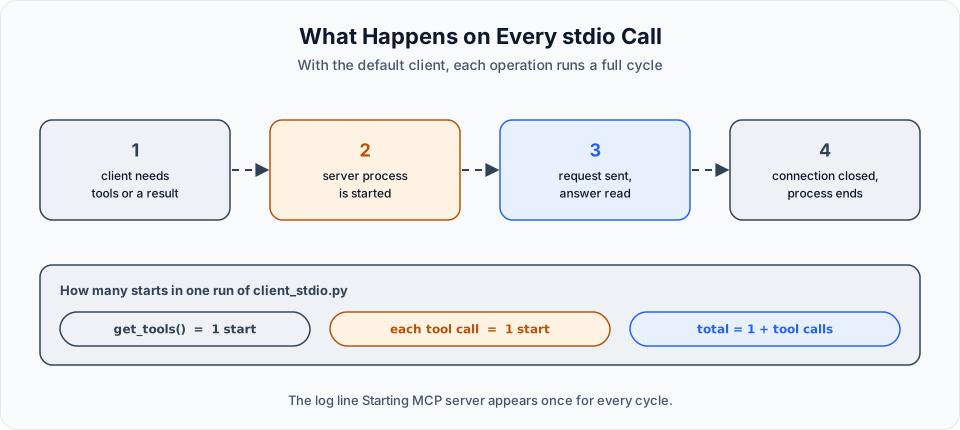
With the client used this way, every operation opens a fresh connection: start the server process, send the request, read the answer, close. The library's README describes it as starting a new MCP session for each tool invocation.
So in the run above:
| Operation | Server started |
|---|---|
client.get_tools() | Once |
first_tool.ainvoke({}) | Once more |
For two small tools this costs nothing you would notice. It matters when a server takes long to start or should keep something in memory between calls. For those cases the library lets you open one session and keep it for several calls, with client.session(...). We stay with the default, because it makes the behaviour easy to see.
Part 3: Let the LLM use the tools
Calling a tool by hand proves that the connection works. The real goal is the flow from the tool calling page, with the tools now coming from the server.
Create a new file. The connection part is the same as in client.py. The rest is main.py with three changes.
from dotenv import load_dotenv
from langchain_openai import ChatOpenAI
from langchain_mcp_adapters.client import MultiServerMCPClient
from langchain_core.messages import HumanMessage, ToolMessage, AIMessage

from pathlib import Path
import sys
import asyncio

load_dotenv()

SERVER_PATH = Path(__file__).parent / "mcp_server_stdio.py"

client = MultiServerMCPClient({
    'client': {
        'transport': 'stdio',
        'command': sys.executable,
        'args': [str(SERVER_PATH)]
    }
})

async def main():
    tools = await client.get_tools()

    llm = ChatOpenAI(model='gpt-4o-mini')
    llm_with_tools = llm.bind_tools(tools)

    messages = []

    user_input = input("User: ")
    messages.append(HumanMessage(content=user_input))

    response = llm_with_tools.invoke(user_input)
    messages.append(AIMessage(content=response.content, tool_calls=response.tool_calls))

    tools_by_name = {}
    for tool in tools:
        tools_by_name[tool.name] = tool

    for tool_call in response.tool_calls:
        tool = tools_by_name[tool_call["name"]]
        tool_response = await tool.ainvoke(tool_call['args'])
        messages.append(ToolMessage(content=tool_response, tool_call_id=tool_call['id']))

    final_response = await llm_with_tools.ainvoke(messages)
    print(f'AI: {final_response.content}')


if __name__ == "__main__":
    asyncio.run(main())
What is different from main.py:
In main.py | In client_stdio.py | Why |
|---|---|---|
Tools are defined in the file with @tool | tools = await client.get_tools() | The tools come from the MCP server |
A tools dictionary written by hand | tools_by_name, built in a loop from tool.name | We do not know the tool names in advance. The server tells us |
tool.invoke(args) | await tool.ainvoke(args) | MCP tools are async |
get_tools() already returns a list, so it goes straight into bind_tools.
There is one more small change. In main.py the first response was appended to the messages as it is. Here the video builds the message explicitly:
messages.append(AIMessage(content=response.content, tool_calls=response.tool_calls))Both forms do the same job. This one makes visible what the model needs to see again in the second call: its own reply, which had empty content, and the tool_calls it asked for.
Run it
uv run client_stdio.pyIn the video, the question was for the current date and for 2 multiplied by 4. The log line Starting MCP server ... appears three times, and then the model answers in one sentence that the current date is October 10, 2026 and that 2 times 4 is 8.
Why three times? Count the operations:
| Operation | Server starts |
|---|---|
get_tools() at the beginning | 1 |
The get_current_date tool call | 1 |
The multiply tool call | 1 |
One start for the tool list, plus one for each tool the model decides to use. A question that needs no tool starts the server once. The number depends on the question.
Log lines in the middle of your prompt
The server is a child process of the client, so its log lines appear in the same terminal. Sometimes one lands right next to the User: prompt while you are typing. Nothing is broken. It is only two programs writing to one window.
Do not print to standard output in a stdio server
With stdio, the server's standard output is the communication channel. The specification says that a server must not write anything to it that is not a valid MCP message. A stray print() inside a tool can corrupt the conversation with the client. Return values from your tools, and send log messages to standard error.
Summary
Server side
- Create the server:
mcp = FastMCP('name'). - Register each function with
@mcp.tool. - Start it with
mcp.run(transport='stdio').
Client side
- Describe the server in
MultiServerMCPClientwithtransport,commandandargs. - Get the tools with
await client.get_tools(). - Bind them to the model, exactly as before.
- Run the tool calls the model asks for with
await tool.ainvoke(...). - Send the results back to the model for the final answer.
Steps 3 to 5 on the client side are the tool calling flow you already knew. MCP added the first two.
Try It Yourself
- Write the minimal server and run it by hand. Stop it, add
show_banner=Falseand run it again. - Add the two tools with
@mcp.tooland writeclient.py. Print the tool list and find the schema ofmultiplyin it. - Replace
@mcp.toolwith LangChain's@toolon one function. Run the client and see which tool is missing. Change it back. - Call
multiplydirectly fromclient.pywithawait tools[1].ainvoke({'num1': 6, 'num2': 7}). - Write
client_stdio.py. Ask three questions: one that needs no tool, one that needs one tool and one that needs both. Count theStarting MCP serverlines each time. - Add a third tool to the server, for example
subtract. Run the client again without changing the client file, and ask a question that uses the new tool.
Official references
- FastMCP: quickstart
- FastMCP: tools
- MCP specification: stdio transport
- langchain-mcp-adapters on GitHub
- LangChain: MCP
Written By: Shramik Masti
How is this guide?
Last updated on
What is MCP
Understand the Model Context Protocol, the roles of host, client and server, the three things a server can offer, tools, resources and prompts, and the two transports, stdio and Streamable HTTP.
Building an MCP Server with HTTP
Run a FastMCP server over HTTP on a port, connect to it by URL with the Streamable HTTP transport, and see how it differs from a stdio server that the client starts itself.