
Connecting to Multiple MCP Servers
Connect one client to a stdio server and an HTTP server at the same time, give the LLM the tools of both, and answer a single question that needs all of them.
So far each client talked to one server. A real AI application rarely stops there. It may need a GitHub server for code, a calendar server for meetings and a server of your own for internal tools, all in the same conversation.
The class we have been using is called MultiServerMCPClient for a reason. Connecting to a second server is one more entry in the dictionary. The rest of the program does not change.
Step 1: Give the two servers different tools
At the moment both of our servers offer the same two tools, which would make it impossible to see where an answer comes from. Change the HTTP server so that it has tools of its own:
from fastmcp import FastMCP
from datetime import date

mcp = FastMCP('MCPStdioServer')

@mcp.tool
def greet(name: str) -> str:
    '''This is Greet Tool, and based on the name, it going to greet the user'''
    return f'Hello {name}, Welcome to telusko! How are you doing today?'

@mcp.tool
def addition(num1 :int, num2 :int) -> int:
    """Add two integers and return the result."""
    return num1 + num2

if __name__ == "__main__":
    mcp.run(transport='http', host='127.0.0.1', port=8000,  show_banner=False)
The stdio server stays as it was. The two servers now look like this:
| Server | Transport | Tools |
|---|---|---|
mcp_server_http.py | HTTP, on port 8000 | greet, addition |
mcp_server_stdio.py | stdio | get_current_date, multiply |
Step 2: One client, two entries
Create client_combined.py and copy client_http.py into it. Then add the stdio entry from client_stdio.py under a second name:
SERVER_PATH = Path(__file__).parent / "mcp_server_stdio.py"

client = MultiServerMCPClient({
    'client': {
        'transport': 'streamable_http',
        'url': 'http://127.0.0.1:8000/mcp'
    },
    'client2': {
        'transport': 'stdio',
        'command': sys.executable,
        'args': [str(SERVER_PATH)]
    }
})
Each key is one connection. The names 'client' and 'client2' are the ones from the video. Any names work as long as they are different. In a real project, names like 'http_tools' and 'local_tools', or 'github' and 'calendar', say more.
The two entries use different transports, and that is fine. The client handles each connection in its own way and gives you one combined result.
The rest of the file is unchanged. This is the complete program:
from dotenv import load_dotenv
from langchain_openai import ChatOpenAI
from langchain_mcp_adapters.client import MultiServerMCPClient
from langchain_core.messages import HumanMessage, ToolMessage, AIMessage

from pathlib import Path
import sys
import asyncio

load_dotenv()

SERVER_PATH = Path(__file__).parent / "mcp_server_stdio.py"

client = MultiServerMCPClient({
    'client': {
        'transport': 'streamable_http',
        'url': 'http://127.0.0.1:8000/mcp'
    },
    'client2': {
        'transport': 'stdio',
        'command': sys.executable,
        'args': [str(SERVER_PATH)]
    }
})

async def main():
    tools = await client.get_tools()
    print(tools)

    llm = ChatOpenAI(model='gpt-4o-mini')
    llm_with_tools = llm.bind_tools(tools)

    messages = []

    user_input = input("User: ")
    messages.append(HumanMessage(content=user_input))

    response = llm_with_tools.invoke(user_input)
    messages.append(AIMessage(content=response.content, tool_calls=response.tool_calls))

    tools_by_name = {}
    for tool in tools:
        tools_by_name[tool.name] = tool

    for tool_call in response.tool_calls:
        tool = tools_by_name[tool_call["name"]]
        tool_response = await tool.ainvoke(tool_call['args'])
        messages.append(ToolMessage(content=tool_response, tool_call_id=tool_call['id']))

    final_response = await llm_with_tools.ainvoke(messages)
    print(f'AI: {final_response.content}')


if __name__ == "__main__":
    asyncio.run(main())
Step 3: Start what needs starting
Remember the difference between the two transports:
- The HTTP server must be running before the client starts. Since its tools changed in Step 1, stop it if it is still running and start it again.
- The stdio server needs nothing. The client starts it when it is needed.
In the first terminal:
uv run mcp_server_http.pyIn the second terminal:
uv run client_combined.pyStep 4: One list with four tools
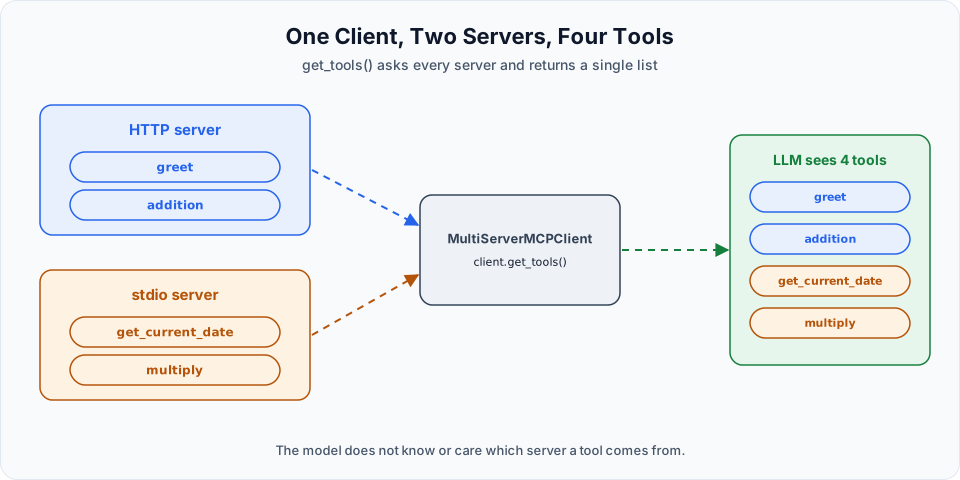
The printed tool list is longer now. In the video the tools appear in this order:
| Tool | Comes from |
|---|---|
greet | The HTTP server |
addition | The HTTP server |
get_current_date | The stdio server |
multiply | The stdio server |
get_tools() asked both servers and returned a single list. From this point on, the program has no idea that two servers exist. It has four tools. They are bound to the model in one call, and the model sees four tools as well.
Step 5: One question for all four
The question in the video is written so that every tool is needed:
User: My name is Akshay, greet me, tell me the current date? And what is sum of 2 and 9, and what is 2*10?In the client's terminal, the stdio server's log line appears twice, and then the answer:
INFO     Starting MCP server 'MCPStdioServer' with transport 'stdio'
INFO     Starting MCP server 'MCPStdioServer' with transport 'stdio'
AI: Hello Akshay, Welcome to Telusko! How are you doing today?

Today's date is 2026-10-10. The sum of 2 and 9 is 11, and the result of multiplying 2 by 10 ...
The end of the last line runs off the screen in the video. It gives the product, 20.
Trace each part of the answer back to its source:
| Part of the answer | Tool | Server |
|---|---|---|
| "Hello Akshay, Welcome to Telusko! ..." | greet | HTTP |
| "Today's date is 2026-10-10" | get_current_date | stdio |
| "The sum of 2 and 9 is 11" | addition | HTTP |
| The product of 2 and 10 | multiply | stdio |
The two log lines match this table. Two of the four tool calls went to the stdio server, and each of them started it once. The two calls to the HTTP server left no trace in this terminal, because that server was already running in the other one. Its requests show up there.
The model asked for four tools in a single response. Our loop ran each one against the right server, collected four ToolMessage objects and sent everything back. One user question, two servers, four tools, one answer.
What this shows
You wrote two small servers yourself, so it may not look like much. Replace them in your mind with servers you did not write: GitHub's, a calendar's, a file system's. The client code would be the same dictionary with other entries, and the model could combine their tools in one answer in exactly this way.
That is the promise of a protocol. Every server is reached in the same manner, so adding one is configuration, not a new integration.
Two servers with the same tool name
tools_by_name uses the tool name as its key. If two servers both offer a tool called search, the second one silently replaces the first in that dictionary, and a call meant for one server goes to the other. Our four tools have different names, so nothing goes wrong here. When you combine servers you do not control, check the names in the list you get back.
More tools is not always better
Every tool you bind is described to the model in every request. That description takes input tokens, and a very long list makes it harder for the model to pick the right tool. Connect the servers an application really needs, not every server you can find.
Try It Yourself
- Change the HTTP server to
greetandaddition, restart it and runclient_combined.py. Find all four tools in the printed list. - Ask a question that needs only the two HTTP tools. How many
Starting MCP serverlines appear in the client terminal? Then ask one that needs only the stdio tools. - Rename the connections from
'client'and'client2'to names that describe them, and confirm that everything still works. - Start the client without starting the HTTP server. Read the error and decide which of the two connections caused it.
- Add a tool called
multiplyto the HTTP server as well, with a different docstring. Printtools_by_nameand see which one survived. Remove it again afterwards.
Official references
Written By: Shramik Masti
How is this guide?
Last updated on
Building an MCP Server with HTTP
Run a FastMCP server over HTTP on a port, connect to it by URL with the Streamable HTTP transport, and see how it differs from a stdio server that the client starts itself.
Integrating the GitHub MCP Server
Connect a Python client to GitHub's official remote MCP server with a personal access token, then create a repository, a branch, a file, a pull request and a review through its tools.