
What is MCP
Understand the Model Context Protocol, the roles of host, client and server, the three things a server can offer, tools, resources and prompts, and the two transports, stdio and Streamable HTTP.
On the previous page we wrote two tools and gave them to a model. Both tools were functions in our own file. That works as long as you write every tool yourself.
Now suppose your AI application should work with GitHub: create a branch, open a pull request, add a review. You could write a tool for each of these on top of the GitHub API. So would every other team building an AI application, each in their own way. And GitHub is one service. Add a calendar, a database and a file system, and you are maintaining a pile of integrations that have nothing to do with your product.
There is a better split of the work. The people who know GitHub best, GitHub, write the tools once. Every AI application then uses those same tools. For that to work, the application and the tool provider need an agreed way to talk to each other.
We have solved this kind of problem before
Think about how you use the GitHub API from a normal application. You did not write those endpoints. GitHub did. You can still call them from any language, because both sides follow the same protocol: HTTP. The request has a known shape, the response comes back as JSON, and nobody had to coordinate with you in advance.
Tools for AI applications need the same thing: a protocol, so that tools built in one place can be discovered and called from another. That protocol is MCP, the Model Context Protocol.
The official documentation defines it in one sentence:
MCP (Model Context Protocol) is an open-source standard for connecting AI applications to external systems.
It was introduced by Anthropic in November 2024 and is now supported across AI tools and services from many companies.
The name says what it is about. An application uses MCP to bring context to its model: tools it can call, data it can read, prompts it can use.
The USB-C comparison
The documentation continues with a comparison that is worth keeping in mind:
Think of MCP like a USB-C port for AI applications. Just as USB-C provides a standardized way to connect electronic devices, MCP provides a standardized way to connect AI applications to external systems.
A USB-C port does not care what you plug in. A charger, a monitor and a drive all work, because both ends follow one standard. In the same way, an AI application that speaks MCP can connect to a GitHub server, a calendar server or a server you wrote yourself, and the code on the application side looks the same every time.
Host, client and server
Three roles appear in every MCP setup.
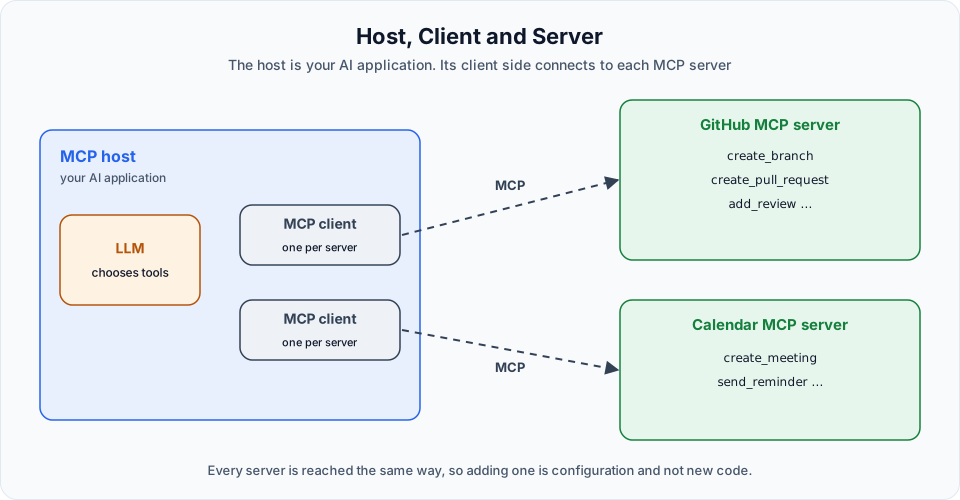
| Role | What it is | In these docs |
|---|---|---|
| MCP server | A program that offers tools, and possibly data and prompts, to AI applications | The servers we build with FastMCP, and GitHub's server |
| MCP host | The AI application itself. It contains the LLM integration and decides what to do with what the servers offer | Our Python client programs |
| MCP client | The part inside the host that keeps the connection to a server and speaks the protocol with it | The MultiServerMCPClient object from langchain-mcp-adapters |
A few notes that prevent confusion later:
- The provider of tools is called the server, even when it runs on your own laptop. "GitHub's tools" become "the GitHub MCP server".
- The server does not contain the LLM, and it does not decide when a tool is used. It only offers tools and runs them when asked.
- In the official architecture, a host creates one client for each server it connects to. When the video draws a single "MCP Client" box talking to two servers, read it as the host's client side. The library we use hides the individual connections behind one object.
On the diagram this can look like a lot of machinery. In code it is small. You describe the servers you want in one dictionary, the same shape you would write as JSON in a configuration file, call one function, and you receive the tools of all of them. You will write that dictionary on the next page.
What a server can offer
Tools are the best-known part of MCP, but a server can share three kinds of things.
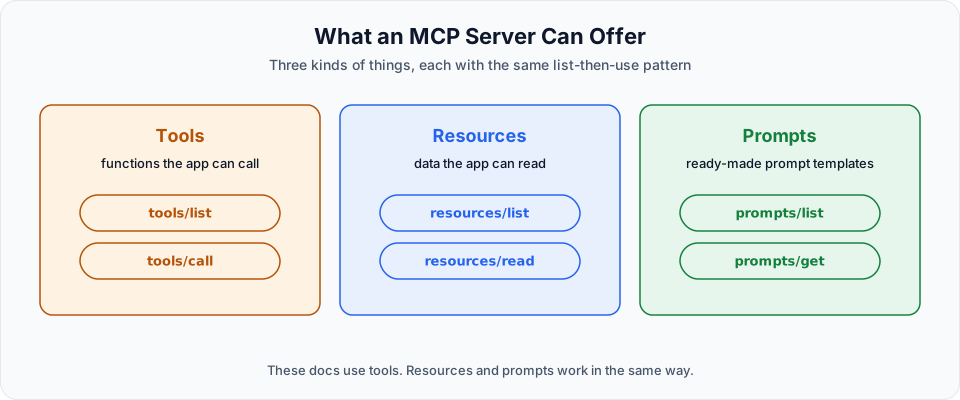
| What it is | Example | |
|---|---|---|
| Tools | Functions the AI application can call to do something | Create a pull request, run a query, send a reminder |
| Resources | Data the application can read and use as context | A file, a document, a database record, a page |
| Prompts | Ready-made prompt templates the server provides | A "review this pull request" template with blanks to fill in |
The video describes tools as Python functions, because we write ours in Python. A server can be written in any language. From the outside, a tool is only a name, a description and a list of parameters.
The same few operations on every server
This is the heart of the standard. Every MCP server answers the same small set of requests, whatever it does inside:
| Kind | Method | What it does |
|---|---|---|
| Tools | tools/list | Returns the tools the server has, each with its name, description and input schema |
| Tools | tools/call | Runs one tool with the given arguments |
| Resources | resources/list | Returns the resources that are available |
| Resources | resources/read | Returns the content of one resource |
| Prompts | prompts/list | Returns the prompt templates the server offers |
| Prompts | prompts/get | Returns one prompt, filled in with the given arguments |
Because the method names are fixed, a client does not need to know anything about a server in advance. It asks tools/list, reads the answer and knows what it can call. This is what makes a tool written by somebody else usable in your application with no custom integration code.
You will not type these method names yourself. When our client code calls get_tools(), the library sends tools/list. When we run a tool, it sends tools/call.
The messages themselves are written in JSON-RPC 2.0, a simple and widely used format for "call this method with these parameters".
Changed since the video: resource subscriptions
The diagram in the video also lists resources/subscribe and resources/unsubscribe, which let a client ask to be notified when a resource changes. That was correct for the specification versions available until mid 2026. The specification revision of 2026-07-28 replaced these two methods with a single one, subscriptions/listen. The idea is unchanged: a client can still be told when data changes. Only the method is different. None of the code in these docs uses subscriptions.
In these docs we work with tools only. Resources and prompts follow the same list-then-use pattern.
Transports: how the two sides are connected
The protocol defines what is said. A transport defines how the messages travel between client and server. MCP has two standard transports.
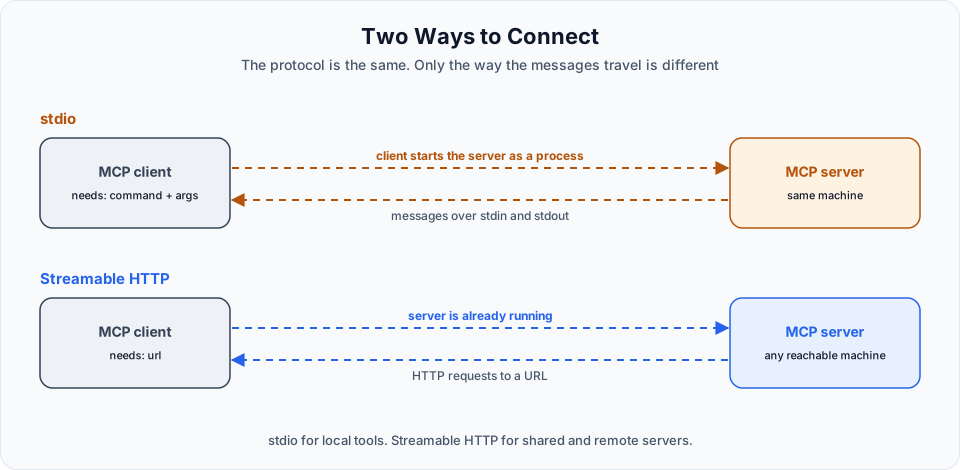
| stdio | Streamable HTTP | |
|---|---|---|
| Where the server runs | On the same machine as the client | Anywhere that can be reached over a network, including your own machine |
| Who starts the server | The client starts it as a child process | It is started separately and keeps running |
| How messages travel | Through the standard input and output streams of that process | As HTTP requests to a URL |
| What the client needs to know | The command that starts the server | The URL of the server |
| Typical use | Local tools and development | Shared or remote servers, such as GitHub's |
stdio stands for standard input and output, the streams every program has: stdin for what comes in and stdout for what goes out. With this transport there is no port and no URL. The client launches the server program and the two exchange messages through those streams. It is simple and fast, and nothing is exposed to the network.
Streamable HTTP is used when the server runs as a service of its own. The server listens on an address, and clients send their requests there, much like calling a web API.
You may also come across SSE, short for server-sent events, in older tutorials and configurations. It was the first remote transport of MCP. The specification has marked it as deprecated since the 2025-03-26 revision, with Streamable HTTP as its replacement. Use Streamable HTTP for anything new.
What changes in our code
Compare the program from the previous page with what we are about to build:
| Tool calling without MCP | With MCP | |
|---|---|---|
| Where the tools are written | In the same file as the program | In a separate server, possibly by somebody else |
| How the program gets them | It imports the functions | It asks the server with tools/list |
| Who runs a tool | Our program calls the function | Our program asks the server with tools/call |
| How the model uses them | bind_tools, read tool_calls, send results back | Exactly the same |
The last row is the important one. Nothing about the model changes. MCP only changes where tools come from and where they run.
What comes next
Enough theory. On the next page we build a real MCP server with two tools, and a client that connects to it: Building an MCP Server with stdio.
Try It Yourself
- In your own words, explain the difference between an MCP host, an MCP client and an MCP server. Then check your answer against the architecture page linked below.
- Pick three services you use, for example GitHub, a calendar and a database. For each, list two tools, one resource and one prompt that an MCP server for it could offer.
- For each of these, decide whether stdio or Streamable HTTP fits better and why: a tool that reads files on your laptop, a company-wide ticket system, a server you are still developing.
- Open the official specification and find the page for tools. Look at the example of a
tools/listresponse and identify the name, the description and the input schema of a tool.
Official references
- What is the Model Context Protocol
- Architecture overview
- Specification
- Specification changelog, 2026-07-28
Written By: Shramik Masti
How is this guide?
Last updated on
Tool Calling from Scratch
Understand why an LLM needs tools, turn Python functions into tools with LangChain, run the tool the model asks for, and handle several tool calls in one question.
Building an MCP Server with stdio
Build your first MCP server with FastMCP, connect to it over stdio with a LangChain MCP client, call its tools directly and then let an LLM choose them.