
Tool Calling from Scratch
Understand why an LLM needs tools, turn Python functions into tools with LangChain, run the tool the model asks for, and handle several tool calls in one question.
The chat program from the previous page can talk. It cannot do anything, and it does not know anything that happened after its training ended. Ask it a very simple question:
User: What is current dateIn the video, the model confidently answered with April 6, 2024. The recording was made on October 5, 2026. The model did not look at a calendar. It has no calendar. It produced a date that sounds reasonable, which is exactly what hallucination means. For a chat demo this is funny. Inside an application that real users trust, it is a bug you cannot ship.
Ask ChatGPT the same question and you get the correct date. The model behind it is not smarter about dates. The application around the model has a tool that fetches the date, and the model is allowed to use it.
This page builds that mechanism by hand. It is the foundation of everything that follows: MCP is a standard way to share tools, so you first need to know what a tool is and how a model uses one.
The model is the brain, tools are the hands
Think of the LLM as a brain. It can read, reason and write. It cannot reach outside itself. It cannot read a clock, query your database or call an API.
A tool is a normal function in your code that does one of those things. You describe the function to the model. When a question needs it, the model says "please run this function with these arguments". Your code runs it and hands the result back.
Three points are easy to miss and important to remember:
- The model never executes anything. It only asks.
- Your program decides whether and how to run the tool.
- The model sees only the tool's name, its description and its parameters. It never sees the code inside.
Step 1: Write a function
Start from the single-question version of main.py. The chat loop and the history list are removed to keep the focus on tools.
from datetime import date

def get_current_date() -> str:
    """Return today's date in ISO format (YYYY-MM-DD)."""
    return date.today().isoformat()
Nothing here is specific to AI. date.today().isoformat() returns a string such as 2026-10-05.
The line in triple quotes is the docstring. In normal Python it is documentation for humans. Here it has a second job. The model reads two things to decide whether this tool fits a question: the function name and the docstring. A vague name or an empty docstring leads to a tool that is never picked, or picked at the wrong time.
Step 2: Turn the function into a tool
LangChain provides a decorator for this:
from datetime import date
from langchain_core.tools import tool

@tool
def get_current_date() -> str:
    """Return today's date in ISO format (YYYY-MM-DD)."""
    return date.today().isoformat()
@tool wraps the function in an object that carries the name, the description and the parameter types in a form the model understands.
Keep the tools in a dictionary, with the tool name as the key. You will see in Step 4 why a dictionary is handy:
tools = {
    'get_current_date': get_current_date
}
Step 3: Tell the model about the tools
llm = ChatOpenAI(model='gpt-4o-mini')

llm_with_tools = llm.bind_tools(list(tools.values()))
bind_tools takes a list of tools, so the dictionary values are converted to a list. It returns a new object, here called llm_with_tools. From now on, call this one and not the plain llm.
Run the program and ask the date again:
user_input = input("User: ")
response = llm_with_tools.invoke(user_input)
print(f'AI: {response.content}')
User: What is current date?
AI:An empty answer. Print the whole response to see what happened:
print(f'AI: {response}')AI: content='' additional_kwargs={'refusal': None} response_metadata={... 'finish_reason': 'tool_calls', ...}
tool_calls=[{'name': 'get_current_date', 'args': {}, 'id': 'call_Xv9jMvtdrLKP3pXCsIwhwqRE', 'type': 'tool_call'}]
...The output is long. Three parts matter:
| Part | Value | Meaning |
|---|---|---|
content | '' | The model did not answer in words |
finish_reason | 'tool_calls' | It stopped because it wants a tool to be run |
tool_calls | a list with one entry | Which tool, with which arguments |
Each entry in tool_calls is a dictionary:
| Key | Example | Meaning |
|---|---|---|
name | 'get_current_date' | The tool the model picked |
args | {} | The arguments it wants to pass. Empty here, because the function takes none |
id | 'call_Xv9j...' | An identifier for this request. You need it in Step 5 |
So the model did not give the date. It told us which tool can give it.
Step 4: Run the tool the model asked for
tool_calls is a list, because one question can need several tools. Loop over it, find the tool by its name in the dictionary and run it:
for tool_call in response.tool_calls:
    tool_response = tools[tool_call['name']].invoke(tool_call['args'])
    print(tool_response)
User: What is current date?
2026-10-05There are now two different invoke calls in the program. llm_with_tools.invoke(...) calls the model. tools[...].invoke(...) calls a tool. A tool object has an invoke method too, and it receives the arguments exactly as the model supplied them.
The date is correct, but 2026-10-05 is raw data, not an answer. A chat application should reply in a sentence. For that, the result has to go back to the model.
Step 5: Send the result back to the model
The model needs the full story: what the user asked, what it requested, and what the tool returned. That is a list of messages, the same idea as the chat history from the previous page.
The first attempt in the video appended plain values to the list:
messages.append(user_input)
messages.append(response)
messages.append(tool_response)
and the second call to the model failed with an error. A bare string in that list gives the model no way to know that the last item is the output of a tool. LangChain has a message class for each role, and tool results must use the right one:
| Class | Who is speaking |
|---|---|
HumanMessage | The user |
AIMessage | The model. The response object you get from invoke is already one |
ToolMessage | The output of a tool |
A ToolMessage needs two things: the content, which is what the tool returned, and the tool_call_id, which is the id from Step 3. The id tells the model which of its requests this result answers.
from langchain_core.messages import HumanMessage, ToolMessage

messages = []

user_input = input("User: ")
messages.append(HumanMessage(content=user_input))

response = llm_with_tools.invoke(user_input)
messages.append(response)

for tool_call in response.tool_calls:
    tool_response = tools[tool_call['name']].invoke(tool_call['args'])
    messages.append(ToolMessage(content=tool_response, tool_call_id=tool_call['id']))

response = llm_with_tools.invoke(messages)
print(f'AI: {response.content}')
User: What is the current date?
AI: The current date is October 5, 2026.A proper sentence, with a date that came from the machine's clock and not from the model's memory.
The complete flow
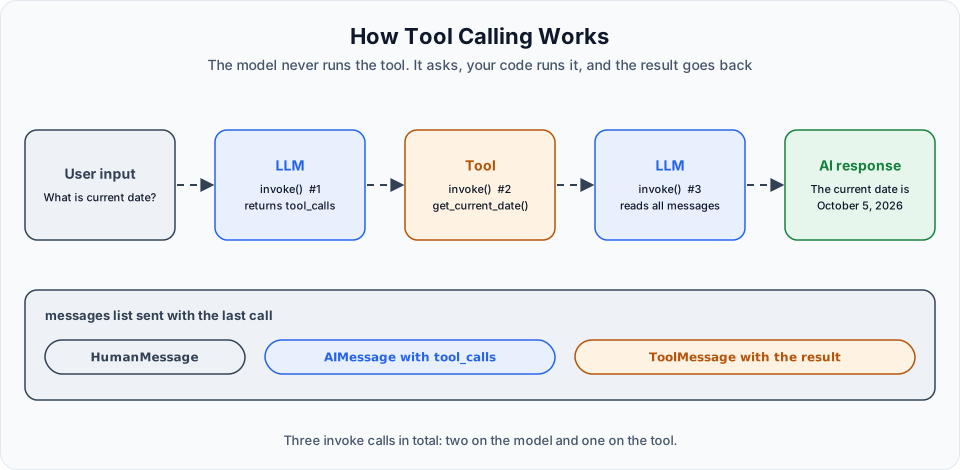
Count the invoke calls in the program: three.
| # | Call | What comes back |
|---|---|---|
| 1 | llm_with_tools.invoke(user_input) | No text. A request to run a tool |
| 2 | tools[name].invoke(args) | The raw result of the function |
| 3 | llm_with_tools.invoke(messages) | The final answer in words |
The third call is your choice. If your program only needs the raw value, you can stop after the second.
Adding a second tool
One tool is not much of a decision. Add another and see whether the model picks the right one:
@tool
def multiply(num1 :int, num2 :int) -> int:
    """Multiply two integers and return the result."""
    return num1 * num2

tools = {
    'get_current_date': get_current_date,
    'multiply': multiply
}
This tool has parameters. The type hints int are part of what the model sees, so it knows it must send two whole numbers.
Nothing else in the program changes. The loop already handles any tool by name. To watch the model's decision, print the first response as well.
User: What is 2 multiplied by 4?
content='' ... tool_calls=[{'name': 'multiply', 'args': {'num1': 2, 'num2': 4}, 'id': '...', 'type': 'tool_call'}] ...
followed by the final answer from the model, which states that the result is 8.
Look at args. You typed a sentence. The model pulled the two numbers out of it and matched them to the parameter names num1 and num2. Your code passes that dictionary to the function unchanged.
A model like this can multiply 2 by 4 without help. It still chose the tool, because you offered one whose description matches the question.
Several tool calls in one question
User: What is current date, and what is 2*3
content='' ... tool_calls=[
  {'name': 'get_current_date', 'args': {}, 'id': 'call_AWhpf...', 'type': 'tool_call'},
  {'name': 'multiply', 'args': {'num1': 2, 'num2': 3}, 'id': 'call_3s7GF...', 'type': 'tool_call'}
] ...
AI: The current date is October 5, 2026, and 2 times 3 = 6.
Two entries in tool_calls, each with its own id. The for loop runs both tools and adds two ToolMessage objects, and the model combines both results into one answer. This is why Step 4 used a loop from the start, and why each result carries its tool_call_id.
The complete program
from dotenv import load_dotenv
from langchain_openai import ChatOpenAI
from datetime import date
from langchain_core.tools import tool
from langchain_core.messages import HumanMessage, ToolMessage

load_dotenv()

@tool
def get_current_date() -> str:
    """Return today's date in ISO format (YYYY-MM-DD)."""
    return date.today().isoformat()

@tool
def multiply(num1 :int, num2 :int) -> int:
    """Multiply two integers and return the result."""
    return num1 * num2

tools = {
    'get_current_date': get_current_date,
    'multiply': multiply
}

def main():
    llm = ChatOpenAI(model='gpt-4o-mini')

    llm_with_tools = llm.bind_tools(list(tools.values()))

    messages = []

    user_input = input("User: ")
    messages.append(HumanMessage(content=user_input))

    response = llm_with_tools.invoke(user_input)
    messages.append(response)
    print(response)

    for tool_call in response.tool_calls:
        tool_response = tools[tool_call['name']].invoke(tool_call['args'])
        messages.append(ToolMessage(content=tool_response, tool_call_id=tool_call['id']) )

    response = llm_with_tools.invoke(messages)
    print(f'AI: {response.content}')

if __name__ == "__main__":
    main()
uv run main.pyWhen the model does not need a tool
Ask this program "What is LangChain?" and the first response has normal text in content and an empty tool_calls list. The loop then runs zero times and the program calls the model a second time for no reason. It still works. In your own code, check if response.tool_calls: first and print response.content directly when the list is empty.
A tool is real code with real effects
The two tools here only read a date and multiply numbers. A tool can just as well delete a file or send an email, and it runs with the arguments the model chose. Treat those arguments like any input from outside: validate them, and keep tools that change or delete things behind a confirmation.
From tools to MCP
Both tools on this page live in the same file as the program that uses them. That is fine for your own functions.
Now think bigger. GitHub could write tools for creating branches and pull requests. A calendar service could write tools for meetings. You do not want to rewrite those in your project, and they do not want to write a separate integration for every AI application in the world. Tools written in one place need a standard way to be used from another.
That standard is the Model Context Protocol, and it is the subject of the next page: What is MCP.
Try It Yourself
- Run the program without
bind_toolsand ask for the current date. Then bind the tool and ask again. Compare the two answers. - Print the full first response and find
content,finish_reasonandtool_callsin it. - Change the docstring of
get_current_dateto something unrelated, such as"""Return the name of a fruit.""", and ask for the date. Does the model still pick the tool? Put the docstring back afterwards. - Add a third tool,
add(num1: int, num2: int), and ask a question that needs all three tools at once. - Add the
if response.tool_calls:check so that a general question is answered with a single model call.
Official references
Written By: Shramik Masti
How is this guide?
Last updated on
Building Your First LLM App
Set up a Python project with uv, call an OpenAI model through LangChain, read the response and its token usage, and give a chat loop memory by sending the conversation history.
What is MCP
Understand the Model Context Protocol, the roles of host, client and server, the three things a server can offer, tools, resources and prompts, and the two transports, stdio and Streamable HTTP.