
Streaming Responses
Show a model's answer piece by piece as it is generated, with OpenAiStreamingChatModel and a StreamingChatResponseHandler, and fix the two problems the lesson runs into on the way.
Every program so far behaved the same way: you run it, nothing happens for a few seconds, and then the complete answer appears at once.
ChatGPT does not feel like that. The lesson opens it and types "tell me about lc4j in short". The answer starts almost immediately and grows word by word, as if someone were typing.
That effect is called streaming, and it is not decoration. A long answer can take ten seconds or more to finish. If the user sees the first words after half a second, the application feels fast. If the user stares at an empty screen for ten seconds, it feels broken.
Why streaming is possible
Remember how a model produces an answer, from Transformers and Attention: one token at a time.
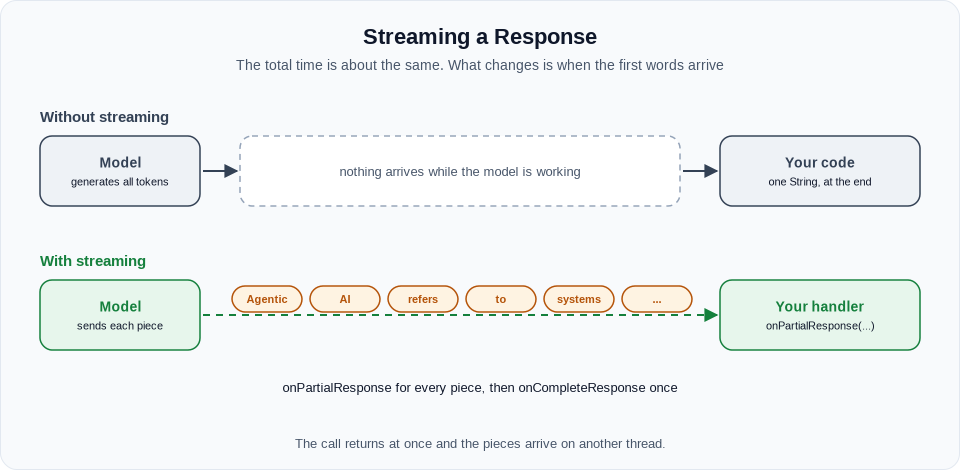
| Without streaming | With streaming | |
|---|---|---|
| What the server does | Generates all tokens, then sends the complete answer | Sends each piece as soon as it is generated |
| What your code gets | One String, at the end | Many small pieces, one after another |
| What the user sees | Nothing, then everything | The answer building up |
The total time is about the same. What changes is when the first words arrive.
Step 1: Use the streaming model
We continue in lc4j-demo, in Main.java. Comment out the OpenAiChatModel and create a streaming model. The builder calls are the same:
OpenAiStreamingChatModel chatModel = OpenAiStreamingChatModel.builder()
        .apiKey(apiKey)
        .modelName("gpt-4o-mini")
        .temperature(0.4)
        .maxCompletionTokens(400)
        .build();
OpenAiStreamingChatModel is a different class from OpenAiChatModel. It implements StreamingChatModel, not ChatModel.
Step 2: Pass a handler
A normal chat call returns the answer. A streaming call cannot do that, because the answer does not exist yet when the call returns. So you hand over an object that will be called back whenever something happens:
chatModel.chat("Explain about agentic ai",  new StreamingChatResponseHandler() {

    @Override
    public void onPartialResponse(String partial) {
        System.out.print(partial);
    }

    @Override
    public void onCompleteResponse(
            dev.langchain4j.model.chat.response.ChatResponse response) {
        System.out.println("\nStreaming completed!");
    }

    @Override
    public void onError(Throwable error) {
        error.printStackTrace();
    }
});
The lesson implements three methods of StreamingChatResponseHandler. The interface has a few more, for example for tool calls, and they have default implementations:
| Method | Called | What the lesson does in it |
|---|---|---|
onPartialResponse(String partial) | Many times, once for each piece of the answer | Prints the piece with print, without a line break, so the pieces join into text |
onCompleteResponse(ChatResponse response) | Once, when the whole answer has been sent | Prints "Streaming completed!" |
onError(Throwable error) | If something goes wrong | Prints the stack trace |
onCompleteResponse receives a ChatResponse with the complete answer and its metadata, so you do not have to collect the pieces yourself if you need the full text at the end.
Step 3: Run it, and meet the first problem
Exception in thread "main" java.lang.IllegalArgumentException: chatModel cannot be null
	at dev.langchain4j.internal.Exceptions.illegalArgument(Exceptions.java:27)
	at dev.langchain4j.internal.ValidationUtils.ensureNotNull(ValidationUtils.java:90)
	...
	at dev.langchain4j.service.DefaultAiServices$1.invoke(DefaultAiServices.java:702)
The message says that a chat model is missing, and the stack trace points into DefaultAiServices. That is the clue. The error does not come from the streaming call. It comes from older code further down in the same main method, left over from Prompt Templates:
LearningAssistant assistant = AiServices.create(LearningAssistant.class, chatModel);

String answer=assistant.explain("Microservices", "Beginner");
The variable chatModel used to be an OpenAiChatModel. Now it is a streaming model. The line still compiles, because AiServices.create also accepts a streaming model. But explain returns a plain String, and for that the AI Service needs a normal chat model, which it was never given.
Fix: comment out those leftover lines.
Step 4: Run again, and meet the second problem
Process finished with exit code 0No error this time, and no answer. The program ends at once.
This is the more instructive problem. The streaming chat call does not wait. It starts the request, returns immediately, and the pieces arrive later on another thread. Our main method has nothing else to do, reaches its end, and the program finishes before the first piece arrives.
A web server does not have this problem, because it keeps running. A small console program has to be told to wait.
Step 5: Wait with a CountDownLatch
CountDownLatch is a small class from java.util.concurrent. One thread waits on it, and another thread releases it.
CountDownLatch latch = new CountDownLatch(1);| Place | Code | Meaning |
|---|---|---|
After the chat(...) call | latch.await(); | The main thread stops here and waits |
In onCompleteResponse | latch.countDown(); | The answer is complete, release the main thread |
In onError | latch.countDown(); | Something failed, release it too. Otherwise the program would hang for ever |
await() can throw InterruptedException, so main declares it.
The complete program
package com.telusko;

import dev.langchain4j.model.chat.response.StreamingChatResponseHandler;
import dev.langchain4j.model.openai.OpenAiStreamingChatModel;

import java.util.concurrent.CountDownLatch;

public class Main {
    public static void main(String[] args) throws InterruptedException {
        String apiKey = System.getenv("OPENAI_API_KEY");

        CountDownLatch latch = new CountDownLatch(1);

        OpenAiStreamingChatModel chatModel = OpenAiStreamingChatModel.builder()
                .apiKey(apiKey)
                .modelName("gpt-4o-mini")
                .temperature(0.4)
                .maxCompletionTokens(400)
                .build();

        chatModel.chat("Explain about agentic ai",  new StreamingChatResponseHandler() {

            @Override
            public void onPartialResponse(String partial) {
                System.out.print(partial);
            }

            @Override
            public void onCompleteResponse(
                    dev.langchain4j.model.chat.response.ChatResponse response) {
                System.out.println("\nStreaming completed!");
                latch.countDown();
            }

            @Override
            public void onError(Throwable error) {
                error.printStackTrace();
                latch.countDown();
            }
        });

        latch.await();
    }
}
Step 6: Run it
Now the console fills up while you watch. A screenshot taken in the middle of the run shows the last line unfinished:
- **Healthcare**: Systems that can diagnose conditions and recommend treatments based on patient data.
- **Gaming**: Non-player characters (NPC
A moment later that line has continued. That is streaming, visible in the console. The run ends like this:
- **Accountability**: Determining
Streaming completed!

Process finished with exit code 0
Two details in those last lines:
- "Streaming completed!" is printed by
onCompleteResponse. The handler was told that the answer is finished, and released the latch. - The answer stops in the middle of a sentence, at "Determining". The model still has
maxCompletionTokens(400). The limit cuts a streamed answer exactly like a normal one.
Checked for these docs
This program was run for these docs with LangChain4j's streaming model class for Ollama and a local model, with the same handler and the same latch. The chat call returned to main in well under a second, long before the first piece of the answer arrived, which is exactly why a program without the latch ends in silence. The answer then came in 63 pieces, printed one by one, and "Streaming completed!" appeared at the end. The first problem from the lesson was reproduced too: an AI Service with a String return type that is given the streaming model throws IllegalArgumentException: chatModel cannot be null.
Additions beyond the lesson
Streaming with an AI Service. The lesson streams with the low-level model and a handler. AI Services can stream too. The method returns a TokenStream in place of a String:
interface Assistant {
    TokenStream explain(String topic);
}

Assistant assistant = AiServices.create(Assistant.class, chatModel);

assistant.explain("agentic ai")
        .onPartialResponse(System.out::print)
        .onCompleteResponse(response -> latch.countDown())
        .onError(error -> { error.printStackTrace(); latch.countDown(); })
        .start();
Nothing is sent until start() is called. This form was compiled and run for these docs. It is described in the response streaming guide of the official documentation.
Streaming in a web application. In a console program, streaming means print. In a web application, the pieces have to travel on to the browser, usually as server-sent events. The official guide shows how AI Services can return a reactive Flux<String> for that. The next lesson builds REST endpoints without streaming, to keep them simple.
You still need the complete answer sometimes. Saving the answer, counting tokens, or passing it to the next step all need the full text. Take it from the ChatResponse in onCompleteResponse. Do not rebuild it from the pieces.
Mistakes and fixes
| What you see | Cause | Fix |
|---|---|---|
IllegalArgumentException: chatModel cannot be null | An AI Service with a String method was created with the streaming model. In the lesson it is leftover code from an earlier exercise | Remove that code, or give the service a normal ChatModel |
| The program ends without printing an answer | chat returned and main finished before the pieces arrived | Wait with a CountDownLatch |
| The program never ends | The latch is released only in onCompleteResponse, and an error occurred | Call latch.countDown() in onError too |
| Every piece is on its own line | println was used in onPartialResponse | Use print |
"Unhandled exception: InterruptedException" on latch.await() | It is a checked exception | Add throws InterruptedException to main |
Try It Yourself
- Run the streaming program and watch the answer arrive.
- Remove
latch.await()and run it again. What do you see? - Change
printtoprintlninonPartialResponse. How large are the pieces? - Count the pieces with a counter in
onPartialResponseand print the number inonCompleteResponse. - In
onCompleteResponse, printresponse.aiMessage().text()and compare it with what was streamed. - Use a wrong model name. Which handler method is called?
- Rewrite the example with an AI Service that returns a
TokenStream.
Official references
- LangChain4j: response streaming
- LangChain4j: AI Services, streaming section
- LangChain4j: OpenAI integration
- Java: CountDownLatch API documentation
Written By: Shramik Masti
How is this guide?
Last updated on
Structured Output
Get a Java record, a POJO or an enum back from a model in place of free text, by changing the return type of an AI Service method, and learn what LangChain4j does behind the scenes to make it work.
Building AI REST APIs
Use LangChain4j inside a Spring Boot application, let Spring create the ChatModel from application.properties, declare an AI Service with one annotation, and expose both as REST endpoints.