
Structured Output
Get a Java record, a POJO or an enum back from a model in place of free text, by changing the return type of an AI Service method, and learn what LangChain4j does behind the scenes to make it work.
Every program so far printed what the model wrote: a paragraph, a list, some code. For a person reading the console, that is fine.
Your application is not a person. A backend wants a value it can save to a database, pass to a method or compare in an if statement. A paragraph that mentions a name and a number somewhere is of no use to it. What it needs is a Java object.
Getting a model to answer in a fixed, typed shape is called structured output.
The idea
The whiteboard in the lesson shows it in three stages:
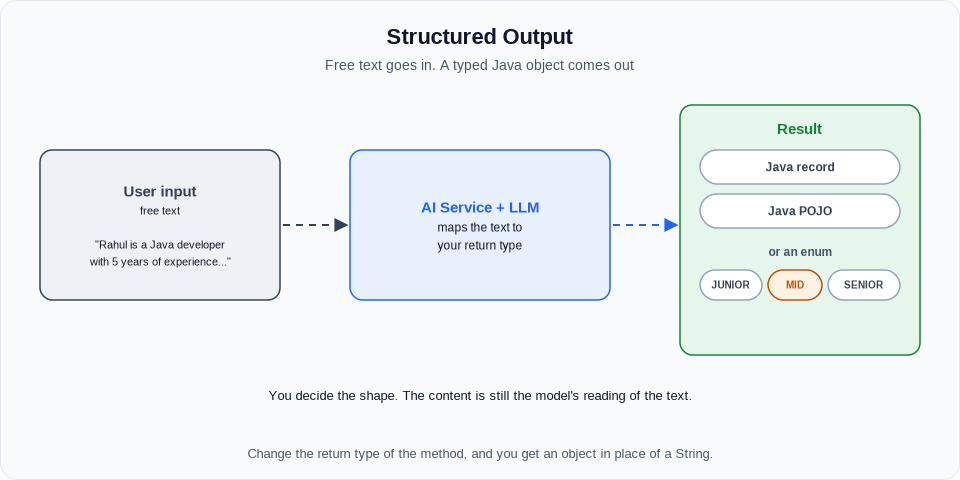
| Stage | Content |
|---|---|
| User input | Free text |
| LangChain4j AI Service + LLM | Maps the text to your return type |
| Result | A Java record, a Java POJO or an enum |
You already have the mechanism. In AI Services you saw that the proxy converts the model's reply to the return type of your method. Until now that type was String. Change it, and you get something else.
The lesson creates a new package, com.telusko.so, in the lc4j-demo project, with one class to run, LaunchMain.
Example 1: A record
The task: read a sentence about a job candidate and get the details as an object.
Step 1: Describe the data
package com.telusko.so;

import java.util.List;

public record Candidate(
        String name,
        int experience,
        List<String> skills
) {}
A record is a compact way to write a class that only holds data. It has been part of Java since version 16. Three components: a name, the years of experience as a number, and a list of skills.
Step 2: Return it from an AI Service
package com.telusko.so;

import dev.langchain4j.service.UserMessage;

public interface ResumeAssistant {
    @UserMessage("""
        Extract candidate details from this text:
        {{it}}
        """)
    Candidate extract(String resume);
}
Two things to notice.
The return type is Candidate, not String. That one word is what turns a chat call into structured output.
The template uses {{it}}. When a method has exactly one parameter, {{it}} stands for it, and no @V annotation is needed.
Step 3: Call it
ResumeAssistant assistant = AiServices.create(ResumeAssistant.class, chatModel);

Candidate candidate = assistant.extract(
        "Rahul is a Java developer with 5 years of experience. " +
                "He knows Spring Boot, AWS and Docker.");

System.out.println(candidate);
System.out.println(candidate.name());
System.out.println(candidate.experience());
System.out.println(candidate.skills());
Candidate[name=Rahul, experience=5, skills=[Java, Spring Boot, AWS, Docker]]
Rahul
5
[Java, Spring Boot, AWS, Docker]In the video the sentence is pasted into the call, and the IDE escapes the pasted quotation marks, so the string on screen looks more complicated than the one above. The call above is the intended code. The first line is the record printed as a whole. The next three are its components, read with the accessor methods a record provides. experience is a real int and skills is a real List<String>. You could store the object, loop over the skills or compare the number.
Look closely at the skills
The sentence says that Rahul "knows Spring Boot, AWS and Docker". Java is mentioned as his job, "a Java developer", and not in the list of what he knows. The result still contains Java as the first skill. The model made an inference, and a sensible one. But it shows what structured output is: you decide the shape of the data, and the content is still the model's reading of the text. If an exact rule matters, state it in the prompt, and check the values before you rely on them.
Example 2: A POJO
Records are not required. An ordinary class with fields, a no-argument constructor, getters and setters works the same way. Many existing projects have such classes already, for example JPA entities and DTOs.
Step 1: The class
package com.telusko.so;

public class Employee {

    private String name;
    private String department;
    private int experience;

    public Employee() {}

    public String getName() {
        return name;
    }

    public void setName(String name) {
        this.name = name;
    }

    public String getDepartment() {
        return department;
    }

    public void setDepartment(String department) {
        this.department = department;
    }

    public int getExperience() {
        return experience;
    }

    public void setExperience(int experience) {
        this.experience = experience;
    }
}
Step 2: The interface
package com.telusko.so;

import dev.langchain4j.service.UserMessage;

public interface EmployeeAssistant {

    @UserMessage("Extract employee details: {{it}}")
    Employee extract(String text);
}
Step 3: Call it
System.out.println("======================");

EmployeeAssistant empAssistant = AiServices.create(EmployeeAssistant.class, chatModel);

Employee employee = empAssistant.extract(
        "Priya works in the IT department and has 4 years of experience."
);

System.out.println(employee.getName());
System.out.println(employee.getDepartment());
System.out.println(employee.getExperience());
======================
Priya
IT
4The same idea with a different kind of class. Use a record for new code, where the object is only a carrier of data. Use a class when you already have one or need it to be mutable.
The complete LaunchMain
package com.telusko.so;

import dev.langchain4j.model.openai.OpenAiChatModel;
import dev.langchain4j.service.AiServices;

public class LaunchMain
{
    public static void main(String[] args)
    {
        String apiKey = System.getenv("OPENAI_API_KEY");

        OpenAiChatModel chatModel = OpenAiChatModel.builder()
                .apiKey(apiKey)
                .modelName("gpt-4o-mini")
                .temperature(0.4)
                .maxCompletionTokens(400)
                .build();

        ResumeAssistant assistant = AiServices.create(ResumeAssistant.class, chatModel);

        Candidate candidate = assistant.extract(
                "Rahul is a Java developer with 5 years of experience. " +
                        "He knows Spring Boot, AWS and Docker.");

        System.out.println(candidate);
        System.out.println(candidate.name());
        System.out.println(candidate.experience());
        System.out.println(candidate.skills());

        System.out.println("======================");

        EmployeeAssistant empAssistant = AiServices.create(EmployeeAssistant.class, chatModel);

        Employee employee = empAssistant.extract(
                "Priya works in the IT department and has 4 years of experience."
        );

        System.out.println(employee.getName());
        System.out.println(employee.getDepartment());
        System.out.println(employee.getExperience());
    }
}
Keep the key out of the source file
In the video, this one class has the API key written directly into the apiKey string. Do not copy that habit. A key in a source file is one commit away from being public. The code above reads it from the environment, as every other lesson does. Create a run configuration for LaunchMain with OPENAI_API_KEY, or define the variable once in your operating system.
Example 3: An enum
The whiteboard shows a third kind of result that the lesson does not code: an enum, with the values JUNIOR, MID and SENIOR, and MID marked as the chosen one. An enum as return type turns the model into a classifier. It has to pick one of your values.
package com.telusko.so;

public enum Level {
    JUNIOR, MID, SENIOR
}package com.telusko.so;
import dev.langchain4j.service.UserMessage;
public interface LevelAssistant {
@UserMessage("Classify the experience level of this candidate: {{it}}")
Level classify(String text);
}LevelAssistant levelAssistant = AiServices.create(LevelAssistant.class, chatModel);
Level level = levelAssistant.classify("Rahul is a Java developer with 5 years of experience.");
System.out.println(level);The result is a Level value that you can use in a switch. This is useful for routing, tagging and any decision with a fixed set of outcomes.
This example is an addition
The enum case is on the lesson's whiteboard and is not written as code in the video. The three files above were written for these docs, compiled against the versions used in the course and run with a local model. A developer with 5 years of experience was classified as MID, a person who had just finished college as JUNIOR, and someone who had led teams for 18 years as SENIOR.
What happens behind the scenes
The model does not know what a Java record is. It can only produce text. LangChain4j translates in both directions:
| Step | Who | What |
|---|---|---|
| 1 | AI Service | Looks at the return type and works out its fields and their types |
| 2 | AI Service | Sends your message to the model, together with a description of the JSON it expects |
| 3 | Model | Answers with JSON |
| 4 | AI Service | Converts that JSON into your record, class or enum |
| 5 | Your code | Receives the object |
Step 2 can be done in two ways. By default, LangChain4j describes the expected JSON in words and appends that to your message. The stronger way is to send a real JSON Schema through the provider's structured output feature, which has to be enabled on the model. The official documentation calls the default approach less reliable.
Going deeper
The separate LangChain4j docs cover this in detail, including how to switch on the JSON Schema mode and a tested finding about marking fields as required: Structured Output with Records.
What you can and cannot rely on
| What you get | You still have to check |
|---|---|
| An object of your type, or an exception if the model's reply cannot be converted | Whether each value is correct |
| The field names are yours | Whether a field is missing. A value the model could not find arrives empty: null or an empty text, 0 for an int, an empty list |
| Numbers are numbers, lists are lists | Whether the model added something the text did not say, as with Java above |
Give the extractor a sentence that contains no candidate at all, and it still returns a Candidate, because that is the return type. Validate the object like any other input from outside your system.
Checked for these docs
The record and the POJO example were run for these docs with a local model in place of OpenAI, with the same sentences as in the lesson.
- The Rahul sentence returned
Candidate[name=Rahul, experience=5, skills=[Java, Spring Boot, AWS, Docker]]. The skillJavawas added by the local model too, exactly as in the video. - The Priya sentence returned the name
Priya, the departmentITand the experience4. - The sentence "The weather in Pune is pleasant today." returned
Candidate[name=, experience=0, skills=[]]. An object came back although the text contains no candidate.
Mistakes and fixes
| What you see | Cause | Fix |
|---|---|---|
| The method returns text with JSON in it | The return type is still String | Return your record or class |
| An exception while the answer is converted | The model did not answer with the expected JSON. More likely with small models and the default mode | Use a more capable model or enable the JSON Schema mode |
OutputParsingException for a POJO | The class has no no-argument constructor, so the object cannot be created. In the test for these docs this ended in an exception. Setters are not required: a class with private fields and no setters was filled correctly | Add a no-argument constructor, or use a record |
| An authentication error | LaunchMain is a new class without a run configuration that sets OPENAI_API_KEY | Create the configuration, or set the variable system-wide |
List cannot be resolved in the record | The import is missing | import java.util.List; |
Try It Yourself
- Create
CandidateandResumeAssistantand extract the details from a sentence of your own. - Run the Rahul example and check the skills. Then add "List only the skills that are named after the words 'He knows'" to the prompt and run again.
- Add a field
String cityto the record and run it with a sentence that names no city. What value arrives? - Write the
Employeeclass and its assistant, and extract an employee. - Remove the setters from
Employeeand run again. Are the fields still filled? Then remove the no-argument constructor and add one with a parameter. What happens now? - Add the
Levelenum and classify three different candidate descriptions. - Give
extracta sentence that has nothing to do with a candidate. Print the result and decide how your code should react. - Combine two ideas: a record
CandidateReport(Candidate candidate, Level level)returned by one method.
Official references
Written By: Shramik Masti
How is this guide?
Last updated on
Prompt Templates
Write a prompt once with placeholders and fill in the values at run time, first with LangChain4j's PromptTemplate class and then with the @UserMessage and @V annotations of an AI Service.
Streaming Responses
Show a model's answer piece by piece as it is generated, with OpenAiStreamingChatModel and a StreamingChatResponseHandler, and fix the two problems the lesson runs into on the way.