
AI Services
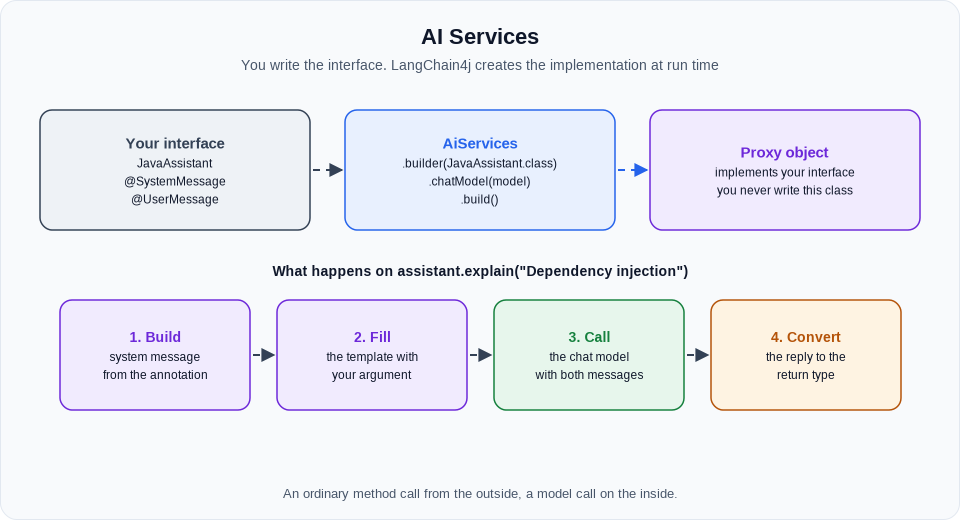
Describe what you want from a model as a plain Java interface, add the system and user messages as annotations, and let LangChain4j's AiServices create the implementation at run time.
In the previous lesson we created a SystemMessage object, a UserMessage object, passed both to the model, received a ChatResponse and took the text out of it. It works, and it is manual. Every new kind of question would repeat those steps.
LangChain4j has a higher level that removes them. It is called AI Services, and it starts with something every Java developer knows well: an interface.
The idea
An interface in Java is a specification. It says what should be done and leaves the how to whoever implements it.
With AI Services you write only that specification:
- You define an interface with a method.
- LangChain4j provides the implementation, at run time.
- You call your method.
You never write the class that implements the interface.
Step 1: Write the interface
In the same project, first-lc4j, create a new interface. The name is yours to choose. The lesson calls it JavaAssistant:
package com.telusko;

public interface JavaAssistant
{
    String chat(String prompt);
}
One abstract method. It takes the prompt as a String and returns the answer as a String. There is no implementation anywhere.
Step 2: Let AiServices build it
In Main.java, comment out the ChatResponse lines from the previous lesson and add:
JavaAssistant assistant = AiServices.builder(JavaAssistant.class)
        .chatModel(model)
        .build();
String answer=assistant.chat("What is dependency injection in short");
System.out.println(answer);| Call | Meaning |
|---|---|
AiServices.builder(JavaAssistant.class) | "Create an implementation of this interface" |
.chatModel(model) | The model it should use, the one we built earlier |
.build() | Returns an object that implements JavaAssistant |
Then assistant.chat(...) is an ordinary method call on an ordinary Java object. That object happens to have been created by LangChain4j.
Run it:
Dependency Injection (DI) is a design pattern used in software development to improve the modularity and testability of code. ...

By using DI, developers can easily swap out implementations, facilitate unit testing by mocking dependencies, and reduce tight coupling ...
Two paragraphs, no code example. The model answered a bare question in its own default style. We wrote an interface, gave no implementation, and it worked.
Step 3: Add a system message as an annotation
Last time the system message was an object that we created and passed along. With AI Services it is an annotation on the method:
package com.telusko;

import dev.langchain4j.service.SystemMessage;

public interface JavaAssistant
{
    @SystemMessage(
            """
            You are an experienced Java instructor.
            Explain concepts in simple words.
            Always provide a small example.
            """
    )
    String chat(String prompt);
}
Nothing changes in Main.java except the question:
String answer=assistant.chat("What is dependency injection");This time the answer contains a Java example, with an Engine passed into a Car:
    private Engine engine;

    // Constructor Injection
    public Car(Engine engine) {
        this.engine = engine;
    }
The question did not ask for an example. The system message did, with "Always provide a small example". The role now lives in one place, next to the method it belongs to.
Two things are called SystemMessage
The annotation used here is dev.langchain4j.service.SystemMessage. The class from the previous lesson is dev.langchain4j.data.message.SystemMessage. They have the same simple name and different jobs. In an AI Service interface you need the one from the service package. The same is true for UserMessage.
Step 4: A user message with a placeholder
At the moment the caller writes the whole question each time. Often the wording of the question is fixed, and only one part changes. That fixed wording can go into the interface as well:
package com.telusko;

import dev.langchain4j.service.SystemMessage;
import dev.langchain4j.service.UserMessage;
import dev.langchain4j.service.V;

public interface JavaAssistant
{
    @SystemMessage(
            """
            You are an experienced Java instructor.
            Explain concepts in simple words.
            Always provide a small example.
            """
    )
    @UserMessage("Explain {{topic}} with a simple example")
    String chat(@V("topic") String topic);
}| Part | Meaning |
|---|---|
@UserMessage("...") | The text of the user message. It is a template |
{{topic}} | A placeholder inside the template |
@V("topic") | Says that this method parameter fills the placeholder named topic |
The caller passes only the topic:
String answer=assistant.chat("Dependency injection");LangChain4j builds the user message "Explain Dependency injection with a simple example", adds the system message, calls the model and returns the text. The output is again an explanation with the Engine and Car example.
Templates get a lesson of their own next: Prompt Templates.
Step 5: Name the method for what it does
The method no longer chats. It explains a topic. Its name is ours to choose, so the lesson renames it:
String explain(@V("topic") String topic);and the call:
String answer=assistant.explain("Dependency injection");LangChain4j does not care what the method is called. Good names make the calling code read like your application: assistant.explain("Dependency injection").
The complete code
package com.telusko;

import dev.langchain4j.service.SystemMessage;
import dev.langchain4j.service.UserMessage;
import dev.langchain4j.service.V;

public interface JavaAssistant
{
    @SystemMessage(
            """
            You are an experienced Java instructor.
            Explain concepts in simple words.
            Always provide a small example.
            """
    )
    @UserMessage("Explain {{topic}} with a simple example")
    String explain(@V("topic") String topic);
}package com.telusko;
import dev.langchain4j.model.openai.OpenAiChatModel;
import dev.langchain4j.service.AiServices;
public class Main {
public static void main(String[] args)
{
String apiKey = System.getenv("OPENAI_API_KEY");
OpenAiChatModel model = OpenAiChatModel.builder()
.apiKey(apiKey)
.modelName("gpt-4o-mini")
.temperature(0.4)
.maxCompletionTokens(400)
.build();
JavaAssistant assistant = AiServices.builder(JavaAssistant.class)
.chatModel(model)
.build();
String answer=assistant.explain("Dependency injection");
System.out.println(answer);
}
}In the lesson's file, the message objects and the ChatResponse lines from the previous lesson are still present, the latter as comments. They are left out here because the AI Service replaces them.
The last run in the lesson ends like this:
### Explanation of the Example:

1. **Engine Interface**: This defines what an engine can do (in this case, just starting).
2. **V8
It stops in the middle of point 2. The model still has maxCompletionTokens(400) from the previous lesson, and the answer with its example is longer than that.
Checked for these docs
The complete code above was compiled against LangChain4j 1.20.0 and run for these docs with a local model in place of OpenAI. The interface needed no change. The answer followed the system message: simple words and a small Java example.
Who implemented the interface?
LangChain4j did. AiServices creates an object at run time that implements your interface. Such an object is called a proxy.
When you call assistant.explain("Dependency injection"), the proxy does what you did by hand in the previous lesson:
| Step | What the proxy does |
|---|---|
| 1 | Reads @SystemMessage and creates the system message |
| 2 | Takes the @UserMessage template and replaces {{topic}} with your argument |
| 3 | Sends both messages to the chat model |
| 4 | Takes the text out of the model's reply |
| 5 | Converts it to the method's return type, here String, and returns it |
If you have used Spring Data JPA, the pattern is familiar. There you declare a repository interface and never write its implementation. The official LangChain4j documentation makes the same comparison.
Step 5 will become important soon. The proxy converts the reply to whatever type your method returns. In Structured Output the return type is a Java record, and the same mechanism gives you an object with fields.
Before and after
| Previous lesson | AI Service | |
|---|---|---|
| System message | A SystemMessage object created in main | An annotation on the method |
| User message | A UserMessage object created in main | A template annotation plus a method parameter |
| Calling the model | model.chat(systemMessage, userMessage) | assistant.explain(topic) |
| Reading the answer | chatResponse.aiMessage().text() | The return value |
Mistakes and fixes
| What you see | Cause | Fix |
|---|---|---|
.build() is underlined in red | The variable was declared as AiServices<JavaAssistant> assistant. This happens in the lesson | Declare it with the interface type: JavaAssistant assistant = .... build() returns an implementation of your interface |
answer is red in the print statement | The old line that declared answer was commented out | Declare it again from assistant.chat(...) |
| The annotation does not compile | SystemMessage or UserMessage was imported from dev.langchain4j.data.message | Import both from dev.langchain4j.service |
IllegalArgumentException: Value for the variable 'topic' is missing when the method is called | The name in @V("...") does not match the placeholder in the template | Use the same name in both places |
| The answer stops in the middle | maxCompletionTokens(400) is still set on the model | Raise the limit or ask for a shorter answer |
Try It Yourself
- Create the plain
JavaAssistantwith onlyString chat(String prompt)and call it. - Add the
@SystemMessageand ask the same question. What changed in the answer? - Add the
@UserMessagetemplate and pass only a topic. - Change the placeholder to
{{subject}}without changing@V("topic"). Read the error, then fix it. - Add a second method
String quiz(@V("topic") String topic)with its own@UserMessagethat asks for three quiz questions. Call both methods. - Replace the builder with the short form
AiServices.create(JavaAssistant.class, model)and confirm that it behaves the same. - Print
assistant.getClass(). It shows a name such asjdk.proxy2.$Proxy4. What does that tell you about who wrote the class?
Official references
Written By: Shramik Masti
How is this guide?
Last updated on
ChatModel Configuration
Control a LangChain4j chat model with temperature and a limit on output tokens, and send a system message together with a user message to set how the model should behave.
Prompt Templates
Write a prompt once with placeholders and fill in the values at run time, first with LangChain4j's PromptTemplate class and then with the @UserMessage and @V annotations of an AI Service.