
Chat Memory
Make an AI Service remember the conversation with MessageWindowChatMemory, and give every user a separate memory with @MemoryId and a ChatMemoryProvider.
Every application so far has the same weakness. It answers one question well, and it cannot answer a follow-up question.
Tell it "My name is Rahul." and then ask "What is my name?". It does not know. ChatGPT and Gemini handle this without any trouble, so where is the difference?
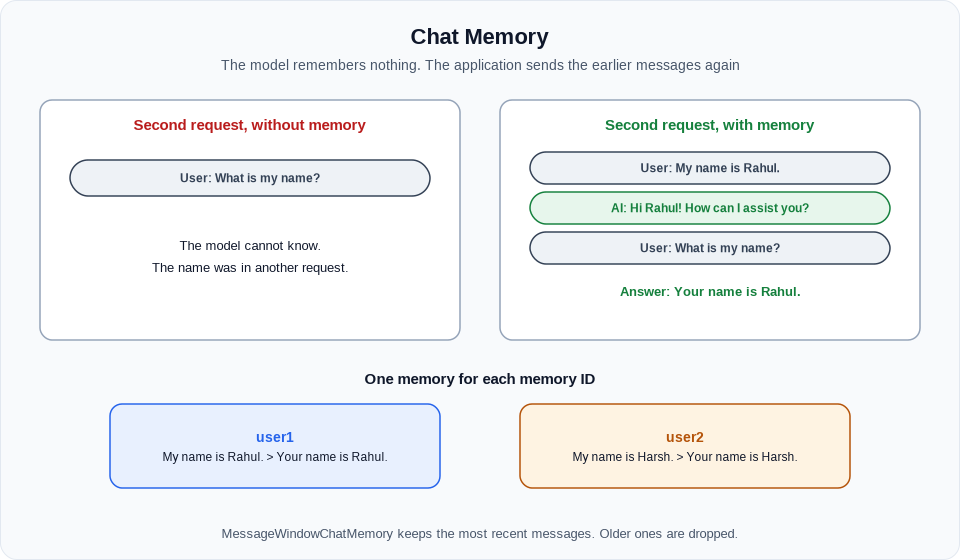
The difference is not in the model. A request to an LLM is stateless. Each request stands alone, and the model keeps nothing from the previous one. An application that seems to remember does something simple: it stores the conversation, and it sends the earlier messages again with every new question.
That stored conversation is called chat memory. LangChain4j can manage it for you.
How chat memory works
| Without memory | With memory |
|---|---|
| Request 2 contains only "What is my name?" | Request 2 contains "My name is Rahul.", the model's reply, and then "What is my name?" |
| The model has no way to know | The model reads the answer from the earlier messages |
The model does not remember anything in either case. With memory, your application reminds it every time.
The project
The lesson uses a prepared project named lc4j-chat-memory-java21. It is a plain Java Maven project, not Spring Boot, with JDK 21, the same two LangChain4j dependencies as before and the package com.telusko.chatmemory. From this lesson on, the prepared projects in the video use LangChain4j 1.18.1. Everything here works the same with 1.20.0.
It contains two files: an AI Service interface and a class with main. The comments in the code below are tidied a little compared with the file on screen, where the label "Step 4" appears twice. The code itself is the same.
Part 1: One conversation
Step 1: The AI Service
package com.telusko.chatmemory;

import dev.langchain4j.service.SystemMessage;
import dev.langchain4j.service.UserMessage;

/** AI Services interface: LangChain4j generates the implementation. */
public interface Assistant {

    @SystemMessage("You are a friendly Java tutor. Answer clearly and briefly.")
    @UserMessage("{{it}}")
    String chat(String message);
}
Nothing here is about memory. It is an ordinary AI Service with a system message. {{it}} is the built-in placeholder for the single parameter, so no @V annotation is needed.
Step 2: Create a memory and attach it
package com.telusko.chatmemory;

import dev.langchain4j.memory.chat.MessageWindowChatMemory;
import dev.langchain4j.model.openai.OpenAiChatModel;
import dev.langchain4j.service.AiServices;

/** Run this class from IntelliJ IDEA. Requires Java 21 and OPENAI_API_KEY. */
public class ChatMemoryApp {

    public static void main(String[] args) {
        // Step 1: Read API key from environment (never hardcode secrets).
        String apiKey = System.getenv("OPENAI_API_KEY");

        // Step 2: Configure the model.
        OpenAiChatModel model = OpenAiChatModel.builder()
                .apiKey(apiKey)
                .modelName("gpt-4o-mini")
                .build();

        // Step 3: Retain up to 10 recent chat messages (not 10 conversations).
        MessageWindowChatMemory memory = MessageWindowChatMemory.withMaxMessages(10);

        // Step 4: Attach memory to the AI Service.
        Assistant assistant = AiServices.builder(Assistant.class)
                .chatModel(model)
                .chatMemory(memory)
                .build();

        // Step 5: First conversation
        System.out.println(
                assistant.chat("My name is Rahul.")
        );

        // Step 6: Follow-up question
        System.out.println(
                assistant.chat("What is my name?")
        );

        System.out.println("Goodbye!");
    }
}
Two things are new.
| Code | Meaning |
|---|---|
MessageWindowChatMemory.withMaxMessages(10) | A memory that keeps the 10 most recent messages |
.chatMemory(memory) | Gives that memory to the AI Service |
This is also why the builder form of AiServices is used and not the short create form. The short form takes only a model. Anything extra, such as a memory, needs the builder.
From now on the AI Service does the bookkeeping. Before each call it adds your message to the memory and sends everything in the memory to the model. After the call it adds the model's reply as well.
Step 3: Run it
Hi Rahul! How can I assist you today with Java?
Your name is Rahul. How can I help you today?
Goodbye!
The second call contains only the question "What is my name?". The name was given in the first call. The answer is correct because the first exchange travelled along with the second request.
The SLF4J lines in the console
Each run in the video starts with three red lines that begin with SLF4J(W): No SLF4J providers were found. They are warnings from the logging library, not errors, and the lesson ignores them. They disappear if you add a logging implementation such as slf4j-simple to pom.xml.
What "10 messages" means
The lesson speaks of the last ten conversations. The comment in the code is more exact: up to 10 messages, not 10 conversations.
One exchange is two messages, your question and the model's reply. So a window of 10 holds about five exchanges. When the window is full, the oldest messages are removed to make room for new ones. Removed messages are gone for the model. It can no longer answer questions about them.
A window is needed for two reasons. Every message in the memory is sent again with every request, so a long history costs more input tokens each time. And the context window of the model has a hard limit.
Part 2: A separate memory for every user
The program above has one memory. In a web application with many users that would be a serious bug: all users would share one conversation, and one user's name could show up in another user's answer.
Each user needs a separate memory. LangChain4j solves this with a memory ID. You pass an ID with every call, and each ID gets its own memory.
Step 1: Add the ID to the interface
package com.telusko.chatmemory;

import dev.langchain4j.service.MemoryId;
import dev.langchain4j.service.UserMessage;
import dev.langchain4j.service.V;

/** AI Services interface: LangChain4j generates the implementation. */
public interface Assistant {

    @UserMessage("{{message}}")
    String chat(
            @MemoryId String userId,
            @V("message") String message
    );
}| Code | Meaning |
|---|---|
@MemoryId String userId | This parameter is not sent to the model. It selects which memory to use |
@V("message") String message | With two parameters, {{it}} no longer applies. The template names its variable, and @V connects it to the parameter |
The version of the interface that the lesson pastes at this point has no @SystemMessage line any more, and the code above shows it as it appears on screen. You can keep the system message from Part 1. It works together with @MemoryId.
Step 2: Replace the memory with a memory provider
One memory object is not enough now. The AI Service must be able to create a new memory whenever it meets a new ID. So you give it a small function in place of an object:
Assistant assistant = AiServices.builder(Assistant.class)
        .chatModel(model)
        .chatMemoryProvider(memoryId ->
                MessageWindowChatMemory.withMaxMessages(10))
        .build();
chatMemoryProvider takes a function from a memory ID to a memory. The first time user1 appears, the function is called and creates a window of 10 messages for that ID. On later calls with user1, the same memory is used again. user2 gets a different one.
Step 3: Talk as two users
package com.telusko.chatmemory;

import dev.langchain4j.memory.chat.MessageWindowChatMemory;
import dev.langchain4j.model.openai.OpenAiChatModel;
import dev.langchain4j.service.AiServices;

/** Run this class from IntelliJ IDEA. Requires Java 21 and OPENAI_API_KEY. */
public class ChatMemoryApp {

    public static void main(String[] args) {
        String apiKey = System.getenv("OPENAI_API_KEY");

        OpenAiChatModel model = OpenAiChatModel.builder()
                .apiKey(apiKey)
                .modelName("gpt-4o-mini")
                .build();

        // One memory per memory id, each with up to 10 recent messages.
        Assistant assistant = AiServices.builder(Assistant.class)
                .chatModel(model)
                .chatMemoryProvider(memoryId ->
                        MessageWindowChatMemory.withMaxMessages(10))
                .build();

        // First conversation
        System.out.println(
                assistant.chat("user1", "My name is Rahul."));
        System.out.println(
                assistant.chat("user2", "My name is Harsh."));

        // Follow-up question
        System.out.println(
                assistant.chat("user1", "What is my name?")
        );
        System.out.println(
                assistant.chat("user2", "What is my name?")
        );

        System.out.println("Goodbye!");
    }
}
Step 4: Run it
Hello, Rahul! How can I assist you today?
Nice to meet you, Harsh! How can I assist you today?
Your name is Rahul.
Your name is Harsh. How can I help you further?
Goodbye!
Both users ask the identical question, "What is my name?", and each gets the correct name. The two conversations do not mix.
In this demo the IDs are the fixed strings user1 and user2. In a real application the ID is something that identifies the conversation, for example the ID of the logged-in user or of a chat session.
Checked for these docs
Both parts were compiled against LangChain4j 1.18.1 and run for these docs with a local model in place of OpenAI. Four things were observed:
- Without any memory, the second call answered that it did not know the name.
- With
.chatMemory(memory), it answered "Your name is Rahul". After the two calls the memory held five messages: the system message, two user messages and two AI messages. - With
chatMemoryProviderand two IDs,user1got Rahul anduser2got Harsh. - With a window of only 2 messages, three calls in a row ("My name is Rahul.", "I live in Pune.", "What is my name?") ended with the model not knowing the name. The first message had already been pushed out of the window.
Additions beyond the lesson
The system message stays. MessageWindowChatMemory treats the system message specially. It is always kept, even when older user and AI messages are removed. The run with the window of 2 confirmed it: the memory still held the system message at the end.
Memory in a database. MessageWindowChatMemory keeps its messages in the JVM's memory by default. Restart the program and every conversation is gone. The lesson mentions that a database can be used. In LangChain4j that is done with a ChatMemoryStore, an interface with three methods to load, update and delete the messages of one memory ID. You implement it for your database and pass it to the memory with chatMemoryStore(...).
Counting tokens. There is also TokenWindowChatMemory, which limits the memory by the number of tokens and not by the number of messages. That matches how cost and context limits are measured.
In Spring Boot. With the @AiService annotation from Building AI REST APIs, you declare a ChatMemoryProvider bean, and the starter connects it to the AI Service.
More detail. The separate LangChain4j docs look at the messages that are sent on every call: Chat Memory.
Mistakes and fixes
| What you see | Cause | Fix |
|---|---|---|
| The follow-up question is not answered | No memory was attached to the AI Service | Add .chatMemory(...) or .chatMemoryProvider(...) |
The calls assistant.chat("My name is Rahul.") turn red | The method now has two parameters. This happens in the lesson after the interface is changed | Pass the user ID as the first argument |
memory is red in .chatMemory(memory) | The line that declared memory was commented out. This also happens in the lesson | Replace the call with .chatMemoryProvider(...) |
IllegalArgumentException: Value for the variable 'message' is missing | The template uses {{message}} and the name in @V("...") on the parameter is different | Use the same name in both places |
| Every user gets the same conversation | @MemoryId is used, but the service was built with one shared .chatMemory(memory). In the run for these docs, user2 was then told that the name is Rahul | Use .chatMemoryProvider(...) |
| The model forgets something that was said earlier | It fell out of the window | Use a larger window, or store important facts outside the chat memory |
| All conversations are lost after a restart | The memory lives in the JVM | Use a ChatMemoryStore backed by a database |
Try It Yourself
- Run Part 1 without the
.chatMemory(memory)line. What does the model answer to "What is my name?" - Add the memory and run it again.
- After the two calls, print
memory.messages(). How many messages are there, and of which types? - Set the window to
withMaxMessages(2)and send three messages, with the name in the first one. Does the model still know it? - Change the interface and the builder for Part 2, and run the two-user example.
- Add a third user who never says a name and asks "What is my name?".
- Build the Part 2 service with
.chatMemory(...)in place of.chatMemoryProvider(...)and see whatuser2is told. Then explain why. - Put the
@SystemMessagefrom Part 1 back on the two-parameter method and check that both features work together.
Official references
- LangChain4j: chat memory
- LangChain4j: AI Services, chat memory section
- LangChain4j: Spring Boot integration
Written By: Shramik Masti
How is this guide?
Last updated on
Building AI REST APIs
Use LangChain4j inside a Spring Boot application, let Spring create the ChatModel from application.properties, declare an AI Service with one annotation, and expose both as REST endpoints.
Tool Calling
Let a model use your own Java methods to answer questions, by marking them with @Tool and registering them on an AI Service, and understand who really executes a tool.