
Connecting to a Filesystem MCP Server
Connect a LangChain4j application to the ready-made filesystem MCP server, with a stdio transport, an MCP client and a tool provider, and let the model list and summarise local files without writing a single tool.
The previous lesson explained MCP with diagrams. Now we build the left branch of that diagram: a Java application that uses the filesystem MCP server.
This server was written by someone else. It contains tools that list folders and read files. Our application will not contain any such logic. It only connects, discovers the tools and hands them to the model.
What we are building
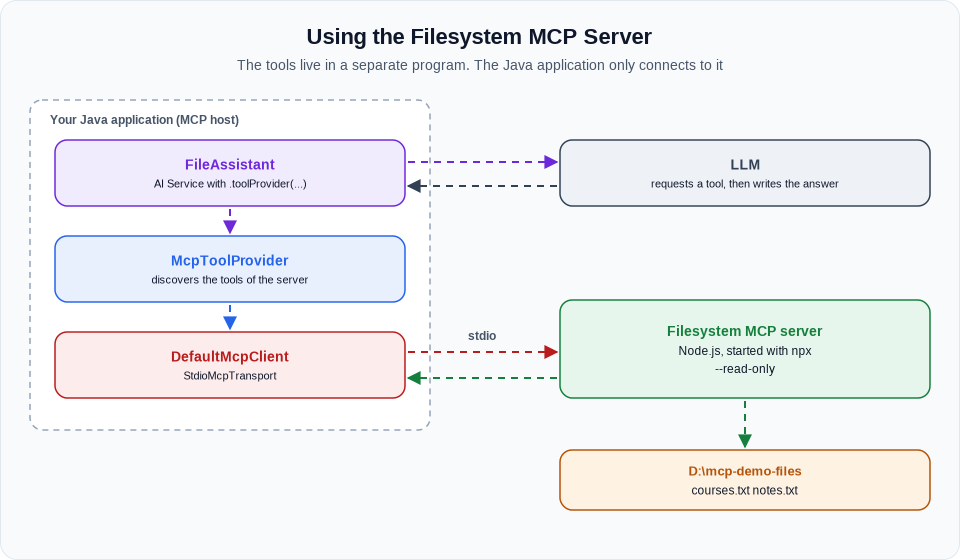
| Part from the architecture | In this lesson |
|---|---|
| MCP host | Our Java application with LangChain4j |
| MCP client | A DefaultMcpClient object |
| Connection | A stdio transport: our application starts the server as a child process and talks to it through standard input and output |
| MCP server | The filesystem server, a Node.js program started with npx |
| What the server may touch | One folder, D:\mcp-demo-files |
Step 1: Check Node.js
The filesystem server is written for Node.js. That is one of the nice properties of MCP: the server is JavaScript, our application is Java, and neither side cares.
Node.js must be installed, because our application will start the server with npx. Check it in a terminal:
PS C:\Users\haide> node -v
v24.12.0
PS C:\Users\haide> npm --version
11.6.2
PS C:\Users\haide> npx --version
11.6.2
If these commands are not found, install Node.js from nodejs.org first. npm and npx come with it. Use a current version: the server version that was tested for these docs, 2.4.0, declares that it wants Node.js 24 or newer.
Step 2: A folder with two files
Create a folder for the demo and put two small text files in it. The lesson uses D:\mcp-demo-files with courses.txt and notes.txt. The video does not open the files. Any short text works, for example a few lines about LangChain4j in notes.txt and a list of courses in courses.txt.
Step 3: The project and the MCP dependency
The lesson starts from a prepared Maven project named mcp-filesystem-starter, with the package com.telusko.mcp, the two LangChain4j dependencies you know, and one new dependency:
<dependency>
    <groupId>dev.langchain4j</groupId>
    <artifactId>langchain4j</artifactId>
    <version>${langchain4j.version}</version>
</dependency>
<dependency>
    <groupId>dev.langchain4j</groupId>
    <artifactId>langchain4j-open-ai</artifactId>
    <version>${langchain4j.version}</version>
</dependency>

<dependency>
    <groupId>dev.langchain4j</groupId>
    <artifactId>langchain4j-mcp</artifactId>
    <version>1.18.1-beta28</version>
</dependency>
langchain4j-mcp contains the MCP client. Its version has a -beta suffix, the same pattern as the Spring Boot starters: 1.18.1-beta28 belongs to LangChain4j 1.18.1.
Step 4: The model and the AI Service
Nothing new here. In Main, build the model:
OpenAiChatModel model = OpenAiChatModel.builder()
        .apiKey(System.getenv("OPENAI_API_KEY"))
        .modelName("gpt-4o-mini")
        .build();
And create an AI Service interface:
package com.telusko.mcp;

import dev.langchain4j.service.SystemMessage;
import dev.langchain4j.service.UserMessage;

public interface FileAssistant
{
    @SystemMessage("""
            You are a helpful file assistant.

            Use the available filesystem tools when
            the user asks about local files.

            Never invent file contents.
            """)
    @UserMessage("{{it}}")
    String chat(String message);

}
The system message sets the behaviour: use the filesystem tools for questions about local files, and never invent what a file contains.
Step 5: The transport, which starts the server
McpTransport transport = StdioMcpTransport.builder()
        .command(List.of(
                "cmd", "/c",
                "npx", "-y",
                "@modelcontextprotocol/server-filesystem",
                "--read-only",
                "D:\\mcp-demo-files"
        ))
        .logEvents(true)
        .build();
A transport is the communication path between client and server. StdioMcpTransport starts the server as a child process of our application and exchanges messages with it through the process's standard input and output.
The list is the command line that starts the server, one element for each word:
| Element | Meaning |
|---|---|
cmd, /c | Needed on Windows. npx is a script there, and Java cannot start it directly. cmd /c runs the rest as a command |
npx | The Node.js tool that downloads a package if necessary and runs it |
-y | Answers "yes" to the question whether the package may be installed, so nothing waits for input |
@modelcontextprotocol/server-filesystem | The name of the filesystem server package |
--read-only | Offer only the tools that read and list. No tool can change a file |
D:\\mcp-demo-files | The folder the server may access. In a Java string every backslash is written twice |
On macOS and Linux, leave out the first two elements and start the list with "npx".
.logEvents(true) asks the transport to log the messages that travel between client and server. You only see them when the project has a logging implementation. Without one, the output shows the SLF4J warning lines and no events, which is the case in the video.
The folder is the security boundary
The path at the end of the command is not a detail. It decides what the model can read through this server. Point it at a small folder made for the purpose, never at your home folder or a whole drive, and keep --read-only unless you really want the model to change files.
Step 6: The MCP client
McpClient mcpClient = DefaultMcpClient.builder()
        .key("filesystem")
        .transport(transport)
        .build();
DefaultMcpClient is LangChain4j's MCP client. It takes the transport and a key, a name of your choice that identifies this client. The key becomes useful when an application has several clients.
build() already does real work. It starts the server process and performs the opening handshake of the protocol. After this line the server is running.
Step 7: Close the client when you are done
The client holds a connection and a child process. Both must be released at the end, also when something fails. The lesson wraps the remaining code in try, catch and finally:
try
{
    // use the client here
}
catch(Exception e)
{
    e.printStackTrace();
}
finally {
    mcpClient.close();
}
mcpClient.close() is underlined in red at first, because close() can throw a checked exception and the finally block is outside the try. The lesson fixes it by changing the signature to main(String[] args) throws Exception.
Step 8: The tool provider and the AI Service
Inside the try block:
McpToolProvider toolProvider = McpToolProvider.builder()
        .mcpClients(mcpClient)
        .build();

FileAssistant assistant = AiServices.builder(FileAssistant.class)
        .chatModel(model)
        .toolProvider(toolProvider)
        .build();

String answer = assistant.chat("List the files available inside D:\\mcp-demo-files");
System.out.println(answer);
McpToolProvider is the bridge between MCP and the tool calling you already know. It asks the client which tools the server offers and presents them to the AI Service as tools.
| In Tool Calling | Here |
|---|---|
A Java object with @Tool methods | A tool provider that gets its tools from an MCP server |
.tools(tools) | .toolProvider(toolProvider) |
The two builder methods are different on purpose, and the lesson finds that out the hard way.
The mistake: .tools(toolProvider)
The first version of the code registers the provider with .tools(...), as in the previous lesson. The program fails as soon as the AI Service is built. Running that same code for these docs produced:
dev.langchain4j.service.IllegalConfigurationException: Object 'dev.langchain4j.mcp.McpToolProvider' does not have any methods annotated with @ToolThe message explains itself. .tools(...) expects an object whose methods carry @Tool, and it looks for them in whatever it is given. A McpToolProvider has no such methods. Its tools are not Java methods at all. They are discovered from the server at run time.
Fix: use .toolProvider(toolProvider).
The complete program
package com.telusko.mcp;

import dev.langchain4j.mcp.McpToolProvider;
import dev.langchain4j.mcp.client.DefaultMcpClient;
import dev.langchain4j.mcp.client.McpClient;
import dev.langchain4j.mcp.client.transport.McpTransport;
import dev.langchain4j.mcp.client.transport.stdio.StdioMcpTransport;
import dev.langchain4j.model.openai.OpenAiChatModel;
import dev.langchain4j.service.AiServices;

import java.util.List;

public class Main {

    public static void main(String[] args) throws Exception {
        System.out.println("MCP Filesystem Demo");
        OpenAiChatModel model = OpenAiChatModel.builder()
                .apiKey(System.getenv("OPENAI_API_KEY"))
                .modelName("gpt-4o-mini")
                .build();

        McpTransport transport = StdioMcpTransport.builder()
                .command(List.of(
                        "cmd", "/c",
                        "npx", "-y",
                        "@modelcontextprotocol/server-filesystem",
                        "--read-only",
                        "D:\\mcp-demo-files"
                ))
                .logEvents(true)
                .build();

        McpClient mcpClient = DefaultMcpClient.builder()
                .key("filesystem")
                .transport(transport)
                .build();
        try
        {
            McpToolProvider toolProvider = McpToolProvider.builder()
                    .mcpClients(mcpClient)
                    .build();

            FileAssistant assistant = AiServices.builder(FileAssistant.class)
                    .chatModel(model)
                    .toolProvider(toolProvider)
                    .build();

            String answer = assistant.chat("List the files available inside D:\\mcp-demo-files");
            System.out.println(answer);

        }
        catch(Exception e)
        {
            e.printStackTrace();
        }
        finally {
            mcpClient.close();
        }

    }
}
The import lines are not readable in the video. The ones above were confirmed by compiling this file against langchain4j-mcp 1.18.1-beta28.
Step 9: Run it
The available files inside `D:\mcp-demo-files` are:

- courses.txt
- notes.txt
We never wrote code that lists a folder. The model asked for a tool of the filesystem server, the server listed the folder, and the model turned the result into a sentence.
Change the question:
String answer = assistant.chat("Read notes.txt and summarize it in three points.");Here are three key points from the notes in "notes.txt":
1. LangChain4j is a Java library designed for creating applications that utilize large language models.
2. The library provides support for various features, including AI services, tool calling, and chat memory.
3. It also offers integration with MCP (Model Control Protocol).This time the model needed the content of a file. The server read it, and the model wrote the summary.
MCP is the Model Context Protocol
The last point of that answer expands MCP as "Model Control Protocol". That is the model's wording on screen, and it is not correct. MCP stands for Model Context Protocol. The content of notes.txt is never shown in the video, so we cannot tell whether the file or the model introduced the wrong word. Either way it is a good reminder that a summary can contain errors even when the tool call worked perfectly.
What happened, step by step
| Step | Who | What |
|---|---|---|
| 1 | Our application | Starts the server with npx and connects to it |
| 2 | Tool provider | Asks the server for its list of tools |
| 3 | AI Service | Sends the question and the tool descriptions to the model |
| 4 | Model | Requests a tool, for example the one that lists a directory |
| 5 | MCP client | Passes the request to the server |
| 6 | Filesystem server | Reads the folder and returns the result |
| 7 | Model | Receives the result and writes the answer |
| 8 | Our application | Closes the client, which also ends the server process |
The rule from tool calling is unchanged: the model only requests. This time the execution happens in the server, and not in our own Java methods.
Checked for these docs
The connection part of this lesson was run for these docs with langchain4j-mcp 1.18.1-beta28, Node.js 22 and a demo folder with the same two file names. Server version 2.4.0 asks for Node.js 24 and only printed a warning about the older version before it started. Use Node.js 24 or newer, as the video does.
- Version 2.4.0 of the server with
--read-onlyoffered 10 tools:read_file,read_text_file,read_media_file,read_multiple_files,list_directory,list_directory_with_sizes,directory_tree,search_files,get_file_infoandlist_allowed_directories. Callinglist_directorydirectly returned the two files. A direct call ofwrite_filewas refused with "Tool write_file not found". - An old cached version of the server, 1.0.0, behaved differently. It did not know the
--read-onlyoption, printed a warning that it could not access a directory named--read-only, offered 14 tools includingwrite_file, and awrite_filecall really created a file in the demo folder. - The
.tools(toolProvider)mistake produced the exception shown above.
The whole program was also run with a local model in place of OpenAI. For the first question it answered that the folder contains courses.txt and notes.txt. For the second it read notes.txt through the server and returned a correct summary in three points.
Make sure read-only really is read-only
The second result above matters. npx keeps downloaded packages in a cache and can start an old copy without telling you. An old copy of this server does not know --read-only. It prints a warning that is easy to miss and offers its write tools anyway. To be sure, name the version in the command, for example "@modelcontextprotocol/server-filesystem@2.4.0", and check which tools the server offers before you trust it with a folder. Try It Yourself number 3 shows how.
Additions beyond the lesson
Try-with-resources. McpClient is AutoCloseable, so the try, finally and close() can be written more compactly as try (McpClient mcpClient = DefaultMcpClient.builder()...build()) { ... }.
Limiting the tools. A server may offer more tools than you want the model to have. McpToolProvider can filter them, for example by name with filterToolNames(...). The official MCP guide of LangChain4j describes the options.
Several servers. mcpClients(...) accepts more than one client. That is how the picture with three clients from the previous lesson is built: one tool provider that collects the tools of all of them.
The first start can be slow. On the first run npx downloads the server. If that takes longer than the client is willing to wait for the handshake, the program ends with a TimeoutException. That happened once while testing for these docs. Running the program again, or running the npx command once in a terminal beforehand, solves it.
Mistakes and fixes
| What you see | Cause | Fix |
|---|---|---|
IllegalConfigurationException: Object 'dev.langchain4j.mcp.McpToolProvider' does not have any methods annotated with @Tool | The provider was passed to .tools(...). This happens in the lesson | Use .toolProvider(toolProvider) |
mcpClient.close() is underlined in red | close() throws a checked exception outside the try block. This also happens in the lesson | Add throws Exception to main, or use try-with-resources |
An error that the program npx cannot be run | On Windows, npx was started without cmd /c, or Node.js is not installed | Add "cmd", "/c" on Windows, and check npx --version in a terminal |
TimeoutException when the client is built | The server did not answer in time, often because npx was still downloading it | Run again, or start the npx command once by hand |
| The model says it cannot access the file | The path is outside the folder given to the server | Ask about files inside the allowed folder, or change the folder in the command |
Several classes named McpTransport are offered for import | There is one in a registry client package too | Choose dev.langchain4j.mcp.client.transport.McpTransport |
No MCP log lines although logEvents(true) is set | The project has no SLF4J implementation | Add a logging dependency such as slf4j-simple |
Try It Yourself
- Create the demo folder with two text files and run the program with the "list the files" question.
- Ask for a summary of one file, then ask a question that needs both files.
- Before building the AI Service, print the tools the server offers: loop over
mcpClient.listTools()and printname()of each. Is there any tool that can write? - Remove
--read-onlyfrom the command, print the tool list again and compare. Then put the option back. - Change
.toolProvider(toolProvider)to.tools(toolProvider)and read the exception. - Ask the model to read a file outside the demo folder, for example a file on your desktop. What does it answer?
- Add the
slf4j-simpledependency and run again withlogEvents(true). Find the message in which the client asks for the list of tools. - Rewrite the program with try-with-resources.
Official references
- LangChain4j: Model Context Protocol (MCP)
- Filesystem MCP server: README
- Model Context Protocol: transports
- Node.js: downloads
Written By: Shramik Masti
How is this guide?
Last updated on
MCP Explained
What the Model Context Protocol is, why it exists when tool calling already works, and how host, client and server fit together, before any code is written.
Building Your Own MCP Server
Write an MCP server in plain Java with the official MCP Java SDK, register three course tools by hand, package it as a jar, and connect the LangChain4j application from the previous lesson to it.