
Using the OpenAI Java SDK
Replace the manual HTTP code with OpenAI's official Java SDK, create a client from the environment, send a request with ResponseCreateParams, and print only the answer text from the response.
In the previous lesson we did everything by hand: the HTTP client, the request object, the headers, a JSON body written as a string, and a response that was one large block of JSON.
OpenAI publishes an official SDK for Java that does all of that for you. You create a client, give it the input and the model, and get a response object back. No HttpClient, no headers, no JSON.
Step 1: Find the dependency
Open the OpenAI developer documentation and go to the SDK section. Under Install an official SDK there is a tab for each language: JavaScript, Python, .NET, Java, Go, Ruby and CLI. Choose Java.
The page shows one Maven dependency and a short sample program. We use both.
Step 2: Add it to the project
We stay in the same project, first-app-llm. Its pom.xml has no <dependencies> section yet, so create one and add the SDK:
<dependencies>
    <dependency>
        <groupId>com.openai</groupId>
        <artifactId>openai-java</artifactId>
        <version>4.68.0</version>
    </dependency>
</dependencies>
Reload the Maven project. While IntelliJ is downloading the library, the version number is shown in red. That goes away when the download has finished, which can take a minute.
4.68.0 is the version shown in the lesson. The SDK is released often, so the documentation will show a newer number when you look.
Step 3: Comment out the old code
In Main.java, comment out everything inside main. We reuse the same file for a practical reason: this project's run configuration already has the OPENAI_API_KEY environment variable.
Step 4: Create the client
OpenAIClient client = OpenAIOkHttpClient.fromEnv();Compare this one line with the previous lesson. There we read the key, created an HttpClient and put the key into an Authorization header. Here, fromEnv() does all of it. It reads the key from the OPENAI_API_KEY environment variable by itself. You do not mention the key anywhere in the code.
Both classes come from the com.openai packages of the library we just added.
Step 5: Build the request
ResponseCreateParams params =
        ResponseCreateParams.builder()
                .input("Explain Java in one sentence")
.model("gpt-5.6-luna").build();| Call | Replaces, from the previous lesson |
|---|---|
.input(...) | The "input" field in the JSON string |
.model(...) | The "model" field in the JSON string |
.build() | Writing and closing the JSON by hand |
It is the same request as before, the same prompt and the same model. Now the compiler checks it. A typing mistake in a method name does not compile, where a typing mistake in a JSON string was found only by the server.
The sample in the documentation uses a different prompt and a different model. The lesson replaces both, so that the result can be compared with the previous program.
Step 6: Send it
Response response = client.responses().create(params);
System.out.println(response);
client.responses().create(params) is the call to the model. Everything before it only prepared the request.
Run the program. The console shows one extremely long line. Scrolling through it, you find pieces like these:
... model=ResponsesModel{chat=gpt-5.6-luna}, object_=response, output=[ResponseOutputItem{message=ResponseOutputMessage{...
... text=Java is a versatile, object-oriented programming language designed to run on many platforms through its Java Virtual ...
The answer is in there. So is every other field of the response: the model, ids, status and usage data. It is the same information as the JSON from the previous lesson, now printed as a Java object.
Step 7: Print only the text
To get just the answer, comment out that println and use the chain from the documentation's sample:
response.output().stream()
        .flatMap(item -> item.message().stream())
        .flatMap(message -> message.content().stream())
        .flatMap(content -> content.outputText().stream())
        .forEach(outputText -> System.out.println(outputText.text()));
It looks like a lot, and it does one simple thing. It walks down the structure of the response and keeps only the text. IntelliJ's type hints show what each step produces:
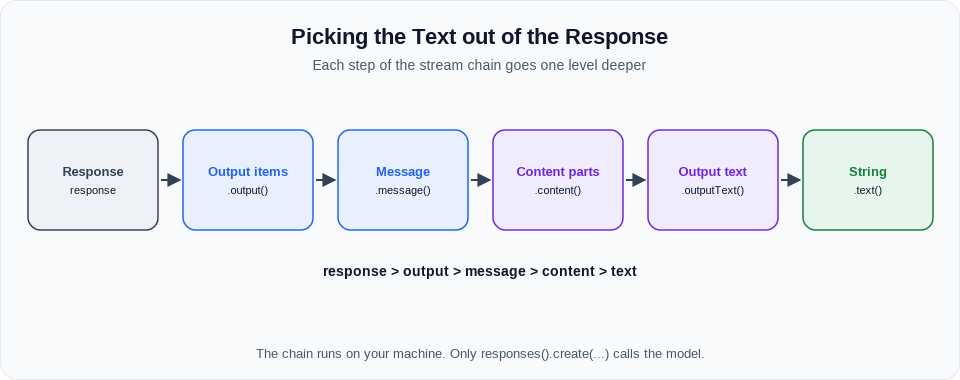
| Step | Takes | Gives |
|---|---|---|
response.output().stream() | The response | Every output item |
item.message().stream() | An output item | Its message, if the item is a message |
message.content().stream() | A message | Its content parts |
content.outputText().stream() | A content part | Its text part, if it is text |
outputText.text() | A text part | The plain string |
The instructor describes it as filtering: from the response take the output, from the output the messages, from the messages the content, from the content the text.
This chain is not a call to the model
Only client.responses().create(params) talks to the model and costs tokens. The stream chain runs on your machine afterwards and only picks values out of the object you already have.
The complete program
The old code can stay in the file as comments, as it does in the lesson. Without it, the program is this:
package com.telusko;

import com.openai.client.OpenAIClient;
import com.openai.client.okhttp.OpenAIOkHttpClient;
import com.openai.models.responses.Response;
import com.openai.models.responses.ResponseCreateParams;

public class Main {
    public static void main(String[] args) {

        OpenAIClient client = OpenAIOkHttpClient.fromEnv();

        ResponseCreateParams params =
                ResponseCreateParams.builder()
                        .input("Explain Java in one sentence")
                        .model("gpt-5.6-luna").build();

        Response response = client.responses().create(params);
        //System.out.println(response);

        response.output().stream()
                .flatMap(item -> item.message().stream())
                .flatMap(message -> message.content().stream())
                .flatMap(content -> content.outputText().stream())
                .forEach(outputText -> System.out.println(outputText.text()));
    }
}
In the lesson's file, main still declares throws IOException, InterruptedException and the java.net.http imports are still there, greyed out by the IDE because nothing uses them any more. They are left out here.
Step 8: Run it
Java is a high-level, object-oriented, platform-independent programming language used to build applications ranging from web and mobile ...

Process finished with exit code 0
One clean sentence, and nothing else.
Core Java and the SDK side by side
| Core Java | OpenAI SDK | |
|---|---|---|
| Dependencies | None | openai-java |
| API key | Read by you, put into a header by you | Read by fromEnv() |
| Request | A JSON string | A typed builder |
| HTTP details | URL, headers, POST, all written by you | Hidden |
| Response | One JSON string | A Java object with typed fields |
| Getting the answer text | Parse JSON yourself | A stream chain over the object |
The SDK is clearly less work. It still has two limits, and they are the reason this course does not stop here:
- It is OpenAI's SDK. Every class in the program belongs to one provider. If you want to use another provider, or a local model through its own API, this code does not come with you.
- It is still low-level. Five lines to read one string. A system message, a conversation with memory, a Java object as the result or a tool call are all more code that you write yourself.
LangChain4j addresses both, and it is the subject of everything from the next lesson on.
Mistakes and fixes
No run fails in this lesson. These are the things that look like errors on the way, and the ones you may meet yourself.
| What you see | Cause | Fix |
|---|---|---|
The version in pom.xml is red | Maven is still resolving the dependency | Wait, or reload the Maven project |
ResponseCreateParams or Response is red | The import is missing. IntelliJ offers several classes with similar names | Import from com.openai.models.responses |
| The output is one unreadable line | The whole Response object was printed | Use the stream chain to print only the text |
| An error that no credential was found | OPENAI_API_KEY is not set for the configuration you ran | Add it to the run configuration, as in the previous lesson |
Try It Yourself
- Add the dependency and write the SDK version. Run it first with
System.out.println(response)and find the answer text in the long line. - Switch to the stream chain and confirm that only the sentence is printed.
- Change the prompt to a question whose answer has several sentences. Does the chain still print all of it?
- Count the lines of the core Java program and of the SDK program, without comments and imports.
- Print
response.output().size(). How many output items does your model return? - Remove the environment variable from the run configuration and read the exception that
fromEnv()throws. - Open the SDK's README on GitHub and find how the same request is written with the older Chat Completions API.
Official references
- OpenAI: developer quickstart
- OpenAI: libraries
- OpenAI Java SDK on GitHub
- OpenAI: Responses API reference
Written By: Shramik Masti
How is this guide?
Last updated on
Calling an LLM from Core Java
Call the OpenAI Responses API from plain Java with java.net.http.HttpClient, no SDK and no framework, store the API key in an IntelliJ run configuration, and read the raw JSON that comes back.
Your First LangChain4j Application
See what LangChain4j is, add its Maven dependencies to a new project, create an OpenAiChatModel with a builder, and get an answer from a model with a few lines of Java.