
Type Conversion and Casting
1. Introduction
Type conversion in Java refers to changing one data type into another.
It occurs both automatically and manually, depending on the situation.
Type conversion is essential when:
- Assigning one variable to another of a different type
- Performing arithmetic with mixed data types
- Reading input from the user
- Interacting with APIs or performing numeric operations
Java supports two types of conversions:
- Implicit Conversion (Widening Conversion)
- Explicit Conversion (Narrowing Conversion)
This document explains both in detail with examples and best practices.
2. Why Do We Need Type Conversion?
Variables in Java have fixed data types, and operations must respect those types.
When working with expressions like:
int a = 5;
double b = a;
The int must be converted to double so that the operation is valid.
Without type conversion, mixing types would lead to errors or unexpected output.
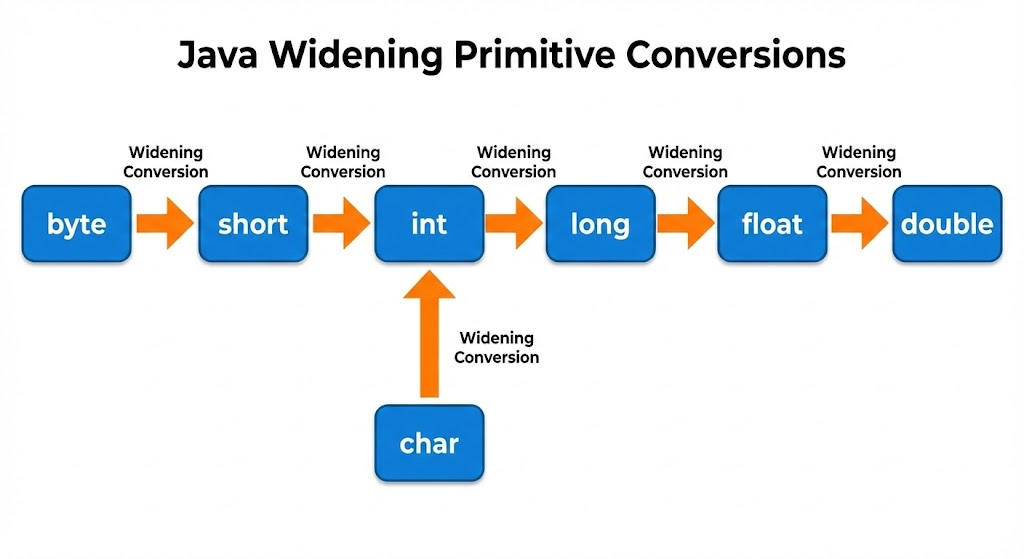
3. Implicit Type Conversion (Widening)
Implicit conversion happens automatically when:
- Converting a smaller type → larger type
- No data loss occurs
Widening Hierarchy
byte → short → int → long → float → double
           char ↗
Example
int a = 10;
double b = a;  // int → double
System.out.println(b); // 10.0
Why is it allowed?
Because the larger type can store all values of the smaller type safely.
4. Explicit Type Conversion (Narrowing)
Narrowing conversion happens manually, using a cast ( ).
Used when:
- Converting a larger type → smaller type
- Data may be lost
- The compiler cannot convert automatically
Example
double d = 99.99;
int i = (int) d; // explicit casting
System.out.println(i); // 99
Here, fractional part .99 is lost.
Narrowing Hierarchy
double → float → long → int → short → byteImportant Note
Explicit conversion may:
- Lose data
- Change value
- Cause overflow or underflow
Example:
int x = 130;
byte y = (byte) x;
System.out.println(y); // -126 (overflow)
5. Mixed-Type Arithmetic
When two different types are used in an expression: Java promotes them to the largest type in the expression.
Example:
int a = 5;
double b = 2.5;
double result = a + b;
The int is promoted to double.
Another Example
byte x = 10;
byte y = 20;
int z = x + y; // result is int
Why?
Because arithmetic operations on smaller types (byte, short, char) always promote them to int internally.
6. Type Promotion Rules (Important for Interviews)
Rule 1: Arithmetic operations on smaller types (byte, short, char) → int
byte a = 5, b = 6;
byte c = a + b; // ERROR
int c = a + b;  // correct
Rule 2: Mixed types promote to the highest type
int + long → long
long + float → float
float + double → double
Example:
long a = 5;
float b = 2.5f;
float result = a + b;
7. Converting between char and int
char stores Unicode values.
Converting char ↔ int is common.
char → int
char c = 'A';
int val = c; // 65
int → char
int code = 66;
char ch = (char) code; // 'B'
8. String Conversions
String → numeric
int a = Integer.parseInt("123");
double b = Double.parseDouble("10.5");
numeric → String
int x = 100;
String s1 = String.valueOf(x);
String s2 = x + "";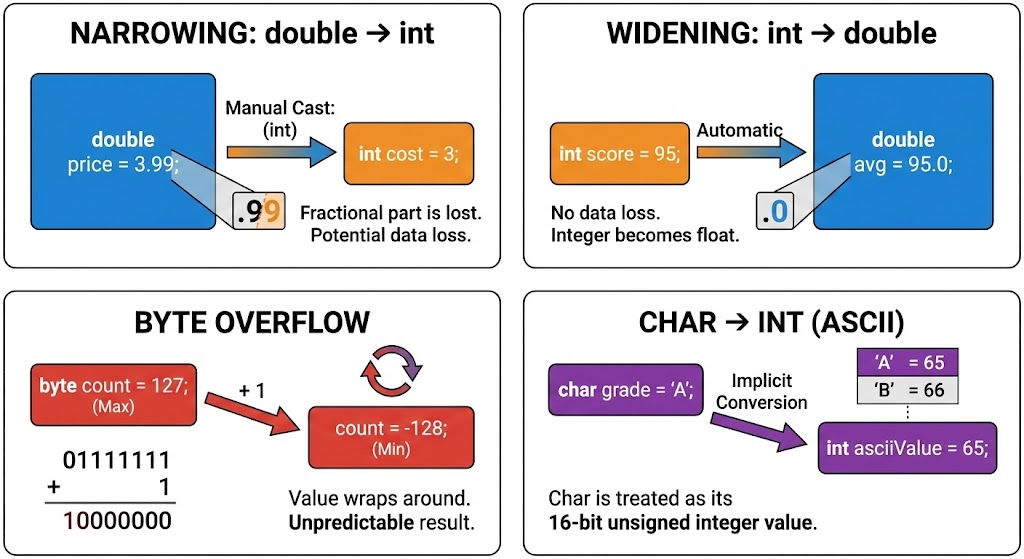
9. Examples
Example 1: Widening
int x = 15;
long y = x;
double z = y;
Example 2: Narrowing
float f = 9.75f;
int i = (int) f;
Example 3: Overflow
int num = 260;
byte b = (byte) num; // 4
Why 4? 260 % 256 = 4
10. Common Mistakes
- Forgetting
( )during narrowing - Expecting fractional values to remain after casting to int
- Overflow issues when narrowing large numbers
- Assuming all
charvalues are ASCII (they are Unicode)
11. Summary
- Type conversion allows assigning values across different data types.
- Widening (implicit) is safe and automatic.
- Narrowing (explicit) may cause data loss and must be done manually.
- Arithmetic operations promote types internally.
- String conversion uses wrapper classes like
Integer,Double. - Understanding conversions helps avoid errors and write optimized code.
Written By: Shiva Srivastava
How is this guide?
Last updated on