
Keyboard Input Using BufferedReader in Java
1. Introduction
Before the Scanner class was introduced (Java 5), BufferedReader was the most common way to read keyboard input in Java.
Many legacy applications, competitive programming environments, and high-performance systems still prefer BufferedReader due to its speed.
BufferedReader is faster than Scanner because:
- It reads data as raw text.
- It does not perform automatic parsing.
- It buffers input, reducing I/O operations.
BufferedReader is part of the java.io package.
2. Importing BufferedReader
To use BufferedReader, you must import:
import java.io.BufferedReader;
import java.io.InputStreamReader;
BufferedReader needs InputStreamReader, which reads bytes from keyboard and converts them into characters.
3. Creating a BufferedReader Object
BufferedReader br = new BufferedReader(new InputStreamReader(System.in));Explanation:
System.in→ reads bytes from keyboardInputStreamReader→ converts bytes → charactersBufferedReader→ reads characters efficiently
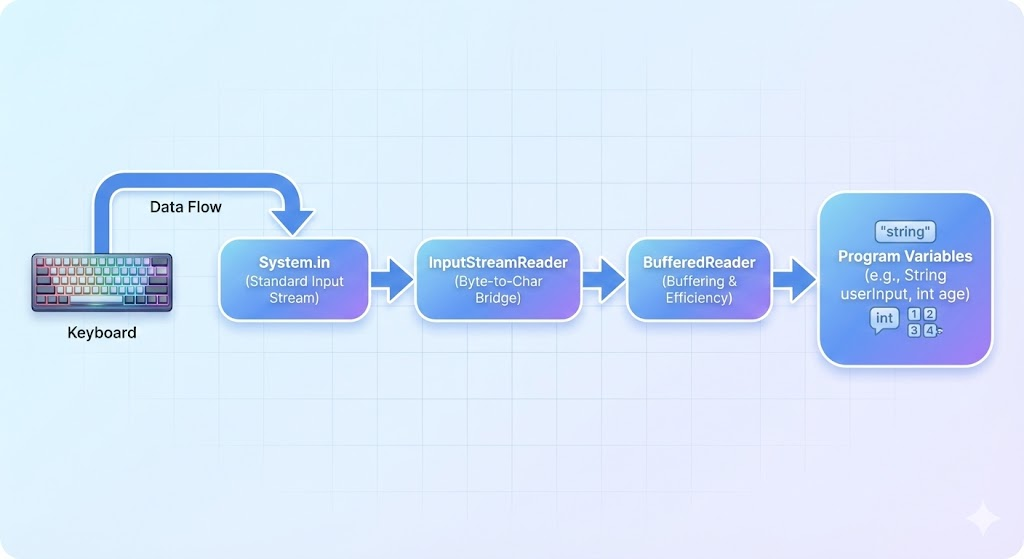
4. Reading Input with BufferedReader
BufferedReader reads strings only using:
String input = br.readLine();To read numbers, you must convert the string manually.
5. Reading a String
System.out.print("Enter your name: ");
String name = br.readLine();
System.out.println("Hello, " + name);
6. Reading an Integer
Since BufferedReader reads only text, convert using Integer.parseInt().
System.out.print("Enter your age: ");
int age = Integer.parseInt(br.readLine());
7. Reading a Double
System.out.print("Enter your salary: ");
double salary = Double.parseDouble(br.readLine());
8. Reading a Character
BufferedReader does not have readChar(), so you extract the first char.
System.out.print("Enter your grade: ");
char grade = br.readLine().charAt(0);
9. Handling Exceptions
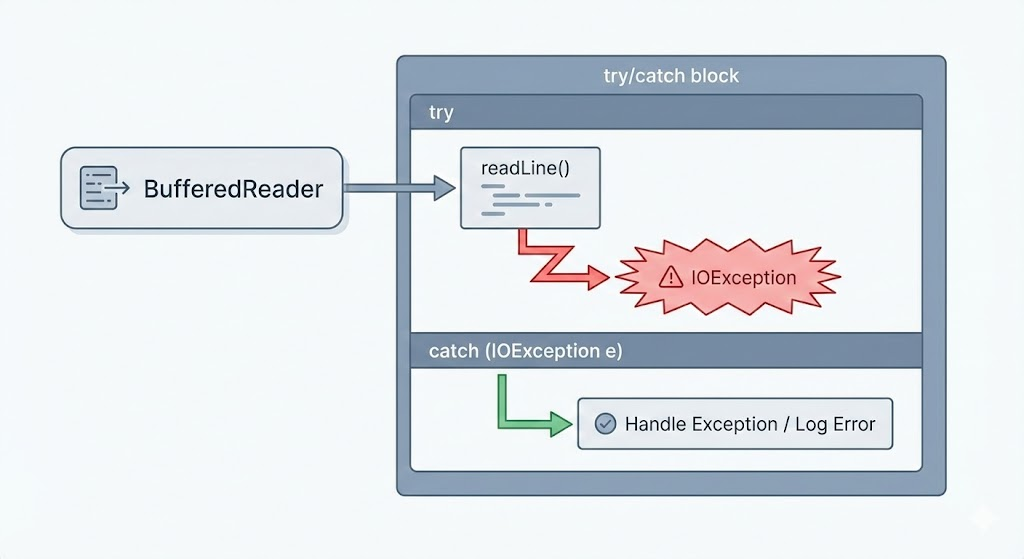
readLine() throws a checked exception → IOException.
Hence, you must use try-catch or throws.
Method 1: Using throws
public static void main(String[] args) throws Exception {
    BufferedReader br = new BufferedReader(new InputStreamReader(System.in));
    String name = br.readLine();
    System.out.println(name);
}
Method 2: Using try-catch
try {
    String name = br.readLine();
} catch (Exception e) {
    System.out.println("Error reading input");
}
10. Closing BufferedReader
Although optional for console I/O, closing is a good practice.
br.close();But avoid closing System.in in larger applications, as it cannot be reopened.
11. Full Example Program
import java.io.BufferedReader;
import java.io.InputStreamReader;

public class Main {
    public static void main(String[] args) throws Exception {

        BufferedReader br = new BufferedReader(new InputStreamReader(System.in));

        System.out.print("Enter name: ");
        String name = br.readLine();

        System.out.print("Enter age: ");
        int age = Integer.parseInt(br.readLine());

        System.out.print("Enter salary: ");
        double salary = Double.parseDouble(br.readLine());

        System.out.print("Enter grade (A/B/C): ");
        char grade = br.readLine().charAt(0);

        System.out.println("\n--- User Details ---");
        System.out.println("Name: " + name);
        System.out.println("Age: " + age);
        System.out.println("Salary: " + salary);
        System.out.println("Grade: " + grade);

        br.close();
    }
}
12. BufferedReader vs Scanner - Comparison
| Feature | BufferedReader | Scanner |
|---|---|---|
| Speed | Faster | Slower (parsing overhead) |
| Input Type | Reads Strings only | Reads all data types directly |
| Conversion | Manual parsing required | Automatic parsing |
| Used For | Performance-critical apps | Simple input programs |
| Exception | Requires try/catch | No mandatory exception |
13. Summary
- BufferedReader is a fast and efficient way to read input.
- It works with
readLine()to read text. - You need to manually convert Strings to numbers.
- Works well for large input or competitive programming.
- Must handle exceptions using
try-catchorthrows.
Written By: Shiva Srivastava
How is this guide?
Last updated on