
JDK, JRE, JVM
1. Introduction
Java is a platform-independent programming language. This independence is achieved because Java programs do not run directly on your operating system; instead, they run inside a virtual machine - the JVM. To understand how Java works internally, you must clearly understand three important components:
- JDK – Java Development Kit
- JRE – Java Runtime Environment
- JVM – Java Virtual Machine
These three work together to allow writing, compiling, and running Java applications.
2. What is JVM? (Java Virtual Machine)
Definition
The JVM is a virtual computer inside your real computer. It is responsible for executing Java bytecode.
Key Responsibilities of JVM
- Loads the
.classfile (Class Loader subsystem) - Verifies bytecode (Bytecode Verifier)
- Executes bytecode (Interpreter + JIT Compiler)
- Provides memory management (Heap, Stack, Method Area)
- Runs garbage collection
Internal Working of JVM
When you type:
java MyProgramThis is what happens internally:
- Class loader loads
MyProgram.class - Bytecode is verified for safety
- Interpreter converts bytecode → machine code
- JIT compiler optimizes frequently used code
- Garbage collector removes unused objects
JVM Memory Structure
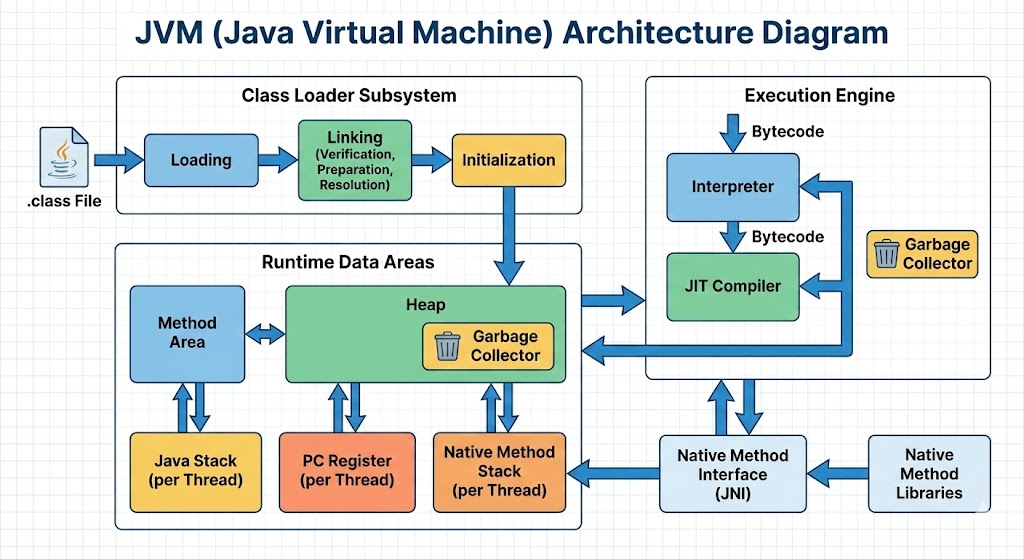
JVM memory is divided into sections:
1. Method Area
Stores:
- Class metadata
- Static variables
- Constant pool
- Method code
2. Heap Area
Stores objects and instance variables.
3. Stack Area
Stores method calls, local variables, references.
4. PC Register
Tracks the current instruction.
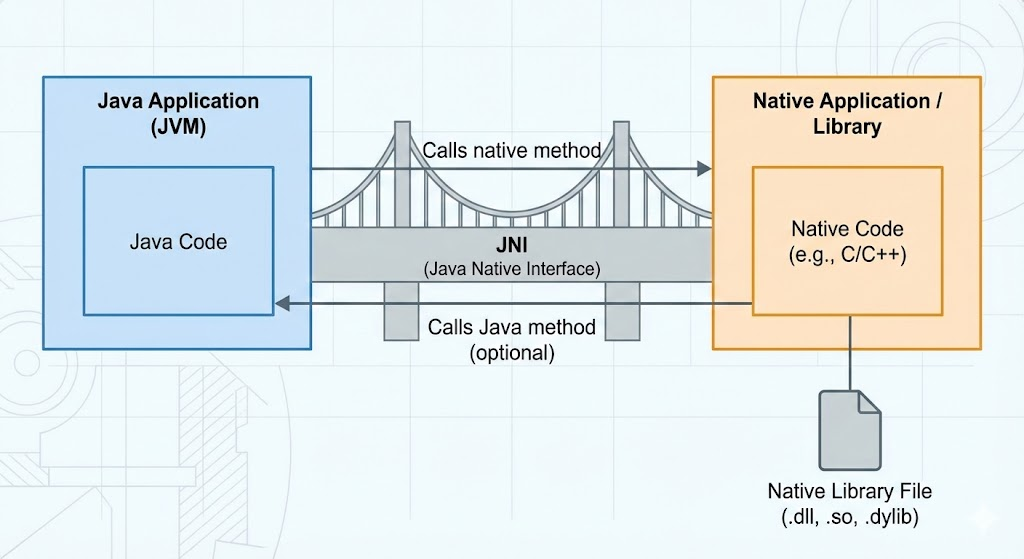
5. Native Method Stack
Stores native (e.g., C/C++) calls.
3. What is JRE? (Java Runtime Environment)
Definition
JRE is the environment needed to run Java programs. It includes:
- JVM
- Core Java class libraries (String, Math, Collection, IO, etc.)
- Java supporting files
What JRE Does
If you only need to run Java applications (not write them), installing the JRE is enough.
JRE = JDK – (Compiler + Development tools)
Example Scenario
If you only want to run a Java-based software like Eclipse or Minecraft, you only need the JRE.
4. What is JDK? (Java Development Kit)
Definition
JDK is the complete Java development package used to build Java applications.
It includes:
- JRE (JVM + Libraries)
- Compiler →
javac - Debugger →
jdb - Documentation tool →
javadoc - Packaging tool →
jar - Profiler →
jconsole,jvisualvm
In simple words:
JDK = JRE + Development Tools
Example Commands in JDK
Compile a Java program
javac Hello.javaRun the program
java HelloCreate documentation
javadoc Hello.java5. Differences Between JDK, JRE, JVM
| Feature | JVM | JRE | JDK |
|---|---|---|---|
| Purpose | Executes bytecode | Runs Java programs | Develops Java programs |
| Contains | JVM only | JVM + libraries | JRE + compiler + tools |
| For developers? | No | No | Yes |
| For running apps? | Yes | Yes | Yes |
| Components | GC, Class Loader, JIT | JVM, libraries | JRE + javac + tools |
6. Which One Should You Install?
If you want to run Java programs → Install JRE If you want to develop Java programs → Install JDK
(because JDK already contains the JRE)
In modern Java versions, JRE is no longer distributed separately. Now JDK includes everything.
7. Real-World Example
Consider the following Java program:
class Hello {
    public static void main(String[] args) {
        System.out.println("Hello Java");
    }
}
Step-by-step execution:
- You write code → JDK
- Code is compiled into bytecode
.class→javac - Bytecode is executed by JVM →
javacommand - JRE provides libraries → System.out.println
- JVM converts bytecode → machine code
- CPU runs the final machine code
8. Why Java Is Platform Independent
- Source code → compiled once into bytecode
- Bytecode → runs on any JVM
- JVM is platform-dependent (Windows JVM, Mac JVM, Linux JVM)
- But bytecode is platform-independent
Therefore: "Write Once, Run Anywhere" = Java Philosophy
9. Interview Questions
10. Summary
- JVM runs Java programs by translating bytecode to machine code.
- JRE provides libraries + JVM needed to run Java applications.
- JDK provides everything needed to develop Java applications - including JRE + tools.
- Java is platform-independent due to its bytecode and JVM.
Written By: Shiva Srivastava
How is this guide?
Last updated on