
JavaBasics
Command-Line Arguments
1. Introduction
Command-line arguments allow users to pass information to a Java program at the time of execution, without modifying the code.
They are commonly used for:
- Configurations
- File paths
- User inputs in automated scripts
- Running programs with dynamic values
- Processing multiple inputs efficiently
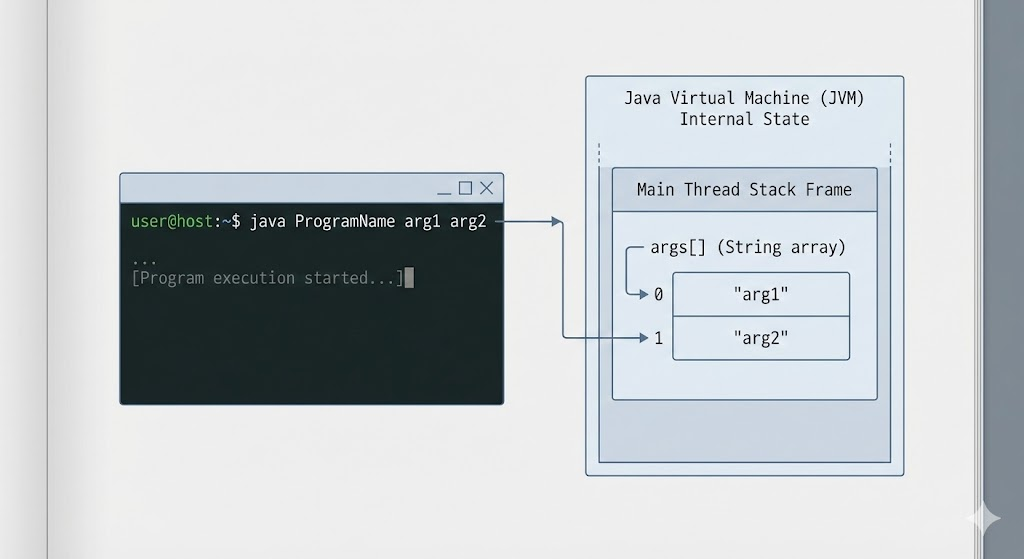
In Java, command-line arguments are stored in the String array args of the main() method.
2. main() Method and args[]
The standard Java main method is:
public static void main(String[] args)Here:
args→ array of Strings- Each value passed from the command line becomes an element of this array
Example:
java ProgramName hello world 123Inside main:
args[0]→ "hello"args[1]→ "world"args[2]→ "123"
3. Basic Example
Program: Print Command-Line Arguments
public class Main {
    public static void main(String[] args) {
        for (int i = 0; i < args.length; i++) {
            System.out.println("Argument " + i + ": " + args[i]);
        }
    }
}
Execution:
java Main Apple Banana MangoOutput:
Argument 0: Apple
Argument 1: Banana
Argument 2: Mango
4. Passing Numbers as Command-Line Arguments
Arguments are always Strings. To use them as numbers, convert them manually.
Example: Add Two Numbers
public class Add {
    public static void main(String[] args) {
        int a = Integer.parseInt(args[0]);
        int b = Integer.parseInt(args[1]);

        int sum = a + b;
        System.out.println("Sum: " + sum);
    }
}
Execution:
java Add 10 20Output:
Sum: 305. Handling Errors (Missing Arguments)
If you run:
java Add 10Then args[1] does not exist → runtime error:
ArrayIndexOutOfBoundsExceptionFix using validation:
if (args.length < 2) {
    System.out.println("Please provide two numbers!");
    return;
}
6. Using args.length
args.length tells how many arguments were passed.
Example:
System.out.println("Total arguments: " + args.length);7. real-world use cases
7.1 File input from command line
java FileReader data.txtargs[0] → "data.txt"
7.2 Running programs with configurations
java Server --port=8080 --mode=dev7.3 Automating tasks in DevOps scripts
java Backup /home/user/files8. Advanced Example
Example: Sum of all command-line arguments
public class SumArgs {
    public static void main(String[] args) {
        int sum = 0;

        for (String val : args) {
            sum += Integer.parseInt(val);
        }

        System.out.println("Total Sum: " + sum);
    }
}
Execution:
java SumArgs 5 10 15 20Output:
Total Sum: 509. Common Mistakes
- Forgetting to check
args.length - Assuming command-line arguments are always numbers
- Attempting to modify
args(avoid doing so) - Mixing spaces incorrectly while passing input
Example mistake:
java Test "Hello World"If quotes are not used:
java Test Hello World
# args[0] = Hello
# args[1] = World
10. Summary
- Command-line arguments allow passing dynamic values to a program.
- They are accessed through the
args[]array in themain()method. - All arguments are Strings; convert manually for numeric use.
- Always validate the number of arguments using
args.length. - Useful for automation, scripts, configurations, and flexible programs.
Written By: Shiva Srivastava
How is this guide?
Last updated on