
Variables
1. Introduction
Variables are the basic building blocks of any Java program.
A variable acts as a container that stores data during program execution.
In Java:
- Every variable has a name
- Every variable has a data type
- Every variable has a value (assigned later or during declaration)
- Every variable has a scope
Understanding variables is essential because all logic, input, output, loops, and functions revolve around using variables correctly.
2. What Is a Variable?
A variable is a memory location with a name, used to store data.
Example:
int age = 20;Here:
int→ data typeage→ variable name20→ value stored in memory
3. How Variables Work in Memory
When you declare a variable, the JVM allocates a specific amount of memory based on the data type.
For example:
int→ 4 bytesdouble→ 8 byteschar→ 2 bytes
4. Types of Variables in Java
Java supports three main types of variables:
4.1 Local Variables
- Declared inside a method, constructor, or block.
- Must be initialized before use.
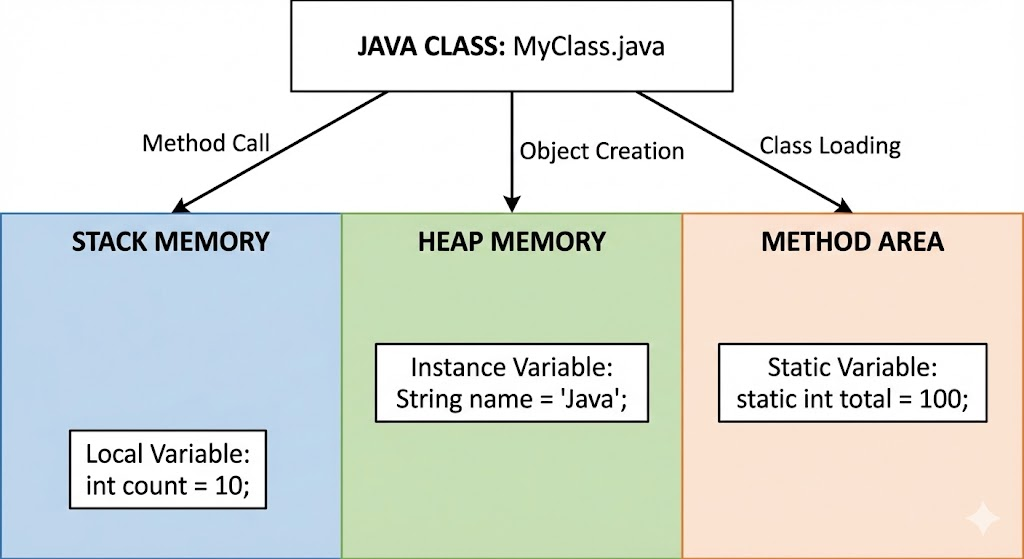
- Stored in stack memory.
- Accessible only within that block.
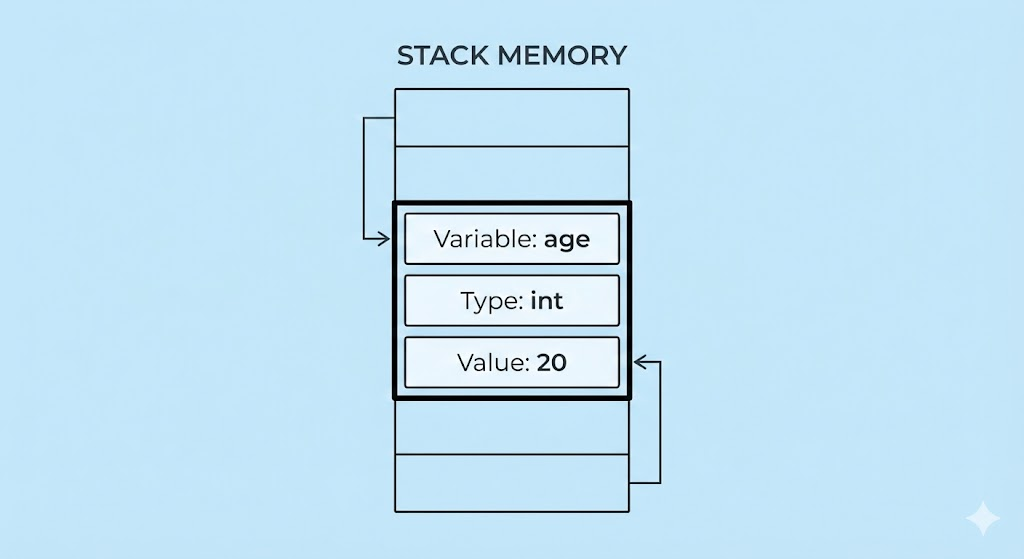
Example:
void display() {
    int age = 20; // local variable
    System.out.println(age);
}
You cannot access age outside the display() method.
4.2 Instance Variables (Non-static variables)
- Declared inside a class, but outside any method.
- Each object gets its own copy.
- Stored in heap memory.
Example:
class Student {
    int age; // instance variable
}
Each object has its own age.
4.3 Static Variables (Class variables)
- Declared using the
statickeyword. - Only one copy shared by all objects.
- Stored in method area of JVM.
Example:
class Student {
    static String schoolName = "ABC School";
}
All Student objects share this same school name.
5. Declaring Variables
Syntax:
data_type variable_name;or with initialization:
data_type variable_name = value;Examples:
int number = 10;
double price = 99.99;
char grade = 'A';
boolean isActive = true;
6. Rules for Naming Variables
Java follows specific naming conventions:
- Must start with a letter,
_, or$ - Cannot start with a digit
- Cannot contain spaces or special symbols
- Cannot use Java keywords (
class,public, etc.)
Recommended Naming Style (camelCase)
Examples:
int studentAge;
double accountBalance;
boolean isVerified;
Bad examples:
int StudentAge;   // starts with uppercase (looks like a class)
int a;            // meaningless name
int student_age;  // not preferred in Java style
7. Variable Initialization
Proper initialization:
int x = 5;Uninitialized local variable (Error):
int x;
System.out.println(x); // ERROR: x is not initialized
But instance/static variables get default values:
| Type | Default Value |
|---|---|
| int | 0 |
| double | 0.0 |
| boolean | false |
| Object | null |
8. Variable Scope
Scope defines where a variable can be accessed.
Local Variable Scope
if (true) {
    int n = 10; // available only inside this block
}
System.out.println(n); // ERROR
Instance Variable Scope
class A {
    int x = 10; // accessible by all methods of class A
}
Static Variable Scope
Accessible anywhere using:
ClassName.variableName9. Variable Lifetime
- Local variables → created when method starts, destroyed when method ends.
- Instance variables → exist as long as the object exists.
- Static variables → exist as long as the program/JVM is running.
10. Examples
Complete Example Using All Variable Types
class Car {

    // static variable
    static String manufacturer = "Toyota";

    // instance variable
    String model;

    void displayModel() {
        // local variable
        String message = "The model is: ";
        System.out.println(message + model);
    }
}

public class Main {
    public static void main(String[] args) {
        Car c = new Car();
        c.model = "Fortuner";
        c.displayModel();

        System.out.println(Car.manufacturer);
    }
}
11. Common Mistakes
- Not initializing local variables
- Using unclear names like
x,y,data - Mixing camelCase and PascalCase incorrectly
- Declaring too many global variables instead of local ones
- Using
staticunnecessarily
12. Summary
- Variables store data and have a type, name, and value.
- Three types of variables: local, instance, static.
- Variables differ by scope, memory location, and lifetime.
- Naming conventions improve readability.
- Proper initialization and scope management lead to clean code.
Written By: Shiva Srivastava
How is this guide?
Last updated on