
Multi-Dimensional Array
1. Introduction
So far you have seen one-dimensional arrays like:
int[] marks = {80, 90, 75};But some data is naturally tabular or grid-like, for example:
- Matrix of rows and columns
- Marks of students in multiple subjects
- Pixel values in an image (rows × columns)
- Chessboard or game board
To represent such data, Java provides multi-dimensional arrays. The most common is the two-dimensional (2D) array.
2. What Is a Multi-Dimensional Array?
A multi-dimensional array is simply an array of arrays.
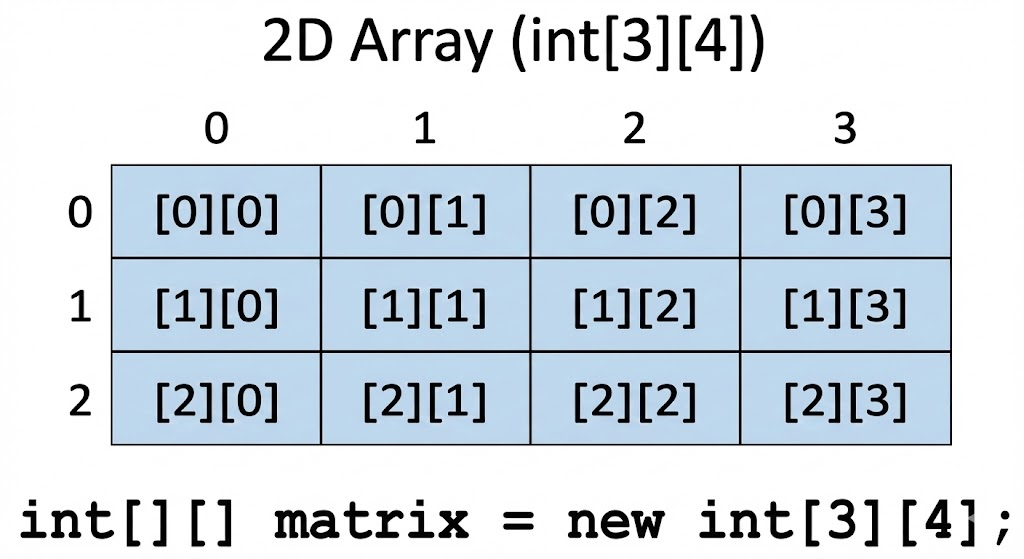
Example (2D int array):
int[][] matrix = new int[3][4];This represents a table with:
- 3 rows
- 4 columns
So total elements = 3 × 4 = 12.
3. Declaring a 2D Array
Syntax
dataType[][] arrayName;Examples:
int[][] matrix;
double[][] marks;
String[][] names;
This only declares the variable; memory is not allocated yet.
You can also write:
int matrix[][];But the first style int[][] matrix is preferred.
4. Creating a 2D Array
4.1 Declaring and Creating Together
int[][] matrix = new int[3][4];Here:
matrix.length→ number of rows (3)matrix[0].length→ number of columns in row 0 (4)
All values are initialized to default (0 for int).
4.2 Initializing with Values (Literal)
int[][] matrix = {
    {1, 2, 3},
    {4, 5, 6},
    {7, 8, 9}
};
This creates a 3 × 3 matrix.
Indexing:
matrix[0][0]→ 1matrix[1][2]→ 6matrix[2][1]→ 8
5. Accessing Elements in a 2D Array
Use two indices:
int value = matrix[rowIndex][colIndex];Example:
int[][] matrix = {
    {10, 20, 30},
    {40, 50, 60}
};

System.out.println(matrix[0][1]); // 20
System.out.println(matrix[1][2]); // 60
6. Iterating Over a 2D Array
6.1 Using Nested For Loops
int[][] matrix = {
    {1, 2, 3},
    {4, 5, 6}
};

for (int i = 0; i < matrix.length; i++) {               // rows
    for (int j = 0; j < matrix[i].length; j++) {        // columns
        System.out.print(matrix[i][j] + " ");
    }
    System.out.println();
}
Output:
1 2 3
4 5 6
6.2 Using Enhanced For Loop
for (int[] row : matrix) {
    for (int value : row) {
        System.out.print(value + " ");
    }
    System.out.println();
}
7. Real-World Examples
7.1 Marks of Students in Subjects
int[][] marks = {
    {80, 75, 90}, // student 1 (3 subjects)
    {70, 85, 88}, // student 2
    {92, 81, 77}  // student 3
};
marks[1][2] → marks of student 2 in subject 3.
7.2 Matrix Addition
int[][] a = {
    {1, 2},
    {3, 4}
};

int[][] b = {
    {5, 6},
    {7, 8}
};

int[][] sum = new int[2][2];

for (int i = 0; i < a.length; i++) {
    for (int j = 0; j < a[i].length; j++) {
        sum[i][j] = a[i][j] + b[i][j];
    }
}
8. More Than 2 Dimensions (3D Arrays)
Java also supports 3D arrays (arrays of 2D arrays):
int[][][] cube = new int[2][3][4];This is harder to visualize but you can think of it as:
- 2 matrices
- Each matrix has 3 rows
- Each row has 4 columns
Access like:
cube[layer][row][column];3D arrays are useful for:
- 3D games
- Simulation grids
- Color images with depth layers
(3D and jagged structures are discussed more in jagged-and-3d-array.mdx.)
9. Default Values and Length Properties
For:
int[][] matrix = new int[3][4];- All elements default to
0 matrix.length→ 3 (rows)matrix[0].length→ 4 (columns of row 0)
Always check lengths dynamically to avoid errors.
10. Common Mistakes
10.1 Confusing Indices
matrix[row][column]Not:
matrix[column][row]10.2 ArrayIndexOutOfBoundsException
Trying to access outside valid range:
matrix[3][0]; // invalid if matrix has 3 rows (0..2)
matrix[0][4]; // invalid if row has 4 columns (0..3)
10.3 Assuming All Rows Have Same Length
That is true for regular 2D arrays, but not for jagged arrays (covered later).
11. Complete Example Program
public class MultiDimArrayDemo {
    public static void main(String[] args) {

        int[][] matrix = {
            {1, 2, 3},
            {4, 5, 6},
            {7, 8, 9}
        };

        System.out.println("Matrix values:");

        for (int i = 0; i < matrix.length; i++) {
            for (int j = 0; j < matrix[i].length; j++) {
                System.out.print(matrix[i][j] + " ");
            }
            System.out.println();
        }
    }
}
Output:
Matrix values:
1 2 3
4 5 6
7 8 9
12. Summary
- Multi-dimensional arrays are arrays of arrays.
- The most common type is 2D array → used for tables and matrices.
- Declare with
type[][] name; create usingnew type[rows][cols]. - Access elements with two indices:
matrix[row][column]. - Iterate using nested loops or enhanced for loops.
- Higher dimensions (3D, etc.) are possible but harder to manage and read.
Written By: Shiva Srivastava
How is this guide?
Last updated on