
Array Iteration Techniques
1. Introduction
After creating an array, the most common operation is iterating through its elements.
Iteration means accessing each element one by one, usually for tasks like:
- Printing values
- Searching
- Summing numbers
- Applying logic to each element
Java provides multiple ways to iterate over arrays, and choosing the right one improves readability and performance.
2. Why Do We Need Iteration?
Consider:
int[] marks = {85, 90, 78, 92};If you want to print all marks, doing this:
System.out.println(marks[0]);
System.out.println(marks[1]);
System.out.println(marks[2]);
System.out.println(marks[3]);
is not scalable and becomes impossible for large arrays (e.g., 100 or 1,000 elements). Loops solve this problem.
3. Techniques to Iterate Over Arrays
Java allows different approaches for iterating depending on the requirement.
3.1 Using Traditional For Loop
The classic and most flexible method.
Example
int[] nums = {10, 20, 30, 40};

for (int i = 0; i < nums.length; i++) {
    System.out.println("Index " + i + ": " + nums[i]);
}
When to use:
- When you need index
- When you want to loop in reverse
- When you want to skip elements or jump by steps (
i += 2) - When you need to modify array elements
Example: Modifying Elements
for (int i = 0; i < nums.length; i++) {
    nums[i] = nums[i] * 2;
}
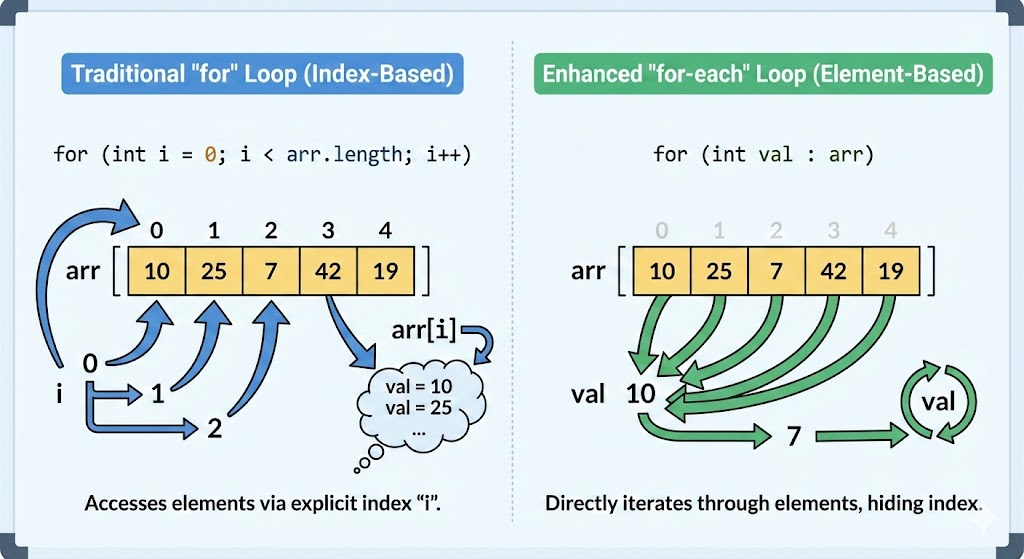
3.2 Using Enhanced For Loop (For-Each Loop)
Simple, clean, and ideal for reading elements.
Example
int[] nums = {10, 20, 30, 40};

for (int n : nums) {
    System.out.println(n);
}
When to use:
- When you only need element values
- When you don’t need the index
- When iterating sequentially from start to end
Limitation:
You cannot modify the array structure or use indexes.
3.3 Using While Loop
Useful when loop conditions are dynamic.
int[] nums = {10, 20, 30};
int i = 0;

while (i < nums.length) {
    System.out.println(nums[i]);
    i++;
}
3.4 Using Do-While Loop
Runs at least once, even if the array is empty. Not commonly used but important to understand.
int[] nums = {10, 20, 30};
int i = 0;

do {
    System.out.println(nums[i]);
    i++;
} while (i < nums.length);
3.5 Iterating in Reverse Order
Only possible with index-based loops.
int[] nums = {10, 20, 30, 40};

for (int i = nums.length - 1; i >= 0; i--) {
    System.out.println(nums[i]);
}
3.6 Iterating with Steps (Skipping Elements)
Example: print every 2nd element.
int[] nums = {1, 2, 3, 4, 5, 6};

for (int i = 0; i < nums.length; i += 2) {
    System.out.println(nums[i]);
}
3.7 Using Arrays.toString() for Quick Printing
A convenient method for debugging.
import java.util.Arrays;

int[] nums = {10, 20, 30};

System.out.println(Arrays.toString(nums));
Output:
[10, 20, 30]3.8 Using Java Streams (Advanced)
Introduced in Java 8.
Example: Printing Elements
import java.util.Arrays;

Arrays.stream(nums).forEach(System.out::println);
Example: Summing Elements
int sum = Arrays.stream(nums).sum();Example: Filtering Elements
Arrays.stream(nums)
      .filter(n -> n > 20)
      .forEach(System.out::println);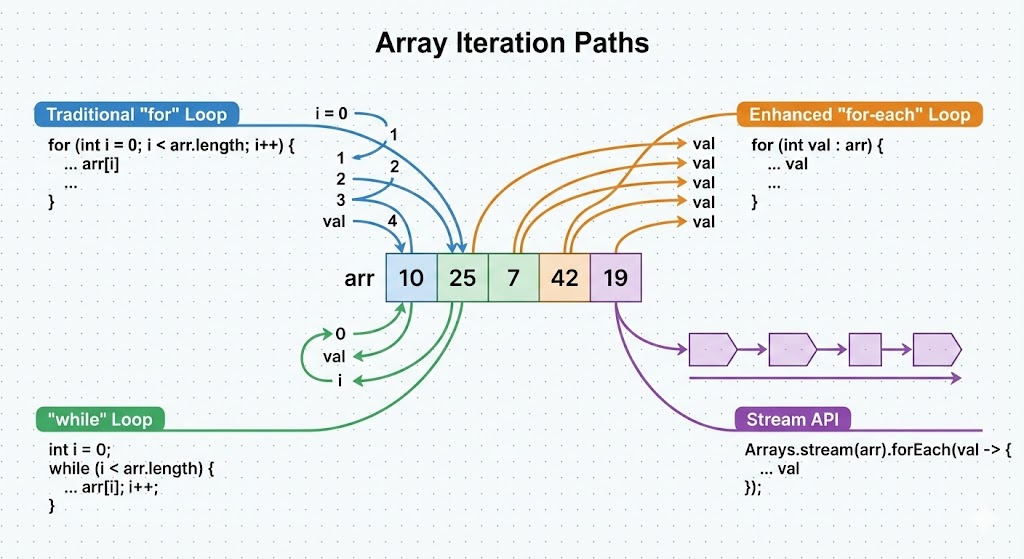
4. Choosing the Right Iteration Technique
| Technique | Best For |
|---|---|
| Traditional For | Index access, reverse loops, modification |
| Enhanced For | Simple reading of values |
| While | Dynamic loop conditions |
| Do-While | At least one execution |
| Streams | Functional-style processing |
5. Common Mistakes to Avoid
5.1 Off-by-One Errors
for (int i = 0; i <= arr.length; i++) // WRONGCorrect:
for (int i = 0; i < arr.length; i++)5.2 Forgetting Initialization
int[] arr;
for (int i : arr) {} // NullPointerException
5.3 Using Enhanced For When Index is Needed
Enhanced for cannot provide index directly.
6. Complete Example
public class ArrayIterationDemo {
    public static void main(String[] args) {
        int[] nums = {5, 10, 15, 20};

        System.out.println("Using For:");
        for (int i = 0; i < nums.length; i++)
            System.out.println(nums[i]);

        System.out.println("Using Enhanced For:");
        for (int n : nums)
            System.out.println(n);

        System.out.println("Using Streams:");
        Arrays.stream(nums).forEach(System.out::println);
    }
}
7. Summary
- Array iteration is essential for processing array elements.
- Java provides several looping techniques: for, enhanced for, while, do-while, reverse looping, stepping, and streams.
- Choosing the right method depends on whether you need index access, simplicity, or advanced functional operations.
- Always ensure index boundaries are respected to avoid errors.
Written By: Shiva Srivastava
How is this guide?
Last updated on