
Jagged and 3D Arrays
1. Introduction
In Multi-Dimensional Arrays, you learned regular 2D arrays where each row has the same number of columns.
But Java also supports more flexible structures known as Jagged Arrays.
Additionally, Java allows 3D arrays, which represent a cube-like structure or "array of 2D arrays."
This file explains:
- What jagged arrays are
- How they differ from normal 2D arrays
- How to create and use jagged arrays
- What 3D arrays are
- How to declare, create, and iterate through 3D arrays
2. Jagged Arrays (Ragged Arrays)
A jagged array is a 2D array where each row can have a different number of columns.
Example:
int[][] jagged = new int[3][];This means:
- 3 rows
- Number of columns per row is NOT fixed
- Columns must be assigned manually
2.1 Creating a Jagged Array
int[][] jagged = new int[3][];

jagged[0] = new int[2];  // row 0 has 2 columns
jagged[1] = new int[4];  // row 1 has 4 columns
jagged[2] = new int[3];  // row 2 has 3 columns
Row lengths:
- Row 0 → 2 elements
- Row 1 → 4 elements
- Row 2 → 3 elements
This provides flexibility that normal arrays don't allow.
2.2 Initializing Jagged Arrays with Values
int[][] jagged = {
    {1, 2},
    {3, 4, 5, 6},
    {7, 8, 9}
};
2.3 Accessing Elements
Same syntax as regular 2D arrays:
System.out.println(jagged[1][2]); // 52.4 Iterating Over Jagged Arrays
for (int i = 0; i < jagged.length; i++) {
    for (int j = 0; j < jagged[i].length; j++) {
        System.out.print(jagged[i][j] + " ");
    }
    System.out.println();
}
Output:
1 2
3 4 5 6
7 8 9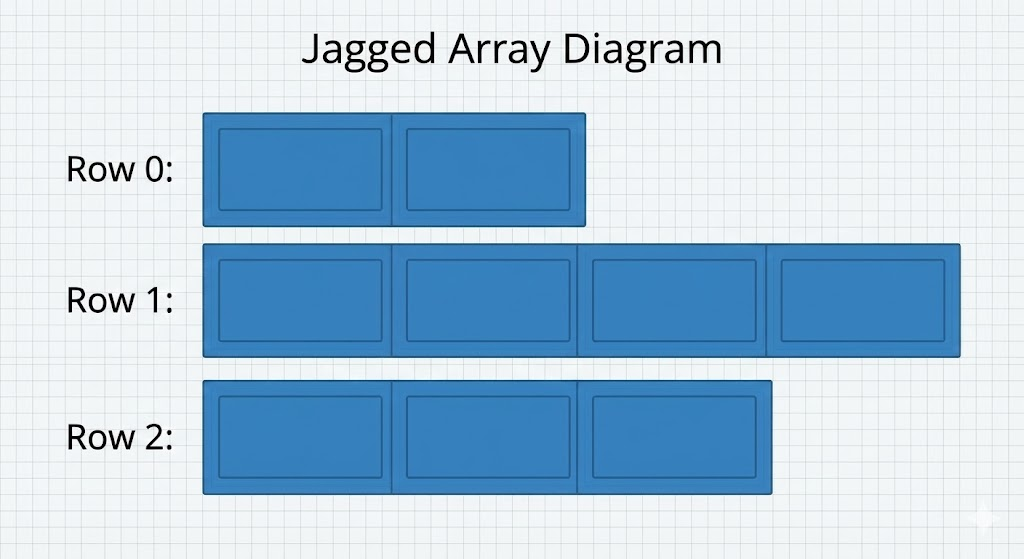
3. Why Use Jagged Arrays?
Jagged arrays are useful when:
- Rows represent different-length data
- Memory should not be wasted by forcing equal row size
Examples:
Example 1: Student marks
Each student has different number of subjects.
Example 2: Days in months
Months have varying days.
Example 3: Variable-width data tables
Such as datasets where entry sizes differ.
4. 3D Arrays
A 3D array is an array of 2D arrays. You can imagine it as a cube or a stack of matrices.
Syntax:
dataType[][][] arrayName;Example:
int[][][] cube = new int[2][3][4];Meaning:
- 2 layers
- Each layer has 3 rows
- Each row has 4 columns
Total elements = 2 × 3 × 4 = 24.
4.1 Creating a 3D Array
Declaration + Creation
int[][][] cube = new int[2][3][4];Initialization with Values
int[][][] cube = {
    {
        {1, 2, 3},
        {4, 5, 6}
    },
    {
        {7, 8, 9},
        {10, 11, 12}
    }
};
Layer 0 → contains 2 rows Layer 1 → contains 2 rows
4.2 Accessing Elements
cube[layer][row][column];Example:
System.out.println(cube[0][1][2]); // 6
System.out.println(cube[1][0][1]); // 8
4.3 Iterating Through a 3D Array
Use 3 nested loops (layer, row, column):
for (int i = 0; i < cube.length; i++) {             // layers
    for (int j = 0; j < cube[i].length; j++) {      // rows
        for (int k = 0; k < cube[i][j].length; k++) { // columns
            System.out.print(cube[i][j][k] + " ");
        }
        System.out.println();
    }
    System.out.println("-----");
}
5. When to Use 3D Arrays
3D arrays are helpful when representing:
- 3D game boards
- RGB image color values (
height × width × 3) - Multi-layered simulation data
- Tensors in scientific computations
But note: 3D arrays become hard to visualize and maintain, so they should be used only when necessary.
6. Jagged 3D Arrays (Advanced)
Java even allows jagged arrays in 3 dimensions, meaning:
- Layers can have different number of rows
- Rows can have different number of columns
Example:
int[][][] jagged3D = new int[2][][];

jagged3D[0] = new int[2][];
jagged3D[0][0] = new int[3];
jagged3D[0][1] = new int[1];

jagged3D[1] = new int[1][];
jagged3D[1][0] = new int[4];
This creates a fully irregular 3D structure.
7. Summary
- Jagged arrays allow each row to have different lengths.
- They are more flexible and memory efficient than regular 2D arrays.
- 3D arrays are arrays of 2D arrays used for multi-layered or cube-like data.
- You can access values using
array[layer][row][column]. - Iteration requires nested loops.
- Jagged arrays and 3D arrays are powerful but should be used wisely to maintain clarity.
Written By: Shiva Srivastava
How is this guide?
Last updated on