
Drawbacks of Array
1. Introduction
Arrays are fundamental in Java and provide an efficient way to store multiple values of the same type.
However, arrays also come with significant limitations that make them less flexible for real-world applications.
Understanding these drawbacks is important because it explains why Java Collections (ArrayList, HashMap, etc.) were introduced.
2. Major Drawbacks of Arrays
Arrays are simple and fast, but they lack important features needed in modern programming.
2.1 Fixed Size (Cannot Grow or Shrink)
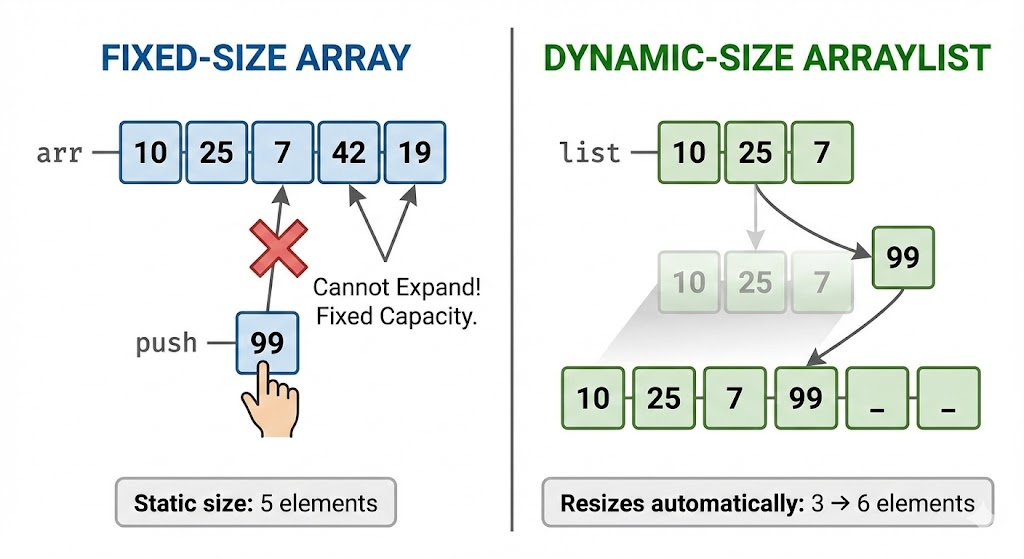
This is the biggest disadvantage.
When you create an array:
int[] numbers = new int[5];The size is permanently fixed to 5.
If you need to add a 6th element, it's impossible without creating a new array:
int[] newArr = new int[6];This makes arrays unsuitable for dynamic data.
2.2 Only Store Same-Type Elements
All elements in an array must be of the same data type.
Example:
int[] arr = {1, "hello", 3.5}; // ERRORYou cannot mix integers, strings, or objects without using an array of Object, which is not type-safe.
This limitation reduces flexibility.
2.3 No Built-in Methods for Common Operations
Arrays do not have useful methods like:
- add()
- remove()
- contains()
- resize()
- indexOf()
Instead, you must manually write logic.
Example: find if array contains an element:
boolean found = false;
for (int n : arr) {
    if (n == target) {
        found = true;
        break;
    }
}
Whereas with ArrayList:
list.contains(target); // very easy2.4 Difficult to Insert or Delete Elements
To insert a new value at a specific position:
- You must shift elements manually
- Sometimes create a new array
Example: insert at index 2:
int[] arr = {10, 20, 30, 40};
int[] newArr = new int[5];

// manual shifting
Deleting is equally complicated.
2.5 Inefficient for Large Data Changes
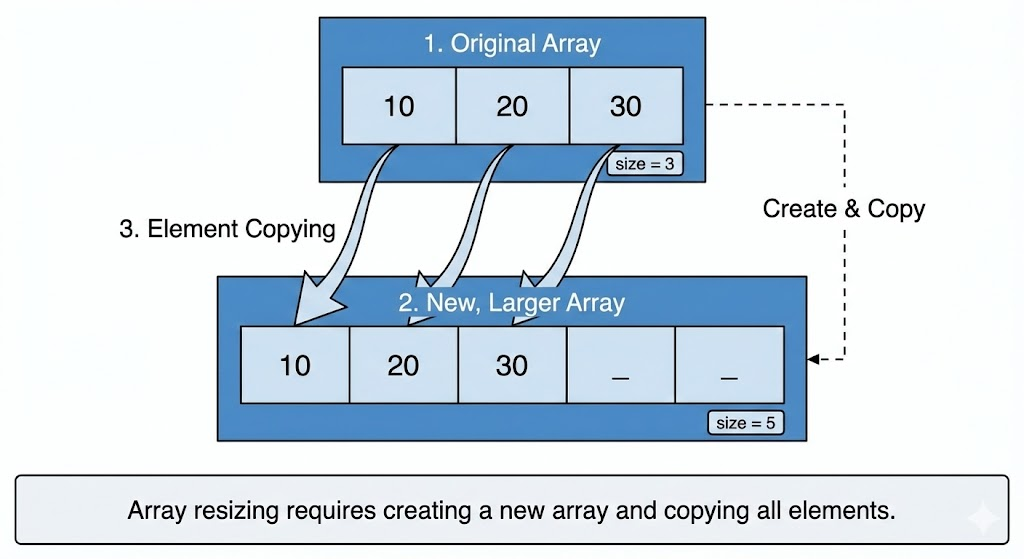
Because arrays are fixed-size, resizing operations involve:
- Creating a new array
- Copying all existing elements
This is slow for large arrays and consumes extra memory.
2.6 No Type Safety with Object Arrays
If you use an array of Object to store mixed types:
Object[] data = {10, "hello", 2.5};You must cast elements manually:
int x = (int) data[0];This can cause runtime errors (ClassCastException).
2.7 Cannot Directly Store Collections or Dynamic Data
Arrays do not support advanced features like:
- Automatic resizing
- Sorting methods
- Searching methods
- Hashing
- Iterable behavior (limited)
Most real applications prefer Collections for these reasons.
2.8 No Built-in Bounds Checking for Safe Modifications
Although Java throws ArrayIndexOutOfBoundsException, you still must manually ensure:
0 <= index < array.lengthThis increases chances of bugs.
3. Real-World Scenarios Where Arrays Fail
Scenario 1: Student List in School System
New students join every year, so list size must grow.
- Arrays cannot grow dynamically
- ArrayList is better
Scenario 2: Managing Orders in an Ecommerce App
Orders come and go constantly.
- Arrays can't easily remove or add
- Collections provide
add,remove,sort, etc.
Scenario 3: Social Media Feed
Number of posts is unpredictable.
- Arrays are not suitable
- Collections scale efficiently
4. Why Collections Solve These Problems
Java introduced the Collections Framework to address array drawbacks.
Collections provide:
- Dynamic resizing
- Flexible storage
- Powerful built-in methods
- Better performance for add/remove operations
- Generic type safety
Example:
ArrayList<Integer> list = new ArrayList<>();
list.add(10);
list.add(20);
No fixed size or manual resizing needed.
5. Summary
Arrays have several drawbacks:
- Fixed size
- Same-type only
- No built-in add/remove/search methods
- Insertion and deletion are difficult
- Not efficient for dynamic data
- No automatic resizing
- No type-safe heterogeneous storage
Written By: Shiva Srivastava
How is this guide?
Last updated on