
Arrays Class Methods
1. Introduction
Java provides a powerful utility class called java.util.Arrays that contains many static methods to work with arrays.
Instead of writing your own logic for:
- Printing arrays
- Sorting arrays
- Searching elements
- Comparing arrays
- Copying arrays
- Filling arrays with values
you should use the Arrays class.
To use it:
import java.util.Arrays;All methods are static, so you call them using:
Arrays.methodName(...);2. Commonly Used Methods in Arrays Class
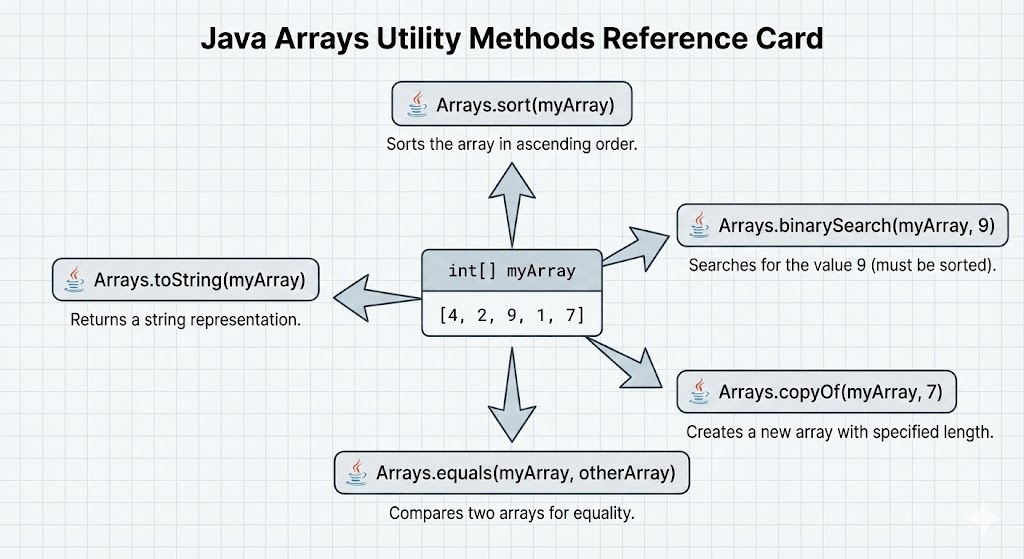
Some of the most important methods are:
toString()/deepToString()sort()/parallelSort()binarySearch()fill()copyOf()/copyOfRange()equals()/deepEquals()
We will go through each with examples.
3. Printing Arrays: toString() and deepToString()
3.1 toString() – For 1D Arrays
Normally, printing an array:
int[] arr = {1, 2, 3};
System.out.println(arr);
Output (not useful):
[I@1b6d3586Use Arrays.toString():
int[] arr = {1, 2, 3};
System.out.println(Arrays.toString(arr));
Output:
[1, 2, 3]Supports all primitive and object 1D arrays.
3.2 deepToString() – For Multi-Dimensional Arrays
For 2D or multi-dimensional arrays, use deepToString():
int[][] matrix = {
    {1, 2, 3},
    {4, 5, 6}
};

System.out.println(Arrays.deepToString(matrix));
Output:
[[1, 2, 3], [4, 5, 6]]toString() is not enough for nested arrays; deepToString() understands nested structure.
4. Sorting Arrays: sort() and parallelSort()
4.1 sort() – Standard Sorting
Sorts the array in ascending order.
int[] nums = {5, 2, 9, 1};
Arrays.sort(nums);
System.out.println(Arrays.toString(nums)); // [1, 2, 5, 9]
Works for:
- Primitive arrays:
int[],double[],char[], etc. - Object arrays:
String[],Integer[], etc. (uses natural order or Comparator)
Sorting Part of an Array
int[] nums = {5, 2, 9, 1, 7};
Arrays.sort(nums, 1, 4); // sort from index 1 (inclusive) to 4 (exclusive)
System.out.println(Arrays.toString(nums));
4.2 parallelSort() – Parallel Sorting (Large Arrays)
Works like sort() but can use multiple CPU cores for large arrays.
int[] nums = {5, 2, 9, 1};
Arrays.parallelSort(nums);
System.out.println(Arrays.toString(nums));
For small arrays, sort() is usually enough; for large arrays, parallelSort() may perform better.
5. Searching Arrays: binarySearch()
binarySearch() searches for a value in a sorted array.
int[] nums = {1, 3, 5, 7, 9};
int index = Arrays.binarySearch(nums, 7);
System.out.println(index); // 3
Important rules:
- Array must be sorted in ascending order (same order used by
Arrays.sort()). - If element is found → returns its index (0-based).
- If not found → returns a negative value:
-(insertionPoint) - 1.
Example (not found):
int[] nums = {1, 3, 5, 7, 9};
int index = Arrays.binarySearch(nums, 4);
System.out.println(index); // -3
Here, 4 would fit at index 2 → insertionPoint = 2 → result = -2 - 1 = -3.
6. Filling Arrays: fill()
fill() assigns the same value to all elements of an array.
int[] nums = new int[5];
Arrays.fill(nums, 10);
System.out.println(Arrays.toString(nums)); // [10, 10, 10, 10, 10]
You can also fill a range:
int[] nums = {0, 0, 0, 0, 0};
Arrays.fill(nums, 1, 4, 5); // from index 1 (inclusive) to 4 (exclusive)
System.out.println(Arrays.toString(nums)); // [0, 5, 5, 5, 0]
7. Copying Arrays: copyOf() and copyOfRange()
7.1 copyOf() – Copy Entire Array to New Length
int[] original = {1, 2, 3};
int[] copy = Arrays.copyOf(original, 5);
System.out.println(Arrays.toString(copy)); // [1, 2, 3, 0, 0]
If new length > original → extra elements filled with default values If new length < original → array is truncated.
7.2 copyOfRange() – Copy a Portion
int[] original = {10, 20, 30, 40, 50};
int[] part = Arrays.copyOfRange(original, 1, 4);
System.out.println(Arrays.toString(part)); // [20, 30, 40]
Parameters:
- Start index: inclusive
- End index: exclusive
8. Comparing Arrays: equals() and deepEquals()
8.1 equals() – For 1D Arrays
Checks if two arrays:
- Have the same length
- Have the same elements in the same order
int[] a = {1, 2, 3};
int[] b = {1, 2, 3};
int[] c = {1, 3, 2};

System.out.println(Arrays.equals(a, b)); // true
System.out.println(Arrays.equals(a, c)); // false
8.2 deepEquals() – For Multi-Dimensional Arrays
equals() is not sufficient for nested arrays. Use deepEquals():
int[][] m1 = {
    {1, 2},
    {3, 4}
};

int[][] m2 = {
    {1, 2},
    {3, 4}
};

System.out.println(Arrays.deepEquals(m1, m2)); // true
9. Arrays and Streams (Preview)
Arrays also provides methods to create streams from arrays (used in functional programming with Java 8+):
import java.util.Arrays;

int[] nums = {1, 2, 3, 4, 5};

int sum = Arrays.stream(nums).sum();
System.out.println(sum); // 15
This is useful for:
- Sum, average
- Filtering
- Mapping
but full details belong to the Stream API topic.
10. Quick Reference Table
| Method | Purpose |
|---|---|
toString(arr) | Convert 1D array to string |
deepToString(arr) | Convert multi-dimensional array |
sort(arr) | Sort array in ascending order |
parallelSort(arr) | Sort using parallel algorithm |
binarySearch(arr, key) | Search element in sorted array |
fill(arr, value) | Fill all elements with a value |
copyOf(arr, newLen) | Copy array with new length |
copyOfRange(arr, a, b) | Copy subrange [a, b) |
equals(a1, a2) | Compare 1D arrays |
deepEquals(a1, a2) | Compare nested arrays |
11. Complete Example
import java.util.Arrays;

public class ArraysClassDemo {
    public static void main(String[] args) {

        int[] nums = {5, 2, 9, 1, 7};

        // Sorting
        Arrays.sort(nums);
        System.out.println("Sorted: " + Arrays.toString(nums));

        // Binary Search
        int index = Arrays.binarySearch(nums, 7);
        System.out.println("Index of 7: " + index);

        // Copy
        int[] copy = Arrays.copyOf(nums, 7);
        System.out.println("Copy: " + Arrays.toString(copy));

        // Fill
        int[] filled = new int[5];
        Arrays.fill(filled, 3);
        System.out.println("Filled: " + Arrays.toString(filled));

        // Equals
        System.out.println("nums equals copy? " + Arrays.equals(nums, copy));
    }
}
12. Summary
java.util.Arraysis a utility class with powerful methods for working with arrays.- It saves time and reduces errors compared to writing manual logic.
- Common tasks: printing, sorting, searching, copying, comparing, and filling arrays.
- Use
toString/deepToString,sort,binarySearch,copyOf,fill, andequalsregularly when working with arrays.
Written By: Shiva Srivastava
How is this guide?
Last updated on