
Packages
1. Introduction
A package in Java is a mechanism to group related classes, interfaces, and sub-packages.
Packages help in:
- Organizing code
- Avoiding name conflicts
- Providing access protection
- Building modular applications
Java packages are similar to folders in a file system, allowing clean structure and easy maintenance.
2. Types of Packages in Java
Java provides two types of packages:
- Built-in Packages (predefined)
- User-Defined Packages (created by developers)
2.1 Built-in Packages
Examples:
java.lang→ Core classes (String, Math, Integer)java.util→ Utility classes (ArrayList, HashMap, Date)java.io→ Input/output classesjava.time→ Date and time APIjava.net→ Networkingjava.sql→ Database connectivity
These packages are part of the JDK.
2.2 User-Defined Packages
Developers create packages to organize large projects.
Example:
package com.example.project;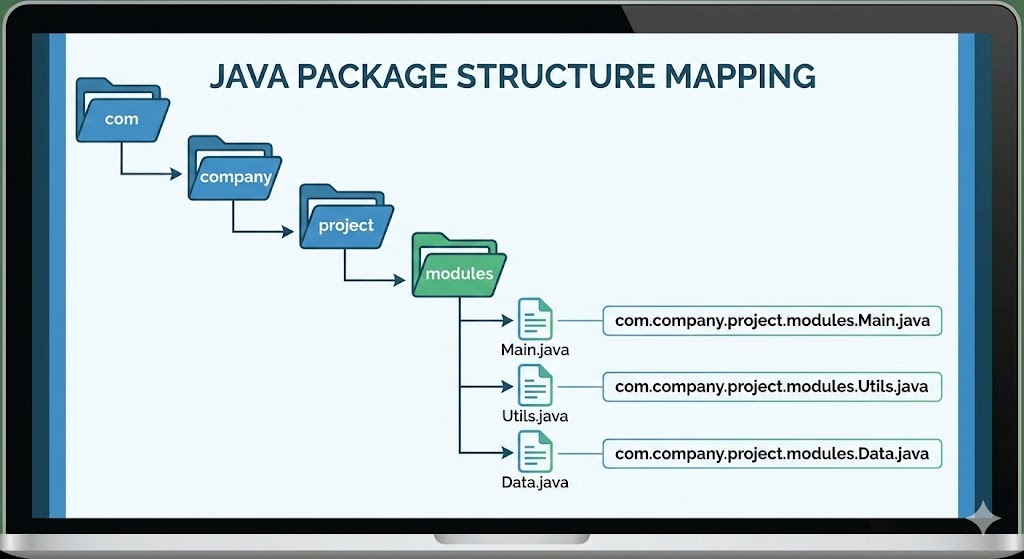
3. Creating a Package
Step 1: Declare package at the top of the Java file
package mypackage;

public class Student {
    public void display() {
        System.out.println("Inside Student class");
    }
}
Step 2: Compile with package directory creation
javac -d . Student.java-d . instructs the compiler to create directories based on package name.
Step 3: Use the package
import mypackage.Student;

public class Main {
    public static void main(String[] args) {
        Student s = new Student();
        s.display();
    }
}
4. Using import Statement
To use a class from another package, import it:
import mypackage.Student;OR import all:
import mypackage.*;Importing improves readability but does not increase runtime memory.
5. Sub-packages
Packages inside other packages are known as sub-packages.
Example:
com.company.productDirectory structure:
com/
   company/
       product/
           Product.java
Organizing large projects becomes easier with sub-packages.
6. Access Modifiers and Packages
Packages play an important role in access control.
| Modifier | Same Class | Same Package | Subclass | Outside Package |
|---|---|---|---|---|
| public | Yes | Yes | Yes | Yes |
| protected | Yes | Yes | Yes | No |
| default (no modifier) | Yes | Yes | No | No |
| private | Yes | No | No | No |
Package-level (default) access is restricted to classes inside the same package.
7. Static Import
Java allows importing static members:
import static java.lang.Math.PI;
import static java.lang.Math.sqrt;

System.out.println(PI);
System.out.println(sqrt(25));
8. Real-World Use of Packages
Large applications follow layered architecture using packages:
com.company.app
      ├── controller
      ├── service
      ├── model
      ├── repository
      └── config
Each layer contains logically grouped classes, improving:
- Maintainability
- Readability
- Scalability
9. Package Naming Conventions
Follow industry style:
- Domain in reverse order →
com.google.api - Use lowercase
- No special characters
- Short and meaningful
Examples:
com.amazon.paymentorg.springframework.corecom.myapp.utils
10. Complete Example Demonstrating Package Use
File: mypack/Message.java
package mypack;

public class Message {
    public void print() {
        System.out.println("Hello from mypack");
    }
}
File: Main.java
import mypack.Message;

public class Main {
    public static void main(String[] args) {
        Message m = new Message();
        m.print();
    }
}
Compile:
javac -d . Message.java Main.javaRun:
java MainOutput:
Hello from mypack11. Summary
- Packages group related classes and avoid naming conflicts.
- Two types: built-in and user-defined.
- Use
packageto declare a package andimportto use classes. - Packages improve code organization and readability.
- Sub-packages help structure large applications.
- Access modifiers behave differently across packages.
This completes Packages in Java.
Next topic: classes-and-objects-practical.mdx if you want the next file in sequence.
Written By: Shiva Srivastava
How is this guide?
Last updated on