
Static Variables
1. Introduction
In Java, variables can belong either to:
- Objects (instance variables), or
- Classes (static variables)
A static variable is a variable that belongs to the class itself, not to any individual object.
This means:
- Only one copy of the variable exists in memory
- All objects of the class share the same value
- Static variables are loaded when the class is loaded by the JVM
Static variables are essential for managing shared data and are widely used in real-world applications.
2. What Is a Static Variable?
A static variable is declared using the static keyword:
static int count;Key properties:
- Shared across all objects of the class
- Stored in the Method Area of the JVM
- Accessed using class name or via object (class name preferred)
- Initialized only once during class loading
Example
class Student {
    static int count = 0; // static variable
    String name;          // instance variable

    Student(String name) {
        this.name = name;
        count++;          // increment static count
    }
}
Usage:
Student s1 = new Student("Amit");
Student s2 = new Student("Ravi");

System.out.println(Student.count);  // 2
All objects share a single count variable.
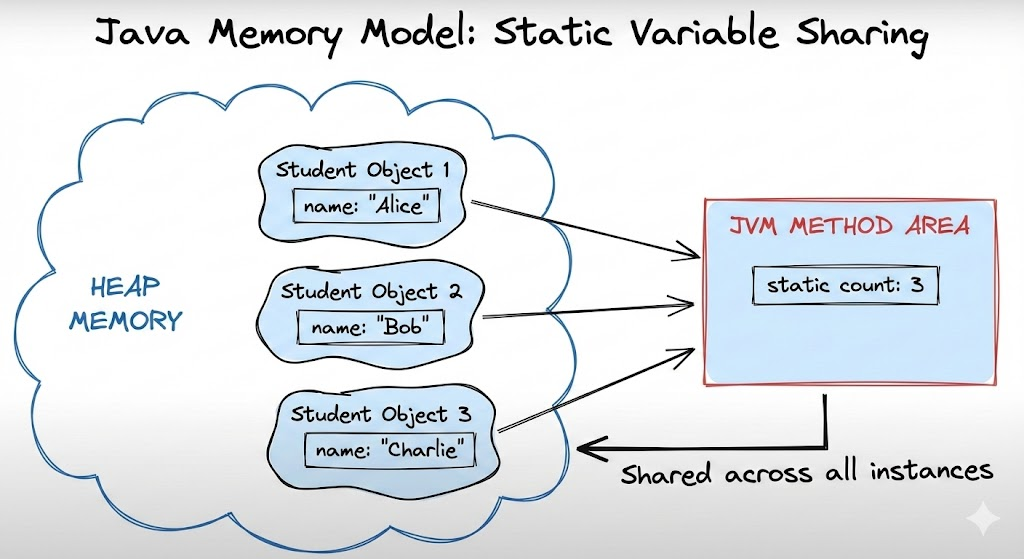
3. Instance Variables vs Static Variables
| Feature | Instance Variable | Static Variable |
|---|---|---|
| Belongs to | Object | Class |
| Memory location | Heap | Method Area |
| Number of copies | One per object | One per class |
| Access | objectName.var | ClassName.var |
| Lifecycle | Created when object is created | Created during class loading |
| Can be used in static context? | No | Yes |
4. Accessing Static Variables
Static variables should be accessed using the class name:
ClassName.variable;Example:
Student.count;You can access static variables through objects, but this is discouraged:
Student s = new Student("Amit");
System.out.println(s.count);   // allowed, but bad practice
Recommended:
System.out.println(Student.count);5. Why and When to Use Static Variables?
Static variables are used when:
-
A value must be shared across all objects Example: student count, number of active users
-
Memory optimization Large shared structures (e.g., configuration settings) can be static to avoid duplication.
-
Constants
static finalvariables are used to create constants.
Example:
static final double PI = 3.14159;- Utility classes such as
Math,Collections, etc.
Practical Example
class Library {
    static int booksIssued = 0;

    void issueBook() {
        booksIssued++;
    }
}

public class Main {
    public static void main(String[] args) {
        Library l1 = new Library();
        Library l2 = new Library();

        l1.issueBook();
        l2.issueBook();

        System.out.println(Library.booksIssued); // 2
    }
}
6. Static Variables with Static Methods
Static variables can be used inside static methods:
class Test {
    static int x = 10;

    static void show() {
        System.out.println(x); // works
    }
}
However, static methods cannot access instance variables without creating an object.
7. Static Variables and Constructors
Static variables do not get reinitialized per object:
class Demo {
    static int x = 0;

    Demo() {
        x++;    // increments for every object
    }
}
8. Static Variables as Class-Level Constants
Most constants are declared as:
static final int MAX_VALUE = 100;static→ belongs to the classfinal→ cannot be changed
Used widely in frameworks and enterprise code.
9. Example Program Demonstrating Static Variable Behavior
class Employee {
    static int idCounter = 1000;
    int empId;

    Employee() {
        empId = ++idCounter;
    }
}

public class Main {
    public static void main(String[] args) {
        Employee e1 = new Employee();
        Employee e2 = new Employee();
        Employee e3 = new Employee();

        System.out.println(e1.empId);  // 1001
        System.out.println(e2.empId);  // 1002
        System.out.println(e3.empId);  // 1003
    }
}
Static variable ensures unique ID generation.
10. Common Mistakes with Static Variables
Mistake 1: Using object reference instead of class name
obj.x; // works but misleadingPrefer:
ClassName.x;Mistake 2: Expecting separate copies per object
Static variables are shared, not per-object.
Mistake 3: Modifying static variables unnecessarily
Since they are shared, altering them affects the entire application.
11. Summary
- Static variables belong to the class, not objects.
- Only one copy exists for the entire class.
- Stored in the JVM Method Area.
- Accessed using ClassName.variable.
- Useful for shared data, counters, constants, and utility classes.
- Static variables are loaded once during class loading and remain until the program ends.
This completes Static Variables in Java.
Written By: Shiva Srivastava
How is this guide?
Last updated on