
Project: AI Course Support Assistant
The final project of the course - a console assistant in which a supervisor agent delegates student questions to three specialised agents, one of which fetches real course data through the custom MCP server.
This is the last lesson, and it adds no new concept. It combines the ones you have:
| Building block | Learned in |
|---|---|
Agents with @Agent | Your First AI Agent |
| A supervisor that delegates | Supervisor Agents |
| An MCP client and a tool provider | Connecting to a Filesystem MCP Server |
| Our own MCP server with course data | Building Your Own MCP Server |
The result is a small AI Course Support Assistant. A student types a question in the console. A supervisor reads it and passes it to the right specialist. One of the specialists looks up prices and durations in the MCP server. The answer is printed.
The architecture
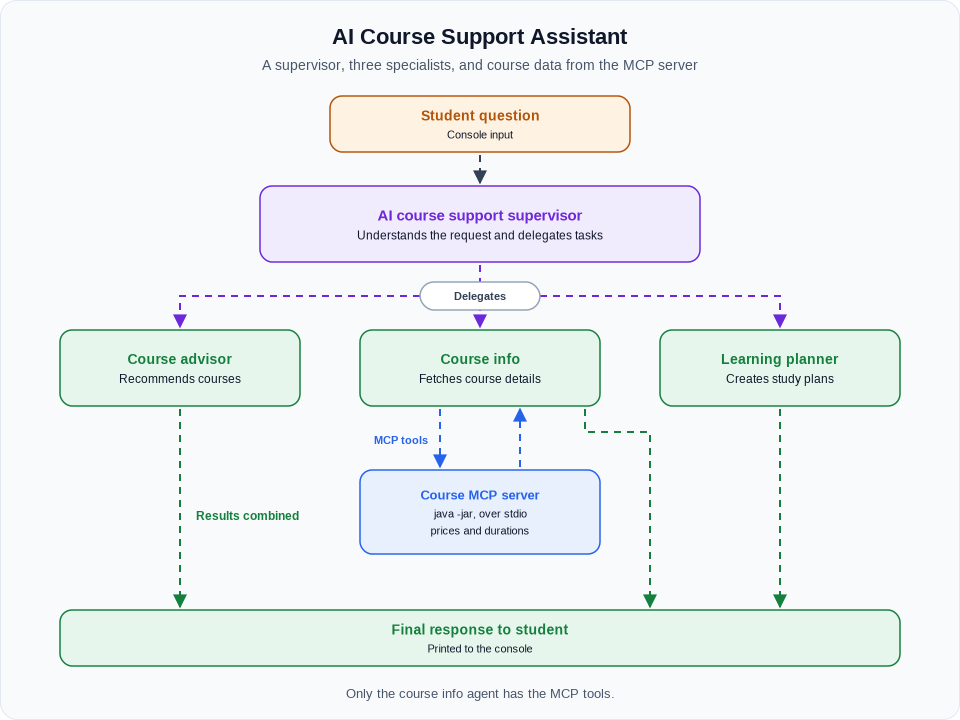
The lesson's diagram, from top to bottom:
| Box | Text in the diagram | In the code |
|---|---|---|
| Student question | Console input | Scanner in Main |
| AI course support supervisor | Understands the request and delegates tasks | CourseSupportSupervisor |
| Course advisor | Recommends courses | CourseAdvisorAgent |
| Course info | Fetches course details | CourseInfoAgent, the only agent with MCP tools |
| Learning planner | Creates study plans | LearningPlanAgent |
| Final response to student | Printed to the console | System.out in Main |
The supervisor decides for each question whether one agent is enough or whether several are needed, and in which order.
The project is a console application. The lesson mentions that the same service could be exposed over HTTP with Spring Boot, as in Building AI REST APIs, and keeps the console to stay focused on the agents.
You need the MCP server jar first
This project starts the course MCP server from Building Your Own MCP Server as a child process. Build that project first and note the path of course-mcp-server-1.0-SNAPSHOT.jar. Without the jar, this application cannot start. The instructor says the same in the video.
Project structure
The lesson opens a prepared project, ai-course-support-assistant-starter-java21. Most files already exist and are walked through. Two are written in the lesson: CourseSupportService and Main.
src/main/java/com/telusko/coursesupport
├── agent
│   ├── CourseAdvisorAgent.java
│   ├── CourseInfoAgent.java
│   └── LearningPlanAgent.java
├── config
│   ├── McpClientConfig.java
│   └── ModelConfig.java
├── service
│   └── CourseSupportService.java
├── workflow
│   └── CourseSupportSupervisor.java
└── Main.java| Package | Responsibility |
|---|---|
agent | The three specialists. Only interfaces with prompts |
config | How the model and the MCP client are created |
workflow | The supervisor interface |
service | Puts everything together and offers one method, ask |
Main | The console loop |
The instructor calls this modularity. In the earlier lessons everything was in main. Here each concern has a place, which is how a real application is organised.
About the code on this page
The video shows this project in pieces. Some files are visible completely and some only in part. Lines that are never on screen, such as imports, the method of CourseAdvisorAgent, the end of McpClientConfig and parts of Main, are completed here in the style of the visible code. The complete project as shown on this page was compiled and run for these docs. Where a file was completed, a note under it says so.
Dependencies
<dependencies>
    <dependency>
        <groupId>dev.langchain4j</groupId>
        <artifactId>langchain4j-open-ai</artifactId>
        <version>1.18.1</version>
    </dependency>
    <dependency>
        <groupId>dev.langchain4j</groupId>
        <artifactId>langchain4j-agentic</artifactId>
        <version>1.18.1-beta28</version>
    </dependency>
    <dependency>
        <groupId>dev.langchain4j</groupId>
        <artifactId>langchain4j-mcp</artifactId>
        <version>1.18.1-beta28</version>
    </dependency>
</dependencies>
One dependency for the model, one for agents, one for MCP. The project uses Java 21.
Step 1: The three agents
The advisor
package com.telusko.coursesupport.agent;

import dev.langchain4j.agentic.Agent;
import dev.langchain4j.service.UserMessage;
import dev.langchain4j.service.V;

public interface CourseAdvisorAgent
{
    @Agent(
            description = "Recommends a technical course based on a student's background",
            outputKey = "recommendation"
    )
    @UserMessage("""
            You are a technical course advisor.

            Student request: {{request}}

            Recommend ONE suitable technical topic
            based on the student's experience.

            Explain the recommendation in 2 sentences.

            Do not invent course prices or availability.
            """)
    String recommend(@V("request") String request);
}
The annotations and the prompt are from the video. The method line is not visible there. The name recommend and its parameter are completed for these docs.
The course information agent
package com.telusko.coursesupport.agent;

import dev.langchain4j.agentic.Agent;
import dev.langchain4j.service.UserMessage;
import dev.langchain4j.service.V;

public interface CourseInfoAgent
{
    @Agent(
            description = """
                    Retrieves available courses, course prices,
                    and course durations using MCP tools.
                    Use this agent for factual course information.
                    """,
            outputKey = "courseInfo"
    )
    @UserMessage("""
            You are a course information assistant.

            Student request: {{request}}

            You have access to MCP tools for:
            - Listing courses
            - Finding course prices
            - Finding course durations

            Use the relevant tools to answer the request.

            Never invent course names, prices or durations.
            If information is unavailable, say so clearly.
            """)
    String getCourseInfo(@V("request") String request);
}
This agent is the one that will receive the MCP tools. Its description tells the supervisor to use it "for factual course information".
The planner
package com.telusko.coursesupport.agent;

import dev.langchain4j.agentic.Agent;
import dev.langchain4j.service.UserMessage;
import dev.langchain4j.service.V;

public interface LearningPlanAgent
{
    @Agent(
            description = "Creates a four-week learning plan for a technical topic",
            outputKey = "learningPlan"
    )
    @UserMessage("""
            You are a technical learning plan creator.

            Student request: {{request}}

            Create a practical four-week learning plan.

            For each week include:
            - Main topic
            - Practice activity

            Keep the response concise.
            """)
    String createPlan(@V("request") String request);
}
What the three have in common
| Agent | Input | Output key | Has tools |
|---|---|---|---|
CourseAdvisorAgent | request | recommendation | No |
CourseInfoAgent | request | courseInfo | Yes, from the MCP server |
LearningPlanAgent | request | learningPlan | No |
All three take {{request}}. That follows the lesson learned in Supervisor Agents: agents under a supervisor should be able to work from the request alone. And each description states clearly when the agent is the right choice, because the supervisor chooses by reading them.
Two of the prompts contain a guard against hallucinations: "Do not invent course prices or availability" and "Never invent course names, prices or durations". Prices must come from the tools, never from the model's imagination.
Step 2: The configuration classes
The model
package com.telusko.coursesupport.config;

import dev.langchain4j.model.openai.OpenAiChatModel;

public class ModelConfig
{
    public static OpenAiChatModel createModel()
    {

        String apiKey = System.getenv("OPENAI_API_KEY");

        if (apiKey == null || apiKey.isBlank()) {
            throw new IllegalStateException(
                    "Please set OPENAI_API_KEY"
            );
        }

        return OpenAiChatModel.builder()
                .apiKey(apiKey)
                .modelName("gpt-4o-mini")
                .build();
    }
}
The builder is the one you know. The check in front of it is new and worth copying. If the environment variable is missing, the program stops at once with a clear message. Without the check, the failure would appear later as an authentication error from the provider.
The MCP client
package com.telusko.coursesupport.config;

import dev.langchain4j.mcp.McpToolProvider;
import dev.langchain4j.mcp.client.DefaultMcpClient;
import dev.langchain4j.mcp.client.McpClient;
import dev.langchain4j.mcp.client.transport.McpTransport;
import dev.langchain4j.mcp.client.transport.stdio.StdioMcpTransport;

import java.util.List;

public class McpClientConfig
{
    public static McpClient createClient() {

        String jarPath = System.getenv("COURSE_MCP_JAR");

        if (jarPath == null || jarPath.isBlank()) {
            throw new IllegalStateException(
                    "Please set COURSE_MCP_JAR to the MCP server JAR path"
            );
        }

        McpTransport transport = StdioMcpTransport.builder()
                .command(List.of("java", "-jar", jarPath))
                .logEvents(true)
                .build();

        return DefaultMcpClient.builder()
                .key("course-mcp-server")
                .transport(transport)
                .build();
    }

    // WHAT: Expose the MCP server's tools to an AI agent.
    public static McpToolProvider createToolProvider(McpClient client) {

        return McpToolProvider.builder()
                .mcpClients(client)
                .build();
    }
}
Both methods contain code from the MCP lessons: a stdio transport that runs java -jar, a client with a key, and a tool provider.
Environment variable or fixed path
The starter project reads the jar path from an environment variable, COURSE_MCP_JAR, as shown above. In the video the instructor comments those lines out and writes the full path of the jar on his machine directly into .command(...).
The code here keeps the environment variable. A path such as D:\AI Basics\... exists on one machine only, and a variable lets everyone run the same code. Set COURSE_MCP_JAR in the run configuration, next to OPENAI_API_KEY. The line that uses jarPath in the command is completed for these docs, because the starter's original line is not visible in the video.
Step 3: The supervisor interface
package com.telusko.coursesupport.workflow;

import dev.langchain4j.agentic.Agent;
import dev.langchain4j.service.V;

public interface CourseSupportSupervisor
{
    @Agent
    String handle(@V("request") String request);
}
One request in, one answer out, and no prompt. The decision which agent handles a request is made by the supervisor's model at run time. Nobody wrote that logic.
Step 4: The service that connects everything
This class is written live in the lesson, in the order of the list below:
package com.telusko.coursesupport.service;

import com.telusko.coursesupport.agent.CourseAdvisorAgent;
import com.telusko.coursesupport.agent.CourseInfoAgent;
import com.telusko.coursesupport.agent.LearningPlanAgent;
import com.telusko.coursesupport.config.McpClientConfig;
import com.telusko.coursesupport.config.ModelConfig;
import com.telusko.coursesupport.workflow.CourseSupportSupervisor;
import dev.langchain4j.agentic.AgenticServices;
import dev.langchain4j.mcp.McpToolProvider;
import dev.langchain4j.mcp.client.McpClient;
import dev.langchain4j.model.openai.OpenAiChatModel;

public class CourseSupportService implements AutoCloseable {

    private final McpClient mcpClient;
    private final CourseSupportSupervisor supervisor;

    public CourseSupportService()
    {
        OpenAiChatModel model = ModelConfig.createModel();
        mcpClient=McpClientConfig.createClient();

        McpToolProvider toolProvider = McpClientConfig.createToolProvider(mcpClient);

        CourseAdvisorAgent advisorAgent =
                AgenticServices.agentBuilder(CourseAdvisorAgent.class)
                        .chatModel(model)
                        .build();

        LearningPlanAgent planAgent =
                AgenticServices.agentBuilder(LearningPlanAgent.class)
                        .chatModel(model)
                        .build();

        CourseInfoAgent infoAgent =
                AgenticServices.agentBuilder(CourseInfoAgent.class)
                        .chatModel(model)
                        .toolProvider(toolProvider)
                        .build();

        supervisor=AgenticServices.supervisorBuilder(CourseSupportSupervisor.class)
                .chatModel(model)
                .subAgents(advisorAgent, planAgent, infoAgent)
                .build();


    }

    public String ask(String question) {

        if (question == null || question.isBlank()) {
            return "Please enter a question.";
        }

        return supervisor.handle(question);
    }

    @Override
    public void close() throws Exception {
        mcpClient.close();
    }
}
The constructor does six things:
| Step | Code | What it does |
|---|---|---|
| 1 | ModelConfig.createModel() | Gets the chat model |
| 2 | McpClientConfig.createClient() | Starts the MCP server and connects to it |
| 3 | McpClientConfig.createToolProvider(mcpClient) | Makes the server's tools available |
| 4 | Two agentBuilder calls | Builds the advisor and the planner, with a model only |
| 5 | agentBuilder with .toolProvider(toolProvider) | Builds the info agent, with the model and the MCP tools |
| 6 | supervisorBuilder with .subAgents(...) | Builds the supervisor over all three |
Three design decisions are worth a closer look.
Only one agent gets the tools. The .toolProvider(toolProvider) line appears once, on the info agent. The advisor and the planner have no access to the MCP server. Each agent gets exactly what its job needs. This is the "permissions and constraints" part of the agent definition from AI Agents vs Agentic AI, in practice.
The agent builder accepts a tool provider. It is the same method as on the AI Service builder in the MCP lessons. Agents are AI Services with extras, so everything that worked there works here.
The service is AutoCloseable. The MCP client holds a child process, and it must be closed. By implementing AutoCloseable with a close() method that closes the client, the service can be used in a try-with-resources block, and the cleanup happens automatically. This is tidier than the finally block of the earlier MCP lessons.
ask is a small helper. It rejects empty input without spending a model call, and passes everything else to the supervisor.
Step 5: The console loop
package com.telusko.coursesupport;

import com.telusko.coursesupport.service.CourseSupportService;

import java.util.Scanner;

public class Main {
    public static void main(String[] args) throws Exception {
        try (Scanner scanner = new Scanner(System.in);
             CourseSupportService service = new CourseSupportService()) {

                System.out.println("================================");
                System.out.println("   AI COURSE SUPPORT ASSISTANT  ");
                System.out.println("================================");

                while (true) {

                    System.out.print("\nStudent: ");
                    String question = scanner.nextLine();

                    // Type exit to leave the assistant.
                    if (question.equalsIgnoreCase("exit")) {
                        System.out.println("Goodbye!");
                        break;
                    }

                    try {
                        // The supervisor handles the student request.
                        String response = service.ask(question);

                        System.out.println("\nAI Assistant:");
                        System.out.println(response);

                    } catch (Exception e) {

                        // Report errors without terminating the console loop.
                        System.err.println(
                                "Request failed: " + e.getMessage()
                        );
                    }
                }
        }
    }
}
In the video the top of this method and the lines around the exit check are hidden. The banner, the loop, the call of service.ask(question), the two output lines and the error handling are as shown on screen. The opening try line, the reading of the question, the exit check with its comment and the exit message are completed for these docs, in a way that fits every fragment that is visible.
| Part | Purpose |
|---|---|
| try-with-resources | Closes the scanner and the service, and with it the MCP client, when the loop ends |
while (true) | Lets the student ask question after question |
The exit check | The way out of the loop |
The inner try and catch | One failed request prints an error and the loop continues. The program does not crash because of a single bad answer |
Step 6: Run it
Set the two environment variables in the run configuration, OPENAI_API_KEY and COURSE_MCP_JAR, and run Main.
================================
   AI COURSE SUPPORT ASSISTANT
================================

Student: tell mw course pricve of java

AI Assistant:
The price of the Java course is 3000 INR.
The question has two typing mistakes, exactly as the instructor typed it. The system still understood it. The supervisor chose the info agent, the info agent asked the MCP server for the price, and the server's answer came back as a sentence. The number 3000 comes from the CourseServices class that we wrote ourselves in the MCP server.
The second question asks for advice:
Student: I know Java basics. What should I learn next?

AI Assistant:
### Four-Week Learning Plan for Spring Framework
...
**Week 4: Advanced Topics in Spring**
- **Main Topic:** Spring Security and Testing
...
This plan provides a structured approach to learning the Spring Framework, ...
No tool is needed for this, and no course data. The answer is a four-week plan for the Spring Framework, with a main topic and a practice activity for each week, which is the format of the planner's prompt. As in the previous lesson, a question that asks "what next" came back as a plan. The supervisor decided how to handle it, and the console shows only the final answer.
The third question in the video is "What is the price and duration of the python course?", which again needs the info agent and the MCP server. Its answer is not visible on screen.
One question, step by step
For "tell me the course price of Java":
| Step | Who | What |
|---|---|---|
| 1 | Main | Reads the line and calls service.ask(...) |
| 2 | CourseSupportService | Calls supervisor.handle(...) |
| 3 | Supervisor | Asks its model which sub-agent fits. The descriptions point to the info agent |
| 4 | CourseInfoAgent | Sends its prompt and the descriptions of the MCP tools to the model |
| 5 | Model | Requests the tool getCoursePrice with the course name |
| 6 | MCP client | Passes the request to the course MCP server |
| 7 | MCP server | Runs CourseServices.getCoursePrice and returns "Java course costs 3000 INR" |
| 8 | Model | Writes the answer from the tool result |
| 9 | Supervisor | Decides that the task is complete and returns the answer |
| 10 | Main | Prints it |
Every topic of the second half of this course is in that table: an AI Service style interface, tool calling, MCP, agents and a supervisor.
Checked for these docs
All eight files on this page were compiled against LangChain4j 1.18.1 with the agentic and MCP modules in version 1.18.1-beta28. The project was then run for these docs with local models in place of OpenAI, by changing only ModelConfig, and with the MCP server jar built in the earlier lesson.
With one local model, the whole chain worked:
- "tell mw course pricve of java", typed with the same mistakes as in the video, was answered with the list of available courses and, for Java, a price of 3000 INR and a duration of 3 months. All of these values come from the MCP server.
- "What is the price and duration of the python course?" was answered with 2500 INR and 2 months.
With a second, weaker local model, the same code failed at the supervisor. The two price questions ended with "Request failed: No agent found with name: findCoursePrice". That model, acting as supervisor, tried to call a tool of the MCP server as if it were an agent. The catch block reported the error and the loop kept running, as designed. The advice question still returned a four-week plan.
Three more things were confirmed: an empty line is answered with "Please enter a question." without a model call, a missing COURSE_MCP_JAR stops the program with the message from McpClientConfig, and after exit the program printed "Goodbye!" but the Java process stayed alive until it was stopped by hand.
The lesson for your own projects: a supervisor asks more of a model than a single prompt does. Use a capable model for it, and test with the model you will run in production.
What the course covered
The instructor closes with the thought that Java can be used for agentic AI engineering, with the frameworks that are available for it. Looking back, the path was:
| Part | From | To |
|---|---|---|
| AI and LLM Fundamentals | What AI is | Tokens, embeddings, transformers, hallucinations |
| Calling LLMs from Java | An API key | A raw HTTP call and the official SDK |
| LangChain4j in Practice | One chat call | AI Services, memory, tools, REST APIs |
| MCP and Local Models | Using someone else's tools | Your own MCP server, metadata, local models |
| Agentic AI | One agent | A supervisor with specialists and MCP tools |
Ideas for extending the project
- Expose it over HTTP. Wrap
CourseSupportServicein a Spring Boot controller with aPOST /api/askendpoint. - Add chat memory, so that "and how long does it take?" works after a price question.
- Add a fourth agent, for example one that writes a course description, and give it a clear description for the supervisor.
- Log which agent was called, with an agent listener, so that the supervisor's decisions become visible.
- Make the server more tolerant, so that "Java course" and "java" both find the course.
- Run it with a local model through Ollama by changing only
ModelConfig, and compare the supervisor's decisions. - Replace the hard-coded data in the MCP server with a real database.
Mistakes and fixes
| What you see | Cause | Fix |
|---|---|---|
IllegalStateException: Please set OPENAI_API_KEY | The variable is not set for this run configuration | Add it to the configuration |
IllegalStateException: Please set COURSE_MCP_JAR to the MCP server JAR path | The second variable is missing | Set it to the full path of the server jar |
| The application fails while the service is created | The jar path is wrong, or the server project was not packaged | Build the MCP server and check the path |
private final fields are underlined in red | They are not assigned yet. This appears in the lesson while the constructor is being written | Assign both fields in the constructor |
The class name is underlined after adding implements AutoCloseable | close() is not implemented yet. Also in the lesson | Add the close() method |
| A price question is answered without the real price | The info agent has no tool provider, or the supervisor chose another agent | Check .toolProvider(toolProvider) and the description of the info agent |
| "Request failed: ..." in the console | One request threw an exception. The loop continues by design | Read the message and ask again |
The program does not end after exit | A child process or thread is still alive | Stop it from the IDE |
Try It Yourself
- Build the MCP server jar, set both environment variables and start the assistant.
- Ask the three questions from the lesson, including one with typing mistakes.
- Ask "Which courses do you offer?". Which tool of the MCP server answers that?
- Ask a combined question: "I know Java basics. What should I learn next, and what does that course cost?" How many agents are needed?
- Ask for the price of a course that does not exist. Does the assistant invent a number?
- Remove
.toolProvider(toolProvider)from the info agent and ask for a price. What happens to the answer? - Add a
printlnto the tool handlers of the MCP server, usingSystem.err, rebuild the jar and watch when the tools are called. - Pick one idea from the list above and build it.
Official references
- LangChain4j: agents and agentic AI
- LangChain4j: Model Context Protocol (MCP)
- LangChain4j: tools (function calling)
- MCP Java SDK: documentation
Written By: Shramik Masti
How is this guide?
Last updated on