
Your First AI Agent
Build a first agent with the langchain4j-agentic module - an interface with the @Agent annotation, built with AgenticServices.agentBuilder - and understand what the description and the output key are for.
The previous lesson was theory. Now we write the first agent with LangChain4j.
You will notice at once how familiar it looks. An agent in LangChain4j is defined almost exactly like an AI Service: an interface, one method, a prompt in an annotation. Two things are new. An annotation that declares the method as an agent, and a different class that builds it.
This first example is deliberately small. One agent, one job: write a short description for a course. Its purpose is to learn the building block. The interesting behaviour starts in the following lessons, when several of these blocks work together.
The project and the new dependency
The lesson opens a prepared Maven project named first-ai-agent, with the package com.telusko.agentic:
<properties>
    <maven.compiler.release>21</maven.compiler.release>
    <project.build.sourceEncoding>UTF-8</project.build.sourceEncoding>
    <langchain4j.version>1.18.1</langchain4j.version>
</properties>
<dependencies>
    <dependency>
        <groupId>dev.langchain4j</groupId>
        <artifactId>langchain4j-open-ai</artifactId>
        <version>${langchain4j.version}</version>
    </dependency>
    <dependency>
        <groupId>dev.langchain4j</groupId>
        <artifactId>langchain4j-agentic</artifactId>
        <version>1.18.1-beta28</version>
    </dependency>
</dependencies>
langchain4j-agentic is the module for agents. Like the MCP module, its version carries a -beta suffix.
An experimental module
The official documentation states that the whole langchain4j-agentic module has to be considered experimental and is subject to change in future releases. The code of these lessons was compiled against version 1.18.1-beta28, the one in the video. If you use a newer version and a method is not found, check the official agents guide.
Step 1: The model
Nothing changes here. Agents are powered by a model, the same kind of model as before:
OpenAiChatModel model = OpenAiChatModel.builder()
        .apiKey(System.getenv("OPENAI_API_KEY"))
        .modelName("gpt-4o-mini")
        .build();
Step 2: Describe the task as an interface
The starter project contains an empty interface, CourseDescriptionAgent. First it gets a method with two parameters, the course and the audience:
String generateCourseDescription(String course, String audience);Then the prompt, with @UserMessage and one @V for each parameter, exactly as in Prompt Templates:
@UserMessage("""
        You are an experienced technical course instructor.

        Create a short and engaging course description.

        Course: {{course}}
        Target audience: {{audience}}

        Include:
        - What the course teaches
        - Who should take it
        - What students will learn

        Keep the description under 100 words.
        """
)
String generateCourseDescription(@V("course") String course,@V("audience") String audience);
Whoever calls this method passes a course name and an audience, for example beginners or working professionals. The values are placed into {{course}} and {{audience}}.
Up to this point, this is an ordinary AI Service.
Step 3: Declare it as an agent
One more annotation turns the method into an agent operation:
package com.telusko.agentic;

import dev.langchain4j.agentic.Agent;
import dev.langchain4j.service.UserMessage;
import dev.langchain4j.service.V;

public interface CourseDescriptionAgent
{
    @UserMessage("""
            You are an experienced technical course instructor.

            Create a short and engaging course description.

            Course: {{course}}
            Target audience: {{audience}}

            Include:
            - What the course teaches
            - Who should take it
            - What students will learn

            Keep the description under 100 words.
            """
    )
    @Agent(
            description = "Generates descriptions for technical courses",
            outputKey = "description"
    )
    String generateCourseDescription(@V("course") String course,@V("audience") String audience);
}
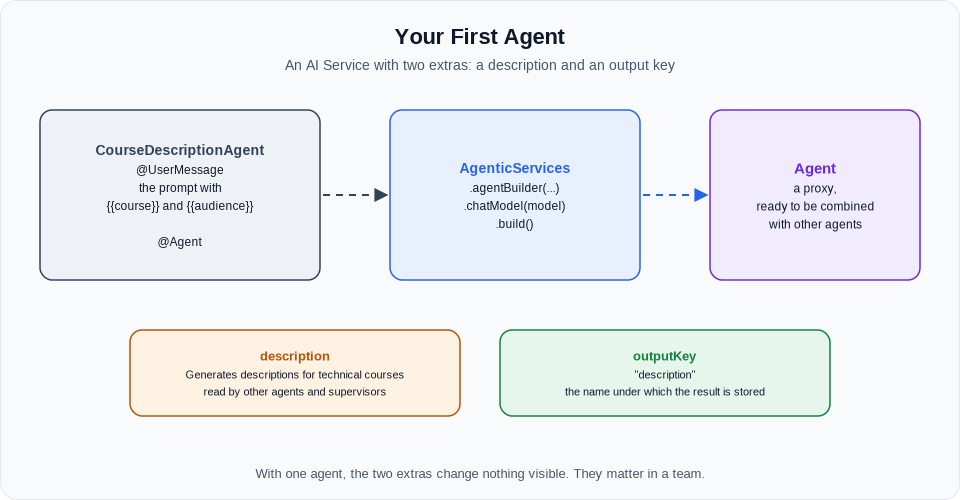
@Agent comes from the package dev.langchain4j.agentic. It has two attributes here, and both exist for the sake of other agents:
| Attribute | Value | What it is for |
|---|---|---|
description | "Generates descriptions for technical courses" | Says what this agent does. Other parts of an agentic system read it to decide whether this agent is the right one for a task |
outputKey | "description" | The name under which this agent's result is stored, so that other agents of the same system can use it |
With a single agent, neither attribute changes anything you can see. The lesson says so openly about the output key. Their value appears when there is more than one agent:
- In Agentic Workflows, the output key is how the result of one agent reaches the next one.
- In Supervisor Agents, the description is how a supervisor chooses between agents.
It does not matter whether @Agent is written above or below @UserMessage. This lesson puts it below, and the next one puts it above.
Step 4: Build the agent
An AI Service is built with AiServices. An agent is built with AgenticServices:
CourseDescriptionAgent agent = AgenticServices.agentBuilder(CourseDescriptionAgent.class)
        .chatModel(model)
.build();| AI Service | Agent |
|---|---|
AiServices.builder(X.class) | AgenticServices.agentBuilder(X.class) |
.chatModel(model) | .chatModel(model) |
.build() | .build() |
The autocomplete on AgenticServices in the lesson shows that agentBuilder is only one of several factory methods. Others, such as loopBuilder, appear in the list. The builders for groups of agents are the subject of the next lessons.
Step 5: Call it
package com.telusko.agentic;

import dev.langchain4j.agentic.AgenticServices;
import dev.langchain4j.model.openai.OpenAiChatModel;

public class Main {
    public static void main(String[] args)
    {
        OpenAiChatModel model = OpenAiChatModel.builder()
                .apiKey(System.getenv("OPENAI_API_KEY"))
                .modelName("gpt-4o-mini")
                .build();

        CourseDescriptionAgent agent = AgenticServices.agentBuilder(CourseDescriptionAgent.class)
                .chatModel(model)
                .build();


        String description = agent.generateCourseDescription(
                "Java Programming",
                "Completely Beginners"
        );
        System.out.println("Course Description: " + description);
    }
}
The import lines of both files are not readable in the video. The ones shown here were confirmed by compiling the files.
Step 6: Run it
The answer is long, and the console in the video shows only parts of it. These two pieces are visible:
Dive into the world of coding with our Java Programming course designed specifically for complete beginne...
... of software development, paving the way for your journey into the tech industry. Join us and unleash your potential in programming!
The agent took a course name and an audience and produced a description, as its prompt asked.
So what is the difference from an AI Service?
It is fair to ask, because the example behaves like one. The official documentation answers it in one sentence:
In essence agents are plain AI services, providing the same features, but with the ability to be combined with other agents to create more complex workflows and agentic systems.
| AI Service | Agent | |
|---|---|---|
| Defined as | An interface with annotations | The same, plus @Agent |
| Built with | AiServices | AgenticServices |
Prompts, @V, tools, memory | Yes | Yes |
| Has a description for other agents | No | Yes |
| Stores its result under an output key | No | Yes |
| Can be a member of a workflow or work under a supervisor | No | Yes |
An agent is an AI Service that is ready to be part of a team. And like an AI Service, it contains no business logic of its own. Everything it does comes from the model behind it.
Is this already an agent in the sense of the theory lesson?
By the definition of the previous lesson, an agent makes decisions and performs actions toward a goal. This first example makes one model call and returns text. Taken alone, it is no more autonomous than an AI Service, and the lesson itself calls it "a very basic example". Think of it as the unit that agentic systems are assembled from. The deciding and the coordinating arrive with workflows and supervisors.
Checked for these docs
Both files were compiled against langchain4j-agentic 1.18.1-beta28 and run for these docs with a local model in place of OpenAI. The agent returned a course description for "Java Programming" aimed at beginners, 85 words long, so the limit of 100 words in the prompt was respected. Printing agent.getClass() showed class jdk.proxy2.$Proxy5. An agent is a proxy created at run time, exactly like an AI Service.
Additions beyond the lesson
The name of an agent. Every agent has a name inside an agentic system. If you do not set one, it is taken from the method that carries @Agent, here generateCourseDescription. It can be set with the name attribute of the annotation.
Description and output key on the builder. Both values can also be given in code, with .description(...) and .outputKey(...) on the agent builder. The official guide uses that style in several examples. The annotation style of the lesson keeps them next to the prompt.
Everything from AI Services still applies. The agent builder accepts tools, a tool provider and chat memory, like the AI Service builder. The project at the end of this course gives one agent the tools of an MCP server.
Mistakes and fixes
| What you see | Cause | Fix |
|---|---|---|
| "Cannot resolve symbol 'OpenAiChatModel'" | The import is missing. This appears in the lesson | Import dev.langchain4j.model.openai.OpenAiChatModel |
@Agent cannot be resolved | The langchain4j-agentic dependency is missing, or the import is | Add the dependency and import dev.langchain4j.agentic.Agent |
A red marker on the method while typing @V("") | The second @V has no name yet. This appears in the lesson | Complete it: @V("audience") |
IllegalArgumentException: Value for the variable 'audience' is missing | A @V name does not match the placeholder in the prompt | Use the same name in both places |
Maven cannot find langchain4j-agentic | The version was written without the -beta suffix | Use the version with the suffix, for example 1.18.1-beta28 |
Try It Yourself
- Create the project and generate a description for a course of your choice.
- Change the audience to "working professionals" and compare the two descriptions.
- Print
agent.getClass(). What does the name tell you about how the agent is implemented? - Count the words of a description. Did the model keep to "under 100 words"?
- Remove the
@Agentannotation and build the same interface withAiServices.builder(...). Is there a visible difference in the result? - Move the instructor role into a
@SystemMessageand keep only the task in@UserMessage. - Write a second agent interface,
CourseTitleAgent, that suggests three titles for a course. You will not combine them yet. That is the next lesson.
Official references
Written By: Shramik Masti
How is this guide?
Last updated on
AI Agents vs Agentic AI
The step from applications that answer to applications that act - chatbot, tool-using assistant, AI agent and agentic AI, with the definitions and the worked example from the lesson.
Multi-Agent Systems
Create two agents with separate jobs, a course advisor and a learning plan creator, and connect them by hand so that the output of the first becomes the input of the second.