
Agentic Workflows
Let LangChain4j coordinate agents for you with a sequential workflow - AgenticServices.sequenceBuilder, sub-agents and output keys - and understand the shared state that carries one agent's result to the next.
In Multi-Agent Systems two agents worked on one task, and we did all the coordination in Java:
String recommendation = advisorAgent.recommend("I know Java basics and OOPs and i m a beginner");
String plan = planAgent.createPlan(recommendation);
We decided the order. We collected the first output. We passed it to the second agent.
For two agents, that is fine. Now imagine ten or twenty agents, where some run one after another and some at the same time. If all of that is coordinated by hand in Java code, the coordination becomes complex and fragile.
An agentic workflow moves this coordination into the framework. You say which agents take part and in which pattern they run. LangChain4j calls them, and carries the results from one to the next.
What a workflow is
A workflow describes how several agents are orchestrated: in which order they run, or whether they run together. LangChain4j has a builder for each pattern. The autocomplete on AgenticServices in this lesson and the two before it shows them:
| Builder | Pattern |
|---|---|
sequenceBuilder | The agents run one after another. The output of one is available to the next |
parallelBuilder | Independent agents run at the same time |
conditionalBuilder | An agent runs only if a condition is true |
loopBuilder | Agents run repeatedly until a condition is met |
supervisorBuilder | A model decides which agents to call. This is the next lesson |
humanInTheLoopBuilder | A person takes part in the flow |
The lesson codes the first one, the sequence, and asks you to experiment with the others yourself.
Step 1: An interface for the workflow
We continue in the multi-agent-demo project. The two agents, CourseAdvisorAgent and LearningPlanAgent, stay exactly as they are.
The workflow gets an interface of its own:
package com.telusko.agentic;

import dev.langchain4j.agentic.Agent;
import dev.langchain4j.service.V;

public interface CourseWorkflows
{
    @Agent
    String createLearningPlan(
            @V("background") String background
    );
}
Compare it with the two agent interfaces. This one has no prompt. There is no @UserMessage at all.
That is correct, because this agent does not talk to a model. Its job is coordination. The interface only describes how the workflow looks from outside:
| Part | Meaning |
|---|---|
@Agent | The workflow is an agent too. Seen from outside, it is called like any other |
@V("background") String background | The input of the whole workflow. It is stored under the name background |
Return type String | The final result of the whole workflow |
Step 2: Build the sequence
In Main, comment out the four manual lines and write:
CourseWorkflows sequenceWorkflow = AgenticServices.sequenceBuilder(CourseWorkflows.class)
        .subAgents(advisorAgent, planAgent)
        .outputKey("learningPlan")
        .build();
String result=sequenceWorkflow.createLearningPlan("I know Java basics and OOPs and I am a beginner");
System.out.println("Learning plan: " + result);| Call | Meaning |
|---|---|
sequenceBuilder(CourseWorkflows.class) | Create a sequential workflow that implements this interface |
.subAgents(advisorAgent, planAgent) | The agents that take part, in the order in which they run |
.outputKey("learningPlan") | Which stored value is returned as the result of the whole workflow |
.build() | Returns an object of type CourseWorkflows |
Then there is one call, createLearningPlan(...). We do not call the advisor. We do not call the planner. We do not pass anything from one to the other.
How the value travels
This is the part to understand, because nothing in Main shows it any more.
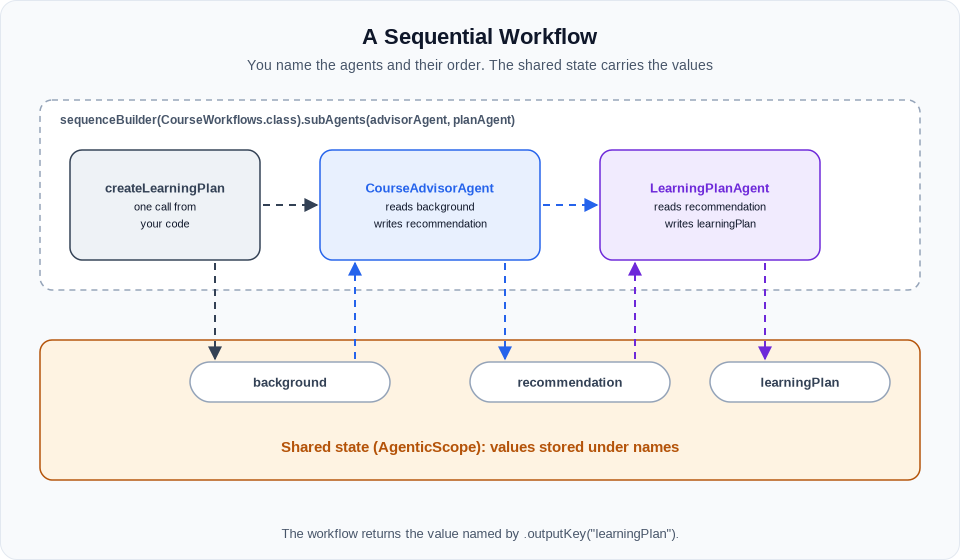
A workflow has a shared state. The official documentation names it the AgenticScope: a collection of data shared among the agents of one agentic system. Agents write their results into it, and other agents read what they need from it.
Follow one call through the scope:
| Step | What happens | State afterwards |
|---|---|---|
| 1 | createLearningPlan("I know Java basics...") is called. The argument is stored under the name from @V | background |
| 2 | The advisor runs. Its prompt needs {{background}}, which is in the state | background |
| 3 | The advisor's answer is stored under its output key | background, recommendation |
| 4 | The planner runs. Its prompt needs {{recommendation}}, which is now in the state | background, recommendation |
| 5 | The planner's answer is stored under its output key | background, recommendation, learningPlan |
| 6 | The workflow returns the value named by its own output key, learningPlan |
Everything is connected by names:
| Name | Written by | Read by |
|---|---|---|
background | The workflow method, through @V("background") | The advisor, through @V("background") and {{background}} |
recommendation | The advisor, through outputKey = "recommendation" | The planner, through @V("recommendation") and {{recommendation}} |
learningPlan | The planner, through outputKey = "learningPlan" | The workflow, through .outputKey("learningPlan") |
Now the remark from the first agent lesson makes sense. The output key seemed useless with a single agent. Here it is the mechanism of the whole workflow. An agent stores its result under a name, and whoever needs it asks for that name.
The complete program
package com.telusko.agentic;

import dev.langchain4j.agentic.AgenticServices;
import dev.langchain4j.model.openai.OpenAiChatModel;

public class Main {
    public static void main(String[] args)
    {
        OpenAiChatModel model = OpenAiChatModel.builder()
                .apiKey(System.getenv("OPENAI_API_KEY"))
                .modelName("gpt-4o-mini")
                .build();

        CourseAdvisorAgent advisorAgent = AgenticServices.agentBuilder(CourseAdvisorAgent.class)
                .chatModel(model)
                .build();

        LearningPlanAgent planAgent = AgenticServices.agentBuilder(LearningPlanAgent.class)
                .chatModel(model)
                .build();

        CourseWorkflows sequenceWorkflow = AgenticServices.sequenceBuilder(CourseWorkflows.class)
                .subAgents(advisorAgent, planAgent)
                .outputKey("learningPlan")
                .build();
        String result=sequenceWorkflow.createLearningPlan("I know Java basics and OOPs and I am a beginner");
        System.out.println("Learning plan: " + result);

    }
}
In the lesson's file the four manual lines are still present as comments above the workflow. They are left out here.
Step 3: Run it
The program prints one result, a four-week learning plan for Data Structures and Algorithms, the same topic as in the manual version:
Learning plan: ### 4-Week Learning Plan for Data Structures and Algorithms

**Week 1: Introduction to Data Structures**
- Overview of Data Structures
- Arrays and Strings
- Linked Lists (Singly and Doubly)
- Basic operations (insertion, deletion, traversal)

**Week 2: Advanced Data Structures**
- Stacks and Queues
- Trees (Binary Trees, Binary Search Trees)
- Heaps and Priority Queues
- Basic tree operations (insertion, traversal, deletion)
The result is the same as before. What changed is who did the coordination.
| Manual version | Sequential workflow | |
|---|---|---|
| Who decides the order | Your Java code, line by line | The order of subAgents(...) |
| Who stores the first result | You, in a variable | The shared state, under the output key |
| Who passes it on | You, as a method argument | The framework, by matching names |
Calls in main | One for each agent | One for the whole workflow |
| Adding a third agent | More variables and calls | One more entry in subAgents(...) |
One difference in what you see
The manual version printed two things, the recommendation and the plan. The workflow returns only the value of its output key, the plan. The recommendation still exists in the shared state, but the method returns one String. If you need both, that is what the output(...) function of the workflow builders and the scope are for. The official guide shows examples.
Is a sequence autonomous?
Not really. The lesson introduces workflows as the automatic alternative to manual coordination, and they are automatic in the sense that you no longer write the calls. But the order is still fixed by you in subAgents(...). No model decides anything about the flow. On the autonomy dial of AI Agents vs Agentic AI, a sequence is at the predictable end, and for many tasks that is exactly what you want.
Checked for these docs
The workflow was compiled against langchain4j-agentic 1.18.1-beta28 and run for these docs with a local model in place of OpenAI. Three variations were tried:
- As in the lesson, with
.outputKey("learningPlan"): one call returned a four-week learning plan. - With
.outputKey("recommendation"): the same workflow returned the advisor's recommendation, a short text of a few sentences and no plan. - With the agents in the wrong order,
subAgents(planAgent, advisorAgent): the call failed withMissingArgumentException: Missing argument: recommendation. The planner ran first and found norecommendationin the shared state.
Additions beyond the lesson
A workflow is an agent. Because the workflow carries @Agent, it can be used as a sub-agent of another workflow or of a supervisor. Small workflows can be combined into larger ones.
Workflows without an interface. The builders can also be called without a class, for example AgenticServices.sequenceBuilder(). The result is an UntypedAgent that is invoked with a Map of inputs. The typed interface of the lesson is nicer to call from Java.
Parallel needs independent agents. The lesson mentions that the parallel builder runs the agents at the same time. That only makes sense when no agent needs another agent's output. Our advisor and planner are not independent, so they are a case for a sequence.
Mistakes and fixes
| What you see | Cause | Fix |
|---|---|---|
@Agent and @V are red in CourseWorkflows | The imports are missing. This appears in the lesson | Import dev.langchain4j.agentic.Agent and dev.langchain4j.service.V |
| The workflow returns the recommendation and not the plan | .outputKey(...) names the wrong key | Use the output key of the agent whose result you want, here learningPlan |
MissingArgumentException: Missing argument: recommendation | An agent needs a value that nobody has stored yet. The agents are in the wrong order, or the names do not match | Put the advisor first, and keep the output key of one agent equal to the variable name of the next |
The same exception for background | The @V name on the workflow method differs from the name the first agent expects | Use background in both places |
| The old and the new code both run | The manual lines were not commented out | Remove or comment them |
Try It Yourself
- Add
CourseWorkflowsand the sequence builder, and run the workflow. - Change
.outputKey("learningPlan")to.outputKey("recommendation"). What is printed now, and why? - Change the advisor's output key to
advicewithout changing the planner. Run it, read the error, and repair it in the planner. - Swap the order to
subAgents(planAgent, advisorAgent)and run it. Explain the result with the table "How the value travels". - Add a third agent that turns a learning plan into three quiz questions, with the input
learningPlanand the output keyquiz. Add it to the sequence and return the quiz. - Read about the parallel workflow in the official guide. Design two agents that are independent and could run in parallel.
- Read about the loop workflow. Which task from your own work would need "repeat until good enough"?
Official references
- LangChain4j: agents and agentic AI, workflow patterns
- LangChain4j: agents and agentic AI, introducing the AgenticScope
- Anthropic: building effective agents
Written By: Shramik Masti
How is this guide?
Last updated on
Multi-Agent Systems
Create two agents with separate jobs, a course advisor and a learning plan creator, and connect them by hand so that the output of the first becomes the input of the second.
Supervisor Agents
Let a model choose which agent should handle a request, with AgenticServices.supervisorBuilder, and see how the descriptions of the sub-agents guide that choice.